
S.M.S.L M300SE
S.M.S.L M300SE HiFi Headphone Amplifier & DAC User Manual
Model: M300SE
Brand: S.M.S.L
1. Product Overview
The S.M.S.L M300SE is an advanced HiFi Headphone Amplifier and Digital-to-Analog Converter (DAC) designed to deliver high-fidelity audio. It incorporates two CS43131 MQA Audio DAC chips, an XMOS XU-316 processor, and supports various input options including USB, Optical, Coaxial, and Bluetooth. The device features both single-ended and balanced headphone outputs, as well as balanced XLR and single-ended RCA line outputs.

Front view of the S.M.S.L M300SE, showcasing its compact design and clear display.
Key Features:
- High-Resolution Audio Support: Capable of directly sampling PCM digital audio up to 32-bit/768kHz and Native DSD playback up to DSD256. Optical/Coaxial input supports DoP64.
- Integrated Headphone Amplifier: Features 6.35mm single-ended and 4.4mm balanced headphone jacks with substantial driving power and automatic impedance detection.
- Full MQA Decoding: Provides complete MQA decoding to fully expand MQA music files for high-quality sound reproduction.
- Pure DAC Mode: Allows disabling volume control in preamp mode, providing fixed output levels (4.0Vrms XLR balanced, 2.0Vrms RCA single) for use as a pure DAC.
- Ultra-Low Distortion: Achieves a THD+N as low as 0.00013%.
2. Setup Guide
This section details the steps to set up your S.M.S.L M300SE for optimal performance.
2.1 Unpacking and Components
Carefully remove all items from the packaging. The box should contain the following:
- S.M.S.L M300SE Unit
- USB Type-C Cable
- Bluetooth Antenna
- Infrared Remote Control (RC-8C)
- User Manual (this document)

Package contents of the S.M.S.L M300SE.
2.2 Connecting Power
The M300SE is powered via its USB-C input. Connect the provided USB Type-C cable to the 'USB' port on the rear of the unit and to a compatible USB power source (e.g., a computer USB port or a 5V USB charger). If using a phone as a source or if the primary USB source does not provide sufficient power, connect an additional 5V DC power supply to the 'AUX POWER' USB-C port to prevent overcurrent issues. Do not use Quick-Charge power supplies over 5V with this unit.
2.3 Input Connections
The M300SE supports multiple digital audio inputs:
- USB Input: Connect your computer or digital audio player to the 'USB' port using the provided USB Type-C cable.
- Optical Input: Connect an optical audio cable from your source device to the 'OPTICAL' port.
- Coaxial Input: Connect a coaxial audio cable from your source device to the 'COAXIAL' port.
- Bluetooth Input: Screw the provided Bluetooth antenna onto the 'Y' connector on the rear panel. Enable Bluetooth on your source device and pair with 'S.M.S.L M300SE'.
2.4 Output Connections
The M300SE offers various audio outputs:
- Headphone Outputs: Connect your headphones to either the 6.35mm single-ended or 4.4mm balanced headphone jack on the front panel.
- Balanced XLR Output: For connecting to balanced amplifiers or active speakers, use XLR cables with the 'BAL-R' and 'BAL-L' ports.
- Single-Ended RCA Output: For connecting to single-ended amplifiers or active speakers, use a 3.5mm to RCA cable with the 'SE' port.
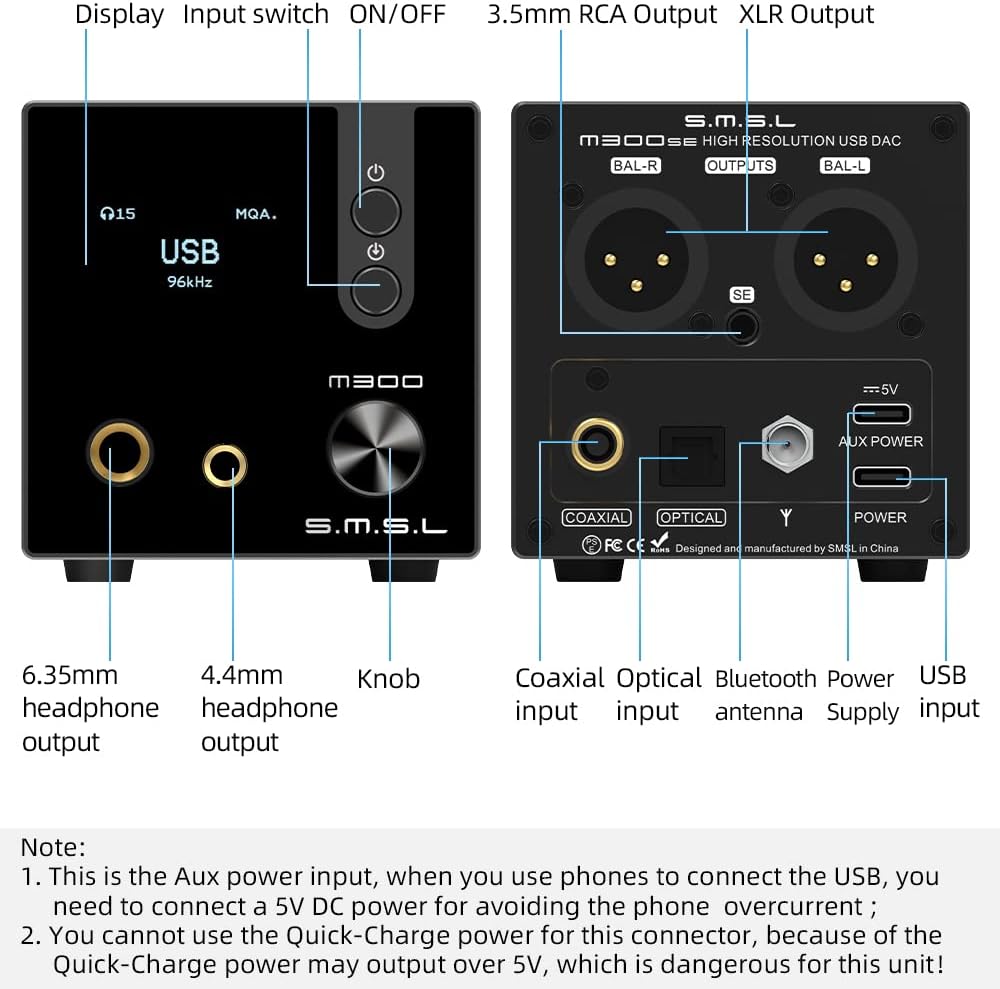
Detailed view of the S.M.S.L M300SE's front and rear connections.
Official product video demonstrating the S.M.S.L M300SE Headphone Amplifier and its features.
3. Operating Instructions
Learn how to operate your S.M.S.L M300SE and utilize its various functions.
3.1 Power On/Off
Press the top power button on the front panel or the power button on the remote control to turn the unit on or off.
3.2 Volume Control
Rotate the knob on the front panel clockwise to increase volume and counter-clockwise to decrease volume. Volume can also be adjusted using the '+' and '-' buttons on the remote control.
3.3 Input Selection
Press the bottom button on the front panel or the 'Switch input' button on the remote control to cycle through available inputs (USB, Optical, Coaxial, Bluetooth).
3.4 Remote Control Functions
The included RC-8C infrared remote control provides convenient access to various settings:
- ON/OFF: Power on/off the unit.
- Menu: Access system settings (no function on this model).
- Next/Previous: (No function on this model).
- Switch Input: Cycle through input sources.
- Mute: Mute/unmute audio output.
- Switch to Bluetooth Input: Directly select Bluetooth input.
- Volume Up/Down: Adjust volume level.

Functions of the S.M.S.L RC-8C infrared remote control.
3.5 MQA Playback
When playing MQA audio files, the M300SE will automatically detect and fully decode the MQA stream, indicated on the display. This ensures you experience the full quality of the original master recording.

Explanation of MQA full decoding support.
3.6 Preamp Mode / Pure DAC Mode
The M300SE can operate in a preamp mode with volume control or as a pure DAC with fixed output. To use it as a pure DAC, you can turn off the volume control function in the menu settings. In this mode, the output level will be fixed at 4.0Vrms for XLR balanced output and 2.0Vrms for RCA single-ended output.
4. Maintenance
To ensure the longevity and optimal performance of your S.M.S.L M300SE, follow these maintenance guidelines:
- Cleaning: Use a soft, dry cloth to wipe the exterior of the unit. Avoid using abrasive cleaners, solvents, or chemical sprays, as these can damage the finish.
- Placement: Place the unit on a stable, flat surface away from direct sunlight, heat sources, and excessive moisture. Ensure adequate ventilation around the unit to prevent overheating.
- Connections: Periodically check all cable connections to ensure they are secure and free from dust or corrosion.
- Storage: If storing the unit for an extended period, disconnect it from power and store it in a cool, dry place.
5. Troubleshooting
If you encounter issues with your S.M.S.L M300SE, refer to the following common problems and solutions:
| Problem | Possible Cause | Solution |
|---|---|---|
| No power / Unit does not turn on | Power cable not connected; Insufficient power from USB source; Faulty power source. | Ensure USB Type-C cable is securely connected. Try connecting a 5V DC power supply to the 'AUX POWER' port. Test with a different USB power source. |
| No sound output | Incorrect input selected; Volume too low or muted; Cables not connected properly; Output mode incorrect. | Verify the correct input is selected. Increase volume and check if unit is muted. Ensure all audio cables are securely connected. Check if the unit is in 'Pure DAC' mode if you expect volume control. |
| "NO SIGNAL" displayed for Optical/Coaxial input | Source device not sending signal; Cable issue; Input not selected. | Ensure the source device is playing audio and its optical/coaxial output is enabled. Check the optical/coaxial cable for damage and ensure it's securely connected. Select the correct input on the M300SE. |
| Noise or distortion in audio | Ground loop; Interference from other devices; Poor quality cables; Overcurrent from phone/laptop USB. | Ensure proper grounding. Try separating the M300SE from other electronic devices. Use high-quality shielded cables. Connect a 5V DC power supply to the 'AUX POWER' port, especially when using with laptops or phones. |
| Bluetooth connection issues | Antenna not connected; Not in pairing mode; Interference; Distance. | Ensure Bluetooth antenna is securely attached. Select Bluetooth input on the M300SE. Move closer to the unit. Reduce interference from other wireless devices. |
If the problem persists after trying these solutions, please contact S.M.S.L customer support or your retailer for further assistance.
6. Specifications
Detailed technical specifications for the S.M.S.L M300SE.
| Feature | Specification |
|---|---|
| DAC Chip | 2 x CS43131 |
| USB Processor | XMOS XU-316 |
| Inputs | USB, Optical, Coaxial, Bluetooth |
| Outputs | 6.35mm Headphone, 4.4mm Balanced Headphone, Balanced XLR, 3.5mm RCA |
| PCM Sampling Rate | Up to 32-bit/768kHz |
| DSD Support | Native DSD256 (USB), DoP64 (Optical/Coaxial) |
| MQA Support | Full MQA Decoding |
| THD+N | 0.00013% |
| Headphone Output Power | Integrated high-performance stereo headphone amplifier (specific power output not detailed in provided data, but noted as substantial) |
| XLR Output Level | 4.0Vrms (fixed in Pure DAC mode) |
| RCA Output Level | 2.0Vrms (fixed in Pure DAC mode) |
| Package Dimensions | 9.13 x 6.61 x 4.41 inches |
| Item Weight | 1.76 pounds |
| Country of Origin | China |

The S.M.S.L M300SE utilizes dual CS43131 DAC chips for high-quality audio.

The third-generation XMOS XU-316 high-end independent main control chip.
7. Warranty and Support
The S.M.S.L M300SE comes with a 12-month warranty from the date of purchase. This warranty covers manufacturing defects and malfunctions under normal use. If you experience any issues with your product within the warranty period, you may be eligible for a return or replacement.
For technical support, warranty claims, or service inquiries, please contact your original retailer or visit the official S.M.S.L website for contact information. Please retain your proof of purchase for warranty validation.
Related documentsM300SE


Ask a question about this manual
Ask about setup, troubleshooting, compatibility, parts, safety, or missing instructions. Manuals+ will review the question and use this page’s manual context to help answer it.