
Introduction
This manual provides detailed instructions for the assembly, operation, and maintenance of your OUTON Floor Lamp. Please read this manual thoroughly before using the product to ensure safe and efficient operation. Keep this manual for future reference.
Safety Instructions
- Ensure the power supply voltage matches the lamp's requirements (220 Volts).
- Do not operate the lamp with a damaged cord or plug.
- Avoid placing the lamp in unstable locations. The heavy base provides stability, but caution is advised around children and pets.
- Do not touch the bulb immediately after use, as it may be hot.
- For indoor use only. This product is not water-resistant.
- Always unplug the lamp from the power outlet before cleaning or replacing bulbs.
Package Contents
Verify that all components are present before assembly:
- Floor Lamp Base
- Lamp Pole Sections (multiple)
- Main Lamp Head (Mother Lamp)
- Reading Lamp Head (Child Lamp) with flexible gooseneck
- E26 LED Bulbs (2 included)
- Remote Control
- User Manual (this document)
Setup and Assembly
The OUTON Floor Lamp is designed for easy, tool-free assembly, typically completed within 5 minutes.
- Unpack Components: Carefully remove all parts from the packaging and lay them out on a clean, flat surface.
- Assemble Lamp Pole: Screw the lamp pole sections together clockwise. Ensure each section is securely tightened to prevent wobbling. The wire should run freely through the pole.
- Attach Lamp Heads: Connect the main lamp head and the reading lamp head to the top pole section. Ensure the electrical connections are secure.
- Install Bulbs: Screw the two provided E26 LED bulbs into their respective sockets in the main lamp head and the reading lamp head.
- Attach Base: Securely screw the assembled lamp pole into the heavy-weighted base. The base is designed for stability.
- Position Lamp: Place the lamp on a flat, stable surface. Adjust the flexible gooseneck of the reading lamp to your desired angle (up to 90° bend and 350° rotation).
- Connect Power: Plug the power cord into a suitable 220V electrical outlet.
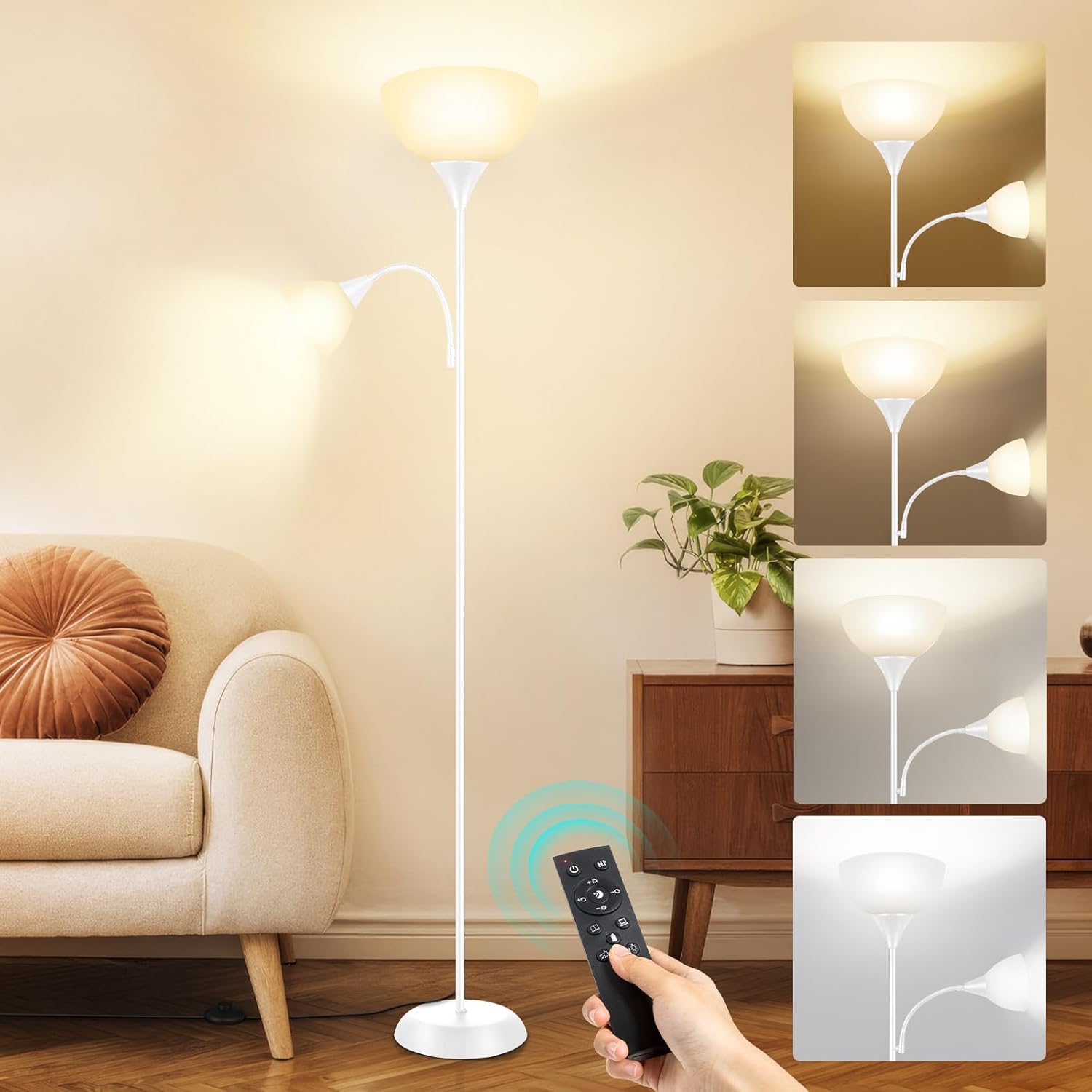
Image: Assembly diagram with dimensions. This image illustrates the lamp's height (70.8 inches), main lamp diameter (10 inches), reading lamp dimensions (6 inches height, 4 inches diameter), cord length (6.7 feet), and base diameter (9.86 inches). It also highlights tool-free assembly, the 90-degree adjustable gooseneck, and the heavy-weighted base.

Image: Detail of the lamp's heavy base. The base is designed to provide stability, tested to withstand an 8° tilt, ensuring safety around children and pets.
Operating Instructions
Remote Control Functions
The OUTON Floor Lamp can be controlled using the included remote control. The two lamps (main and reading) can be operated independently.

Image: Remote control. The remote allows adjustment of brightness, color temperature, and activation of the 1-hour timer.
- Power Button: Turns the lamp ON/OFF.
- Brightness Adjustment: Use the '+' and '-' buttons to increase or decrease brightness from 5% to 100%.
- Color Temperature Adjustment: Cycle through available color temperatures (e.g., 3000K Warm White, 4000K Natural White, 5000K Daylight, 6000K Cool White for the main lamp; 3000K-5000K for the reading lamp).
- 1H Timer Button: Activates the 1-hour sleep timer. The light will gradually dim before turning off.
- Lamp Selection Buttons: Separate buttons to control the main (mother) lamp and the reading (child) lamp independently.
- Scene Modes: Pre-set buttons for various lighting scenes (e.g., Working, Reading, Romantic, Timer).
Manual Control (Rocker Switch)
In addition to the remote, a rocker switch on the lamp pole provides basic ON/OFF functionality for both lamps.
Brightness and Color Temperature
The main lamp offers continuous dimming from 5% to 100% brightness and adjustable color temperatures from 3000K (warm white) to 6000K (cool white). The reading lamp provides 4 distinct color temperatures ranging from 3000K to 5000K for optimal task lighting.

Image: Brightness and color temperature adjustment. This visual demonstrates the range of light from warm (3000K) to cool (6000K) and the stepless dimming capability.
1-Hour Sleep Timer
Activate the 1-hour timer function via the remote control. The lamp will gradually dim over 60 minutes, providing a comfortable transition to sleep before automatically turning off.

Image: 1-Hour Sleep Timer in use. The timer function allows the lamp to slowly dim, promoting a relaxed environment for sleep.
Memory Function
The lamp features a memory function that recalls the last brightness and color temperature settings used when it was last turned off. This ensures your preferred lighting is restored upon reactivation.
Maintenance
- Cleaning: Disconnect the power before cleaning. Wipe the lamp with a soft, dry cloth. Do not use abrasive cleaners or solvents.
- Bulb Replacement: Ensure the lamp is unplugged and the bulbs have cooled before attempting to replace them. Use E26 base bulbs.
- General Care: Regularly check the power cord for any signs of damage. Ensure all connections remain secure.
Troubleshooting
| Problem | Possible Cause | Solution |
|---|---|---|
| Lamp does not turn on. |
|
|
| Remote control not responding. |
|
|
| Light flickers or dims unexpectedly. |
|
|
Specifications
| Brand | OUTON |
| Model | B0DCW9VC9S |
| Material | Metal (Base), Plastic (Lampshade) |
| Height | 182 cm (approx. 71.6 inches) |
| Main Lamp Diameter | 25.4 cm (approx. 10 inches) |
| Base Diameter | 25 cm (approx. 9.86 inches) |
| Weight | 3.8 Kilograms (approx. 8.38 lbs) |
| Bulb Base | E26 |
| Bulb Type | LED (2 included) |
| Power | 9 Watts (per bulb) |
| Voltage | 220 Volts |
| Color Temperature | Main Lamp: 3000K-6000K adjustable; Reading Lamp: 3000K-5000K adjustable |
| Brightness | 5%-100% Dimmable |
| Control Method | Remote Control, Rocker Switch |
| Special Features | 1-Hour Timer, Memory Function, Flexible Gooseneck Reading Lamp |
| Usage Environment | Indoor |
Warranty and Support
For warranty information or technical support, please refer to the contact details provided with your purchase or visit the official OUTON website. Keep your purchase receipt as proof of purchase for warranty claims.


