
1. Product Overview
The PROTEAR AM/FM Bluetooth Radio Headphones are designed to provide effective hearing protection with a Noise Reduction Rating (NRR) of 25dB, certified by ANSI S3.19. These earmuffs integrate Bluetooth 5.3 technology, AM/FM radio, and a built-in microphone for hands-free communication, making them suitable for noisy environments while allowing for entertainment and connectivity.

Image: Detailed view of the PROTEAR headphones, highlighting features like the radio antenna, comfortable headband, soft ear pad, adjustable design, digital display, and simple function buttons for channel searching and volume control.
2. Safety Information
Always ensure proper fit and use of the earmuffs to achieve the stated Noise Reduction Rating (NRR). Hearing protection is crucial in environments with high noise levels to prevent permanent hearing damage. These headphones are designed to reduce harmful sound levels effectively.

Image: A person wearing PROTEAR headphones, emphasizing the importance of hearing protection in loud environments. The image highlights the product's role in safeguarding hearing.

Image: A chart illustrating different noise levels (in dB) for common activities like lawn mowing, circular saws, and chainsaws, indicating when hearing protection is necessary.
3. Setup and Fit
Before first use, ensure the headphones are charged. The headphones are powered by a 1200mAh rechargeable lithium battery (included). Use the provided USB 3.5mm male cable for charging. The digital display will show the battery status.
3.1 Battery Installation and Charging
- Locate the battery compartment, typically on one of the earcups.
- Insert the 1200mAh rechargeable lithium battery.
- Connect the provided USB 3.5mm cable to the charging port on the earmuffs and a compatible USB power source.
- Monitor the digital display for charging status.
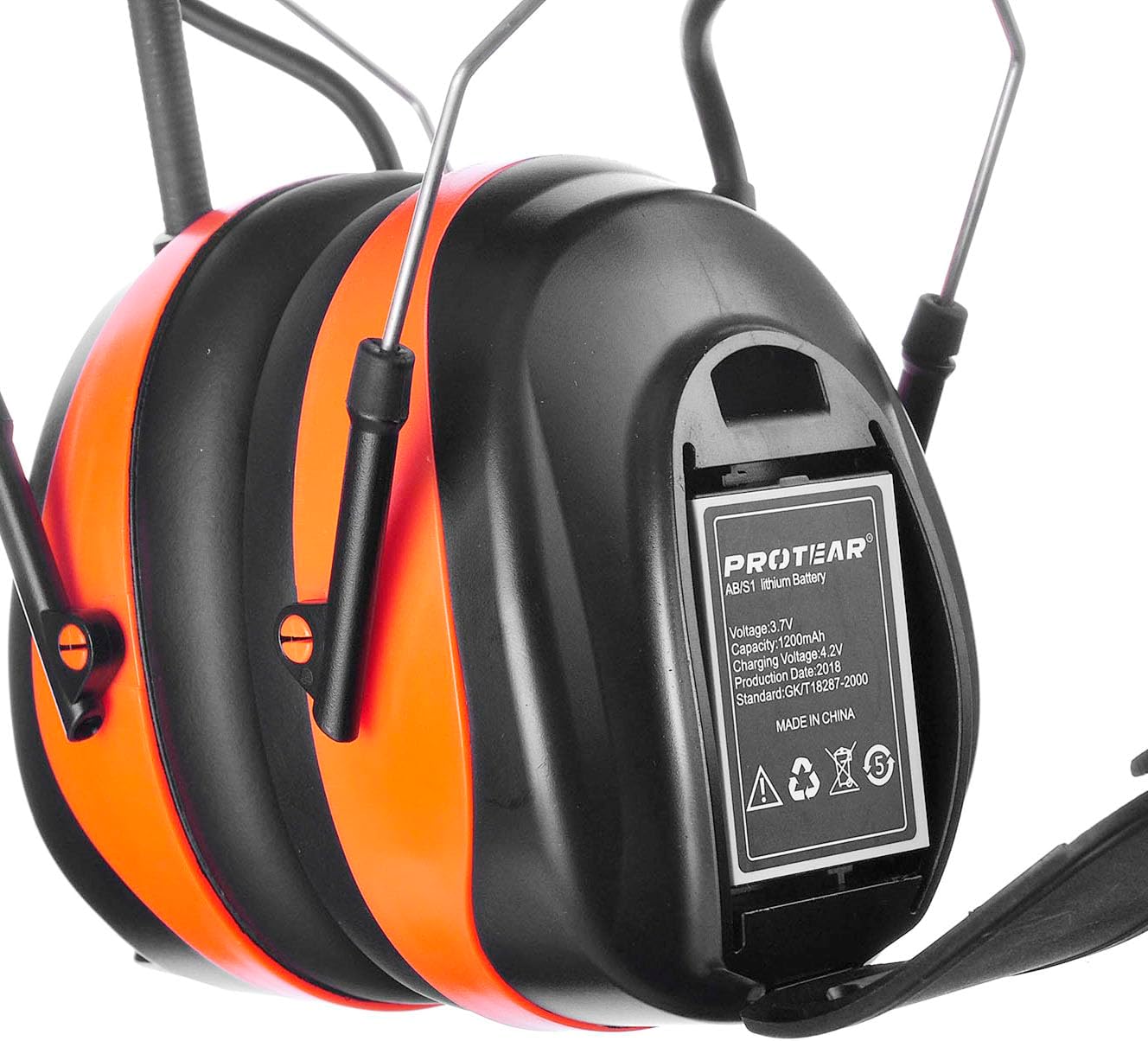
Image: Close-up view of the battery compartment on the PROTEAR headphones, showing the rechargeable lithium battery installed.
3.2 Adjusting the Fit
The headphones feature an adjustable headband and soft, foam-filled ear cups for enhanced comfort. Adjust the headband to ensure a snug fit over your ears, covering them completely to maximize noise reduction. The flexible headband with cutouts improves comfort, especially when worn with hats.

Image: Close-up of the adjustable headband on the PROTEAR headphones, demonstrating its flexibility and padded design for comfort.

Image: Close-up of the soft, foam-filled ear pad, designed for comfort during extended wear.
4. Operating Instructions
4.1 Power On/Off and Volume Control
- To power on/off, locate the power button on the earcup and press and hold.
- Adjust the volume using the dedicated volume knob or buttons.
4.2 AM/FM Radio Operation
- Use the digital LCD display to view the current AM/FM frequency.
- Utilize the "Up" and "Down" buttons for manual tuning.
- Press and hold the "Mode" button for auto-scanning to quickly find and save your favorite stations. The headphones can store up to 20 AM and 20 FM stations.
Video: Demonstrates the operation of the ZOHAN EM033 Bluetooth AM/FM Radio Headphones, including mode selection, tuning, and Bluetooth pairing. Note: This video is from Zohan Inc. and is relevant to the product's functionality.
4.3 Bluetooth Pairing and Hands-Free Calling
- Activate Bluetooth on your mobile device.
- Select the PROTEAR headphones from the list of available devices to pair.
- Once paired, you can seamlessly stream audio from your device.
- The built-in microphone allows for hands-free phone calls without removing the headset.
Video: A review of Bluetooth radio headphones, showcasing their use and features. This video provides a practical demonstration of the product in action.
5. Maintenance
To ensure the longevity and performance of your PROTEAR headphones, regular maintenance is recommended.
- Cleaning: Wipe the exterior of the earmuffs with a soft, damp cloth. Avoid using harsh chemicals or abrasive cleaners.
- Ear Cushions: The ear cushions feature a snap-in design, making them easy to remove and clean or replace if soiled or damaged. This helps maintain hygiene and comfort.
- Storage: Store the headphones in a cool, dry place away from direct sunlight and extreme temperatures when not in use.
6. Troubleshooting
If you encounter issues with your PROTEAR headphones, refer to the following common troubleshooting steps:
- No Power: Ensure the battery is correctly installed and fully charged. Connect the headphones to a power source to confirm charging.
- No Sound/Low Volume: Check the volume level on both the headphones and your connected Bluetooth device. Ensure the headphones are properly paired.
- Bluetooth Connectivity Issues: Make sure the headphones are in pairing mode and within range of your device (up to 33ft effective range). Disconnect and re-pair the device if necessary.
- Poor Radio Reception: Extend the radio antenna fully. Try moving to a different location to improve signal strength.
7. Specifications
| Feature | Detail |
|---|---|
| Noise Reduction Rating (NRR) | 25dB (ANSI S3.19 Certified) |
| Bluetooth Version | 5.3 |
| Battery Type | 1200mAh Rechargeable Lithium Battery (1pc included) |
| Charging Interface | USB 3.5mm male cable |
| AM Radio Frequency Range | 520KHz ~ 1710KHz |
| FM Radio Frequency Range | 87.5MHz ~ 108MHz |
| Saved Stations | Up to 20 AM and 20 FM stations |
| Built-in Microphone | Yes, for hands-free calls |
| Material | Acrylonitrile Butadiene Styrene (ABS) |
| Item Weight | 1.06 pounds |
| Product Dimensions | 10 x 2 x 2 inches |
8. Warranty and Support
For warranty information or technical support, please refer to the product packaging or contact PROTEAR customer service directly. Keep your purchase receipt for any warranty claims.