
1. Introduction
Thank you for purchasing the PHILCO Personal CD Player. This portable device is designed to provide high-quality audio playback from your favorite Audio CDs, CD-R, and CD-RW discs. Its compact design, 60-second Electronic Skip Protection (ESP), and ease of use make it suitable for various listening environments, including home, travel, or in a car. Please read this manual thoroughly before using the product to ensure proper operation and to maximize your listening experience.
2. Important Safety Information
Please observe the following safety precautions to prevent damage to the unit and ensure your personal safety:
- Do not expose the unit to rain, moisture, or extreme temperatures.
- Avoid placing the unit near heat sources such as radiators, heat registers, stoves, or other apparatus (including amplifiers) that produce heat.
- Use only the specified batteries (2 x AA batteries, not included).
- Do not attempt to disassemble or modify the unit. Refer all servicing to qualified service personnel.
- Avoid listening at high volume levels for extended periods to prevent hearing damage.
- Clean the unit only with a dry cloth.
3. Package Contents
Verify that all items are present in the package:
- PHILCO Personal CD Player
- Stereo Earbuds
- Instruction Manual (this document)
Note: AA batteries and an AC adapter are not included.
4. Product Overview
Familiarize yourself with the components and controls of your PHILCO Personal CD Player.

Figure 4.1: Front view of the PHILCO Personal CD Player with connected stereo earbuds. The player features a digital display and control buttons on the front panel.
4.1 Controls and Indicators
- PLAY/PAUSE Button: Starts or pauses CD playback.
- STOP Button: Stops CD playback.
- SKIP/SEARCH Buttons (<< / >>): Skips to the previous/next track. Hold to fast forward/rewind within a track.
- PROG Button: Enters program mode to create custom playlists.
- MODE Button: Selects playback modes (e.g., repeat one, repeat all, random).
- VOLUME Control: Adjusts the audio output level.
- OPEN Button/Switch: Releases the CD compartment lid.
- DC IN Jack: For optional AC adapter (not included).
- PHONES Jack: 3.5mm stereo headphone output.
- LCD Display: Shows track number, playback status, and other information.
- BASS BOOST Switch: Enhances bass frequencies.
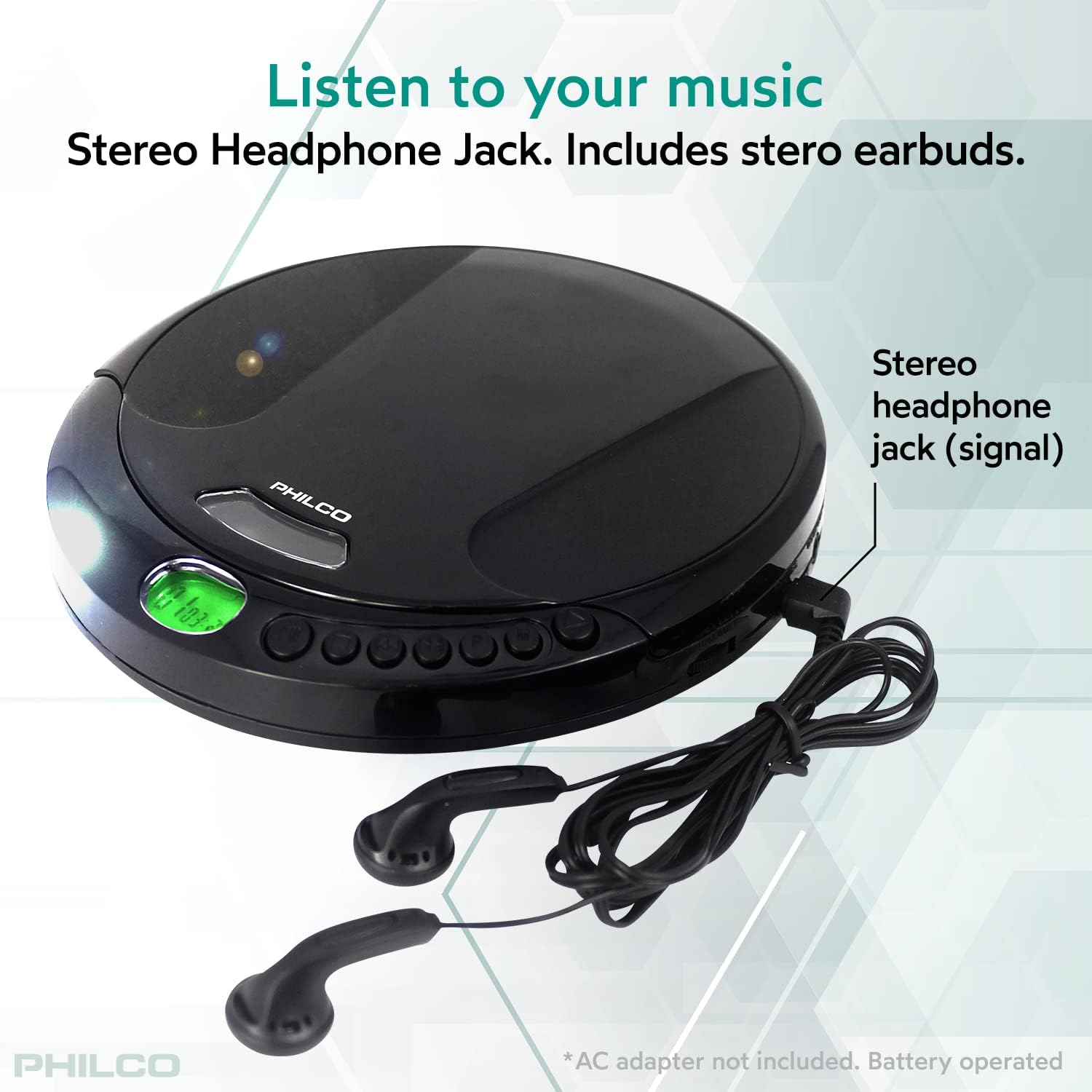
Figure 4.2: Side view highlighting the stereo headphone jack and indicating the battery compartment location. The player is powered by two AA batteries.
5. Setup
5.1 Battery Installation
- Locate the battery compartment on the bottom of the unit.
- Slide the battery compartment cover open.
- Insert two (2) AA batteries (not included) according to the polarity indicators (+ and -) inside the compartment.
- Close the battery compartment cover securely.
Note: For optimal performance, use high-quality alkaline batteries. Remove batteries if the unit will not be used for an extended period.
5.2 Connecting Headphones
Insert the 3.5mm plug of the included stereo earbuds (or your preferred headphones) into the "PHONES" jack on the side of the CD player.
6. Operating Instructions
6.1 Loading a CD
- Press the "OPEN" button/switch to open the CD compartment lid.
- Place an Audio CD, CD-R, or CD-RW disc onto the center spindle with the label side facing up.
- Gently press the disc until it clicks into place.
- Close the CD compartment lid firmly until it latches.

Figure 6.1: The top-loading CD player design, illustrating how to insert a disc with the label side facing upwards.
6.2 Basic Playback
- To Play: Press the PLAY/PAUSE button. The track number and playback icon will appear on the LCD display.
- To Pause: Press the PLAY/PAUSE button during playback. Press again to resume.
- To Stop: Press the STOP button.
- To Skip Tracks: Press the SKIP/SEARCH >> button to go to the next track. Press the SKIP/SEARCH << button to go to the beginning of the current track, or press twice to go to the previous track.
- To Fast Forward/Rewind: Hold down the SKIP/SEARCH >> button to fast forward or SKIP/SEARCH << button to rewind within a track.
- Volume Adjustment: Rotate the VOLUME control to increase or decrease the sound level.
6.3 Electronic Skip Protection (ESP)
The PHILCO Personal CD Player features a 60-second Electronic Skip Protection system. This buffer stores audio data, allowing for continuous playback even if the player experiences minor bumps or vibrations. This feature is automatically active during CD playback.

Figure 6.2: Visual representation of key features including 60-second skip protection, compatibility with CD-R/RW discs, and the inclusion of stereo earphones.
6.4 Programmable Playback
You can program up to 20 tracks to play in a specific order:
- In STOP mode, press the PROG button. "PROG" will flash on the display.
- Use the SKIP/SEARCH << or >> buttons to select the desired track.
- Press the PROG button again to confirm the selection. The display will show the next program number.
- Repeat steps 2 and 3 to add more tracks to your program.
- After programming all desired tracks, press the PLAY/PAUSE button to start programmed playback.
- To clear the program, press the STOP button twice.
6.5 Playback Modes
Press the MODE button repeatedly during playback to cycle through different playback modes:
- Repeat 1: Repeats the current track.
- Repeat All: Repeats all tracks on the disc.
- Random: Plays tracks in a random order.
- Intro: Plays the first few seconds of each track.
- Normal Play: Plays tracks in sequential order.
7. Maintenance and Care
- Cleaning the Unit: Wipe the exterior of the unit with a soft, dry cloth. Do not use abrasive cleaners or solvents.
- Cleaning the Lens: If playback issues occur due to a dirty lens, use a commercially available CD lens cleaner disc. Do not touch the lens directly.
- Disc Care: Handle CDs by their edges. Keep them clean and free from scratches. Store discs in their cases when not in use.
- Battery Care: Remove batteries if the unit is not used for an extended period to prevent leakage.
8. Troubleshooting
| Problem | Possible Cause | Solution |
|---|---|---|
| No power / Unit does not turn on. | Batteries are dead or incorrectly inserted. | Replace batteries with new ones, ensuring correct polarity. |
| No sound. | Headphones not connected properly; Volume too low; Disc not playing. | Ensure headphones are fully plugged in. Increase volume. Press PLAY. |
| Disc skips or playback is interrupted. | Disc is dirty or scratched; Unit is subjected to strong vibrations; Lens is dirty. | Clean the disc. Avoid excessive movement. Use a CD lens cleaner. |
| "NO DISC" error on display. | No disc inserted; Disc inserted incorrectly; Disc is unreadable. | Insert a disc. Ensure disc is placed correctly, label side up. Try a different, known-good disc. |
| Buttons do not respond. | Unit may be in a temporary error state. | Remove and reinsert batteries to reset the unit. |
9. Specifications
| Feature | Detail |
|---|---|
| Model | Personal CD Player |
| Disc Compatibility | Audio CD, CD-R, CD-RW |
| Anti-Skip Protection | 60 seconds (Electronic Skip Protection) |
| Power Source | 2 x AA Batteries (not included) or DC 4.5V AC Adapter (not included) |
| Output | 3.5mm Stereo Headphone Jack |
| Dimensions (L x W x H) | 6 x 5 x 1 inches (approximately) |
| Weight | 9.1 ounces (without batteries) |
| Included Components | CD Player, Stereo Earbuds, Instruction Manual |

Figure 9.1: Approximate dimensions of the PHILCO Personal CD Player, illustrating its compact size.
10. Warranty and Support
PHILCO products are designed for reliability and performance. For information regarding warranty coverage, technical support, or service inquiries, please refer to the warranty card included with your purchase or visit the official PHILCO website. Please retain your proof of purchase for warranty claims.
Manufacturer: PHC Americas, LLC