
1. Introduction
This manual provides essential instructions for the safe and efficient operation of your Ionchill 6-Bottle Wine Cooler, Model WC100. Please read this manual thoroughly before using the appliance and retain it for future reference.
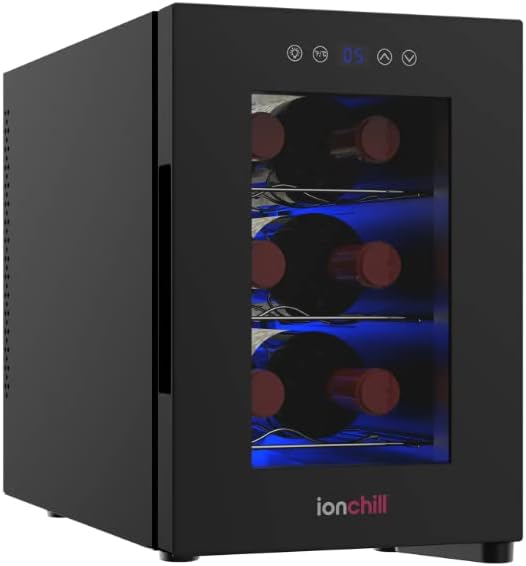
The Ionchill 6-Bottle Wine Cooler is designed to maintain optimal conditions for storing wine, featuring smart cooling technology, balanced humidity levels, and a consistent internal temperature range of 53-64°F (11.7-17.8°C).
2. Important Safety Information
To reduce the risk of fire, electric shock, or injury when using your appliance, follow these basic precautions:
- Read all instructions before using the appliance.
- WARNING: Do not use any power adapter, charger, or cords other than those included with your product. Using incompatible, counterfeit, or non-certified accessories can cause fire or accidents. Contact the manufacturer for replacements.
- Ensure the appliance is placed on a stable, level surface.
- Do not block ventilation openings.
- Do not store explosive substances such as aerosol cans with a flammable propellant in this appliance.
- Unplug the appliance before cleaning or performing maintenance.
3. Package Contents
Verify that all parts are present before discarding packaging materials:
- Ionchill 6-Bottle Wine Cooler Unit
- Three (3) Removable Chrome Steel Racks
- Power Cord
- User Manual
4. Product Features
- Smart Cooling Technology: Maintains balanced humidity levels and a constant internal temperature.
- Temperature Control: Intuitive LED display for monitoring and adjusting internal temperature.
- Capacity: Standard 6-bottle capacity.
- Shelving: Three removable chrome steel racks for organized storage.
- Interior Lighting: Blue LED light illuminates the interior.
- Operation: Low vibration and low noise operation.
- Defrost System: Automatic defrost.
5. Setup Instructions
- Unpacking: Carefully remove the wine cooler from its packaging. Retain packaging materials for future transport if needed.
- Placement:
- Place the cooler on a firm, level surface away from direct sunlight and heat sources (e.g., ovens, radiators).
- Ensure adequate air circulation around the unit. Leave at least 4 inches (10 cm) of space at the back and sides for proper ventilation.
- Avoid placing the unit in areas with extreme temperature fluctuations.
- Initial Cleaning: Before first use, wipe the interior and exterior of the cooler with a damp cloth.
- Power Connection: Plug the power cord into a grounded electrical outlet. Allow the unit to stand upright for at least 2 hours before plugging it in to allow refrigerants to settle.
- Pre-cooling: After plugging in, allow the cooler to operate empty for approximately 2-3 hours to reach the desired temperature before loading bottles.
6. Operating Instructions
6.1 Control Panel
The control panel is located on the front of the unit, above the door, and features an LED display and touch controls for temperature adjustment and light control.

6.2 Setting the Temperature
- Press the Temperature Up (▲) or Temperature Down (▼) buttons on the control panel to adjust the desired temperature.
- The LED display will show the set temperature. The temperature range is 53-64°F (11.7-17.8°C).
- The unit will automatically adjust its cooling to reach and maintain the set temperature.
6.3 Interior Light
Press the Light button (often represented by a light bulb icon) on the control panel to turn the interior blue LED light on or off.
6.4 Loading Bottles
- Ensure bottles are clean and dry before placing them in the cooler.
- Arrange bottles on the removable chrome steel racks. The racks can be adjusted or removed to accommodate different bottle sizes, though the unit is designed for standard 750ml wine bottles.
- Avoid overcrowding to allow for proper air circulation.
7. Maintenance
7.1 Cleaning the Interior
- Unplug the wine cooler before cleaning.
- Remove all bottles and shelves.
- Wash the interior surfaces with a solution of warm water and mild detergent. Rinse thoroughly and dry with a soft cloth.
- Clean the removable shelves with mild soap and water, then dry completely before returning them to the unit.
- Do not use abrasive cleaners or solvents.
7.2 Cleaning the Exterior
Wipe the exterior surfaces with a soft, damp cloth. For stubborn stains, use a mild, non-abrasive cleaner. Ensure the control panel and door seal are kept clean.
7.3 Defrosting
The Ionchill WC100 features an automatic defrost system, minimizing the need for manual defrosting. Any accumulated frost will melt and evaporate automatically.
7.4 Power Outage
In case of a power outage, the cooler will generally maintain its temperature for several hours if the door remains closed. Once power is restored, the unit will resume operation at the previously set temperature.
8. Troubleshooting
| Problem | Possible Cause | Solution |
|---|---|---|
| Cooler does not operate. | No power supply. | Check if the power cord is properly plugged into a working electrical outlet. Check the circuit breaker. |
| Temperature is not cold enough. | Door not closed properly; excessive door opening; unit placed near a heat source; ventilation blocked. | Ensure the door is fully closed. Minimize door openings. Relocate the unit away from direct sunlight or heat sources. Ensure adequate space around the unit for ventilation. |
| Excessive noise. | Unit not level; fan obstruction; normal operating sounds. | Ensure the unit is on a level surface. Check for any obstructions around the fan. Some operational sounds (e.g., refrigerant flow, fan operation) are normal. |
| Vibration. | Unit not level. | Adjust the leveling feet to ensure the unit is stable and level. |
9. Specifications
| Feature | Detail |
|---|---|
| Brand | Ionchill |
| Model | WC100 |
| Capacity | 6 Bottles (standard 750ml) |
| Temperature Range | 53-64°F (11.7-17.8°C) |
| Dimensions (D x W x H) | 14.5" x 9.75" x 14.5" (36.83 cm x 24.77 cm x 36.83 cm) |
| Weight | Approx. 15 lbs (6.8 kg) |
| Power | 860 watts |
| Installation Type | Freestanding |
| Defrost System | Automatic |
| Refrigerant | R-600A |
| Material | Steel, Stainless Steel (door material) |
10. Warranty and Support
This Ionchill product is covered by a manufacturer's 12-month limited warranty from the date of purchase. This warranty covers defects in materials and workmanship under normal use.
For warranty claims, technical support, or replacement parts, please contact Ionchill customer service. Refer to your purchase documentation for specific contact information.
Note: The warranty may be voided if the product is used improperly, modified, or damaged by unauthorized repairs.