
Introduction
Thank you for choosing the Edillas Digital Watch for Kids, Model 2207L. This watch is designed for children, featuring a 7-color LED backlight, 50M (5ATM) water resistance, and multiple functions including time, date, alarm, and stopwatch. This manual provides detailed instructions to help you understand and operate your new watch.
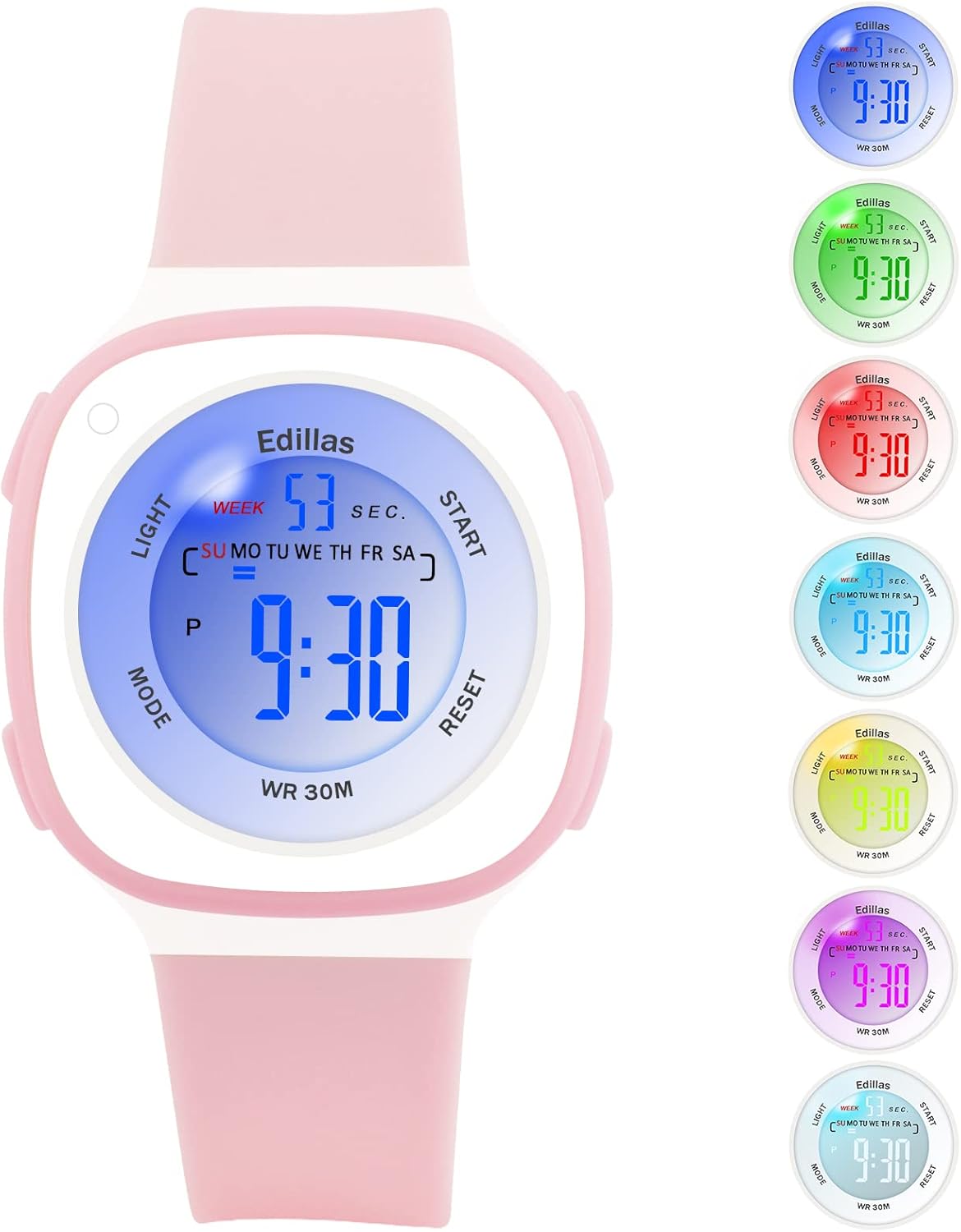
Figure 1: Edillas Digital Watch for Kids (Model 2207L)
Watch Components and Buttons
Familiarize yourself with the watch's buttons and display elements:

Figure 2: Watch Button and Display Layout
- LIGHT Button (Top Left): Activates the backlight and changes backlight color.
- MODE Button (Bottom Left): Cycles through different modes (Time, Alarm, Stopwatch).
- START Button (Top Right): Used to start/stop functions in Stopwatch mode and adjust settings.
- RESET Button (Bottom Right): Used to reset functions in Stopwatch mode and adjust settings.
Setup and Time Setting
- Initial Power On: The watch comes with a pre-installed battery. If the display is off, press any button to activate it.
- Entering Time Setting Mode: From the normal time display, press the MODE button three times. The seconds will start flashing, indicating you are in time setting mode.
- Setting Seconds: Press the RESET button to reset the seconds to zero.
- Setting Minutes: Press the START button to move to the minutes setting. The minutes will flash. Use the RESET button to adjust the minutes.
- Setting Hours: Press the START button again to move to the hours setting. The hours will flash. Use the RESET button to adjust the hours. Note the 'P' indicator for PM in 12-hour format.
- Setting Date (Day, Month, Year): Continue pressing the START button to cycle through setting the day, month, and year. Use the RESET button to adjust each value.
- Setting Day of Week: After setting the date, press START to move to the day of the week. Use RESET to select the correct day.
- Exiting Setting Mode: Once all settings are complete, press the MODE button to return to the normal time display.
Operating Functions
1. LED Backlight
The watch features a 7-color LED backlight. To activate the backlight, press the LIGHT button. To change the backlight color, press and hold the LIGHT button for approximately 3 seconds. The color will cycle through the available options. Release the button when your desired color is displayed.

Figure 3: LED Backlight Functionality
2. Alarm Function
- Entering Alarm Mode: From the normal time display, press the MODE button once. The alarm time will be displayed.
- Setting Alarm Time: While in Alarm mode, press the RESET button. The hour digits will flash. Use the START button to adjust the hour.
- Press the RESET button again to move to the minute digits. Use the START button to adjust the minutes.
- Activating/Deactivating Alarm: Press the START button to toggle the alarm ON/OFF. An alarm icon will appear on the display when activated.
- Exiting Alarm Mode: Press the MODE button to return to the normal time display.
3. Stopwatch Function
- Entering Stopwatch Mode: From the normal time display, press the MODE button twice. The display will show '00:00:00'.
- Starting/Stopping Stopwatch: Press the START button to begin timing. Press START again to pause. Press START once more to resume.
- Resetting Stopwatch: While the stopwatch is paused, press the RESET button to clear the time to '00:00:00'.
- Exiting Stopwatch Mode: Press the MODE button to return to the normal time display.
4. 12/24 Hour Display
To switch between 12-hour and 24-hour time formats, enter the time setting mode (press MODE three times). When the hour digits are flashing, press the START button until you reach the hour setting. Press the RESET button to cycle between 12H (with 'P' for PM) and 24H formats. Exit setting mode by pressing MODE.
Maintenance
1. Water Resistance (50M / 5ATM)
This watch is water-resistant up to 50 meters (5 ATM), making it suitable for daily use, such as hand washing, rain, and showering. It is also suitable for swimming in shallow water. Do not press any buttons while the watch is submerged in water. Avoid using the watch in extremely hot or cold water, as this can shorten its lifespan and compromise water resistance.

Figure 4: Water Resistance Applications
2. Cleaning and Care
- Clean the watch regularly with a soft, damp cloth.
- Avoid using chemical cleaners, as they may damage the watch's materials.
- Store the watch in a dry place when not in use.
- Protect the watch from extreme temperatures and direct sunlight for prolonged periods.
3. Battery Replacement
The watch uses one C-type battery. Battery replacement should ideally be performed by a qualified technician to ensure proper sealing and maintain water resistance. Incorrect battery replacement may void the warranty.
Troubleshooting
| Problem | Possible Cause | Solution |
|---|---|---|
| Display is blank or dim. | Low battery or battery needs replacement. | Replace the battery. If issue persists, contact support. |
| Time is inaccurate. | Time not set correctly. | Refer to the "Setup and Time Setting" section to reset the time. |
| Alarm does not sound. | Alarm is not activated or set incorrectly. | Ensure the alarm is set and activated (alarm icon visible). Check alarm volume if applicable (this model may not have adjustable volume). |
| Buttons are unresponsive. | Temporary software glitch or watch is wet. | Allow the watch to dry completely if wet. Try a soft reset by pressing all four buttons simultaneously for a few seconds (if applicable, consult support if unsure). |
| Screen scratches easily. | Normal wear and tear for acrylic crystal. | Consider applying a screen protector. Handle with care. |
| Strap discolors. | Exposure to dirt, sweat, or chemicals. | Clean the strap regularly with mild soap and water. Avoid prolonged exposure to harsh chemicals. |
Specifications

Figure 5: Watch Dimensions
| Feature | Detail |
|---|---|
| Model Number | 2207L |
| Brand | Edillas |
| Display Type | Digital |
| Movement Type | Japanese Quartz (Digital Module) |
| Water Resistance | 50M (5ATM) - Suitable for swimming, not for diving. |
| Special Features | 7-color LED backlight, Alarm, Stopwatch, Date, 12/24H display |
| Power Source | 1 x C Battery (included) |
| Strap Material | Silicone |
| Case Material | Rubber |
| Crystal Type | Acrylic |
| Case Diameter | 37.4 mm (1.41 inches) |
| Case Thickness | 15 mm (0.39 inches) |
| Strap Width | 20 mm (0.63 inches) |
| Band Length | 19 cm (7.48 inches) |
| Product Weight | 20 g |
| Age Range | Children |
Warranty and Support
Warranty Information
The Edillas Digital Watch for Kids, Model 2207L, comes with a Lifetime Warranty. This warranty covers manufacturing defects and ensures the product's quality under normal use. Please retain your proof of purchase for warranty claims.
Customer Support
For any questions, concerns, or technical assistance regarding your Edillas watch, please refer to the retailer where you purchased the product or visit the official Edillas brand store online. You can also consult the product listing page for additional support options.
We are committed to providing satisfactory service and ensuring the durability of our products.


