
Introduction
Thank you for purchasing the ODK L-Shaped Desk. This manual provides comprehensive instructions for the safe assembly, proper operation, and effective maintenance of your new desk. Please read this manual thoroughly before assembly and retain it for future reference.
Product Overview and Features
The ODK L-Shaped Desk is designed to provide a versatile and efficient workspace, suitable for various uses including computer work, gaming, and home office tasks. Its L-shaped configuration maximizes corner space, offering ample surface area and integrated storage solutions.
Key Features:
- Integrated Power Outlet: Includes 2 AC outlets and 1 USB port for convenient charging of electronic devices directly from your desk.
- Ample Storage: Features an integrated storage rack at the base, providing easy access to books, documents, and other essentials.
- Reversible Design: The storage rack can be configured on either the left or right side to best suit your room layout and personal preference.
- Sturdy Construction: The tabletop supports up to 50kg, providing a stable surface for computers and accessories. It features reinforcement pipes, cross-reinforcement fittings, and a durable steel frame for enhanced stability.
- Durable Surface: Constructed from high-strength melamine laminated board, resistant to dirt, scratches, heat, and water for long-lasting use.
- Safety Edges: The tabletop features filleted (rounded) edges to enhance safety and reduce the risk of injury from accidental bumps.
- Adjustable Feet: Equipped with adjustable feet to ensure stability on uneven floors and prevent wobbling.
Video Description: This video provides a general overview of the ODK L-shaped desk, showcasing its features, design, and versatility in various home and office settings. It highlights the integrated power outlet, storage options, and sturdy construction.
Components List
Before beginning assembly, please verify that all components are present and undamaged. Refer to the included assembly diagram for visual identification of parts.
- Main Desk Panels (L-shaped sections)
- Monitor Stand Panel
- Storage Rack Shelves
- Metal Frame (Legs, Support Bars)
- Integrated Power Outlet Unit (2 AC, 1 USB)
- Assembly Hardware (Screws, Bolts, Allen Wrench)
- Adjustable Feet
Setup and Assembly Instructions
Assembly requires careful attention to detail. It is recommended to have two people for easier and safer assembly. Please follow these general steps, referring to the detailed diagrams in your package for specific part identification and screw placement.
- Unpack and Organize: Carefully unpack all components and lay them out on a clean, soft surface to prevent scratches. Verify all parts against the components list.
- Assemble the Frame: Attach the metal legs and support bars to form the main desk frame. Ensure all connections are secure but do not fully tighten screws until all parts are aligned.
- Attach Desk Panels: Secure the main L-shaped desk panels to the assembled frame. Pay attention to the orientation for the desired left or right configuration of the storage rack.
- Install Storage Rack: Assemble and attach the storage rack shelves to the designated section of the desk.
- Install Monitor Stand: Secure the monitor stand panel to the main desk surface.
- Install Power Outlet: Integrate the power outlet unit into the designated slot on the desk surface. Connect any necessary wiring as per the diagram.
- Final Tightening: Once all components are in place and aligned, fully tighten all screws and bolts.
- Attach Adjustable Feet: Screw the adjustable feet into the bottom of the desk legs. Adjust them as needed to ensure the desk is level and stable.

Image Description: A detailed diagram illustrating the dimensions of the ODK L-shaped desk, including its width (120cm), depth (80cm), and height (76cm). It also visually demonstrates how the integrated storage rack can be installed on either the left or right side of the desk.

Image Description: An illustration demonstrating the flexibility of the ODK L-shaped desk, specifically highlighting that the storage rack component can be assembled on either the left or right side of the main desk, adapting to different room layouts.
Operating Instructions
The ODK L-Shaped Desk features an integrated power outlet for your convenience.
Using the Integrated Power Outlet:
- Ensure the desk's power cord is securely plugged into a functional wall outlet.
- Plug your devices (e.g., computer, monitor, smartphone) into the available AC outlets or the USB port on the desk's integrated power strip.
- The power outlet is designed for standard electronic devices. Do not overload the outlets.

Image Description: A close-up view of a smartphone connected to and charging via the integrated USB port on the ODK L-shaped desk, demonstrating the convenience of the built-in power outlet.

Image Description: A visual representation detailing the power features of the ODK L-shaped desk, including two AC outlets (100-240V/15A), one USB port (5V-2A), and the 1.8m extension cord, along with the PSE safety mark.
Maintenance
Proper care and maintenance will extend the life and appearance of your ODK L-Shaped Desk.
Cleaning:
- Wipe surfaces with a soft, damp cloth.
- Avoid using harsh chemicals, abrasive cleaners, or polishes, as these may damage the finish.
- For spills, wipe immediately with a dry cloth.
General Care:
- Regularly check and tighten all screws and bolts to ensure stability.
- Avoid placing extremely hot or cold items directly on the surface without protective coasters.
- Do not exceed the maximum load capacity of 50kg for the tabletop.
- Ensure children do not climb on or lean against the desk to prevent accidents.

Image Description: A close-up image highlighting the filleted (rounded) edge design of the desk tabletop, emphasizing its safety feature to prevent injuries from accidental bumps.
Troubleshooting
If you encounter any issues with your ODK L-Shaped Desk, please refer to the following common solutions:
Desk is Wobbling:
- Check that all screws and bolts are securely tightened.
- Adjust the leveling feet at the bottom of the desk legs to compensate for uneven floor surfaces.
Power Outlet Not Working:
- Ensure the desk's main power cord is firmly plugged into a live wall outlet.
- Verify that the devices you are trying to charge are properly connected to the desk's outlets or USB port.
- Check if the wall outlet itself is functioning by plugging in another device.
Missing or Damaged Parts:
- If you find any parts missing or damaged upon opening the package, please contact ODK customer support immediately for assistance.
Specifications
| Brand | ODK |
| Model Number | B01XS011262JP-1 |
| Product Dimensions | 120cm (Width) x 80cm (Depth) x 76cm (Height) |
| Product Weight | Approximately 18 kg |
| Material | Metal (Base), Engineered Wood (Top) |
| Finish Type | Powder Coated |
| Color | Black |
| Shape | L-shaped |
| Desk Type | Computer Desk, Desk with Shelves |
| Special Feature | Built-in USB Outlet (2 AC, 1 USB) |
| Tabletop Load Capacity | Approximately 50 kg |
| Package Dimensions | 103 x 57.5 x 8 cm |
| Package Weight | Approximately 19.9 kg |
| Battery Use | No |
Warranty and Support
The ODK L-Shaped Desk comes with a manufacturer's warranty.
Warranty Information:
- Warranty Period: 1 year from the date of purchase.
- This warranty covers manufacturing defects under normal use. It does not cover damage caused by misuse, accidents, unauthorized modifications, or normal wear and tear.
Customer Support:
For warranty claims, technical assistance, or any questions regarding your ODK L-Shaped Desk, please contact ODK customer support through your retailer or the official ODK website. Please have your purchase receipt and model number (B01XS011262JP-1) available when contacting support.
Safety Warnings
- The tabletop has a maximum load capacity of approximately 50kg. Do not exceed this weight.
- To prevent injury, ensure children do not climb on or lean against the desk.
- Always place the desk on a flat, stable surface.
- Keep liquids away from the power outlets to prevent electrical hazards.
- Do not attempt to modify or repair the desk or its electrical components yourself. Contact qualified personnel for service.
Product Images

Image Description: A comprehensive view of the ODK L-shaped desk set up in a contemporary room, showcasing its use for both gaming and office work with multiple monitors, a computer tower, and various accessories.

Image Description: The ODK L-shaped desk positioned in a bright home office, featuring a monitor, keyboard, and decorative plants, illustrating its functional and aesthetic integration into a living space.

Image Description: A view of the ODK L-shaped desk in a clean, minimalist home office environment, equipped with a laptop, external monitor, and a comfortable office chair, highlighting its suitability for focused work.
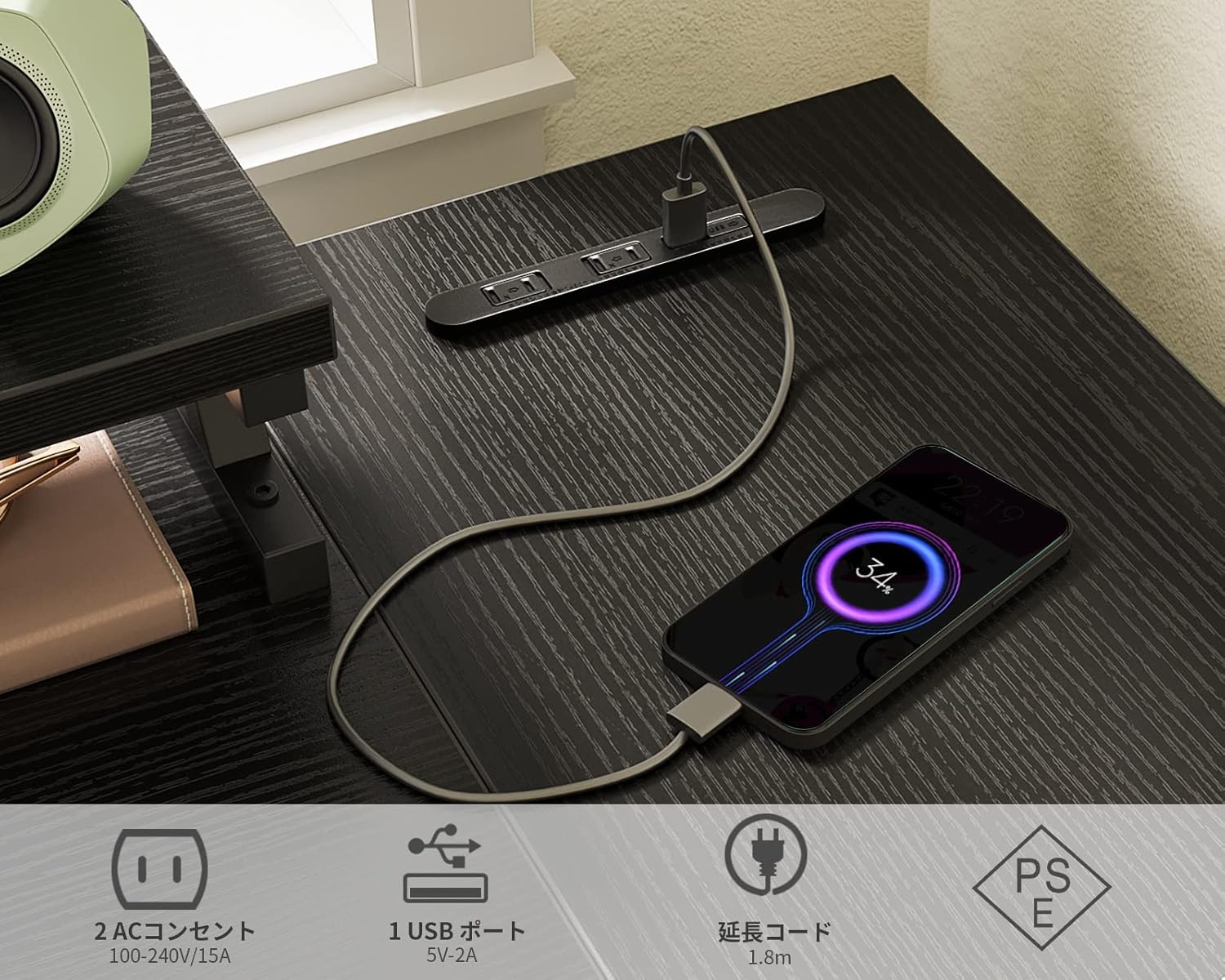
Image Description: The ODK L-shaped desk configured for a gaming setup, featuring a large monitor, gaming keyboard, mouse, and a desktop computer, demonstrating its capacity for immersive gaming experiences.

Image Description: An image of the ODK L-shaped desk in a professional office setting, featuring dual monitors, a printer, and organized documents, illustrating its efficiency for multi-tasking and productivity.

Image Description: The ODK L-shaped desk integrated into a room with a rustic aesthetic, featuring a monitor, laptop, and various decorative elements, showcasing its adaptability to different interior design styles.


