
Introduction
This manual provides detailed instructions for the JOYO JF-20 MOIST REVERB Digital Guitar Pedal and the JOYO R-17 DARK FLAME Modern Metal High Gain Distortion Pedal. These two pedals are designed to be used together or individually to enhance your guitar's sound. Please read this manual thoroughly before operating the pedals to ensure proper usage and optimal performance.

Image: The JOYO JF-20 MOIST REVERB (blue) and R-17 DARK FLAME (red) guitar pedals shown side-by-side. The MOIST REVERB pedal features controls for Decay, Mix, and Tone, along with a mode switch for Studio, Church, and Plate reverb types. The DARK FLAME pedal includes controls for Volume, Gain, Low, Mid, High EQ, and a tone selection switch.
JOYO JF-20 MOIST REVERB Digital Guitar Pedal
Overview
The JOYO JF-20 MOIST REVERB is a digital reverb pedal designed to add depth and space to your guitar tone. It features a high-performance 32-bit DSP chip and offers three distinct reverb modes: Studio, Church, and Plate. The pedal incorporates a true bypass design to minimize signal loss when disengaged.
Controls and Functions
- DECAY: Adjusts the length of the reverb tail.
- MIX: Controls the blend between the dry (unaffected) signal and the wet (reverb) signal.
- TONE: Shapes the tonal character of the reverb effect.
- Mode Switch: Selects between three reverb types:
- Studio: A versatile reverb suitable for various musical styles.
- Church: Simulates the expansive acoustics of a large church.
- Plate: Emulates the classic sound of a plate reverb unit.
- Footswitch: Engages or disengages the effect. Features true bypass.

Image: A close-up view of the JOYO JF-20 MOIST REVERB pedal's controls. The image highlights the Decay, Mix, and Tone knobs, as well as the three-position toggle switch for selecting Studio, Church, or Plate reverb modes.
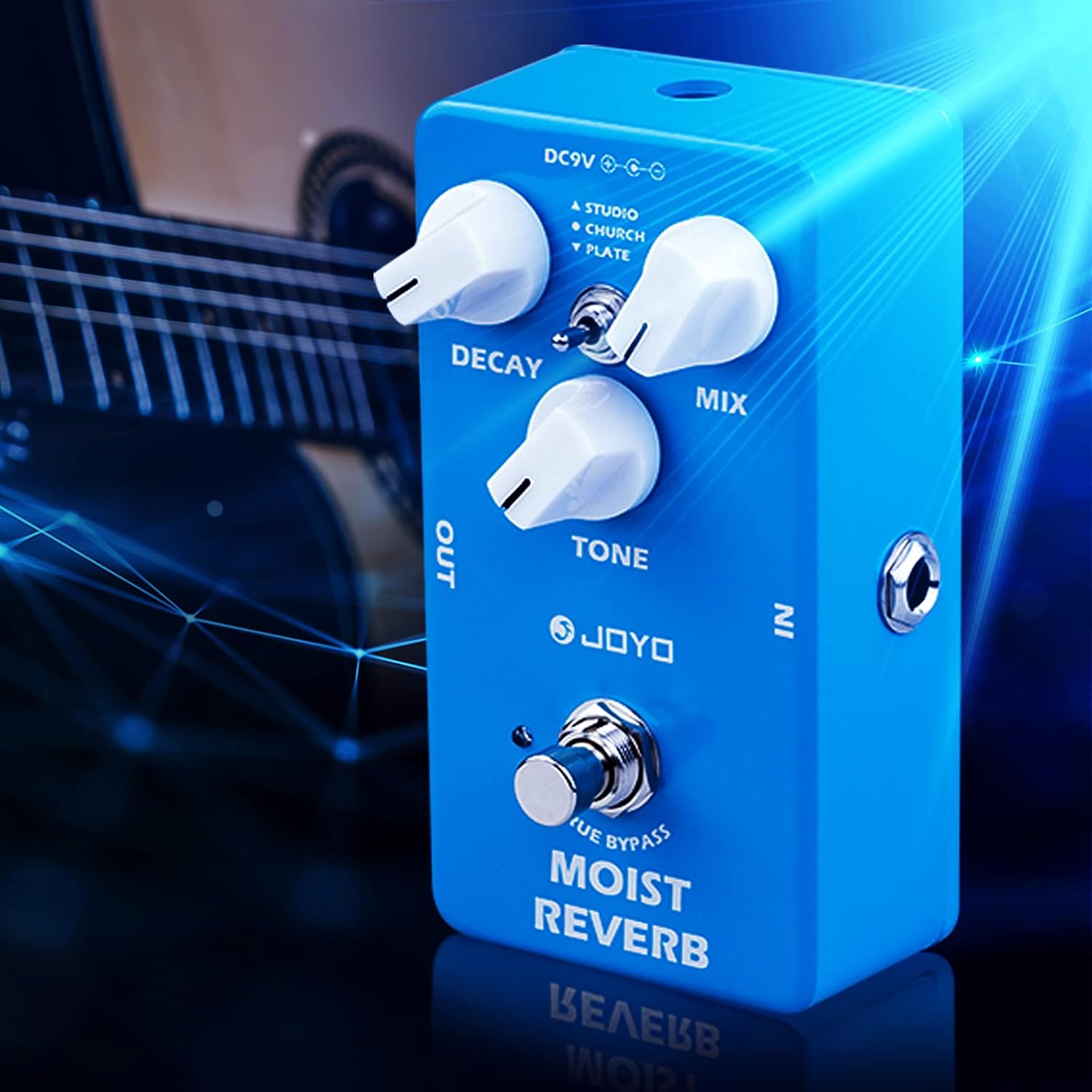
Image: The JOYO JF-20 MOIST REVERB pedal positioned in front of a guitar, illustrating its compact size and typical usage scenario. The pedal's blue casing and white control knobs are clearly visible.
JOYO R-17 DARK FLAME Distortion Pedal
Overview
The JOYO R-17 DARK FLAME is a modern metal high-gain distortion pedal designed for aggressive guitar tones. It features a 3-band equalizer (Low, Mid, High) and a tone selection switch to sculpt various distortion characteristics, making it suitable for both rhythm riffs and lead solos. This pedal also includes a true bypass design.
Controls and Functions
- VOL (Volume): Adjusts the overall output level of the pedal.
- GAIN: Controls the amount of distortion.
- LOW: Adjusts the bass frequencies of the distorted tone.
- MID: Adjusts the midrange frequencies of the distorted tone.
- HIGH: Adjusts the treble frequencies of the distorted tone.
- Tone Selection Switch: Offers different distortion voicings (e.g., Bright, Dark, Off). The specific types are indicated as "3 types of distortion" in the product description, often labeled as Bright, Dark, and a neutral/off position.
- Footswitch: Engages or disengages the effect. Features true bypass.

Image: A detailed view of the JOYO R-17 DARK FLAME pedal's controls. The image labels the Volume and Gain knobs, the Low, Mid, and High EQ knobs, and the tone selection switch (Bright, Off, Dark).

Image: A close-up highlighting the Low, Mid, and High EQ control knobs on the JOYO R-17 DARK FLAME pedal, demonstrating the 3-band equalization capability for shaping the distortion tone.

Image: The JOYO R-17 DARK FLAME pedal connected to a guitar amplifier, with a guitarist in the background. This illustrates a typical setup for using the distortion pedal.
Setup
Power Supply
Both the JOYO JF-20 MOIST REVERB and R-17 DARK FLAME pedals require a DC 9V power supply (center negative). Ensure you use a compatible power adapter to prevent damage to the pedals. The power input jack is located at the top of each pedal.
Connecting the Pedals
- Connect your guitar to the "IN" jack of the first pedal in your signal chain (e.g., the R-17 DARK FLAME distortion pedal).
- Connect the "OUT" jack of the first pedal to the "IN" jack of the second pedal (e.g., the JF-20 MOIST REVERB pedal).
- Connect the "OUT" jack of the last pedal (JF-20 MOIST REVERB) to the input of your guitar amplifier.
- Connect the DC 9V power supply to the power input jack of each pedal.
For optimal sound, it is generally recommended to place distortion pedals before reverb pedals in the signal chain. This allows the distortion to process the dry signal before reverb is applied, creating a more natural effect.
Operating Instructions
General Operation
Once connected and powered, press the footswitch on each pedal to engage or disengage its effect. The LED indicator will illuminate when the effect is active. Both pedals feature true bypass, meaning your guitar signal passes through unaffected when the pedal is disengaged, preserving your tone.
Using the JF-20 MOIST REVERB Pedal
- Start with the MIX knob at a low setting and gradually increase it to find your desired blend of dry and wet signal.
- Experiment with the DECAY knob to control the length of the reverb. Shorter decay times are suitable for subtle ambiance, while longer times create more expansive spaces.
- Adjust the TONE knob to brighten or darken the reverb sound.
- Toggle the mode switch to explore the Studio, Church, and Plate reverb types to find the one that best suits your musical context.
Using the R-17 DARK FLAME Distortion Pedal
- Begin with the VOL knob at a moderate level to match your amplifier's clean volume.
- Increase the GAIN knob to achieve your desired level of distortion. Higher gain settings will produce more aggressive, saturated tones.
- Utilize the LOW, MID, and HIGH EQ knobs to sculpt your distorted tone.
- LOW: Boost for a thicker, heavier sound; cut to reduce muddiness.
- MID: Adjust for presence and cut through the mix; cutting mids can create a "scooped" metal tone.
- HIGH: Boost for brightness and clarity; cut to smooth out harshness.
- Experiment with the Tone Selection Switch (Bright, Off, Dark) to alter the overall character of the distortion.
Specifications
| Feature | JOYO JF-20 MOIST REVERB | JOYO R-17 DARK FLAME |
|---|---|---|
| Product Type | Digital Reverb Guitar Pedal | Modern Metal High Gain Distortion Pedal |
| Signal Processing | Digital (32-bit DSP) | Analog |
| Reverb Modes | Studio, Church, Plate | N/A |
| EQ | Tone Knob | 3-Band (Low, Mid, High) |
| Bypass Type | True Bypass | True Bypass |
| Power Requirement | DC 9V (Center Negative) | DC 9V (Center Negative) |
| Controls | Decay, Mix, Tone, Mode Switch | Volume, Gain, Low, Mid, High, Tone Selection Switch |
| Dimensions | Mini and Portable | Mini and Portable |
Maintenance
To ensure the longevity and optimal performance of your JOYO pedals, follow these maintenance guidelines:
- Cleaning: Use a soft, dry cloth to wipe down the pedals. Avoid using abrasive cleaners or solvents, which can damage the finish and internal components.
- Storage: Store the pedals in a cool, dry place away from direct sunlight, extreme temperatures, and high humidity. When not in use for extended periods, disconnect the power supply.
- Handling: Handle the pedals with care. Avoid dropping them or subjecting them to strong impacts.
- Power: Always use the specified DC 9V (center negative) power supply. Incorrect power can cause irreversible damage.
Troubleshooting
If you encounter issues with your JOYO pedals, refer to the following common troubleshooting steps:
- No Sound:
- Check all cable connections (guitar to pedal, pedal to pedal, pedal to amp). Ensure they are securely plugged in.
- Verify the power supply is correctly connected and providing the correct voltage (DC 9V, center negative).
- Ensure the footswitch is engaged (LED illuminated) if you expect an effect.
- Test with different cables, guitar, and amplifier to isolate the problem.
- Unexpected Noise/Hum:
- Ensure all cables are shielded and in good condition.
- Try a different power outlet or power supply.
- Move the pedals away from other electronic devices that might cause interference.
- Check if the noise occurs when the pedal is bypassed (true bypass should eliminate pedal-induced noise when off).
- Effect Not Working:
- Confirm the pedal is receiving power (LED should light up when engaged).
- Check the control knobs; ensure they are not set to minimum or extreme settings that might make the effect imperceptible.
- For the JF-20 MOIST REVERB, ensure the mode switch is set to a desired reverb type.
- For the R-17 DARK FLAME, ensure the gain knob is turned up.
If problems persist, contact JOYO customer support or your retailer for further assistance.
Warranty and Support
JOYO products are manufactured to high-quality standards. For information regarding warranty coverage, please refer to the warranty card included with your purchase or visit the official JOYO website. For technical support or inquiries, you may contact JOYO customer service directly or consult the JOYO Store on Amazon.
