
FIFINE BM88
FIFINE Microphone Boom Arm Instruction Manual
Model: BM88 | Brand: FIFINE
Introduction
This manual provides comprehensive instructions for the setup, operation, and maintenance of your FIFINE BM88 Low Profile Microphone Boom Arm. Designed for stability and flexibility, this all-metal boom arm offers an unobtrusive solution for podcasting, streaming, gaming, and recording setups. Please read this manual thoroughly before installation and use to ensure optimal performance and longevity of your product.

Figure 1: FIFINE BM88 Low Profile Microphone Boom Arm, showcasing its sleek design and desk mount.
Package Contents
Please verify that all items listed below are included in your package:
- Boom Arm Stand (x1)
- Desk Clamp (x1)
- Rotatable Ball-Head (x1)
- Allen Wrench (x1)
- User's Manual (x1)
- Adapters: 1/4'' to 3/8'' adapter and 3/8'' to 5/8'' adapter (pre-connected on the rotatable ball-head)

Figure 2: All components included in the FIFINE BM88 package, laid out for easy identification.
Setup Guide
Follow these steps to properly set up your microphone boom arm:
1. Attaching the Desk Clamp
- Identify a suitable flat desktop surface. The desk clamp is designed for desktops with a thickness between 0.8 to 2.4 inches (20mm-60mm) and a depth of at least 2 inches (50mm).
- Loosen the screw on the desk clamp until it opens wide enough to fit over your desktop edge.
- Position the clamp firmly on the desktop. Ensure the entire clamping surface is in contact with the desk for maximum stability.
- Tighten the screw securely until the clamp is stable and does not wobble. The handle of the screw can be pulled out and repositioned to allow for full tightening in tight spaces.

Figure 3: Proper and improper installation methods for the desk clamp, highlighting the supported thickness range.
2. Installing the Boom Arm
- Insert the base of the boom arm into the hole on the top of the tightened desk clamp.
- Ensure the arm is fully seated and can rotate freely within the clamp. The first joint of the arm allows for 360-degree horizontal rotation.
3. Attaching Your Microphone
- The rotatable ball-head, which includes 1/4'', 3/8'', and 5/8'' screw adapters, is pre-connected to the end of the boom arm.
- Screw your microphone or shock mount onto the appropriate adapter thread on the ball-head. Ensure it is securely fastened.
- The ball-head allows for multi-directional adjustment of your microphone. Loosen the tension nut on the ball-head to adjust the microphone angle, then tighten to secure.

Figure 4: Illustration of the included screw adapters (1/4'', 3/8'', 5/8'') and examples of compatible microphones.
Operating Instructions
Adjusting the Boom Arm
The FIFINE BM88 boom arm offers extensive adjustability for optimal microphone positioning:
- Horizontal Rotation: The arm can rotate 360 degrees at the base clamp, allowing you to swing the microphone completely out of the way when not in use.
- Vertical Adjustment: The middle joint of the arm allows for vertical movement up to 220 degrees. This joint can be tightened or loosened with the included Allen wrench to adjust tension, ensuring the arm holds its position firmly. Note: The section near the C-clamp cannot be adjusted up or down.
- Extension: The arm can extend up to 29 inches (73.66 cm) horizontally, suitable for large desktop setups.
- Microphone Angle: The rotatable ball-head at the end of the arm provides 180-degree vertical adjustment and 360-degree horizontal rotation for precise microphone angling.
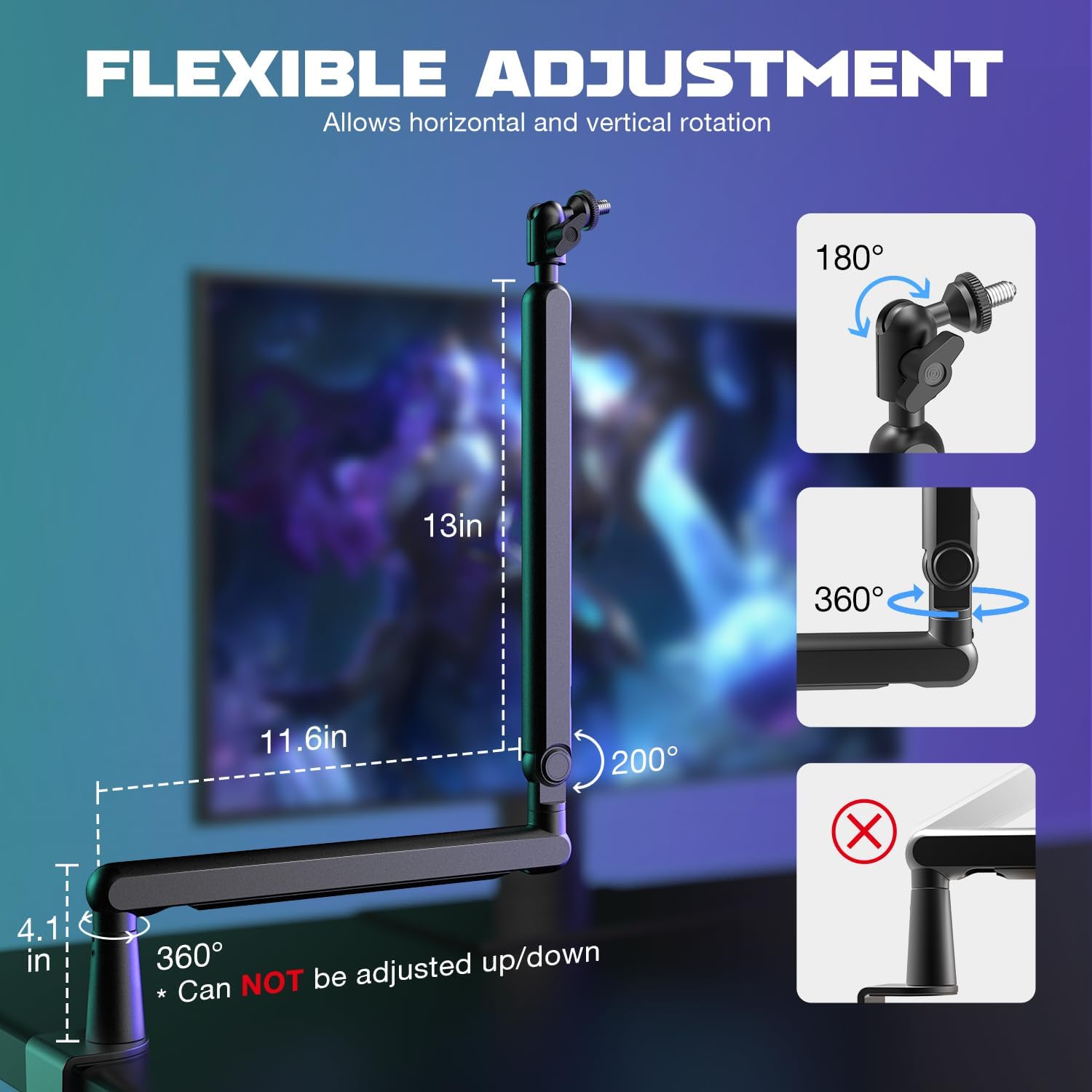
Figure 5: Detailed view of the flexible adjustment points, including vertical and horizontal rotation capabilities.

Figure 6: The low-profile design of the arm stand, providing an unhindered view of your screen.
Cable Management
The boom arm features integrated cable management channels to keep your setup tidy and prevent cable interference:
- Locate the hidden cable channels along the arm segments.
- Gently open the channel covers and route your microphone cable through them.
- Close the channel covers to secure the cable. This ensures a clean and professional appearance, preventing accidental pulling or tangling.

Figure 7: Illustration of the built-in cable management channels for a neat setup.
Maintenance
- Cleaning: Wipe the boom arm with a soft, dry cloth to remove dust and fingerprints. Avoid using abrasive cleaners or solvents.
- Joint Tension: Periodically check the tension of the arm joints. If the arm feels loose or sags, use the provided Allen wrench to tighten the screws at the joints until the desired tension is achieved.
- Clamp Security: Ensure the desk clamp remains securely fastened to your desktop to prevent accidental dislodgement.
Troubleshooting
| Problem | Possible Cause | Solution |
|---|---|---|
| Boom arm is not holding position / sags. | Joints are too loose. | Use the included Allen wrench to tighten the screws at the arm's joints until the desired tension is achieved. |
| Microphone is wobbly on the arm. | Microphone or ball-head not securely tightened. | Ensure your microphone is tightly screwed onto the adapter. Tighten the tension nut on the rotatable ball-head. |
| Desk clamp is unstable or slipping. | Clamp not fully tightened or incompatible desk thickness. | Re-tighten the desk clamp screw firmly. Verify your desktop thickness is within the 0.8 to 2.4 inch range. Ensure the clamp is fully seated on the desk. |
| Cables are messy or interfering with arm movement. | Cables not routed through management channels. | Utilize the built-in cable management channels by opening the covers, inserting cables, and closing them securely. |
Specifications
| Feature | Detail |
|---|---|
| Model Number | BM88 |
| Material | All Metal Construction |
| Color | Black |
| Maximum Horizontal Extension | 29 inches (approx. 73.66 cm) |
| Vertical Adjustment Range | 220 degrees (middle joint) |
| Horizontal Rotation (Base) | 360 degrees |
| Microphone Thread Compatibility | 1/4'', 3/8'', 5/8'' (via included adapters) |
| Desk Clamp Thickness Compatibility | 0.8 to 2.4 inches (20mm-60mm) |
| Desk Clamp Depth Requirement | Minimum 2 inches (50mm) |
| Cable Management | Integrated hidden channels |
| Item Weight | 2.87 pounds (approx. 1.3 kg) |
| Product Dimensions (L x W x H) | 13.66 x 4.09 x 3.46 inches (approx. 34.7 x 10.4 x 8.8 cm) |

Figure 8: Key dimensions of the FIFINE BM88 boom arm for planning your setup.
Warranty and Support
For warranty information, technical support, or any inquiries regarding your FIFINE BM88 Microphone Boom Arm, please refer to the official FIFINE website or contact their customer service directly. Keep your purchase receipt for warranty claims.
Online Support: www.fifinemic.com/support
Email Support: Refer to your product packaging or the official website for the most current contact email.
Related documentsBM88


Ask a question about this manual
Ask about setup, troubleshooting, compatibility, parts, safety, or missing instructions. Manuals+ will review the question and use this page’s manual context to help answer it.