
1. Product Overview
The Yuposl Automatic Cat Feeder 2L is designed to provide scheduled and portion-controlled meals for your pets. It features a 2-liter capacity, dual power supply options, and an anti-clog design to ensure reliable feeding.

Image 1.1: The Yuposl Automatic Cat Feeder 2L, showing its main components including the food reservoir and stainless steel bowl.
2. Package Contents
Please verify that all items are present in the package:
- Yuposl Automatic Cat Feeder (Main Unit)
- Stainless Steel Food Bowl
- Power Adapter (Type-C)
- Desiccant Bag
- User Manual (this document)
3. Setup Guide
3.1 Power Supply
The feeder supports dual power options: AC adapter or 3 D-size alkaline batteries (not included).
- AC Power: Connect the Type-C power adapter to the feeder and plug it into a wall outlet.
- Battery Power: Open the battery compartment at the bottom of the feeder and insert 3 D-size alkaline batteries. Ensure correct polarity. Battery power provides over 180 days of operation and acts as a backup during power outages.

Image 3.1: Illustration of the dual power supply options: Type-C power adapter and D-size batteries.
3.2 Filling the Food Reservoir
- Ensure the feeder is placed on a stable, level surface.
- Open the top lid of the feeder.
- Pour dry pet food into the reservoir. The feeder accommodates dry food sizes ranging from 2mm to 15mm. Do not use kibble larger than 15mm to prevent jamming.
- Place the desiccant bag into its designated slot under the lid to maintain food freshness.
- Close the lid securely. The spring-lock lid helps prevent pets from accessing the food.

Image 3.2: The feeder's food reservoir and features designed to keep kibble fresh and secure.
3.3 Attaching the Food Bowl
Place the stainless steel food bowl into the designated slot at the base of the feeder. Ensure it is seated correctly.

Image 3.3: The detachable stainless steel bowl, designed for hygiene and ease of cleaning.
4. Operating Instructions
4.1 Control Panel Overview
The feeder features an LCD screen and intuitive buttons for programming. No Wi-Fi or smartphone is required for operation.

Image 4.1: The control panel with LCD display for setting time and meal portions.
4.2 Setting the Current Time
- Press and hold the Left Button for a few seconds until the lock icon disappears from the LCD screen. This unlocks the digital pad.
- Press and hold the Right Button for a few seconds until the hour display starts flashing.
- Use the Middle Buttons (- and +) to adjust the hour.
- Press the Right Button again to move to the minutes display, then use the Middle Buttons to adjust the minutes.
- Press the Right Button to confirm and exit time setting.
4.3 Programming Meal Times and Portions
The feeder allows scheduling 1 to 6 meals per day with customizable portions (1-16 portions per meal).
- Unlock the digital pad by pressing and holding the Left Button.
- Press the Right Button repeatedly to cycle through the meal settings (Meal 1 to Meal 6).
- When the desired meal number is flashing, use the Middle Buttons to set the feeding time (hour and minute) for that meal.
- After setting the time, press the Right Button to move to portion setting. Use the Middle Buttons to select the number of portions (P-01 to P-16) for that meal.
- Repeat for all desired meals. If you do not wish to use all 6 meal slots, set the portions to '0' for the unused slots.
- The system will automatically save settings if no buttons are pressed for a few seconds, or you can press the Left Button to lock the panel.
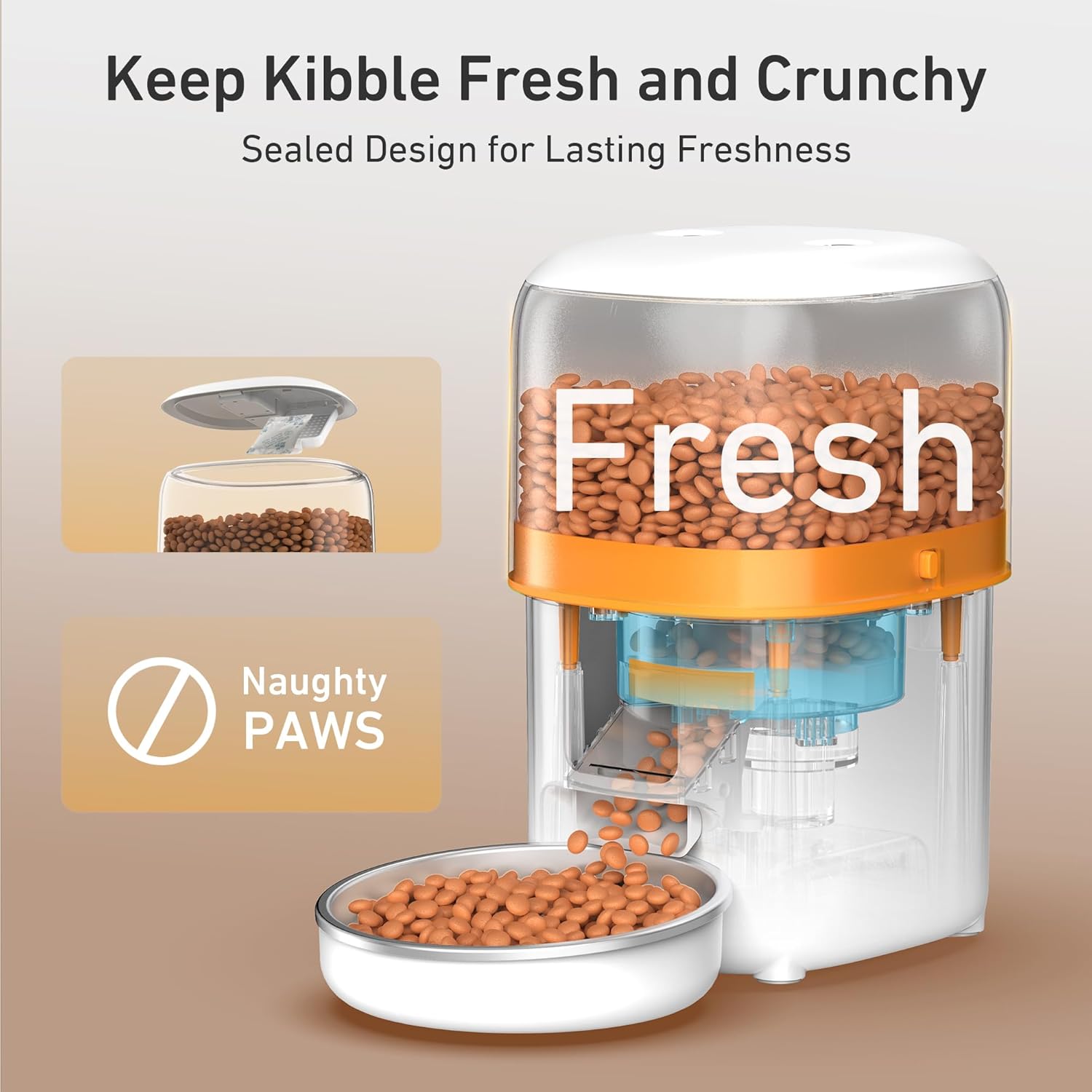
Image 4.2: An example of a programmed feeding schedule, showing meal times and portion sizes.
4.4 Manual Feeding
To dispense a single portion of food immediately, press the Manual Feed Button (usually located on the control panel, often represented by a paw icon). Ensure the digital pad is unlocked first.

Image 4.3: Demonstrating the manual feeding function for immediate food dispensing.
5. Maintenance
5.1 Cleaning the Feeder
Regular cleaning ensures hygiene and proper operation.
- Stainless Steel Bowl: The food-grade stainless steel bowl is removable and dishwasher safe. It can also be hand washed with mild soap and water.
- Food Reservoir: The top part of the feeder (food reservoir) can be disassembled for cleaning. Wipe with a damp cloth and mild detergent. Ensure it is completely dry before reassembling and refilling.
- Main Unit: Wipe the exterior of the main unit with a dry or slightly damp cloth. Do not immerse the main unit in water.
5.2 Desiccant Bag Replacement
The desiccant bag helps keep food fresh. Replace it periodically (e.g., every 1-2 months) for optimal freshness.
6. Troubleshooting
- Feeder Not Dispensing Food:
- Check if the food reservoir is empty.
- Ensure the feeder is powered on (AC adapter connected or batteries installed and charged).
- Verify that the kibble size is between 2mm and 15mm. Larger kibble can cause jams.
- Check for any obstructions in the food outlet.
- Incorrect Portion Sizes:
- Recalibrate portion settings by observing actual dispensed amounts. Adjust the number of portions as needed.
- Ensure the food type and size are consistent, as variations can affect portion accuracy.
- Pets Accessing Food Outside Scheduled Times:
- Ensure the top lid is securely closed and locked.
- Verify that the silicone sealing rotor is properly positioned to block the food outlet between feedings.
- Time Drift on Display:
- If the feeder consistently loses time, ensure fresh batteries are installed if operating on battery power.
- Reprogram the current time as necessary.
7. Specifications
| Feature | Detail |
|---|---|
| Model Name | YPF01-B001 |
| Capacity | 2 Liters (approx. 8 cups) |
| Dimensions (LxWxH) | 7 x 7.8 x 9.4 inches |
| Item Weight | 2.9 Pounds |
| Material | Acrylonitrile Butadiene Styrene, Plastic, Stainless Steel |
| Power Supply | Type-C AC Adapter (included), 3 x D-size Alkaline Batteries (not included) |
| Battery Life | Over 180 days (with D-size batteries) |
| Meals Per Day | 1-6 meals |
| Portions Per Meal | 1-16 portions |
| Compatible Kibble Size | 2mm - 15mm |
| Target Species | Cats, Small Dogs, Small Animals |

Image 7.1: Product dimensions of the Yuposl Automatic Cat Feeder.
8. Warranty and Support
8.1 Warranty Information
This Yuposl Automatic Cat Feeder comes with a 1-year manufacturer's warranty from the date of purchase. This warranty covers defects in materials and workmanship under normal use. It does not cover damage caused by misuse, accidents, unauthorized modifications, or normal wear and tear.
8.2 Customer Support
For any questions, technical assistance, or warranty claims, please contact Yuposl customer support through the retailer's platform or the official Yuposl website. Please have your model number (YPF01-B001) and purchase date ready when contacting support.


