
1. Introduction
Thank you for purchasing the TurboTronic TT-AF32DRD-Silver Digital Hot Air Oven. This versatile appliance combines the functions of a mini oven, toaster, grill, air fryer, and dehydrator, offering a wide range of cooking possibilities. With its 32-liter capacity and 1700W power, it is designed for efficient and convenient meal preparation. Please read this manual thoroughly before first use to ensure safe operation and optimal performance.

Figure 1.1: Front view of the TurboTronic Digital Hot Air Oven. This image displays the sleek white and silver exterior, the digital control panel, and the large glass door.
2. Important Safety Instructions
When using electrical appliances, basic safety precautions should always be followed to reduce the risk of fire, electric shock, and injury to persons, including the following:
- Read all instructions before operating the appliance.
- Do not touch hot surfaces. Use handles or knobs.
- To protect against electrical shock, do not immerse cord, plugs, or the appliance in water or other liquid.
- Close supervision is necessary when any appliance is used by or near children.
- Unplug from outlet when not in use and before cleaning. Allow to cool before putting on or taking off parts.
- Do not operate any appliance with a damaged cord or plug or after the appliance malfunctions or has been damaged in any manner.
- The use of accessory attachments not recommended by the appliance manufacturer may cause injuries.
- Do not use outdoors.
- Do not let cord hang over edge of table or counter, or touch hot surfaces.
- Do not place on or near a hot gas or electric burner, or in a heated oven.
- Extreme caution must be used when moving an appliance containing hot oil or other hot liquids.
- Always attach plug to appliance first, then plug cord into the wall outlet. To disconnect, turn any control to "off", then remove plug from wall outlet.
- Do not use appliance for other than intended use.
- Oversized foods or metal utensils must not be inserted in a toaster oven as they may create a fire or risk of electric shock.
- A fire may occur if the oven is covered or touching flammable material, including curtains, drapes, walls, and the like, when in operation.
- Do not place any of the following materials in the oven: paper, cardboard, plastic, or any other materials not specifically designed for cooking.
- Do not store any materials, other than manufacturer's recommended accessories, in this oven when not in use.
- Do not place any combustible materials such as paper, cardboard, plastic, etc., on top of the oven.
3. Product Components and Package Contents
3.1. Product Overview
The TurboTronic Digital Hot Air Oven features a robust stainless steel construction, a digital control panel with rotary switches, and a transparent glass door for easy monitoring of cooking progress. The interior is designed to accommodate multiple cooking levels.
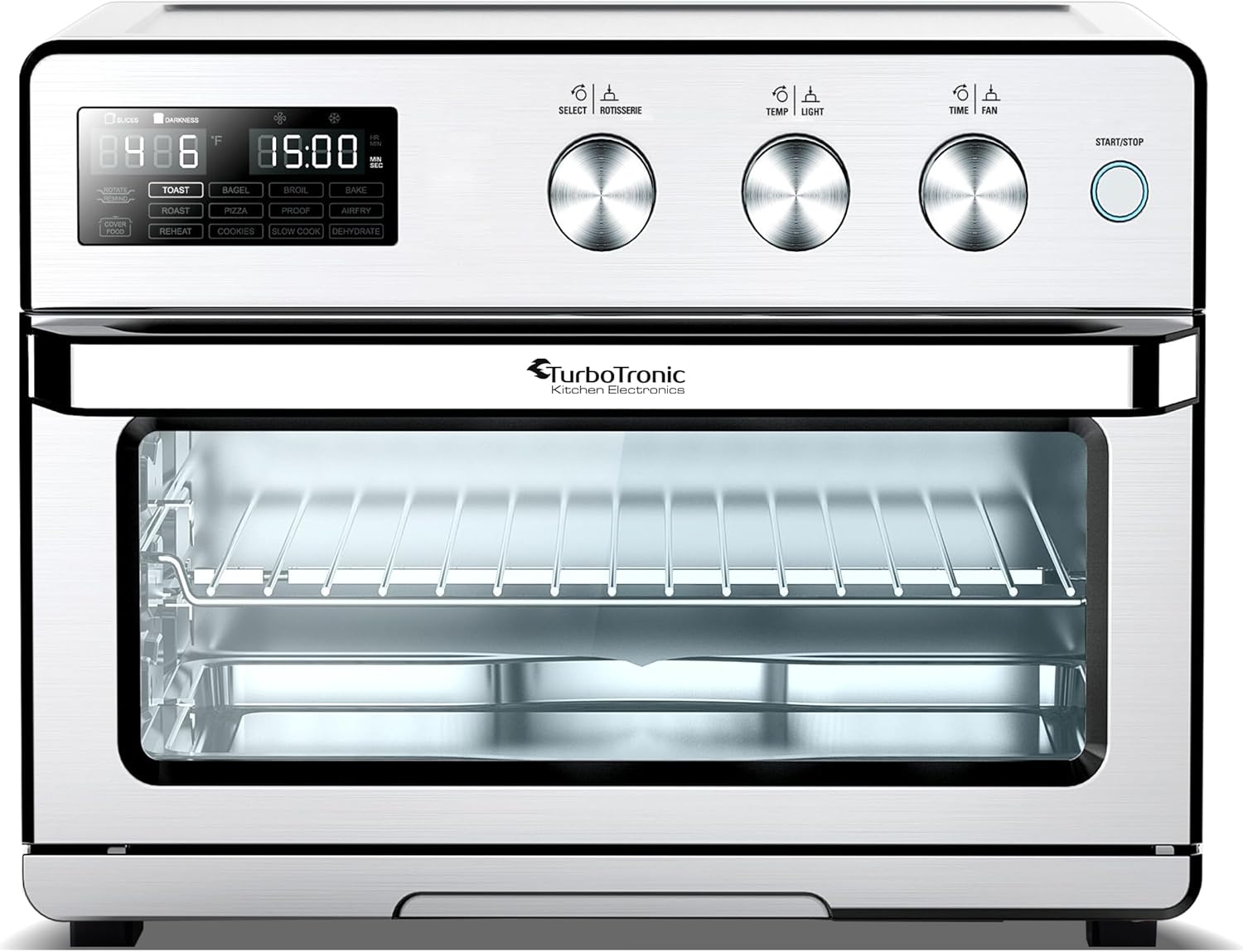
Figure 3.1: Front view of the oven, highlighting the digital display and control knobs.
3.2. Package Contents
Carefully unpack all components and check for any damage. Ensure all items listed below are present:
- TurboTronic Digital Hot Air Oven (Main Unit)
- Wire Rack
- Frying Basket
- Baking Tray
- Rotisserie Spit with 2 Forks
- Rotisserie Removal Tool
- Crumb Tray

Figure 3.2: The rotisserie spit and its accompanying removal tool. These are essential for preparing whole roasted chicken or other rotisserie items.

Figure 3.3: The air frying basket, designed for optimal air circulation during air frying.
4. Setup and First Use
4.1. Before First Use
- Remove all packaging materials, stickers, and labels from the appliance.
- Wipe the exterior of the oven with a damp cloth.
- Wash all accessories (baking tray, wire rack, frying basket, rotisserie spit, crumb tray) in warm, soapy water. Rinse thoroughly and dry completely. All accessories are dishwasher-safe.
- Place the oven on a stable, heat-resistant, and level surface, ensuring adequate ventilation around the appliance (at least 10 cm clearance on all sides).
- Plug the power cord into a grounded 220-240V electrical outlet.
4.2. Initial Burn-Off
It is recommended to run the oven empty for about 15 minutes before first use to burn off any manufacturing residues. This may produce a slight odor or smoke, which is normal and will dissipate quickly.
- Ensure the oven is empty.
- Set the temperature to 230°C and the timer to 15 minutes.
- Allow the oven to run. Ensure the area is well-ventilated.
- Once complete, turn off the oven and allow it to cool down completely before use.
5. Operating Instructions
5.1. Control Panel Overview
The oven features a digital display and three rotary knobs for intuitive control:
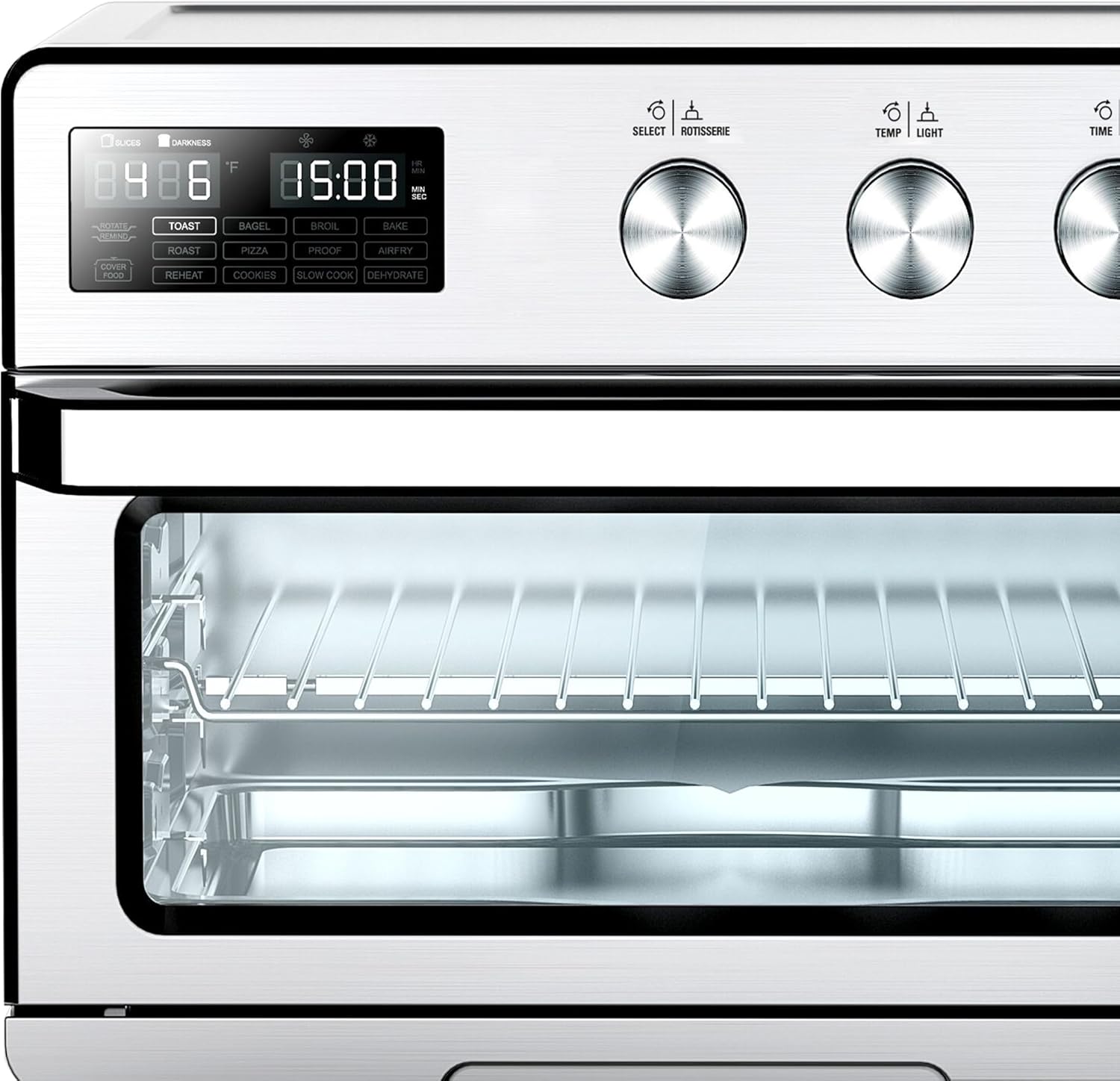
Figure 5.1: Detailed view of the control panel, showing the digital display, preset program buttons, and three control knobs for selection, temperature/light, and time/fan.
- Digital Display: Shows current temperature, time, and selected program.
- Left Knob (SELECT / ROTISSERIE): Used to select cooking programs and activate the rotisserie function.
- Middle Knob (TEMP / LIGHT): Used to adjust temperature and turn the interior light on/off.
- Right Knob (TIME / FAN): Used to set cooking time and control the convection fan.
- START / STOP Button: Initiates or pauses/stops the cooking process.
5.2. Preset Cooking Programs
The oven comes with 12 predefined cooking programs for common dishes:
- TOAST
- BAGEL
- BROIL
- BAKE
- ROAST
- PIZZA
- PROOF
- AIRFRY
- REHEAT
- COOKIES
- SLOW COOK
- DEHYDRATE
To use a preset program:
- Turn the SELECT knob to cycle through the preset programs until the desired program is highlighted on the display.
- The oven will automatically set a default temperature and time for the selected program.
- You can adjust the temperature using the TEMP knob and the time using the TIME knob if needed.
- Press the START / STOP button to begin cooking.
5.3. Manual Operation (Temperature and Time)
For custom cooking, you can manually set the temperature and time:
- Turn the SELECT knob to the desired cooking mode (e.g., Bake, Roast, Airfry) or simply leave it on a general setting if no specific preset applies.
- Use the TEMP knob to set the desired temperature (from 25°C to 230°C).
- Use the TIME knob to set the desired cooking time (up to 99 minutes for most functions, or up to 72 hours for Dehydrate).
- Press the START / STOP button to begin cooking.
5.4. Rotisserie Function
The rotisserie function is ideal for roasting whole chickens or other meats evenly.
- Assemble the rotisserie spit with the forks, securing the food in the center.
- Insert the rotisserie spit into the designated slots inside the oven.
- Select a suitable program (e.g., ROAST) or set manual temperature and time.
- Press the SELECT knob to activate the rotisserie rotation. The rotisserie icon will illuminate on the display.
- Press START / STOP to begin cooking.
- Use the rotisserie removal tool to safely remove the hot spit after cooking.

Figure 5.2: The oven with its door open, revealing the spacious interior and the rotisserie mounting points.
6. Maintenance and Cleaning
Regular cleaning and maintenance will ensure the longevity and optimal performance of your TurboTronic Digital Hot Air Oven.
6.1. Cleaning the Oven Interior and Exterior
- Always unplug the oven from the power outlet and allow it to cool completely before cleaning.
- Wipe the exterior surfaces with a soft, damp cloth. Do not use abrasive cleaners or scouring pads, as they may damage the finish.
- For the interior, wipe down with a damp cloth and mild detergent. For stubborn stains, a non-abrasive cleaner designed for oven interiors can be used. Ensure all detergent residue is wiped away.
- Clean the glass door with a glass cleaner or a damp cloth.
- Ensure the oven is completely dry before plugging it back in or storing.
6.2. Cleaning Accessories
All included accessories (baking tray, wire rack, frying basket, rotisserie spit, crumb tray) are dishwasher-safe for convenient cleaning. Alternatively, they can be washed by hand in warm, soapy water. Rinse thoroughly and dry completely before storing or re-using.
- Remove the crumb tray from the bottom of the oven and empty it after each use to prevent grease buildup and potential fire hazards.
7. Troubleshooting
If you encounter any issues with your oven, please refer to the following troubleshooting guide before contacting customer support.
| Problem | Possible Cause | Solution |
|---|---|---|
| Oven does not turn on. | Not plugged in; Power outage; Faulty outlet. | Ensure the power cord is securely plugged into a working outlet. Check your circuit breaker. Try a different outlet. |
| Food is not cooking evenly. | Incorrect temperature/time setting; Overcrowding the oven; Food placed too close to heating elements. | Adjust temperature and time as needed. Do not overcrowd the oven; cook in batches if necessary. Ensure proper rack placement. |
| Excessive smoke during cooking. | Food residue or grease buildup; High-fat food. | Clean the oven interior and accessories thoroughly. Use the crumb tray to catch drips. For high-fat foods, use a baking tray underneath. |
| Rotisserie is not rotating. | Rotisserie function not activated; Spit not properly installed; Food too heavy or unbalanced. | Ensure the rotisserie function is selected on the control panel. Re-install the spit, ensuring it clicks into place. Ensure food is balanced and within weight limits. |
| Digital display is not working. | Power issue; Internal malfunction. | Unplug the oven for a few minutes, then plug it back in. If the issue persists, contact customer support. |
8. Specifications
Technical specifications for the TurboTronic TT-AF32DRD-Silver Digital Hot Air Oven:

Figure 8.1: Infographic detailing the product's dimensions, capacity, power, and other key specifications.
- Model Number: TT-AF32DRD-Silver
- Brand: TurboTronic
- Color: Silver
- Material: Stainless Steel
- Capacity: 32 Liters
- Power: 1700 Watts
- Voltage: 220-240 Volts
- Temperature Range: 25°C - 230°C
- Timer: Up to 99 minutes (general cooking), up to 72 hours (dehydration)
- Control Type: Digital PCB control with rotary switches
- Convection Heat: Built-in fan circulates hot air (360° Rapid Air Technology)
- Exterior Dimensions (L x W x H): 42 x 45 x 37 cm (16.5 x 17.7 x 14.6 inches)
- Weight: 11 Kilograms (24.25 lbs)
- Special Features: Toast, Grill, Bake, Air Fry, Reheat, Roast, Dehydrate functions; Automatic shut-off.
9. Warranty and Support
For warranty information or technical support, please refer to the warranty card included with your product or visit the official TurboTronic website. Keep your purchase receipt as proof of purchase for any warranty claims.
For further assistance, please contact TurboTronic customer service.