
1. Introduction
Thank you for choosing the TrueLife FitScale W7 BT Smart Scale. This manual provides essential information for the safe and effective use of your new smart scale. Please read it thoroughly before first use and keep it for future reference. The FitScale W7 BT is designed to help you monitor your body composition, including weight, and track your progress through its Bluetooth connectivity and companion application.
This scale supports up to 8 user profiles, allowing multiple individuals to track their personal health data independently.
2. Safety Information
- Do not use this device if you have a pacemaker or other internal medical device.
- Do not use this device if you are pregnant.
- Always place the scale on a hard, flat surface for accurate measurements. Avoid carpets or soft flooring.
- The scale's surface can be slippery when wet. Ensure the surface is dry before stepping on.
- Do not jump on the scale or use it for purposes other than weighing.
- Keep batteries out of reach of children. If swallowed, seek immediate medical attention.
- Dispose of used batteries according to local regulations.
- Do not attempt to disassemble or repair the scale yourself. Contact customer support if issues arise.
3. Package Contents
Ensure all items are present and in good condition upon unpacking:
- TrueLife FitScale W7 BT Smart Scale
- 1 x 12V Battery
- User Manual (this document)
4. Setup
4.1. Battery Installation
The TrueLife FitScale W7 BT uses one 12V battery. The battery is included in the package.
- Turn the scale over to access the battery compartment on the underside.
- Open the battery compartment cover.
- Insert the 12V battery, ensuring the polarity (+ and -) matches the indicators inside the compartment.
- Close the battery compartment cover securely.
4.2. Scale Placement
Place the scale on a hard, flat, and stable surface. Uneven or soft surfaces (like carpets) can affect measurement accuracy.
4.3. App Download and Bluetooth Pairing
To utilize the smart features and body composition analysis, download the official TrueLife companion app from your smartphone's app store (iOS or Android).
- Download and install the TrueLife app on your smartphone.
- Enable Bluetooth on your smartphone.
- Open the TrueLife app and follow the on-screen instructions to create your user profile.
- Step onto the scale briefly to activate it. The scale will automatically attempt to pair with the app via Bluetooth. Confirm the pairing within the app if prompted.
Note: Ensure your phone is within range of the scale during pairing and measurement synchronization.
5. Operating Instructions
5.1. Initial Calibration
Before first use or after moving the scale, perform an initial calibration:
- Gently step on the scale until the display lights up, then step off immediately.
- The display will show "0.0" or similar, indicating it's ready for use.
5.2. Taking a Measurement
For accurate body composition analysis, ensure your feet are bare and clean.
- Step onto the scale with bare feet, positioning them evenly on the electrodes (metal pads).
- Stand still until your weight is displayed and stabilized.
- If connected to the app, your data (weight and body composition metrics) will automatically synchronize to your profile.
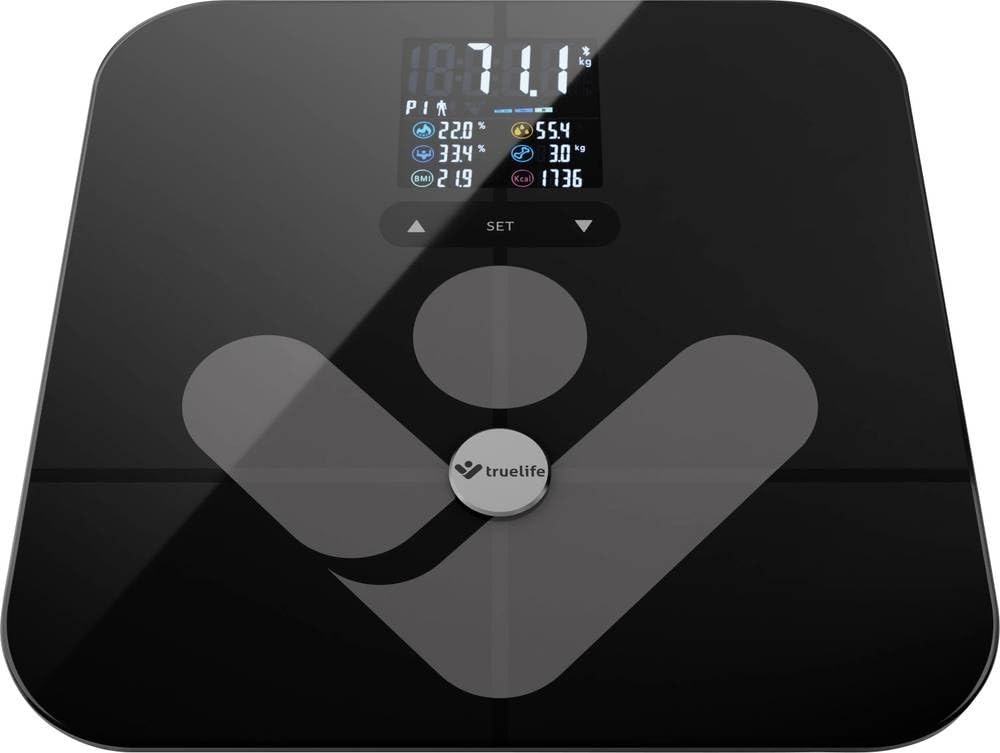
Image: TrueLife FitScale W7 BT Smart Scale. This image shows the sleek black glass surface of the scale with a digital display.
5.3. Managing User Profiles
The scale supports up to 8 user profiles. Each user should create their profile within the TrueLife app. The scale will automatically recognize the user based on their weight and body composition data once a profile is established.
- Creating a Profile: Open the app, navigate to the user management section, and add a new user. Enter personal details such as age, height, and gender for accurate body composition calculations.
- Automatic Recognition: When a registered user steps on the scale, the app will identify them and record the measurement to their specific profile.
6. Maintenance
6.1. Cleaning
To keep your scale in optimal condition:
- Wipe the surface with a soft, damp cloth.
- Do not use abrasive cleaners or immerse the scale in water.
- Ensure the scale is dry before storage or next use.
6.2. Storage
Store the scale in a cool, dry place away from direct sunlight and extreme temperatures.
6.3. Battery Replacement
When the display shows a "Lo" indicator, it's time to replace the battery. Follow the steps in section 4.1 for battery installation.
7. Troubleshooting
| Problem | Possible Cause | Solution |
|---|---|---|
| No display / Scale won't turn on | Battery is dead or incorrectly installed. | Check battery polarity or replace the 12V battery. |
| "Lo" displayed | Low battery power. | Replace the 12V battery. |
| "Err" displayed | Overload (weight exceeds 180 kg) or measurement error. | Ensure weight is within limits. Step off and on again. Ensure scale is on a flat surface. |
| Inaccurate readings | Scale on uneven surface, not calibrated, or feet not properly placed. | Place on a hard, flat surface. Perform initial calibration (Section 5.1). Ensure bare feet are centered on electrodes. |
| Bluetooth connection issues | Bluetooth off, app not open, or scale not activated. | Ensure Bluetooth is enabled on your phone. Open the TrueLife app. Step on the scale to activate it. Try restarting both the scale (by removing/reinserting battery) and your phone. |
| Body composition data not showing | Feet not bare, not making good contact with electrodes, or profile not set up in app. | Ensure bare, clean feet are making full contact with the metal electrodes. Verify your profile is complete in the TrueLife app. |
8. Specifications
| Model: | TLFSW7BTB |
| Brand: | TrueLife |
| Dimensions: | 35 x 34 x 4 cm |
| Weight: | 1.8 kg |
| Maximum Weight Capacity: | 180 Kilograms |
| Display Type: | LCD |
| Material: | Glass |
| Power Source: | 1 x 12V Battery (included) |
| Special Features: | Body Composition Analysis, Bluetooth Connectivity, Up to 8 User Profiles |
9. Warranty and Support
9.1. Warranty Information
TrueLife products are covered by a manufacturer's warranty. For specific warranty terms and conditions, please refer to the warranty card included with your product or visit the official TrueLife website. Keep your proof of purchase for warranty claims. Information regarding spare parts availability is not provided in this manual; please consult the manufacturer's website or your retailer.
9.2. Customer Support
If you encounter any issues or have questions regarding your TrueLife FitScale W7 BT, please contact TrueLife customer support or your retailer. Contact details can typically be found on the TrueLife official website or on your product packaging.

