
AVIALOGIC M2C
M2C Mini Drone User Manual
Brand: AVIALOGIC | Model: M2C
Introduction
This user manual provides essential information for the safe and effective operation of your AVIALOGIC M2C Mini Drone. Designed for kids and beginners, this compact quadcopter features a 1080P HD FPV camera, LED lights, altitude hold, gesture selfie, and 3D flips, offering an easy-to-fly experience. Please read this manual thoroughly before first use and retain it for future reference.

Image: The M2C Mini Drone, its remote controller, and three modular batteries. The drone features blue and green LED lights on its propellers.
Package Contents
Verify that all items listed below are included in your package:
- 1 x M2C Light Drone
- 1 x Remote Controller (Batteries Not Included)
- 4 x Spare Propellers
- 3 x Batteries
- 2 x USB Chargers
- 1 x Screwdriver
- 1 x Tool (for replacing propellers)
- 1 x User Manual (this document)

Image: A comprehensive view of all components included in the M2C Mini Drone package, laid out neatly.
Setup
1. Battery Installation and Charging
The M2C Mini Drone comes with three modular batteries for extended flight time. Ensure all batteries are fully charged before use.
- Drone Battery: Insert the charged battery into the drone's battery compartment until it clicks into place.
- Remote Controller Batteries: The remote controller requires 3 AAA batteries (not included). Open the battery cover on the back of the remote, insert the batteries with correct polarity, and close the cover.
- Charging: Use the provided USB chargers to charge the drone batteries. Connect the battery to the USB charger, then plug the charger into a USB power source (e.g., computer, USB wall adapter). The indicator light on the charger will show charging status (typically red for charging, off or green for fully charged).

Image: The M2C Mini Drone highlighting its modular batteries, emphasizing their safe and durable design and extended flight time.
2. Propeller Installation (if needed)
If propellers are not pre-installed or need replacement:
- Identify the correct propeller type (A or B) by checking the markings on the propeller and the drone's motor arms.
- Carefully push the propeller onto the motor shaft until it is securely seated. Use the provided tool for easier installation/removal if necessary.
3. App Download and Connection
For FPV camera functionality and advanced controls, download the dedicated M2C drone app on your smartphone.
- Scan the QR code in the included user manual or search for "M2C Drone" in your device's app store.
- Turn on the drone and your smartphone's Wi-Fi.
- Connect to the drone's Wi-Fi network (usually named "M2C-XXXXXX").
- Open the M2C Drone app to access the live FPV feed and app-based controls.
Operating Instructions
Familiarize yourself with the remote controller and drone features before flight.
Basic Flight Controls
- One-Key Start/Landing: Press the dedicated button on the remote for automatic takeoff or landing. This simplifies operation for beginners.
- Altitude Hold: The drone maintains a stable altitude automatically, allowing for easier control of horizontal movement.
- Headless Mode: In this mode, the drone's orientation is relative to the pilot, eliminating the need to adjust its position before flight. This is ideal for new users.
- Speed Modes: The drone offers three adjustable speed modes (Speed I, Speed II, Speed III) to suit different skill levels and environments. Select a lower speed for indoor flight or beginners, and higher speeds for outdoor or experienced pilots.

Image: A child enjoying the M2C Mini Drone, demonstrating its ease of use with features like One-Key Start, Altitude Hold, Headless Mode, and Gravity Induction.
Advanced Features
- 1080P HD FPV Camera: Capture high-quality aerial photos and videos. The FPV (First Person View) function allows real-time viewing on your connected smartphone via the app.
- Gesture Selfie: Use specific hand gestures (e.g., "V" for photo, "Palm" for video) to trigger the camera for hands-free photo and video capture.
- 3D Flips: Execute impressive 360-degree flips with a single button press, adding excitement to your flight.
- Gravity Control: Control the drone's flight path by tilting your smartphone, providing an intuitive and engaging control method.
- Trajectory Flight: Draw a desired flight path on your smartphone screen, and the drone will automatically follow it.
- One-Button Circle Fly: The drone can automatically circle a point, capturing dynamic footage.
- LED Light: The drone features neon LED lights that not only indicate flight direction but also provide a visually appealing experience, especially during night flights.
- Anticollision: The drone is designed with features to help mitigate collisions, enhancing durability and safety.
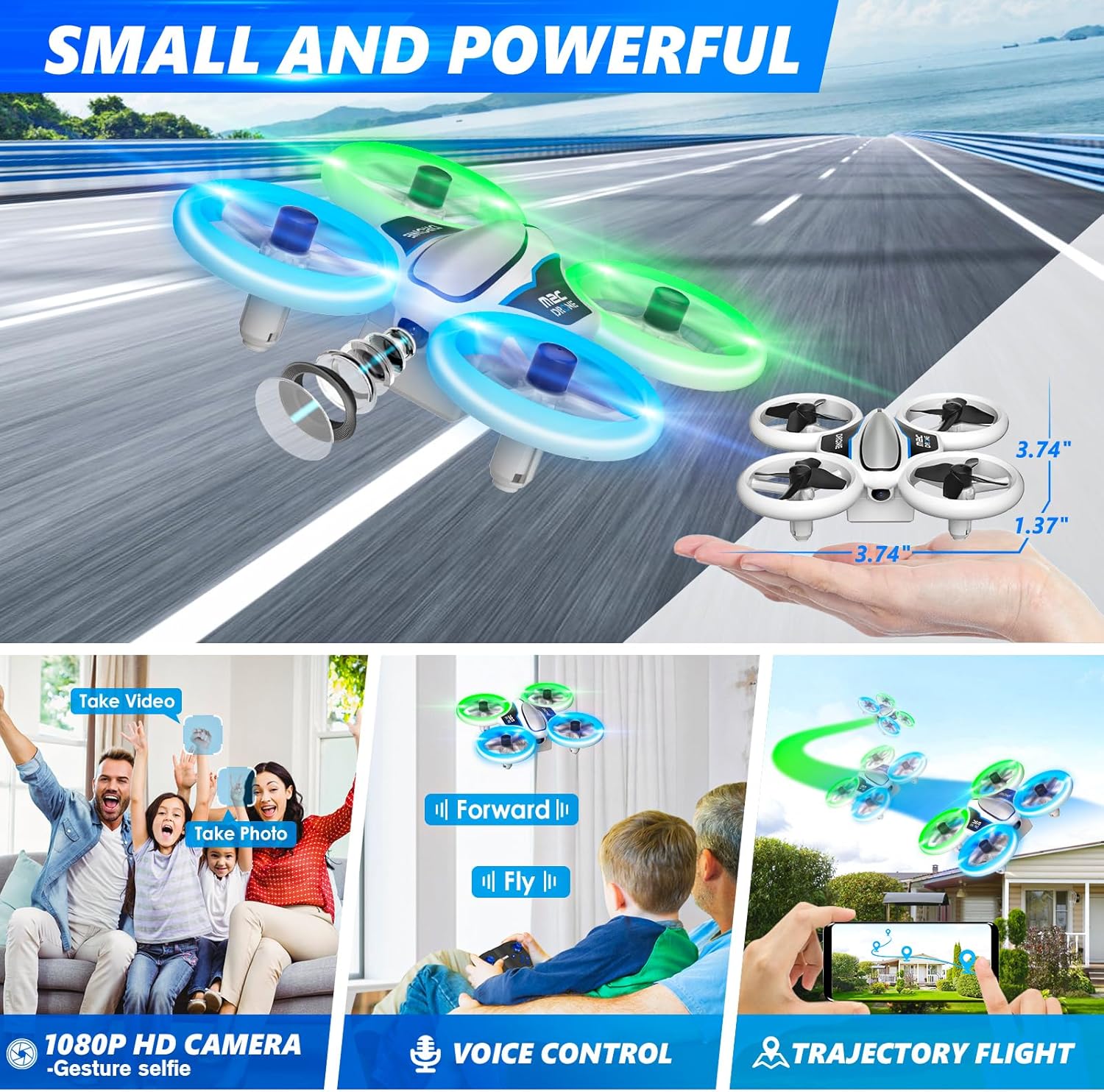
Image: The M2C Mini Drone demonstrating its compact size, 1080P HD FPV camera capabilities, voice control, and trajectory flight features.
Official Product Video
Video: An official product video demonstrating various features of the M2C Mini Drone, including its LED lighting modes, one-button controls, altitude hold, 1080P HD FPV camera with gesture controls, 3D flips, multiple speed settings, gravity control, trajectory flight, one-button circle fly, and anticollision capabilities. This video provides a visual guide to the drone's operation and advanced functions.
Maintenance
- Cleaning: Use a soft, dry cloth to clean the drone and remote controller. Avoid using harsh chemicals or solvents.
- Propeller Inspection: Regularly check propellers for damage (bends, cracks). Replace any damaged propellers immediately using the provided spare parts and tool.
- Battery Care: Store batteries in a cool, dry place. Do not overcharge or over-discharge batteries. If storing for extended periods, charge them to about 50% capacity.
- Storage: When not in use, store the drone and its accessories in a safe place, away from direct sunlight and extreme temperatures.
Troubleshooting
| Problem | Possible Cause | Solution |
|---|---|---|
| Drone does not respond to remote. | Low battery on drone or remote; Not paired correctly. | Charge drone batteries, replace remote batteries; Re-pair drone and remote (refer to quick start guide for pairing steps). |
| Drone drifts during flight. | Needs calibration; Uneven propeller wear. | Perform gyroscope calibration (refer to quick start guide); Check and replace worn propellers. |
| FPV camera feed is unstable or disconnected. | Weak Wi-Fi signal; App issue. | Ensure drone and phone are close; Restart app and drone; Reconnect Wi-Fi. |
| Drone crashes easily. | Beginner pilot; High speed mode. | Practice in open areas; Use low speed mode; Utilize altitude hold and headless mode. |
Specifications
- Brand: AVIALOGIC
- Model Name: M2C
- Special Feature: Lightweight, Integrated Camera
- Age Range (Description): Kid
- Color: Blue
- Video Capture Resolution: 1080p
- Connectivity Technology: USB, Wi-Fi (for FPV)
- Included Components: Propeller, Camera
- Skill Level: Beginner
- Item Weight: 50 Grams (1.76 ounces)
- Video Capture Format: MP4
- Remote Control Technology: Bluetooth
- Control Type: Remote control, Voice control
- Material: Plastic
- Battery Cell Composition: Lithium Ion
- Batteries: 3 Lithium Ion batteries required (included)
- Supported Image Format: JPEG
- Video Output Resolution: 1920x1080 Pixels
- Product Dimensions: 3.9"L x 5.9"W x 3.9"H
- First Available Date: May 2, 2023
Warranty and Support
For warranty information, technical support, or customer service inquiries, please refer to the contact details provided on the product packaging or the official AVIALOGIC website. Keep your purchase receipt as proof of purchase for any warranty claims.
Related documentsM2C

Ask a question about this manual
Ask about setup, troubleshooting, compatibility, parts, safety, or missing instructions. Manuals+ will review the question and use this page’s manual context to help answer it.