
Womb Music Bluetooth Belly Speaker User Manual
Model: Womb Music Bluetooth Belly Speaker
Brand: Wusic
Introduction
The Womb Music Bluetooth Belly Speaker is designed to facilitate prenatal bonding by allowing you to play music, voices, and soothing sounds directly to your baby during pregnancy. This wireless and FCC-certified device offers adjustable volume control and internal memory storage for a safe and convenient experience.
This manual provides detailed instructions on how to set up, operate, and maintain your Womb Music Bluetooth Belly Speaker, ensuring a positive bonding experience for you and your baby.
What's Included
Your Womb Music Bluetooth Belly Speaker bundle includes the following components:
- 1x Womb Music Bluetooth Belly Speaker
- 2x Reusable Silicone Gel Pads (pre-attached)
- 2x Extra Replacement Reusable Silicone Gel Pads with storage case
- 1x Premium Nylon USB Data and Charging Cable
- 1x Storage Gift Bag
- 1x User Manual (this document)
- 1x Bonus Gift Card for personalized music (value $20)


Product Overview
The Womb Music Bluetooth Belly Speaker features intuitive controls for easy operation.

Controls and Indicators:
- PWR/PLAY Button: Press and hold to power on/off. Short press to play/pause audio.
- POWER Indicator: Light indicates power status.
- CHARGING Indicator: Light indicates charging status.
- TRK +/- Buttons: Use to skip to the next or previous track when playing from internal memory or Bluetooth.
- VOL +/- Buttons: Adjust the volume level.
- MEMORY Indicator: Light indicates internal memory mode.
- Bluetooth Indicator: Light indicates Bluetooth connection status.
- MODE Button: Switch between Bluetooth and internal memory playback modes.
- SLEEP Buttons: Activate sleep timer function (specific duration not detailed, refer to quick start guide for exact timing).
Setup
- Charge the Speaker: Before first use, fully charge the speaker using the provided USB cable. Connect the cable to the speaker's charging port and a USB power source (e.g., computer USB port, wall adapter). The CHARGING indicator will illuminate.
- Attach Gel Pads: The speaker comes with reusable silicone gel pads. Ensure the pads are clean and dry. Gently press the speaker onto the adhesive side of the gel pad.
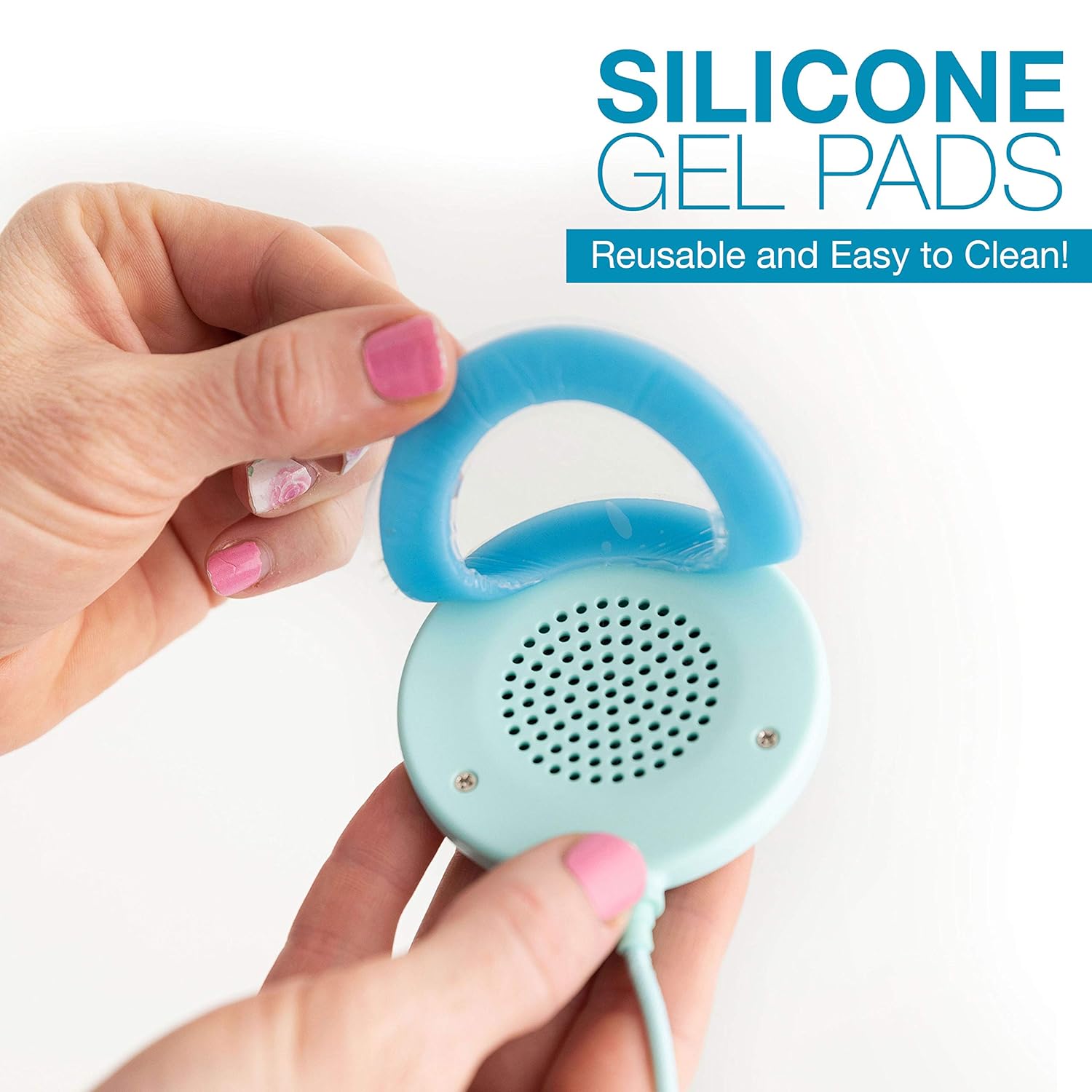
Figure 4: Attaching the reusable silicone gel pad to the speaker. The pads are designed to hold the speaker gently and securely to your belly. They are reusable and washable. Keep the cellophane covers for storage to maintain cleanliness and stickiness.
- Power On: Press and hold the PWR/PLAY button until the POWER indicator lights up.
Operating Instructions
1. Volume Control
The Womb Music Belly Speaker features complete adjustable volume control. It is crucial to adjust the volume to a safe and comfortable level for both you and your baby. Always start with the volume at zero and gradually increase it using the VOL + button until the desired level is reached. The volume can be controlled either via the speaker's built-in buttons or through your Bluetooth-connected phone.

2. Bluetooth Playback
- Ensure the speaker is powered on.
- Press the MODE button until the Bluetooth indicator light is active, indicating Bluetooth mode.
- On your smartphone, tablet, or other Bluetooth-enabled device, go to Bluetooth settings and search for "Womb Music Speaker" (or similar).
- Select the speaker to pair. Once paired, the Bluetooth indicator light will become solid.
- You can now stream audio from your device to the speaker. Use the TRK +/- buttons on the speaker or your device to control tracks.
3. Internal Memory Playback
The speaker includes 2 GB of internal memory storage, allowing you to play music files directly without a connected device.
- Uploading Music: Connect the speaker to your computer using the provided USB cable. The speaker will appear as a removable drive. Drag and drop your desired audio files (e.g., MP3s) into the speaker's storage.
- Playing Music: Disconnect the speaker from your computer. Press the MODE button until the MEMORY indicator light is active, indicating internal memory mode. The speaker will automatically begin playing the stored music.
- Use the TRK +/- buttons to navigate between tracks.
Note: When uploading music, it is recommended to upload your entire playlist at once. If you add more music later, ensure you wipe the device memory completely before re-uploading to prevent issues with file recognition or overwriting.
4. Headphone Jacks
The speaker is equipped with two headphone jacks, allowing you and a partner to listen along with your baby. Simply plug in standard 3.5mm headphones into the designated jacks.

Maintenance
Cleaning Silicone Gel Pads:
The reusable silicone gel pads are designed for repeated use. To maintain their stickiness and hygiene:
- Gently hand wash the pads with warm water.
- Allow them to air dry completely. Do not wipe with a cloth as this can leave lint.
- Once dry, the pads will regain their stickiness.
- Store the pads with their original cellophane covers when not in use to protect them from dust, hair, and fur, which can reduce stickiness.

Troubleshooting
- Speaker not powering on: Ensure the speaker is fully charged. Connect it to a power source and allow it to charge for at least 2 hours.
- No sound: Check the volume level on both the speaker and your connected device (if using Bluetooth). Ensure the speaker is in the correct mode (Bluetooth or Memory).
- Bluetooth pairing issues: Make sure the speaker is in Bluetooth pairing mode (Bluetooth indicator blinking). Turn off and on Bluetooth on your device, then try re-pairing. Ensure no other devices are currently connected to the speaker.
- Internal memory music playback issues (e.g., music not playing correctly, files missing): This can occur if music files are not uploaded correctly. Connect the speaker to your computer, delete all existing music files from the speaker's drive, and then re-upload your desired playlist all at once. Ensure files are in a compatible format (e.g., MP3).
- Volume resets after turning off: This is a characteristic of the device. Always adjust the volume to a safe and comfortable level each time you power on the speaker.
- Gel pads losing stickiness: Clean the pads as described in the Maintenance section. Ensure they are completely dry before re-applying. Store them with their cellophane covers to prevent dust and debris accumulation.
- Speaker detaching from pads: Ensure the pads are clean and dry. Apply gentle pressure when attaching the speaker to the pads. Avoid excessive movement while wearing the speaker, especially immediately after application, to allow body heat to help secure the bond.
Specifications
| Model Name | Womb Music Bluetooth Belly Speaker |
| Target Gender | Unisex |
| Connectivity Technology | Bluetooth |
| Internal Memory | 2 GB (for music files) |
| Power Source | Battery Powered |
| Headphone Jacks | 2 (3.5mm) |
| Pads Included | 2 reusable silicone gel pads + 2 extra replacement pads |
| Certifications | FCC Certified, Bluetooth Certified |
Safety Information
- Always adjust the volume to a safe and comfortable level for both you and your baby. Avoid excessively loud volumes.
- The Womb Music Belly Speaker is FCC and Bluetooth certified, ensuring it meets safety standards.
- Do not immerse the speaker in water. Clean only with a damp cloth.
- Keep the device and its components out of reach of young children to prevent choking hazards.
- If you experience any discomfort or unusual sensations while using the speaker, discontinue use immediately and consult with a healthcare professional.
Warranty and Support
For any questions, technical support, or warranty inquiries regarding your Womb Music Bluetooth Belly Speaker, please refer to the contact information provided on the product packaging or visit the official Wusic website. Keep your purchase receipt for warranty purposes.