
AMTIFO B0C3X88ZQF
AMTIFO Wireless Backup Camera System User Manual
Model: B0C3X88ZQF
1. Product Overview
The AMTIFO Wireless Backup Camera System provides a high-definition 1080P rear view solution for various vehicles including cars, trucks, and campers. It features a 5-inch split-screen touch key monitor and a waterproof license plate camera. The system utilizes digital signal transmission for stable and interference-free imaging, offering functions like adjustable guide lines and image flip options for enhanced safety and convenience. It supports adding a second camera for expanded monitoring.

Figure 1: AMTIFO Wireless Backup Camera System components, showing the 5-inch monitor and the license plate camera.
2. Package Contents
Please verify that all items are present and in good condition upon opening the package:
- 5-inch HD 1080P Wireless Monitor
- Wireless License Plate Backup Camera
- Power Cable for Monitor (Cigarette Lighter Adapter)
- Power Cable for Camera (Red/Black Wires)
- Mounting Bracket for Monitor (Dashboard/Surface Mount)
- User Manual (this document)
- Mounting Hardware (screws, adhesive pad)
3. Setup and Installation
Follow these steps for proper installation of your AMTIFO Wireless Backup Camera System.
3.1 Camera Installation
- Mount the Camera: Secure the license plate camera to your vehicle's rear, typically above the license plate using the existing license plate screws or provided mounting hardware. Ensure the camera has a clear view of the rear. The camera is designed to be hidden behind the license plate without blocking information.
- Connect Power to Camera:
- Locate your vehicle's reverse light power wire (positive, usually red) and ground wire (negative, usually black).
- Connect the camera's red power wire to the reverse light positive wire.
- Connect the camera's black ground wire to a metal chassis ground point or the reverse light negative wire.
- Note: For continuous monitoring, the camera can be connected to a constant 12V power source (e.g., tail light or fuse box).

Figure 2: Illustration of connecting the camera's power and ground wires to the vehicle's reverse light circuit for activation when reversing.

Figure 3: Overview of the simple installation process, showing the monitor plugging into a cigarette lighter and the camera connecting to the license plate area.
3.2 Monitor Installation
- Mount the Monitor: Choose a suitable location on your dashboard or windshield that does not obstruct your view. Use the provided suction cup or adhesive mount to secure the monitor.
- Connect Power to Monitor: Plug the monitor's power cable into your vehicle's 12V cigarette lighter socket.
- Pairing (if necessary): The system is typically pre-paired. If no image appears, refer to the troubleshooting section for manual pairing instructions.
4. Operating Instructions
This section details the functions and settings of your AMTIFO Wireless Backup Camera System.
4.1 Power On/Off
The monitor will automatically power on when the vehicle's ignition is turned on (if connected to an accessory power source) or when the reverse gear is engaged (if camera is wired to reverse lights). To manually power off, press and hold the power button on the monitor.
4.2 Split Screen Functionality
The 5-inch monitor supports split-screen display, allowing for simultaneous viewing from two cameras if a second camera is added to the system. Use the touch keys on the monitor to switch between single camera view and split-screen view. The system uses digital signal transmission for stable and interference-free images.
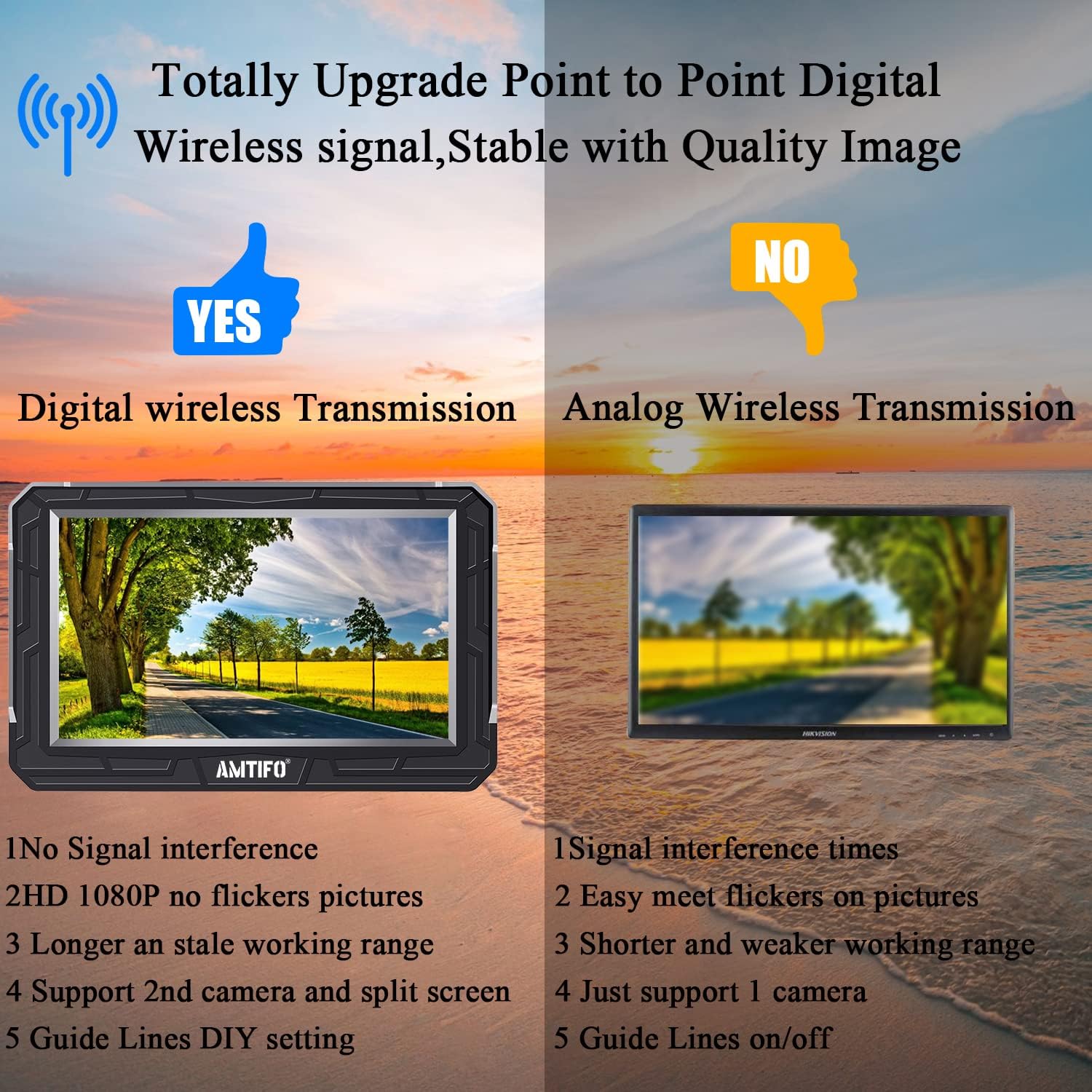
Figure 4: Illustrates the superior stability and image quality of digital wireless transmission used by this system compared to analog systems, which are prone to interference and flickers.
4.3 Guide Lines Adjustment (DIY Guide Lines)
The system allows for customization of the parking guide lines to match your vehicle and preference. Access the settings menu on the monitor to adjust:
- Enable/Disable: Turn guide lines on or off.
- Width Adjustment: Modify the horizontal width of the guide lines.
- Horizontal Position: Move the guide lines left or right.
- Vertical Position: Move the guide lines up or down.

Figure 5: Demonstrates various adjustments for the DIY guide lines, including enabling/disabling, adjusting width, and moving them horizontally or vertically.
4.4 Image Flip Function
The monitor supports multiple image flip options to ensure correct orientation regardless of camera mounting position. Navigate to the image settings to select:
- Normal: Standard view.
- Mirror: Horizontal flip (standard for rear view).
- Inverted Front Image: Vertical flip.
- Inverted Mirror Image: Both horizontal and vertical flip.

Figure 6: Shows the different image flip modes available, allowing users to correct the image orientation as needed.
4.5 Night Vision
The camera is equipped with clear night vision capabilities, providing a visible area even in low-light conditions. This enhances safety during nighttime reversing.

Figure 7: Depicts the clear night vision capability of the camera, showing a bright and detailed view of the surroundings at night.
5. Maintenance
To ensure the longevity and optimal performance of your AMTIFO Wireless Backup Camera System, follow these maintenance guidelines:
- Clean the Camera Lens: Regularly wipe the camera lens with a soft, damp cloth to remove dirt, dust, or water spots that may obstruct the view. Avoid abrasive cleaners.
- Clean the Monitor Screen: Use a microfiber cloth to gently clean the monitor screen. Do not spray cleaning solutions directly onto the screen.
- Check Connections: Periodically inspect all cable connections for looseness or corrosion. Ensure the power cables are securely plugged in.
- Protect from Extreme Temperatures: While designed for automotive use, prolonged exposure to extreme heat or cold can affect electronic components.
6. Troubleshooting
If you encounter issues with your system, please refer to the following common problems and solutions:
| Problem | Possible Cause | Solution |
|---|---|---|
| No image on monitor |
|
|
| Flickering or unstable image |
|
|
| Guide lines incorrect |
|
|
7. Product Specifications
| Feature | Specification |
|---|---|
| Brand | AMTIFO |
| Model | B0C3X88ZQF |
| Screen Size | 5 Inches |
| Video Capture Resolution | 1080p |
| Real Angle of View | 150 Degrees |
| Connectivity | Wireless Digital Signal |
| Installation Type | Dashboard Mount, Surface Mount (Monitor) |
| Product Dimensions | 8 x 8 x 5 inches |
| Item Weight | 1.26 pounds |
| Waterproof Rating | Yes (License Plate Camera) |
| Night Vision | Clear Night Image |
| Features | Split Screen, DIY Guide Lines, Image Flip (Mirrored/Facing/Horizontal/Vertical) |
8. Warranty and Support
AMTIFO stands behind its products with comprehensive customer support:
- Warranty: 2 Years Warranty
- Money-Back Guarantee: 30-Day Money-Back Guarantee
- Customer Service: 24-Hour Online Customer Service
- After-Sales Support: Lifetime After Service Support
For any questions, assistance, or warranty claims, please contact AMTIFO customer service directly. Contact information can typically be found on the product packaging or the official AMTIFO website.
Ask a question about this manual
Ask about setup, troubleshooting, compatibility, parts, safety, or missing instructions. Manuals+ will review the question and use this page’s manual context to help answer it.