Download PDFFree PDF. The Save button below keeps a bookmark and private notes in your account.
Ailltopd Portable Carpet Cleaner Machine C5 User Manual
Model: C5
1. Introduction
Thank you for choosing the Ailltopd Portable Carpet Cleaner Machine, Model C5. This manual provides essential information for the safe and efficient operation, maintenance, and troubleshooting of your new carpet cleaner. Please read these instructions thoroughly before first use and retain for future reference.
The Ailltopd C5 is designed for deep stain cleaning on various surfaces including carpets, couches, pet areas, car seats, upholstery, and furniture. It features a powerful 450W motor providing 11Kpa suction for effective stain removal and quick drying.
2. Safety Information
General Safety Precautions
Always operate the appliance on a stable, level surface.
Do not immerse the appliance in water or other liquids.
Keep hands, hair, loose clothing, and all body parts away from openings and moving parts.
Use only cleaning solutions recommended for portable carpet cleaners.
Do not use without tanks properly in place.
Do not pick up flammable or combustible materials, or anything that is burning or smoking.
Do not allow children to operate the cleaner. Supervise children and pets when the cleaner is in use.
Unplug from outlet when not in use and before cleaning or servicing.
Electrical Safety
Check that the voltage indicated on the rating label corresponds to your mains voltage.
Do not use with a damaged cord or plug. If the supply cord is damaged, it must be replaced by the manufacturer, its service agent, or similarly qualified persons to avoid a hazard.
Do not pull or carry by cord, use cord as a handle, close a door on cord, or pull cord around sharp edges or corners.
Keep the cord away from heated surfaces.
Do not unplug by pulling on the cord. To unplug, grasp the plug, not the cord.
3. Product Overview
Familiarize yourself with the components of your Ailltopd Portable Carpet Cleaner Machine C5:
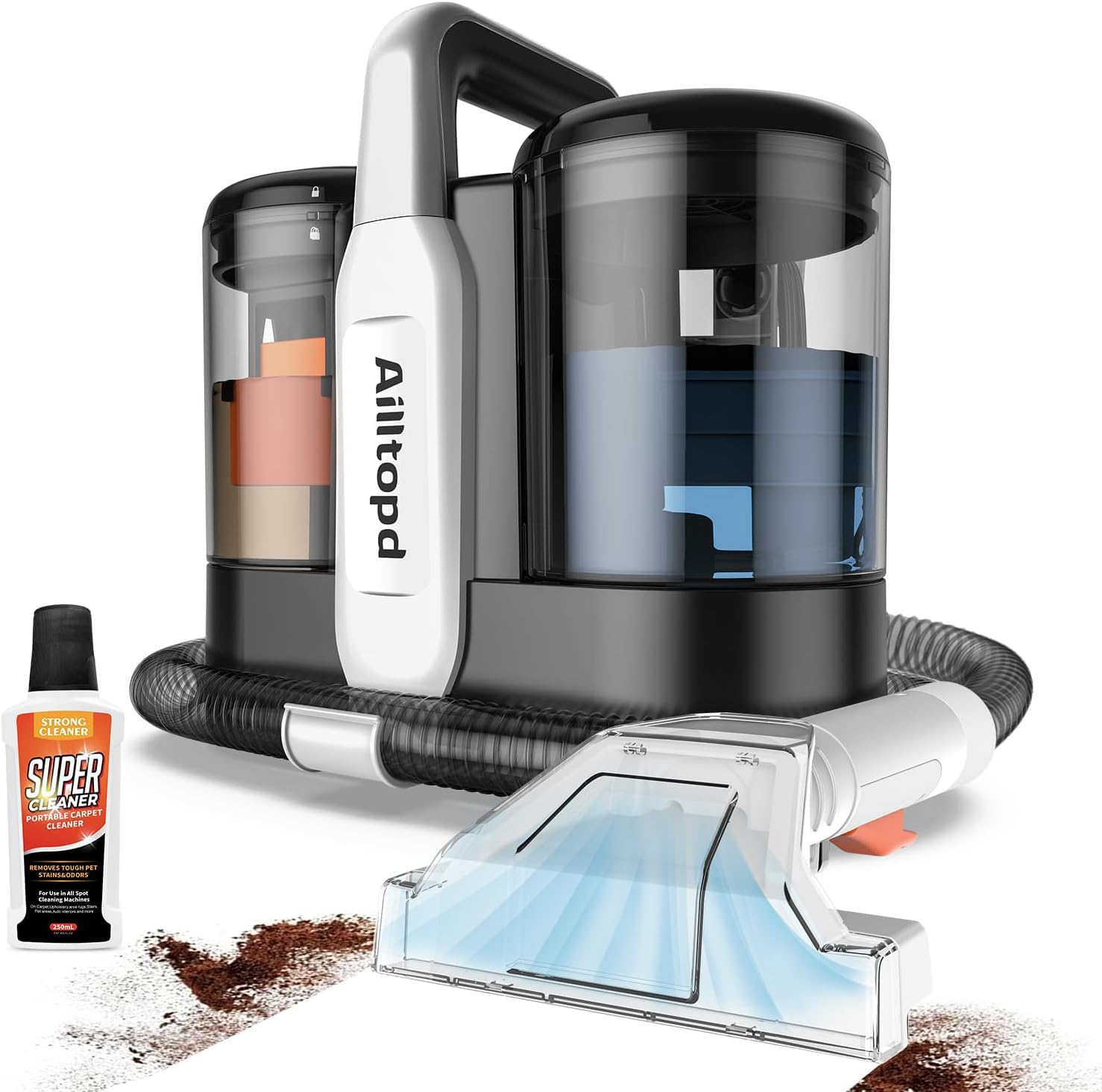
Figure 3.1: Ailltopd Portable Carpet Cleaner Machine C5. This image shows the overall design of the cleaner, including the main unit with its handle, the clean water tank, the dirty water tank, and the attached hose with a brush head.
Main Unit: Houses the motor, suction system, and power controls.
Clean Water Tank: For holding clean water and cleaning solution.
Dirty Water Tank: Collects dirty water and debris during cleaning.
Flexible Hose: Connects the main unit to the cleaning brush head.
Dual Size Brush Head: Features brushes for scrubbing and a suction nozzle for extraction.
Power Cord: For connecting to an electrical outlet.
4. Setup
Unpack the Cleaner: Carefully remove all components from the packaging. Ensure all parts listed in the product overview are present.
Fill the Clean Water Tank:
Remove the clean water tank from the main unit.
Unscrew the cap and fill the tank with warm tap water (max 60°C / 140°F).
Add the recommended amount of carpet cleaning solution according to the solution manufacturer's instructions. Do not overfill.
Securely replace the cap and reinsert the tank into the main unit until it clicks into place.
Attach the Brush Head: Connect the flexible hose to the main unit and then securely attach the desired brush head to the end of the hose. Ensure it is firmly attached to prevent leaks or loss of suction.
Connect Power: Plug the power cord into a grounded electrical outlet.
5. Operating Instructions
Pre-Treatment (Optional)
For heavily soiled areas or stubborn stains, pre-treat the area with a suitable cleaning solution. Allow it to sit for a few minutes as per the solution's instructions before proceeding with cleaning.
Cleaning Process
Power On: Press the power button on the main unit to turn on the cleaner.
Spray Solution: Hold the brush head over the area to be cleaned. Press the trigger on the brush head handle to spray cleaning solution onto the surface.
Scrub the Stain: Gently scrub the stained area with the brush head. For best results, move the brush head back and forth over the stain.
Extract Dirty Water: Release the spray trigger and slowly pull the brush head over the wet area to vacuum up the dirty water. Repeat this step until the water being extracted appears clean.
Repeat as Needed: For tough stains, you may need to repeat the spray, scrub, and extract steps.
Power Off: Once cleaning is complete, turn off the cleaner by pressing the power button.
Video 5.1: Demonstrating the Ailltopd Portable Carpet Cleaner in action. This video illustrates the process of spraying cleaning solution and extracting dirty water from a carpeted surface, showcasing the cleaner's effectiveness.
Video 5.2: A close-up view of the brush head cleaning a carpet. This video highlights the scrubbing action and the immediate suction of the dirty liquid, demonstrating the dual function of the cleaning head.
6. Maintenance and Cleaning
Regular maintenance ensures optimal performance and extends the life of your carpet cleaner.
Empty and Rinse Dirty Water Tank:
After each use, remove the dirty water tank.
Carefully pour out the dirty water into a sink or toilet.
Rinse the tank thoroughly with clean water to remove any residue.
Allow the tank to air dry before reassembling.
Clean the Brush Head:
Detach the brush head from the hose.
Rinse it under running water to remove any trapped debris or hair.
Ensure the spray nozzle is clear of blockages.
Allow to air dry.
Clean the Hose: Periodically rinse the hose by running clean water through it while the machine is on (without the brush head attached, directing the water into a sink).
Wipe Down Main Unit: Use a damp cloth to wipe the exterior of the main unit. Do not use harsh chemicals.
Storage: Store the cleaner in a dry, cool place, away from direct sunlight and extreme temperatures. Ensure both tanks are empty and dry before storage.
Video 6.1: Demonstrating the emptying of the dirty water tank. This video shows how to remove the tank and dispose of the collected dirty water, emphasizing the importance of cleaning after each use.
7. Troubleshooting
Before contacting customer support, please refer to the following common issues and solutions:
Problem
Possible Cause
Solution
No Power
Power cord not securely plugged in. No power at the outlet.
Ensure the power cord is fully inserted into a working outlet. Check the circuit breaker or try another outlet.
No Spray
Clean water tank is empty. Spray nozzle is clogged. Tank not seated correctly.
Refill the clean water tank. Clean the spray nozzle with a small pin or brush. Remove and re-seat the clean water tank firmly.
Low Suction
Dirty water tank is full. Hose or brush head is clogged. Tank not seated correctly.
Empty the dirty water tank. Check the hose and brush head for blockages and clear them. Remove and re-seat both tanks firmly.
Leaking
Tanks not properly sealed. Hose connection is loose.
Ensure both clean and dirty water tanks are securely closed and seated. Check that the hose is firmly connected to both the main unit and the brush head.
8. Specifications
Feature
Detail
Brand
Ailltopd
Model Name
C5
Motor Power
450W
Suction Force
11Kpa
Capacity (Clean Water)
2.3 Liters
Item Weight
9.3 Pounds
Color
Silver
UPC
738063984028
9. Warranty and Support
For warranty information, product support, or to purchase replacement parts, please refer to the documentation included with your product or contact Ailltopd customer service. Keep your purchase receipt as proof of purchase.
Contact information for Ailltopd customer service can typically be found on the product packaging or the official brand website.
Ask a question about this manual
Ask about setup, troubleshooting, compatibility, parts, safety, or missing instructions. Manuals+ will review the question and use this page’s manual context to help answer it.