
Introduction
The Insta360 GO3 is a compact and versatile action camera designed for capturing dynamic moments with ease. Weighing only 35g, it offers hands-free POV recording, advanced stabilization, and a multifunctional Action Pod for enhanced control and extended battery life. This manual provides essential information for setting up, operating, and maintaining your Insta360 GO3 camera.
What's in the Box
Verify that all the following items are included in your Insta360 GO3 package:
- Insta360 GO3 Camera
- Action Pod
- Magnet Pendant
- Easy Clip
- Pivot Stand
- Lens Guard
- Charging Cable (USB-C)
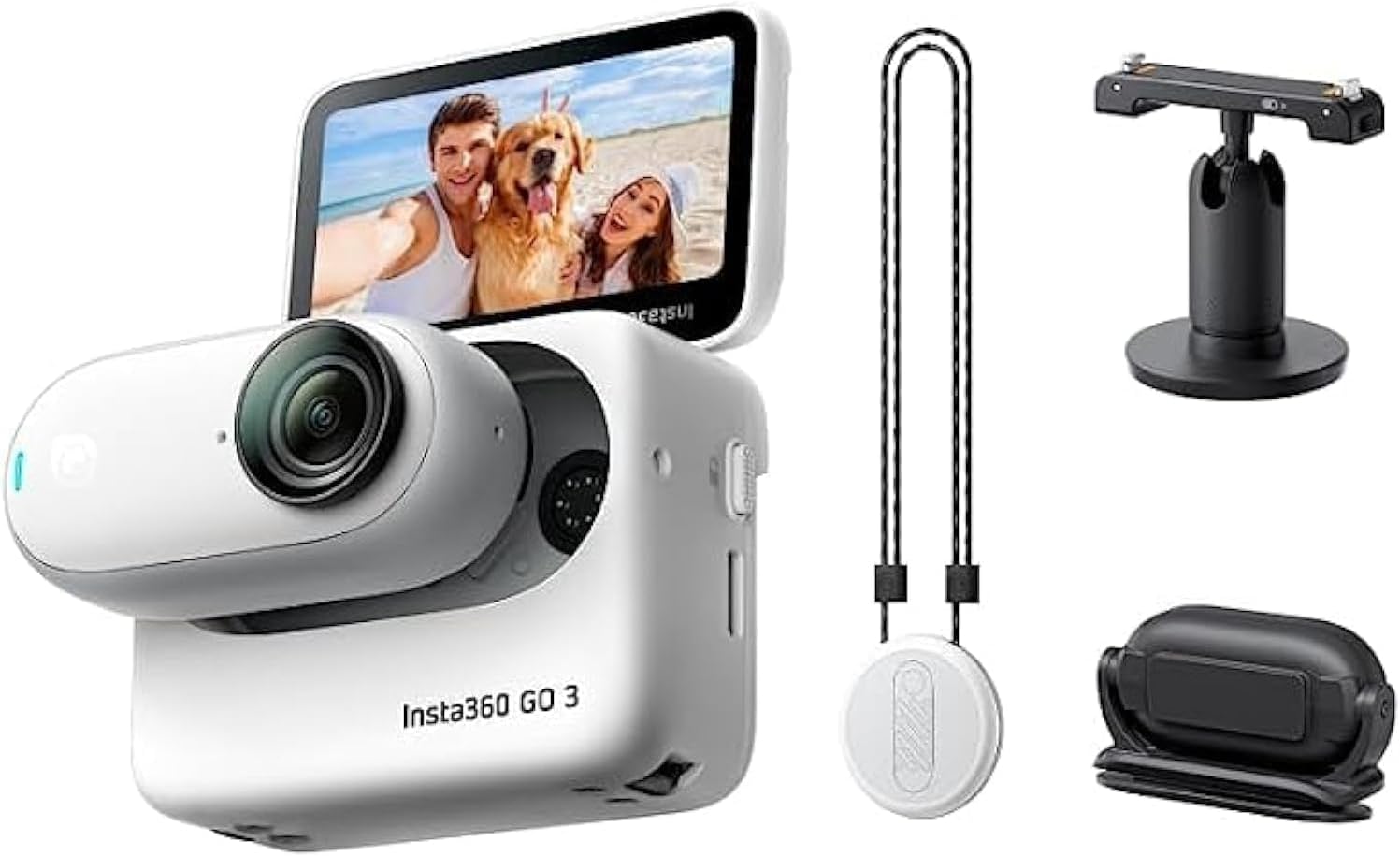
Image: The Insta360 GO3 camera, its Action Pod, and the standard accessories: Magnet Pendant, Easy Clip, and Pivot Stand.
Components Overview
Insta360 GO3 Camera

Image: Front view of the compact Insta360 GO3 camera, highlighting its lens and small form factor.
- Lens: Captures video and photos.
- Indicator Light: Shows camera status (e.g., recording, charging).
- Microphones: Two built-in microphones for audio capture.
- Magnetic Base: For secure attachment to the Action Pod and various mounts.
Action Pod

Image: The Insta360 GO3 Action Pod with the camera securely docked, showcasing its flip-out screen.
- Flip Touchscreen: For live preview, playback, and settings adjustment.
- Control Buttons: Power, Record, and Quick Menu buttons.
- USB-C Port: For charging and data transfer.
- Mounting Point: Compatible with standard action camera mounts.
- Battery: Extends camera battery life significantly.
Setup
- Initial Charge: Before first use, fully charge the Insta360 GO3 camera and Action Pod using the provided USB-C cable. The indicator light will turn off when fully charged.
- Insert Camera into Action Pod: Align the camera with the magnetic slot in the Action Pod and gently push until it clicks into place.
- Power On: Press and hold the Power button on the Action Pod or the camera (if detached) for 1-2 seconds to power on.
- Pair with App (Optional): For advanced control and editing, download the Insta360 app on your mobile device. Follow the in-app instructions to connect your GO3 via Bluetooth.
Operating Instructions
Basic Operation
- Power On/Off: Press and hold the Power button for 1-2 seconds.
- Start/Stop Recording: Press the Record button once.
- Switch Modes: Use the Mode button on the Action Pod or swipe on the touchscreen to cycle through video, photo, and other modes.
Hands-Free POV Capture
The GO3's small size and magnetic design enable unique hands-free perspectives. Attach the camera directly to the Magnet Pendant worn under your shirt for a chest-level POV, or use the Easy Clip to secure it to a hat brim or backpack strap.

Image: Examples of hands-free POV shots, including a person wearing the camera on their chest and another on a hat.
Mounting Options
Utilize the magnetic base of the camera and Action Pod with various mounts for diverse shooting scenarios:
- Magnet Pendant: Wear around your neck for first-person views.
- Easy Clip: Attach to caps or thin clothing for unique angles.
- Pivot Stand: Stick to flat, clean surfaces for stable shots.
- Action Pod: Use the built-in mounting point for standard action camera accessories.

Image: The Insta360 GO3 mounted on a cat's collar, a helmet, a skateboard, and an indoor ceiling, demonstrating its versatility.
Action Pod Functions
- Flip Touchscreen: The Action Pod features a flip-out touchscreen for easy framing of selfies, vlogging, and precise handheld shooting.
- Remote Control & Live Preview: Use the Action Pod to remotely control the camera and view a live preview of your shot, even when the camera is mounted separately.
- Extended Battery Life: The Action Pod significantly extends the GO3's battery life, allowing for up to 170 minutes of recording (camera + pod).

Image: The Insta360 GO3 camera and Action Pod, illustrating the wireless connection and the flip touchscreen functionality.
Stabilization and Horizon Lock
The GO3 features FlowState Stabilization and 360 Horizon Lock, ensuring super smooth and level footage regardless of the action. This technology corrects shakes and maintains a stable horizon, even during extreme movements.

Image: A side-by-side comparison showing video footage with stabilization off versus on, demonstrating the smoothness provided by FlowState Stabilization.
Waterproofing
- The Insta360 GO3 camera is IPX8 waterproof to 16ft (5m) when used without the Action Pod and with the included Lens Guard installed.
- The Action Pod is IPX4 splashproof, meaning it is resistant to splashes and light rain, but should not be submerged.

Image: The Insta360 GO3 camera being used underwater, demonstrating its IPX8 waterproof rating.
Audio
The GO3 is equipped with two built-in microphones, capturing crisp, clear, and immersive audio from all directions, suitable for vlogging and general recording.

Image: An illustration of the Insta360 GO3 camera with sound waves emanating, representing its upgraded audio capabilities.
Creative Modes & Features
- TimeShift: Speed up time and space for dynamic hyperlapse videos.
- PureShot HDR Photo: Utilizes AI to enhance dynamic range for stunning photos.
- Timelapse: Capture time-lapse sequences, even in low-light conditions.
- Webcam Mode: Connect the GO3 to your computer for 1080p webcam functionality with auto-tracking.
- Export in Any Ratio: Choose your desired aspect ratio (1:1, 16:9, 9:16) after recording for flexible social media sharing.
- Auto Editing: The Insta360 app's AI can automatically find highlights and edit them to music.

Image: A collage showcasing three creative modes: TimeShift (motion blur), PureShot HDR Photo (dynamic range comparison), and Timelapse (cityscape at night).
Maintenance
- Cleaning: Use a soft, lint-free cloth to clean the camera lens and body. For the Action Pod screen, use a screen-specific cleaning solution if necessary.
- Water Exposure: After underwater use, rinse the camera thoroughly with fresh water and allow it to air dry completely before placing it back in the Action Pod. Ensure the Lens Guard is always installed for underwater use.
- Storage: Store the camera and Action Pod in a cool, dry place away from direct sunlight and extreme temperatures.
- Firmware Updates: Regularly check for and install firmware updates via the Insta360 app to ensure optimal performance and access to new features.
Troubleshooting
| Issue | Possible Cause | Solution |
|---|---|---|
| Camera not powering on | Low battery; firmware issue. | Charge the camera and Action Pod fully. If issue persists, try a firmware update. |
| Poor video quality | Dirty lens; incorrect settings; low light. | Clean the lens. Adjust resolution/frame rate. Ensure adequate lighting. |
| Connection issues with app | Bluetooth interference; app not updated. | Ensure Bluetooth is enabled. Restart camera/phone. Update Insta360 app. |
| Overheating | Prolonged recording in high temperatures. | Stop recording and allow the camera to cool down. Avoid direct sunlight. |
Specifications
| Feature | Detail |
|---|---|
| Brand | Insta360 |
| Model Number | CINSABKA_GO305 |
| Item Weight | 4.6 ounces (camera and Action Pod) |
| Product Dimensions | 1.18 x 2.52 x 1.89 inches (approx. with Action Pod) |
| Waterproofing (Camera) | IPX8 to 16ft (5m) with Lens Guard |
| Water Resistance (Action Pod) | IPX4 Splashproof |
| Battery Life | Up to 170 minutes (Camera + Action Pod) |
| Video Capture Resolution | 2.7K (Hands-Free POV), 720p (Webcam) |
| Stabilization | FlowState Stabilization, 360 Horizon Lock |
| Storage | 32GB internal storage |
Optional Accessories
Enhance your Insta360 GO3 experience with these optional accessories:
- Monkey Tail Mount: A flexible, bendable mount for wrapping around objects and securing unique angles.
- Mini 2-in-1 Tripod: Functions as both a selfie stick and a compact tripod.
- Screen Protector: Provides additional protection for the Action Pod's touchscreen.
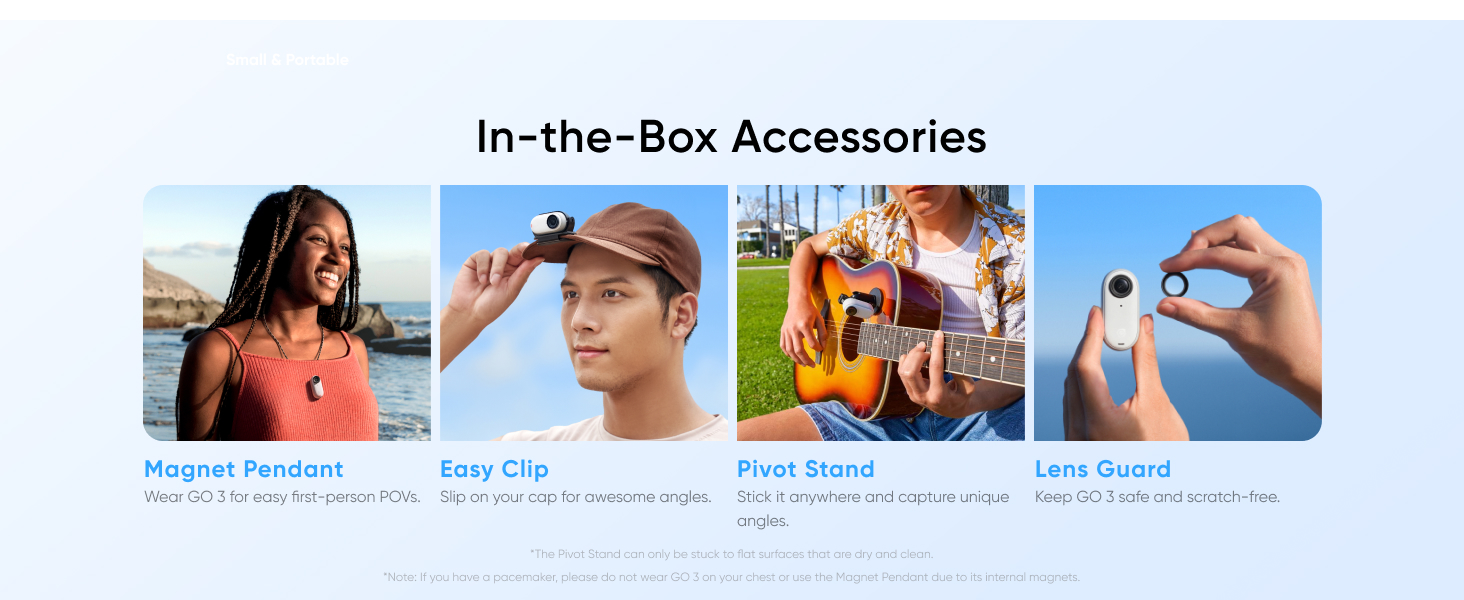
Image: A visual representation of the Monkey Tail Mount, Mini 2-in-1 Tripod, and Screen Protector for the Insta360 GO3.
Warranty and Support
For detailed warranty information and technical support, please refer to the official Insta360 website or contact their customer service. Keep your proof of purchase for warranty claims.
You can visit the Insta360 Store on Amazon for more product information and accessories.


