
Tribesigns F1595-CT
Tribesigns 6FT Conference Table User Manual
Model: F1595-CT
Brand: Tribesigns
Introduction
This user manual provides detailed instructions for the assembly, usage, and maintenance of your Tribesigns 6FT Conference Table (Model F1595-CT). Designed for versatility and durability, this table is suitable for various settings including conference rooms, offices, and even as a large computer desk. Please read this manual thoroughly before assembly and use to ensure proper setup and longevity of your product.
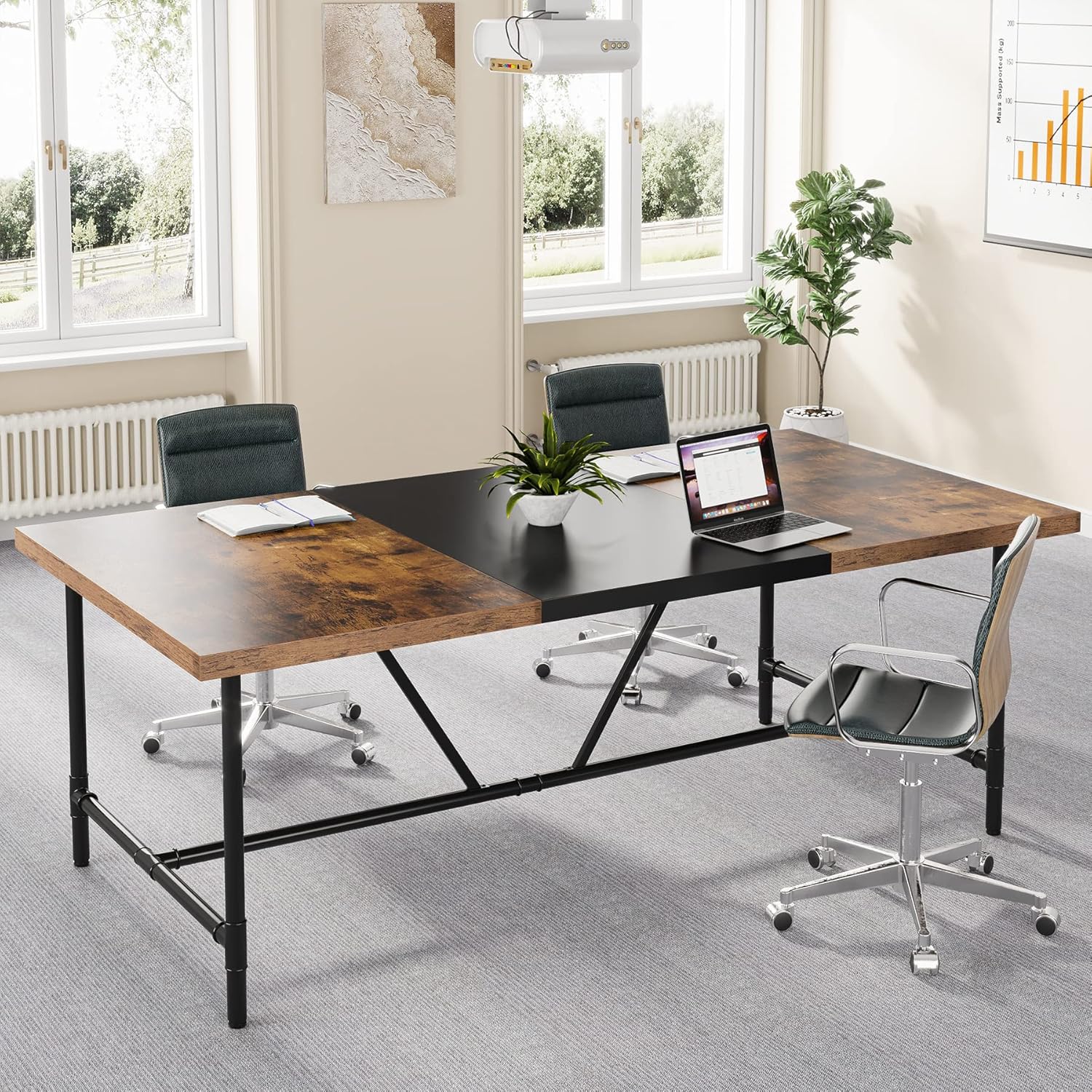
Figure 1: Tribesigns 6FT Conference Table in a modern office environment.
Safety Instructions
- Always assemble the table on a soft, clean surface to prevent scratches.
- Ensure all screws and fasteners are tightened securely before use. Periodically check and re-tighten if necessary.
- Do not exceed the maximum weight recommendation of 220 pounds (100 kg).
- Keep small parts and packaging materials away from children and pets to prevent choking hazards.
- Use caution when moving the assembled table to avoid injury or damage. It is recommended to have at least two people for moving.
Package Contents
Before beginning assembly, verify that all components listed below are present and undamaged. If any parts are missing or damaged, please contact Tribesigns customer service.
- A. Tabletop Sections (2 large wood grain, 1 central black)
- B. Metal Pipe Frame Components (various lengths and shapes for legs and crossbars)
- C. Connectors and Fasteners (screws, bolts, nuts, washers)
- D. Adjustable Feet (4 pieces)
- E. Installation Tool (Allen wrench/screwdriver)
- F. Assembly Guide (this manual)

Figure 2: Key features of the table construction, including material thickness and leg design.
Setup and Assembly
Follow these steps carefully for proper assembly. It is recommended to have two people for assembly.
- Step 1: Unpack and Identify Parts. Lay out all components on a soft, clean surface to prevent damage. Refer to the package contents list to ensure all parts are present.
- Step 2: Assemble the Metal Frame. Connect the various metal pipe frame components (B) using the provided connectors and fasteners (C). Follow the diagrams in the included assembly guide for specific connections. Ensure all connections are finger-tightened initially.
- Step 3: Attach Adjustable Feet. Screw the adjustable feet (D) into the bottom of the assembled metal frame legs. Do not tighten fully yet, as these will be adjusted later for leveling.
- Step 4: Position Tabletop Sections. Carefully place the tabletop sections (A) upside down on your soft assembly surface. Align the pre-drilled holes on the tabletop sections with the holes on the assembled metal frame.
- Step 5: Secure Tabletop to Frame. Attach the metal frame to the tabletop sections using the remaining screws and fasteners (C). Tighten all screws firmly with the installation tool (E), but do not overtighten.
- Step 6: Upright the Table and Level. With assistance, carefully flip the assembled table upright. Place it in its desired location. Adjust the adjustable feet (D) on each leg until the table is stable and level on the floor.

Figure 3: Overview of the table's metal pipe frame structure.
Operating and Usage
The Tribesigns 6FT Conference Table is designed for versatile use in various settings.
- Conference Table: Ideal for meetings, presentations, and collaborative work. It comfortably accommodates 6-8 people.
- Large Computer Desk: Provides ample space for multiple monitors, keyboards, and other office equipment.
- Executive Desk: Offers a spacious and professional workspace for individual use.
- Training/Seminar Table: Suitable for educational or training sessions.

Figure 4: The table configured as a spacious computer desk.

Figure 5: Multiple tables combined for a larger conference setup.
Maintenance
Proper care will ensure the longevity and appearance of your conference table.
- Cleaning: Wipe the table surface with a dry, soft cloth. For stubborn marks, a slightly damp cloth can be used, followed immediately by a dry cloth. Avoid harsh chemicals or abrasive cleaners.
- Spills: Clean up spills immediately to prevent staining, especially on the wood grain sections.
- Stability Check: Periodically check all screws and fasteners to ensure they remain tight. Re-tighten if any looseness is detected.
- Leveling: Re-adjust the adjustable feet as needed to maintain stability on uneven floors.
Troubleshooting
| Problem | Possible Cause | Solution |
|---|---|---|
| Table is wobbly. | Uneven floor; loose fasteners. | Adjust the leveling feet until stable. Check and tighten all assembly screws. |
| Parts are missing or damaged. | Packaging error; shipping damage. | Do not proceed with assembly. Contact Tribesigns customer service immediately for replacement parts. |
| Difficulty aligning holes during assembly. | Parts not oriented correctly. | Double-check the assembly diagrams in the included guide. Ensure parts are facing the correct direction. Loosen previously tightened screws slightly to allow for adjustment, then re-tighten. |
Specifications
| Feature | Detail |
|---|---|
| Brand | Tribesigns |
| Model Name | F1595-CT |
| Product Dimensions | 70.8"W x 35.4"D x 29.5"H (180cm W x 90cm D x 75cm H) |
| Tabletop Thickness | 1.57 inches (4 cm) |
| Maximum Weight Recommendation | 220 Pounds (100 kg) |
| Color | Brown (wood grain) and Black (central panel) |
| Frame Material | Metal (Pipe Metal Frame) |
| Top Material | Engineered Wood (MDF) |
| Seating Capacity | 6-8 people |
| Assembly Required | Yes (Assembly Guide and Installation Tool included) |

Figure 6: Detailed dimensions of the conference table.
Warranty and Support
Tribesigns provides quality assurance for its products.
- Quality Assurance: This product comes with an 18-month quality assurance period.
- Customer Service: If you have any questions, concerns, or require assistance with assembly or parts, please feel free to contact Tribesigns customer service.
- Returns: The product is eligible for 30-day easy returns.
For further assistance, please visit the official Tribesigns store or contact their customer support directly.
Related documentsF1595-CT


Ask a question about this manual
Ask about setup, troubleshooting, compatibility, parts, safety, or missing instructions. Manuals+ will review the question and use this page’s manual context to help answer it.