
Introduction
Welcome to the Puro Sound Labs BT2200 Plus Kids Bluetooth Headphones user manual. This guide provides instructions for setting up, operating, and maintaining your headphones. Please read this manual thoroughly to ensure proper use and to maximize your listening experience.
Package Contents
Please verify that all items listed below are included in your package:
- Puro Sound Labs BT2200 Plus Headphones
- Protective Carrying Case
- On-Ear Cushions (pre-installed or separate)
- Over-Ear Cushions (separate)
- 3.5mm Audio Cable
- USB-C Charging Cable
- USB-C to USB-C Daisy Chain Cable
This image displays the complete set of items you will find in your Puro Sound Labs BT2200 Plus package. It includes the headphones, a durable hard carrying case for protection and organization, two sets of interchangeable earcups (on-ear and over-ear), a 3.5mm audio cable for wired listening, a USB-C charging cable, and a USB-C to USB-C daisy chain cable for audio sharing.
Product Features
The Puro Sound Labs BT2200 Plus headphones are designed with the following key features:
- Volume-Limiting Technology: Audio is limited to 85dB to protect hearing.
- Studio-Grade Audio: Features Puro Balanced Response Curve for clear vocals and deep bass.
- Dual Connectivity: Supports both Bluetooth wireless and 3.5mm wired connections.
- Extended Battery Life: Up to 20 hours of wireless playback and 200 hours of standby time.
- Interchangeable Ear Cups: Easily switch between on-ear (compact) and over-ear (immersive) cushions for comfort and fit.
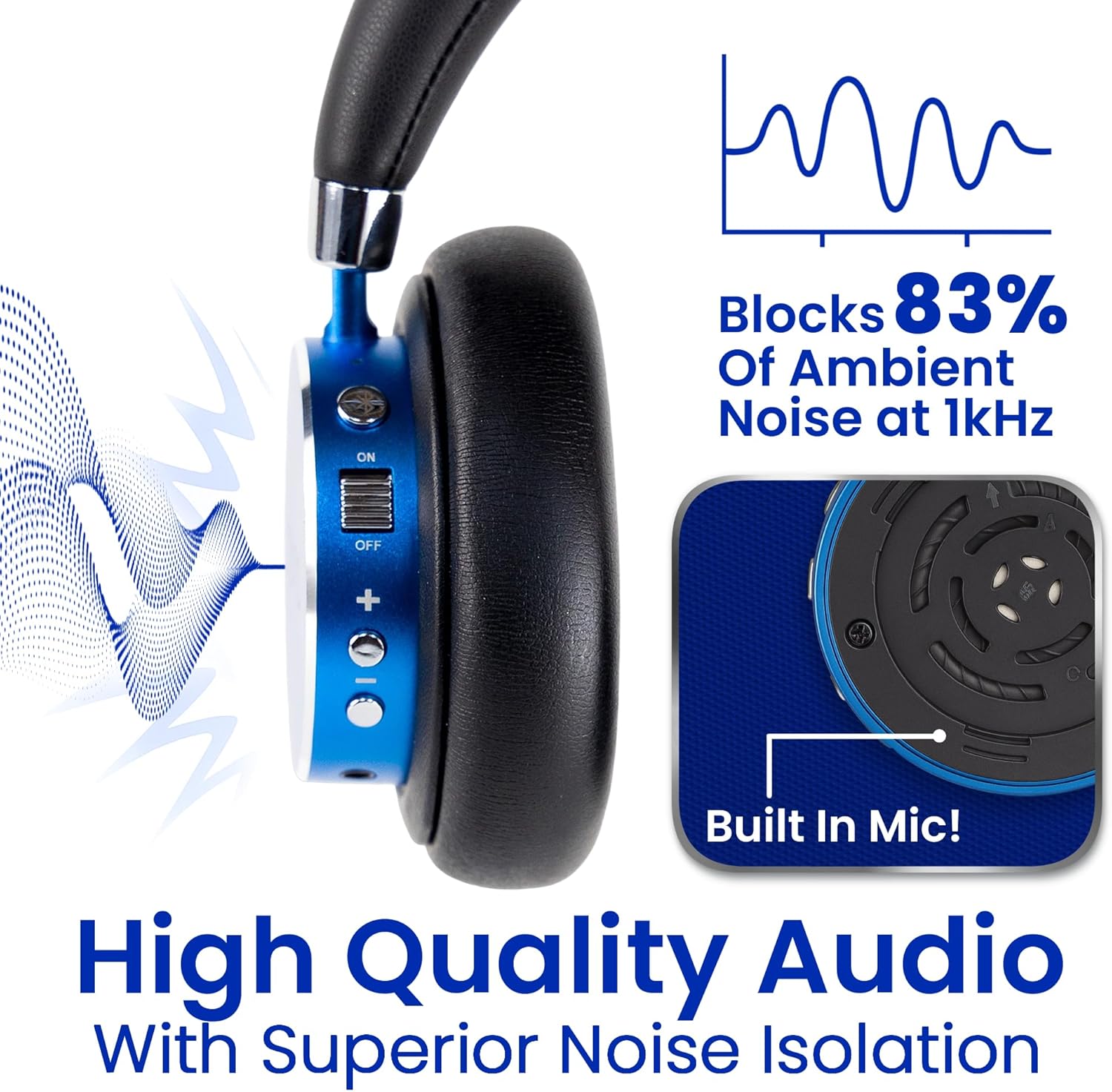
- Built-in Microphone: For hands-free calls and online communication.
- Noise Isolation: Blocks up to 83% of ambient noise at 1kHz.
- Durable Design: Constructed with vegan leather cushions and headband.
- Daisy Chain Sharing: Connect two headphones to one device using the included USB-C to USB-C cable (for audio sharing only, not charging).

This illustration demonstrates the volume-limiting feature of the headphones, which restricts audio output to a maximum of 85dB. This level is recognized as safe for extended listening, protecting young ears from potential damage. The image shows a child comfortably wearing the headphones, emphasizing the product's design for children's safety.

This image highlights the advanced audio features of the headphones, including superior noise isolation that blocks up to 83% of ambient noise at 1kHz. A built-in microphone is also visible, enabling clear communication for calls or online activities. The design focuses on delivering high-quality sound while minimizing external distractions.
Setup Instructions
1. Charging the Headphones
Before first use, fully charge your headphones. Connect the included USB-C charging cable to the headphone's charging port and the other end to a USB power source (e.g., computer USB port, wall adapter). The LED indicator will show charging status and turn off when fully charged.
- Charging Time: Approximately 2-3 hours for a full charge.
- Battery Life: Up to 20 hours of playback, 200 hours standby.
2. Bluetooth Pairing
- Ensure the headphones are turned off.
- Press and hold the Power button until the LED indicator flashes blue and red, indicating pairing mode.
- On your device (smartphone, tablet, computer), enable Bluetooth and search for available devices.
- Select "Puro BT2200 Plus" from the list of devices.
- Once connected, the LED indicator will flash blue slowly.
3. Wired Connection
For wired listening or when the battery is depleted, use the included 3.5mm audio cable.
- Plug one end of the 3.5mm audio cable into the headphone's audio jack.
- Plug the other end into the 3.5mm audio output of your device.
- The headphones will automatically switch to wired mode.

This image illustrates the dual connectivity options of the headphones. It highlights 20 hours of wireless playback via Bluetooth and unlimited listening when connected with the 3.5mm audio cable. The image also shows the 3.5mm audio jack and USB-C charging cable, emphasizing the versatility of the headphones.
4. Daisy Chain Sharing (Audio Sharing)
The included USB-C to USB-C daisy chain cable allows two Puro BT2200 Plus headphones to share audio from a single source.
- Connect one end of the USB-C to USB-C daisy chain cable to the USB-C port of the first headphone.
- Connect the other end of the daisy chain cable to the USB-C port of the second headphone.
- Ensure the first headphone is connected to your audio source (via Bluetooth or 3.5mm cable).
- Both headphones will now receive audio from the same source.
Note: This cable is for audio sharing only and does not charge the headphones.

This image demonstrates the daisy chain feature, allowing two users to share audio from a single device. Two children are shown wearing headphones connected by the USB-C to USB-C daisy chain cable, illustrating how friends or siblings can listen together. The image also displays the USB-C cables used for this connection.
Operating Instructions
1. Power On/Off
- Power On: Press and hold the Power button for approximately 3 seconds until the LED indicator lights up.
- Power Off: Press and hold the Power button for approximately 3 seconds until the LED indicator turns off.
2. Volume Control
The headphones feature integrated volume controls.
- Increase Volume: Press the '+' button.
- Decrease Volume: Press the '-' button.
Note: The volume is limited to 85dB for hearing protection.
3. Playback Control
- Play/Pause: Press the Multi-function button (usually the Power button when not in pairing mode) once.
- Next Track: Double-press the Multi-function button.
- Previous Track: Triple-press the Multi-function button.
4. Call Management
When connected via Bluetooth, you can manage phone calls:
- Answer/End Call: Press the Multi-function button once.
- Reject Call: Press and hold the Multi-function button for 2 seconds.
5. Interchangeable Ear Cups
The BT2200 Plus headphones come with both on-ear and over-ear cushions for customizable comfort and fit.
- To change ear cups, gently twist and pull the existing ear cup off the headphone.
- Align the new ear cup with the headphone and twist it into place until it is securely attached.
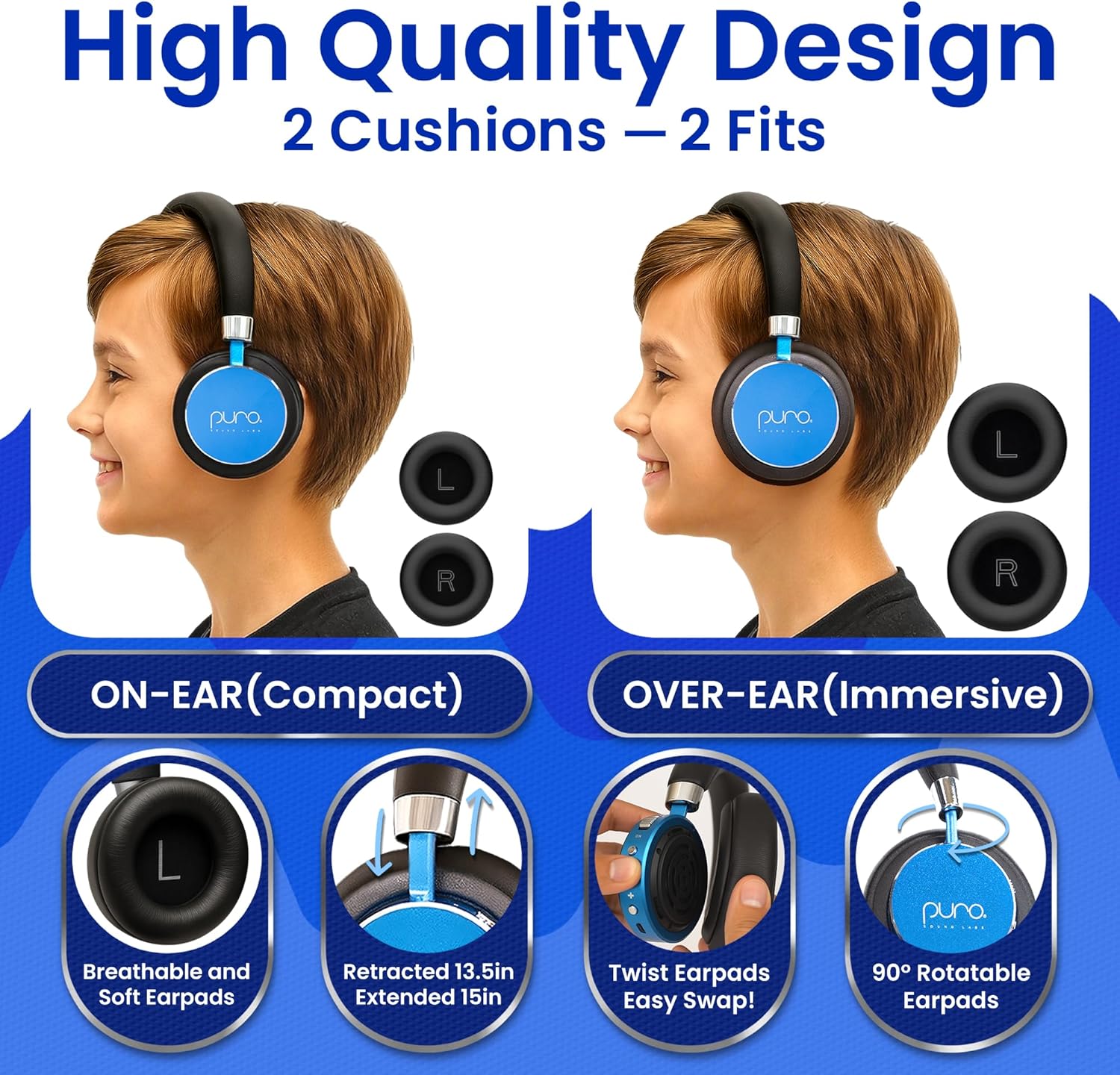
This diagram illustrates the interchangeable ear cup design, offering both on-ear and over-ear options for a personalized fit and comfort. It shows how the earcups can be easily twisted and swapped, along with details on the adjustable headband and 90-degree rotatable ear pads, enhancing the headphones' adaptability for different users.
Maintenance
1. Cleaning
- Wipe the headphones with a soft, dry cloth.
- Do not use abrasive cleaners or solvents.
- Ensure charging ports and audio jacks are free of dust and debris.
2. Storage
- When not in use, store the headphones in the provided protective carrying case to prevent damage.
- Avoid storing in extreme temperatures or high humidity.
Troubleshooting
Common Issues and Solutions:
| Problem | Possible Cause | Solution |
|---|---|---|
| Headphones do not power on. | Battery is depleted. | Charge the headphones using the USB-C charging cable. |
| Cannot pair via Bluetooth. | Headphones not in pairing mode; device Bluetooth off; too far from device. | Ensure headphones are in pairing mode (flashing blue/red). Turn on Bluetooth on your device. Move headphones closer to the device (within 30 feet). |
| No sound in wired mode. | Cable not fully inserted; incorrect audio source selected on device. | Ensure the 3.5mm audio cable is fully inserted into both the headphones and the audio source. Check device's audio output settings. |
| Audio is too quiet. | Device volume too low; headphones are volume-limited. | Increase volume on your connected device. Note that these headphones are designed with an 85dB volume limit for hearing protection. |
| Daisy chain sharing not working. | Incorrect cable used; primary headphone not connected to audio source. | Use the specific USB-C to USB-C daisy chain cable. Ensure the first headphone is properly connected to the audio source (Bluetooth or 3.5mm). |
Specifications
| Feature | Detail |
|---|---|
| Model Name | BT2200 Plus |
| Brand | Puro Sound Labs |
| Connectivity Technology | Wireless (Bluetooth), Wired (3.5mm) |
| Bluetooth Version | 5.1 |
| Bluetooth Range | Up to 30 feet (10 meters) |
| Battery Life (Playback) | Up to 20 hours |
| Battery Life (Standby) | Up to 200 hours |
| Volume Limit | 85dB |
| Frequency Range | 20 Hz - 20,000 Hz |
| Noise Isolation | Blocks 83% of ambient noise at 1kHz |
| Microphone | Built-in |
| Ear Placement | Over Ear (Interchangeable with On-Ear) |
| Material | Faux Leather (Vegan Protein Leather for case) |
| Item Weight | 1.19 pounds |
| Package Dimensions | 8.39 x 8.03 x 2.56 inches |
| UPC | 854381006898 |
Warranty and Support
Puro Sound Labs BT2200 Plus Kids Bluetooth Headphones come with a 1-year limited warranty from the date of purchase. Additionally, a 30-day money-back guarantee is offered.
For technical support, warranty claims, or any questions regarding your product, please visit the official Puro Sound Labs website or contact their customer service department.
Online Support: www.purosoundlabs.com/support
Manufacturer: Puro Sound Labs