
Behringer PP1
Behringer PERFECT PITCH PP1 Guitar and Audio to MIDI, USB and CV Converter Module User Manual
Model: PP1
1. Introduction
The Behringer PERFECT PITCH PP1 is a Eurorack module designed to convert guitar, microphone, or line-level audio signals into MIDI, USB, and Control Voltage (CV) data. This module allows musicians to integrate traditional instruments with digital audio workstations (DAWs) and modular synthesizer systems, expanding creative possibilities for sound design and performance.
2. Safety Instructions
- Power Supply: Ensure the module is connected to a compatible Eurorack power supply providing +12V, -12V, and +5V (if applicable) as specified in the technical data. Incorrect power can damage the unit.
- Environment: Operate the module in a dry environment. Avoid exposure to moisture, rain, or extreme temperatures.
- Ventilation: Ensure proper ventilation around the module when installed in a Eurorack case to prevent overheating.
- Cleaning: Clean the module only with a dry, soft cloth. Do not use liquid cleaners or solvents.
- Servicing: Refer all servicing to qualified service personnel. Do not attempt to repair the unit yourself.
3. Key Features
- Converts guitar, microphone, and line-level signals to MIDI, USB, and CV.
- Extremely fast and accurate pitch tracking for monophonic sources.
- Extracts pitch, gate, and trigger CV from audio signals.
- Features Hi-Z input for direct guitar connection.
- Low Cut function to filter out unwanted low-frequency noise.
- Adjustable bend range for expressive control.
- USB connectivity for direct integration with DAWs.
- Standard MIDI OUT port for hardware synthesizers.
- Dry Thru output for routing the original audio signal.
4. Controls and Connections

Figure 4.1: Front panel overview of the Behringer PERFECT PITCH PP1 module.
This image displays the full front panel of the Behringer PERFECT PITCH PP1 Eurorack module. Key features visible include the USB port, MIDI OUT port, Hi-Z switch, Low Cut switch, Bend knob, Gain knob, Level LEDs, Gate knob, Line Out jack, CV Out jack, Gate Out jack, Input jack (combo XLR/TRS), and Dry Thru jack. The module is colored red with white text labels.
4.1. Input Section
- INPUT (Combo XLR/TRS Jack): This is the primary audio input for connecting your guitar, microphone, or line-level source. It accepts both XLR and 1/4" TRS/TS connectors.
- Hi-Z (Switch): Engages a high-impedance input for direct connection of passive guitar pickups, ensuring optimal signal integrity. Set to ON for guitars, OFF for line-level or microphone inputs.
- Low Cut (Switch): Activates a low-frequency filter to remove unwanted bass rumble or noise from the input signal, improving pitch tracking accuracy.
- GAIN (Knob): Adjusts the input sensitivity to match the level of your connected instrument or audio source. Turn clockwise to increase gain.
- LEVEL (LEDs): Provides visual feedback on the input signal level. Aim for the green LEDs to light consistently, with occasional yellow flashes, to avoid clipping (red).

Figure 4.2: Detailed view of the Input, Hi-Z, Low Cut, Gain, and Level controls.
This close-up image highlights the input section of the PP1 module. It clearly shows the combo XLR/TRS input jack, the Hi-Z toggle switch, the Low Cut toggle switch, the Gain rotary knob, and the vertical row of Level indicator LEDs (green, yellow, red). This section is crucial for proper signal conditioning before conversion.
4.2. Output Section
- MIDI OUT (5-pin DIN): Transmits MIDI pitch and gate data to external MIDI-compatible devices such as hardware synthesizers or drum machines.
- USB (Type B Port): Connects the module to a computer for USB MIDI data transmission to DAWs and software instruments. Also provides power to the module when connected to a USB host.
- CV OUT (1/8" TS Jack): Outputs Control Voltage representing the detected pitch of the input signal, typically 1V/octave, for controlling Eurorack oscillators or other CV-compatible modules.
- GATE OUT (1/8" TS Jack): Outputs a gate signal (on/off voltage) corresponding to the presence of a note, used to trigger envelopes or other gate-sensitive Eurorack modules.
- LINE OUT (1/8" TS Jack): Provides a processed audio output of the input signal, useful for monitoring or further processing within your Eurorack system.
- DRY THRU (1/4" TS Jack): Passes the original, unprocessed input audio signal directly through, allowing you to route your instrument's dry signal to an amplifier or other effects chain simultaneously.

Figure 4.3: Detailed view of the Line Out, CV Out, Gate Out, and Dry Thru jacks.
This image provides a close-up of the various output jacks on the Behringer PP1 module. From left to right, the 1/8" jacks are labeled LINE OUT, CV OUT, and GATE OUT. To the right, a 1/4" jack is labeled DRY THRU. These outputs facilitate integration with modular synthesizers, external effects, and traditional audio setups.
4.3. Control Parameters
- BEND (Knob): Adjusts the pitch bend range for MIDI and CV outputs. This allows for expressive control over pitch modulation in your synthesizers.
- GATE (Knob): Controls the threshold for the gate output. Adjust this to fine-tune when a note is considered "on" or "off" for triggering purposes.
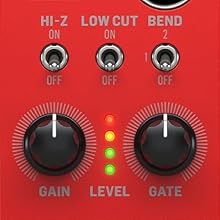
Figure 4.4: Detailed view of the Bend and Gate knobs.
This image focuses on the Bend and Gate control knobs, along with their associated switches. The Bend knob adjusts the pitch bend range, while the Gate knob controls the gate threshold. These controls are essential for customizing the module's response to your playing dynamics and desired synthesizer behavior.
5. Setup
5.1. Eurorack Installation
- Power Off: Before installing, ensure your Eurorack case is powered off and disconnected from the mains.
- Mounting: Align the PP1 module with an available 10HP space in your Eurorack case. Secure it using the provided screws.
- Power Connection: Connect the ribbon cable from your Eurorack power supply to the 16-pin header on the back of the PP1 module. Ensure the red stripe on the ribbon cable aligns with the -12V pin on both the power supply and the module.
- Power On: Once securely mounted and powered, you can power on your Eurorack case.

Figure 5.1: The PP1 module integrated into a Eurorack system.
This image shows the Behringer PERFECT PITCH PP1 module installed within a larger Eurorack modular synthesizer system. The module is positioned alongside other modules, demonstrating its physical integration into a typical Eurorack setup. This visual aids in understanding the module's form factor and how it fits into a modular environment.
5.2. Connecting Your Instrument
- Guitar: Connect your guitar to the INPUT jack using a 1/4" TS cable. Set the Hi-Z switch to ON.
- Microphone: Connect your microphone to the INPUT jack using an XLR cable. Set the Hi-Z switch to OFF.
- Line-Level Audio: Connect your audio source (e.g., synthesizer, audio interface output) to the INPUT jack using a 1/4" TRS/TS cable. Set the Hi-Z switch to OFF.
6. Operating Instructions
6.1. Basic Audio to MIDI/CV Conversion
- Connect your instrument to the INPUT jack and adjust the GAIN until the LEVEL LEDs show a healthy signal (green/yellow).
- Connect the MIDI OUT to your MIDI-compatible device or the USB port to your computer. For modular synthesis, connect CV OUT and GATE OUT to your Eurorack modules.
- Adjust the BEND knob to set the desired pitch bend range for your MIDI/CV output.
- Adjust the GATE knob to fine-tune the gate trigger sensitivity.
- Experiment with the Low Cut switch to clean up the input signal, especially for instruments with significant low-frequency content.
6.2. Using with a DAW (Digital Audio Workstation)
When connected via USB, the PP1 will appear as a standard MIDI input device in your DAW. You can then route its MIDI output to virtual instruments or software synthesizers. Ensure your DAW's MIDI settings are configured to receive input from the PP1.
6.3. Integrating with Eurorack
The CV OUT and GATE OUT jacks provide standard Eurorack-compatible signals. Use the CV OUT to control the pitch of an oscillator and the GATE OUT to trigger an envelope generator or other gate-controlled modules. The LINE OUT can be used to send the processed audio signal to other Eurorack effects or mixers.
7. Maintenance
- Cleaning: Use a soft, dry cloth to wipe the module's surface. Avoid abrasive materials or chemical cleaners.
- Connections: Periodically check all cable connections for secure fit and signs of wear.
- Firmware Updates: Check the Behringer website for any available firmware updates for the PP1 module to ensure optimal performance and access to new features.
8. Troubleshooting
- No MIDI/CV Output:
- Check input signal level (LEVEL LEDs). Adjust GAIN if too low or clipping.
- Ensure the instrument is properly connected to the INPUT.
- Verify MIDI/USB/CV cables are securely connected to the correct outputs and receiving devices.
- Confirm your receiving device (DAW, synth) is configured to accept input from the PP1.
- Inaccurate Pitch Tracking:
- Ensure the input signal is monophonic (single notes). The PP1 is optimized for monophonic tracking.
- Adjust GAIN to an optimal level, avoiding clipping or overly low signals.
- Engage the Low Cut switch if there's excessive low-frequency content or noise.
- For guitars, ensure the Hi-Z switch is ON.
- Noisy Signal:
- Check all cables for damage or poor connections.
- Ensure proper grounding in your Eurorack system and audio setup.
- Try engaging the Low Cut switch.
9. Specifications
| Parameter | Value |
|---|---|
| Model Name | Perfect Pitch PP1 |
| Size | 10HP |
| Item Weight | 240 Grams (8.5 ounces) |
| Product Dimensions | 2.2 x 2.01 x 2.2 inches |
| Connector Type | USB Type B, 5-pin DIN MIDI, 1/4" TS, 1/8" TS, XLR |
| Connectivity Technology | USB |
| Power Source | Eurorack power supply |
| Supported Software | DAWs with USB MIDI support |
| Special Feature | Converts guitar, line level audio, and microphone signals to MIDI, CV, USB |
| UPC | 787790557555 |
10. Warranty and Support
For detailed warranty information and technical support, please visit the official Behringer website or contact your local distributor. Keep your proof of purchase for any warranty claims.
Online Resources:
Related documentsPP1


Ask a question about this manual
Ask about setup, troubleshooting, compatibility, parts, safety, or missing instructions. Manuals+ will review the question and use this page’s manual context to help answer it.