
1. Introduction
The REUMAR AH-WiFi HaLow Extender is designed to expand the range of your existing wireless network. This device acts as a relay, boosting the Wi-Fi signal to areas with weak or no coverage. It is particularly useful for extending network access for devices such as IP cameras and other IoT devices over long distances and through obstacles.
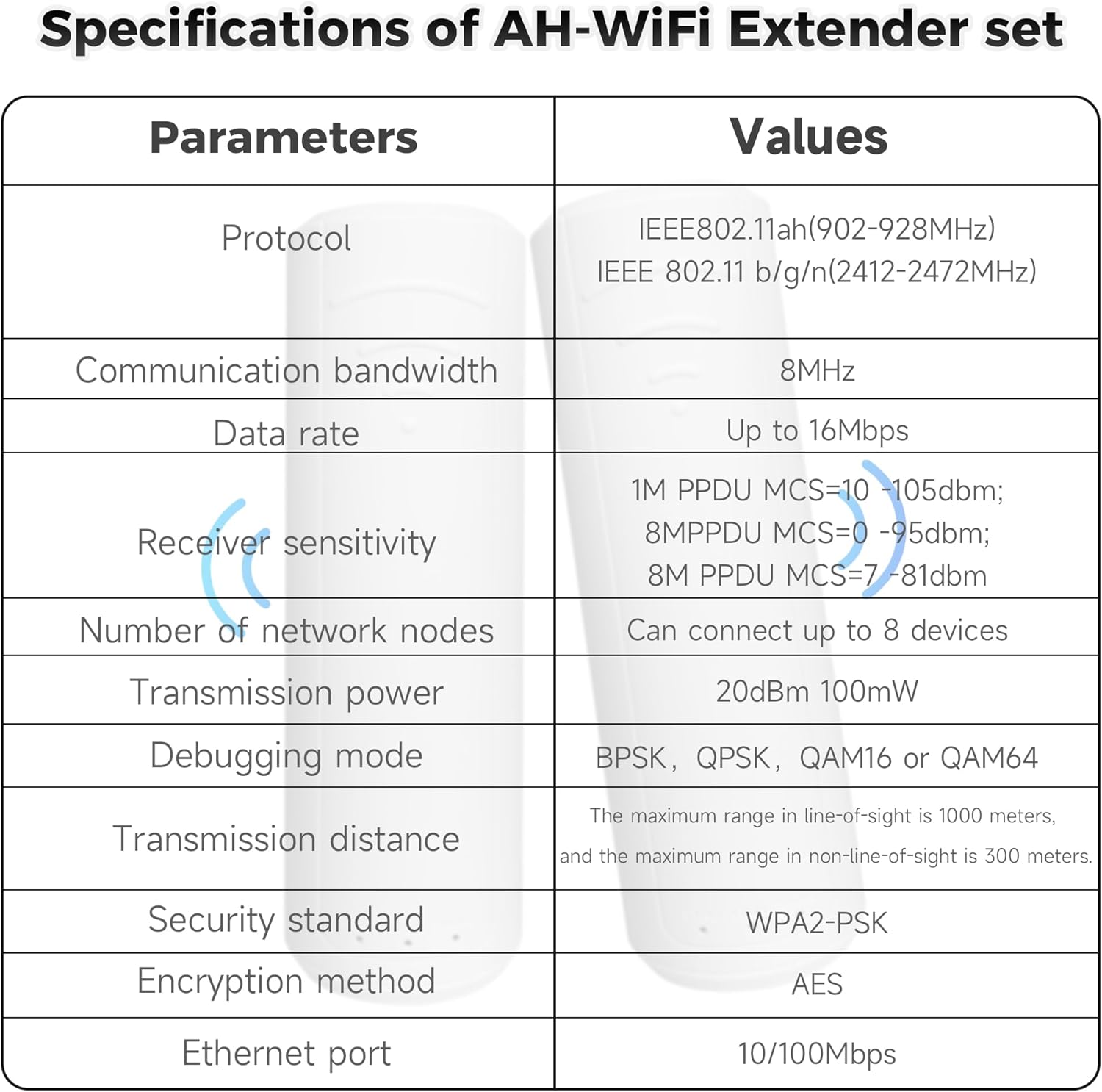
Operating on the 902-928MHz frequency band, the AH-WiFi HaLow Extender offers enhanced wall penetration capabilities and a significant transmission range, surpassing the capabilities of standard Wi-Fi extenders. It supports a maximum of 8 connected devices with a data rate of up to 16Mbps.
2. Package Contents
Please verify that all items are present in your package:
- 1 x AH-WiFi HaLow Transmitter Unit
- 1 x AH-WiFi HaLow Extender Unit
- 2 x AC Adapters
- 1 x Network Cable (Ethernet)
- 2 x USB Type-C Connection Cables

3. Setup Instructions
Follow these steps to set up your REUMAR AH-WiFi HaLow Extender:
- Connect the Transmitter: Plug one USB Type-C cable into the Transmitter unit and connect the other end to an AC adapter. Plug the AC adapter into a power outlet. Connect one end of the network cable to the LAN port of the Transmitter unit and the other end to an available LAN port on your existing wireless router.
- Connect the Extender: Plug the second USB Type-C cable into the Extender unit and connect the other end to its AC adapter. Plug the AC adapter into a power outlet in the area where you need extended Wi-Fi coverage.
- Power On: Ensure both the Transmitter and Extender units are powered on. The indicator lights on both units should illuminate, indicating they are receiving power and attempting to establish a connection.
- Automatic Connection: The Transmitter and Extender units are designed to automatically connect to each other. Once connected, the Extender unit will broadcast a new Wi-Fi network (or extend your existing one, depending on configuration).
- Connect Devices: On your wireless devices (e.g., smartphone, laptop, IP camera), search for available Wi-Fi networks. Connect to the network broadcasted by the REUMAR AH-WiFi HaLow Extender. The network name (SSID) and password will typically be the same as your main router's Wi-Fi network, or a new one if configured.

4. Operating Instructions
Once set up, the REUMAR AH-WiFi HaLow Extender operates automatically to provide extended wireless coverage. Here are some key operational aspects:
- Signal Extension: The extender creates a new Wi-Fi access point, allowing devices to connect to it for improved signal strength and range.
- Optimal Placement: For best performance, place the Extender unit in a location that receives a good signal from the Transmitter unit, but is also closer to the areas where you need improved Wi-Fi. Avoid placing it near large metal objects or other sources of interference.
- Wall Penetration: The HaLow technology is designed for superior wall penetration. This allows the extender to provide reliable connectivity even through multiple walls or floors.
- Device Capacity: The extender can support a maximum of 8 connected devices simultaneously.
- Data Rate: The maximum transmission rate is 16Mbps. Actual speeds may vary based on environmental factors, interference, and distance.


5. Maintenance
To ensure the longevity and optimal performance of your REUMAR AH-WiFi HaLow Extender, consider the following maintenance tips:
- Keep Clean: Regularly wipe the units with a soft, dry cloth to remove dust. Do not use liquid cleaners or aerosols.
- Ventilation: Ensure the units are placed in well-ventilated areas to prevent overheating. Do not block any ventilation openings.
- Firmware Updates: Check the manufacturer's website periodically for any available firmware updates. Keeping the firmware updated can improve performance, security, and stability.
- Power Cycle: If you experience connectivity issues, try power cycling both the Transmitter and Extender units (unplug from power, wait 10 seconds, then plug back in).
6. Troubleshooting
If you encounter issues with your REUMAR AH-WiFi HaLow Extender, refer to the following common problems and solutions:
- No Power/Indicator Lights Off:
- Ensure the AC adapters are securely plugged into both the units and a working power outlet.
- Check if the power outlet is functional by plugging in another device.
- No Internet Connection via Extender:
- Verify that your main router has an active internet connection.
- Ensure the network cable is securely connected between the Transmitter unit and your router.
- Confirm that the Transmitter and Extender units are successfully linked (check indicator lights).
- Try repositioning the Extender unit closer to the Transmitter unit to improve signal strength between them.
- Slow Speed or Frequent Disconnections:
- Interference from other wireless devices (e.g., cordless phones, microwaves) can affect performance. Try moving the units away from such devices.
- Physical obstructions like thick walls or metal objects can degrade signal quality. Adjust the placement of the Extender unit.
- Ensure the Extender unit is within the optimal range of the Transmitter unit. While HaLow offers long range, extreme distances or numerous obstacles can still impact performance.
- Reduce the number of connected devices if you are experiencing slowdowns, as the extender supports a maximum of 8 devices.
- Difficulty Connecting Devices to Extender's Wi-Fi:
- Double-check the Wi-Fi network name (SSID) and password.
- Restart your device and try connecting again.
7. Specifications
| Parameter | Value |
|---|---|
| Brand | REUMAR |
| Wireless Communication Standard | 802.11ah (902-928MHz), 802.11bgn (2412-2472MHz) |
| Data Transfer Rate | Up to 16 Megabits Per Second |
| Special Features | Long transmission distance, wall penetration capability, support for 8 connected devices |
| Color | White |
| Connector Type | RJ45 |
| Compatible Devices | Router |
| Frequency Bands Supported | 902-928 MHz |
| Range | 1000 meters (visual range) |
| Security Standard | WPA2-PSK |
| Encryption Method | AES |
| Ethernet Port | 10/100Mbps |
8. Warranty and Support
REUMAR products are designed for reliability and performance. For warranty information and technical support, please refer to the following:
- Warranty: This product comes with a 1-year limited warranty from the date of purchase. Please retain your proof of purchase for warranty claims. The warranty covers manufacturing defects but does not cover damage caused by misuse, accidents, unauthorized modifications, or natural disasters.
- Technical Support: For technical assistance, troubleshooting, or inquiries about your product, please visit the official REUMAR website or contact their customer support team. Contact details can typically be found on the product packaging or the official website.