
Introduction
The Phinistec S7 HiFi MP3 Player is a portable digital audio player designed for high-resolution audio playback. Featuring a dual DAC ESS9018 chip and Qualcomm CSR Bluetooth, it delivers lossless sound quality and versatile connectivity options. Its elegant design includes a full touchscreen and a durable metal body with a glass back. This manual provides comprehensive instructions for setting up, operating, and maintaining your S7 player.
What's in the Box
- 1 x Phinistec S7 HiFi Music Player
- 1 x User Manual
- 1 x 64GB Micro SD Card
- 1 x Extra Protective Film
- 1 x Type C Data Cable
Product Overview
Familiarize yourself with the physical components and interfaces of your Phinistec S7 player.

Figure 1: Front and back view of the Phinistec S7 HiFi MP3 Player, showcasing its sleek design and golden volume wheel.
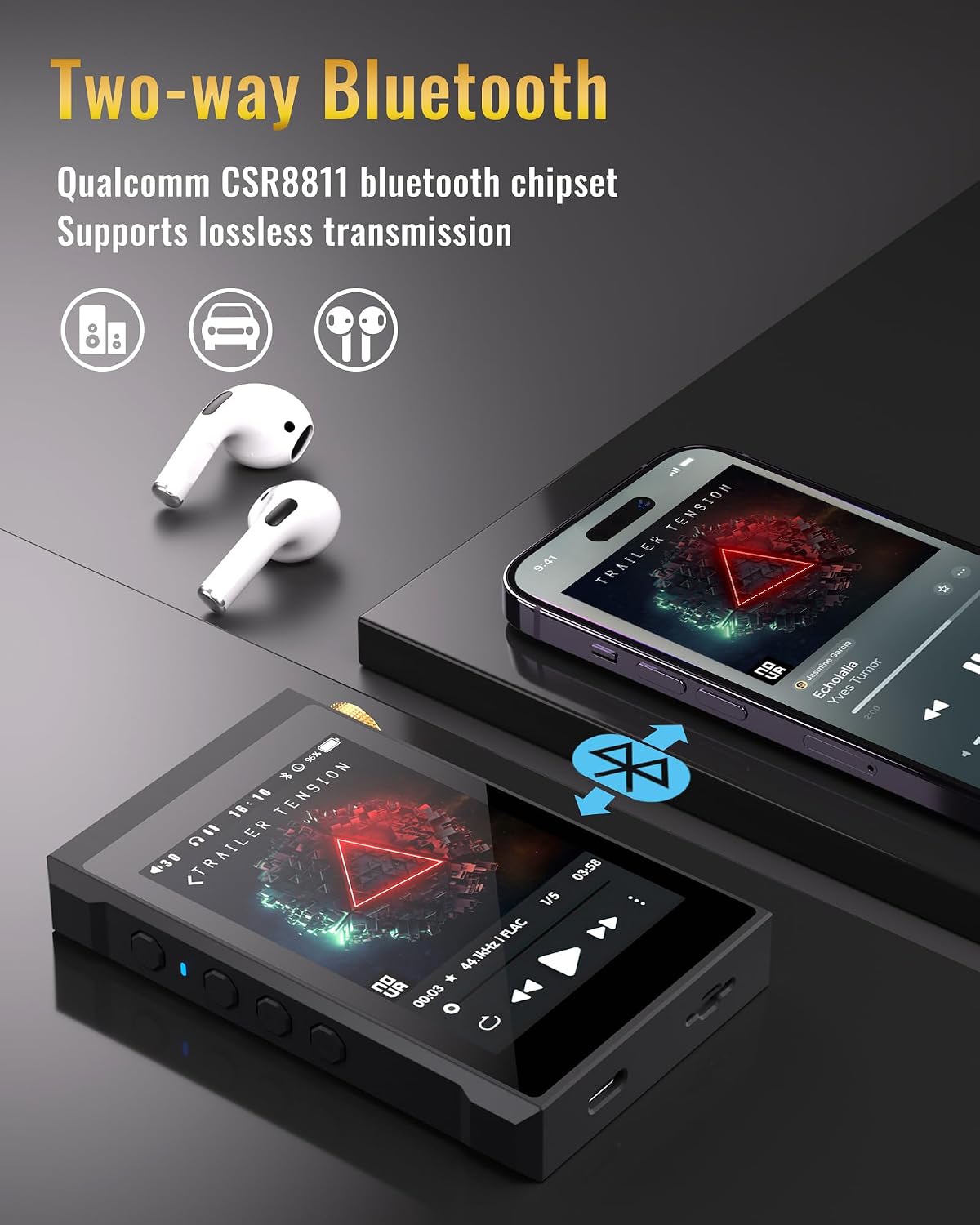
Figure 2: Detailed view of the player's side buttons, USB-C charging/data port, and Micro SD card slot.

Figure 3: Illustration of the two-way Bluetooth functionality, allowing connection to headphones or acting as a Bluetooth receiver for a smartphone.

Figure 4: The player connected to a laptop, highlighting its USB DAC output capability for enhanced audio from a computer or mobile phone.

Figure 5: Visual representation of the built-in 2200mAh battery, providing up to 12 hours of playback.

Figure 6: Screen display emphasizing the HiFi Lossless Sound capabilities, including 3.5-inch full touch, DSD64/128/256 hard-decoding, Dual DAC ESS9018 chip, Qualcomm CSR Bluetooth, USB DAC support, and 3.5mm/2.5mm outputs.
Official Product Video
Video 1: An official product video from Phinistec showcasing the S7 HiFi Music Player with Bluetooth 5.0, highlighting its features and design.
Setup
1. Charging the Device
Connect the included Type-C data cable to the USB-C port on the bottom of the player and plug the other end into a USB power adapter (not included) or a computer's USB port. The battery indicator on the screen will show charging status. A full charge typically takes approximately 3-4 hours.
2. Inserting a Micro SD Card
The Phinistec S7 supports Micro SD cards up to 512GB (a 64GB card is included). Locate the Micro SD card slot on the side of the player. Gently insert the Micro SD card with the gold contacts facing down until it clicks into place. To remove, push the card in slightly until it springs out.
3. Transferring Music Files
Connect the player to your computer using the Type-C data cable. The player will appear as a removable disk. Drag and drop your music files (e.g., DSD, FLAC, WAV, MP3) into the appropriate folders on the Micro SD card. The player supports various audio formats including DSD256, FLAC, WAV, MP3, APE, WMA, AIFF, AAC, and OGG.
Operating Instructions
1. Power On/Off
Press and hold the power button on the side of the device to turn it on or off. A short press will turn the screen on/off.
2. Navigation
The Phinistec S7 features a 3.5-inch full touchscreen for intuitive navigation. Swipe left/right or tap icons to access different menus such as "My Music," "Folder," "Bluetooth Settings," "Play Settings," and "System Settings."
3. Music Playback
From the main menu, select "My Music" or "Folder" to browse your audio files. Tap on a song to begin playback. Use the on-screen controls for play/pause, skip track, and repeat. The physical volume wheel on the side allows for precise volume adjustments.
4. Bluetooth Connection
Go to "Bluetooth Settings" from the main menu. Turn on Bluetooth and search for available devices. Select your Bluetooth headphones or speaker to pair. The S7 supports 2-way Bluetooth, allowing it to transmit audio to Bluetooth devices or receive audio from a smartphone.
Key Features
- Native DSD256 Support: Equipped with dual DAC ESS9018K2M chips, the S7 supports hard decoding of DSD music files up to DSD256, offering a high-fidelity audio experience.
- 2-Way Qualcomm CSR Bluetooth: Features Qualcomm CSR Bluetooth for stable and lossless wireless audio transmission. It can function as both a Bluetooth transmitter (to headphones/speakers) and a receiver (from a smartphone).
- USB DAC Functionality: Connect the player to a PC or mobile phone via USB to use it as an external DAC, enhancing the audio output quality of your connected device.
- Elegant Design: Boasts a 3.5-inch full touchscreen display, a durable metal body, and a stylish glass back. The metal scrolling volume wheel provides smooth and precise control.
- Expandable Storage: Supports Micro SD cards up to 512GB, providing ample space for a vast music library.
- Long Battery Life: The 2200mAh Li-polymer battery offers up to 12 hours of continuous high-resolution audio playback.
Maintenance
- Keep the device dry. Avoid exposure to moisture or liquids.
- Clean the screen and body with a soft, dry cloth. Do not use abrasive cleaners or solvents.
- Avoid extreme temperatures. Store the player in a cool, dry place.
- Protect the screen with the included protective film to prevent scratches.
Troubleshooting
| Problem | Possible Cause | Solution |
|---|---|---|
| Device does not power on. | Low battery; system crash. | Charge the device for at least 30 minutes. If unresponsive, press and hold the power button for 10-15 seconds to force a restart. |
| No sound output. | Volume too low; headphones not properly connected; corrupted audio file. | Increase volume. Ensure headphones are fully plugged into the correct port (3.5mm or 2.5mm). Try playing a different audio file. |
| Bluetooth connection issues. | Device not in pairing mode; interference; out of range. | Ensure Bluetooth is enabled on both devices and the S7 is in pairing mode. Move closer to the Bluetooth device. Restart both devices. |
| Micro SD card not recognized. | Card not inserted correctly; incompatible format; corrupted card. | Reinsert the card. Ensure it is formatted to FAT32 or EXFAT. Try a different Micro SD card. |
Specifications
| Feature | Detail |
|---|---|
| Model Name | S7 |
| Brand | Phinistec |
| Screen Size | 3.5 Inches |
| DAC Chip | Dual ESS9018K2M |
| DSD Support | Native DSD256 (Hard Decoding) |
| Max Sampling Rate | 24bit/384KHZ |
| Bluetooth Version | Qualcomm CSR Bluetooth (2-Way) |
| Memory Storage Capacity | 32 GB (Internal) + up to 512GB Micro SD |
| Battery | 2200mAh Li-polymer |
| Playing Time | Up to 12 hours (actual time depends on settings) |
| Connectivity Technology | Bluetooth, USB-C |
| Compatible Devices | Windows XP/Vista, Win7/8.1, Win10, Mac OS 10, Linux 2.4.2 or above |
| Item Weight | 14 ounces |
| Color | Black |
Warranty and Support
For detailed warranty information and customer support, please refer to the official Phinistec website or contact their customer service. A digital version of this user manual is also available for download:
You can also visit the official Phinistec store on Amazon for more product information and support: Phinistec Amazon Store

