
Introduction
Thank you for choosing the Syvio Automatic Pet Food Dispenser. This device is designed to provide convenient and scheduled feeding for your cats and dogs, ensuring they receive appropriate portions at regular intervals. With features like programmable meal times, voice recording, and dual power supply, this feeder offers reliability and ease of use for pet owners.
Please read this manual thoroughly before operating the device to ensure proper setup, optimal performance, and longevity of your feeder.
Product Overview

Figure 1: Syvio Automatic Pet Food Dispenser
Key Features:
- Programmable Feeding: Schedule up to 6 meals per day with 0-36 portions per meal.
- Voice Recorder: Record a 10-second message to call your pet at meal times.
- Dual Power Supply: Operates via USB-C power adapter or 4 x AA batteries (not included) for backup.
- Anti-Clog Design: Ensures smooth food dispensing and prevents blockages.
- Double Locking Lid: Securely keeps food fresh and prevents pets from accessing the hopper.
- Easy to Clean: Detachable stainless steel bowl and other components for convenient cleaning.
- Desiccant Bag Compartment: Maintains food freshness and prevents moisture.
- User-Friendly Interface: Large LCD screen and unique scroll wheel for easy programming.
- 8° Tilted Bowl Design: Ergonomically designed for comfortable feeding.
Components
The Syvio Automatic Pet Food Dispenser includes the following components:
- Main Feeder Unit (with food hopper and control panel)
- Stainless Steel Food Bowl
- USB-C Power Cable
- Instruction Manual (this document)
- Desiccant Bag (pre-installed or included separately)

Figure 2: Automatic Feeding Schedule Example
Setup
- Unpack and Clean: Carefully remove all components from the packaging. Wash the stainless steel bowl and the food hopper (if detachable) with mild soap and water. Ensure all parts are completely dry before assembly. Note: Do not wash the main feeder unit or the base. Wipe clean with a damp cloth only.
- Install Desiccant Bag: Locate the desiccant bag compartment under the lid. Insert the desiccant bag to help keep the food fresh and dry. It is recommended to replace the desiccant bag every 2 weeks.

Figure 3: Desiccant Bag Installation and Bowl Design
- Fill Food Hopper: Open the top lid by pressing the locking lid button. Pour dry pet food into the hopper. The feeder has a capacity of 3L (approximately 13 cups). Ensure the kibble size is between 2-15mm to prevent clogging. Close the lid securely until it clicks.

Figure 4: Detachable Parts for Cleaning
- Power Supply:
- Primary Power: Connect the USB-C cable to the feeder and plug the adapter into a wall outlet.
- Backup Power: For power outage protection, install 4 x AA batteries (not included) into the battery compartment at the bottom of the feeder.
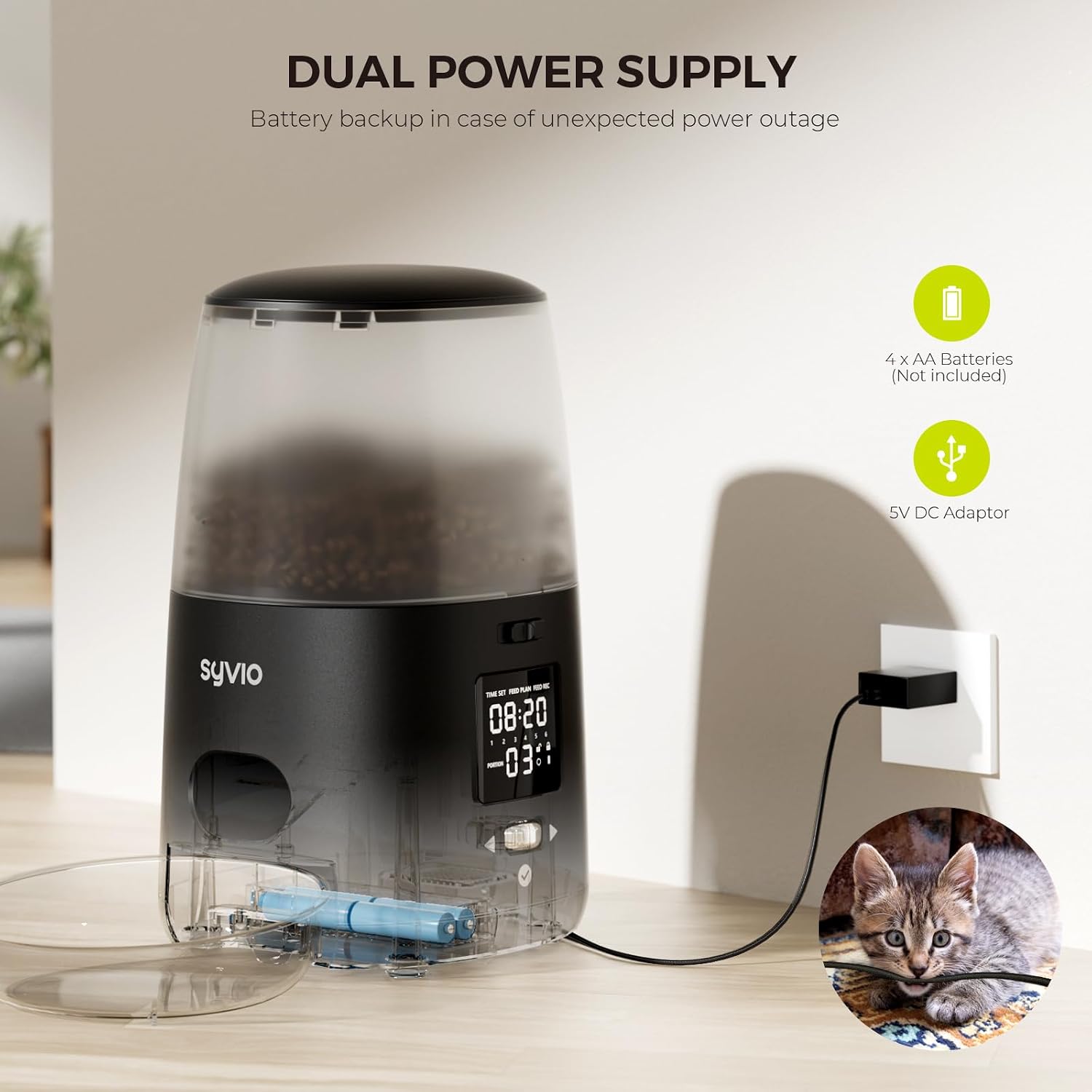
Figure 5: Dual Power Supply Setup
- Place the Bowl: Position the stainless steel food bowl in front of the dispenser outlet.
Operating Instructions
Control Panel Overview:

Figure 6: Control Panel with Scroll Wheel
- LCD Screen: Displays time, meal plan, and recording status.
- Scroll Wheel: Used to navigate menus and adjust settings.
- Check Button (✓): Confirms selections.
- Manual Feed Button: Dispenses food instantly.
- Screen Lock Button: Prevents accidental changes to settings.
Setting Current Time:
- Press and hold the "TIME SET" button until the hour digit flashes.
- Use the scroll wheel to adjust the hour. Press the "Check" button to confirm.
- Repeat for minutes.
Programming Meal Plans:
The feeder supports up to 6 meals per day. Each meal can be set with a specific time and portion size (0-36 portions).
- Press and hold the "FEED PLAN" button until the meal number flashes.
- Use the scroll wheel to select the meal number (1-6) you wish to program. Press "Check".
- The hour digit for the selected meal will flash. Use the scroll wheel to set the desired feeding hour. Press "Check".
- Repeat for minutes. Press "Check".
- The portion size will flash. Use the scroll wheel to set the number of portions (0-36) for this meal. Press "Check".
- Repeat for all desired meals. The feeder will save settings automatically.
Video 1: Syvio Automatic Cat Feeder with Dual Power Supply. This video demonstrates the features of the feeder, including the display, stainless steel bowl, locking lid, desiccant bag, voice recording, anti-jamming design, dual power supply, and screen lock function.
Voice Recording:
You can record a 10-second voice message that will play at each scheduled meal time.
- Press and hold the "FEED REC" button until the microphone icon appears on the screen.
- Speak your message clearly into the microphone located on the feeder.
- Release the "FEED REC" button to save the recording.
- To play back the recording, briefly press the "FEED REC" button.

Figure 7: Voice Recording Feature
Manual Feeding:
To dispense food manually, briefly press the manual feed button. One portion will be dispensed each time the button is pressed.
Screen Lock Function:
To prevent accidental changes to settings by pets or children, activate the screen lock.
- Press and hold the "Check" button for 3 seconds to lock the screen. A lock icon will appear.
- To unlock, press and hold the "Check" button again for 3 seconds. The lock icon will disappear.

Figure 8: Double Locking Design for Security
Maintenance
Regular cleaning and maintenance will ensure the longevity and hygienic operation of your pet feeder.
- Food Bowl: The stainless steel bowl is dishwasher safe. For manual cleaning, wash with mild soap and water, then rinse thoroughly and dry completely.
- Food Hopper and Dispenser: The food hopper and dispenser components are detachable for easy cleaning. Wash with mild soap and water, rinse, and ensure they are completely dry before reassembling.
- Main Unit: Do not immerse the main feeder unit in water. Wipe the exterior with a soft, damp cloth. Ensure no water enters the battery compartment or control panel.
- Desiccant Bag: Replace the desiccant bag every 2 weeks to maintain optimal food freshness and prevent moisture buildup.
- Kibble Check: Periodically check the food hopper for any stuck kibble or debris, especially around the anti-clog mechanism.

Figure 9: Anti-Clog Mechanism
Troubleshooting
| Problem | Possible Cause | Solution |
|---|---|---|
| Feeder not dispensing food. |
|
|
| Voice recording not playing. |
|
|
| Feeder not turning on. |
|
|
| Lid not closing securely. |
|
|
Specifications
| Feature | Detail |
|---|---|
| Model | B0C3Q2W997 |
| Capacity | 3 Liters / 13 Cups |
| Meals per Day | 1-6 Meals |
| Portions per Meal | 0-36 Portions |
| Voice Recording | 10 seconds |
| Power Supply | USB-C Adapter (included), 4 x AA Batteries (not included) |
| Recommended Kibble Size | 2-15 mm |
| Bowl Material | 304 Stainless Steel |
| Dimensions (LxWxH) | 11.97 x 8.15 x 6.61 inches |
| Item Weight | 3.94 pounds (1.79 kg) |
Warranty and Support
Syvio products are designed with quality and reliability in mind. For warranty information, technical support, or any questions regarding your Automatic Pet Food Dispenser, please contact Syvio customer service through the retailer's platform or visit the official Syvio website.
Please retain your purchase receipt as proof of purchase for warranty claims.