
1. Introduction
This manual provides instructions for the proper setup, operation, and maintenance of your DAVITU replacement remote control for Daikin air conditioning units. Please read this manual thoroughly before use to ensure optimal performance and longevity of your remote control.
2. Setup
2.1 Battery Installation
The remote control requires two AAA batteries (not included). Follow these steps to install the batteries:
- Locate the battery compartment cover on the back of the remote control.
- Slide the cover downwards to open the compartment.
- Insert two new AAA batteries, ensuring the positive (+) and negative (-) terminals align correctly with the markings inside the compartment.
- Slide the battery compartment cover back into place until it clicks securely.
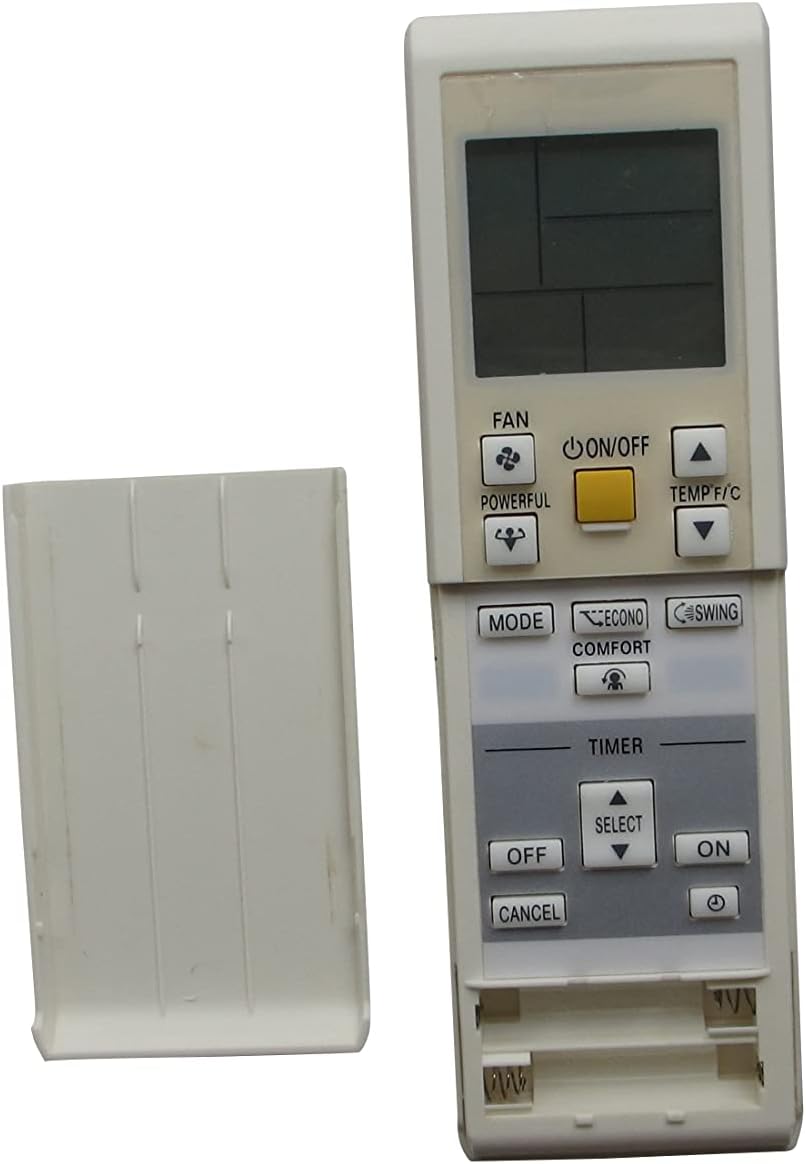
Image: Rear view of the remote control with the battery cover open, illustrating the correct placement for two AAA batteries.
Note: Ensure batteries are inserted with correct polarity. Incorrect installation may prevent the remote from functioning. Remove batteries if the remote will not be used for an extended period to prevent leakage.
3. Operating Instructions
This section details the functions of each button on your remote control.

Image: Front view of the remote control, displaying the LCD screen and all control buttons.
3.1 Button Functions
- ON/OFF Button: Press to turn the air conditioner unit on or off.
- TEMP ▲ / ▼ Buttons: Adjust the desired temperature setting upwards or downwards.
- MODE Button: Cycle through available operating modes (e.g., Cool, Heat, Fan, Dry, Auto).
- FAN Button: Adjust the fan speed (e.g., Low, Medium, High, Auto).
- POWERFUL Button: Activates a powerful operation mode for rapid cooling or heating.
- ECONO Button: Activates economy mode to reduce power consumption.
- COMFORT Button: Activates comfort airflow mode, directing air away from occupants.
- SWING Button: Controls the vertical airflow direction (louver swing).
- TIMER ON/OFF/CANCEL Buttons: Used to set, cancel, or activate the timer functions.
- TIMER SELECT Button: Used to navigate and confirm timer settings.
3.2 Setting the Timer
To set the ON or OFF timer:
- Press the TIMER ON or TIMER OFF button. The timer indicator will flash on the remote's display.
- Use the SELECT button (up/down arrows) to adjust the desired time.
- Press the TIMER ON or TIMER OFF button again to confirm the setting.
- To cancel a set timer, press the CANCEL button.
4. Maintenance
4.1 Battery Replacement
Replace batteries when the remote control's display becomes dim or the remote fails to operate the air conditioner unit. Refer to Section 2.1 for detailed battery installation instructions.
4.2 Cleaning
Wipe the remote control with a soft, dry cloth. Do not use liquid cleaners, abrasive materials, or chemical sprays, as these may damage the remote's surface or internal components.
5. Troubleshooting
- Remote not responding:
- Check if the batteries are correctly installed with the proper polarity.
- Replace old batteries with new ones.
- Ensure there are no obstructions between the remote control and the air conditioner's receiver.
- Confirm the remote is pointed directly at the air conditioner unit.
- Limited range:
- Replace batteries if they are low.
- Ensure no strong light sources (e.g., direct sunlight, fluorescent lights) are interfering with the remote's signal.
6. Specifications
| Feature | Detail |
|---|---|
| Compatibility | Daikin Air Conditioner models: CTXS15K2V1B, CTXS35K2V1B, FTXS20K3V1B, FTXS25K3V1B, CTXS15K3V1B, CTXS35K3V1B, FTXS25L, FTXG25LS, FTXV20UVMA, FTXV25UVMA, FTXV35UVMA, FTXV46UVMA, FTXV50UVMA, FTXV60UVMA, FTXV71UVMA, FTXV85UVMA, FTXV95UVMA, FVXS09NVJU, FVXS12NVJU, FVXS15NVJU, FVXS18NVJU, RXG25L2V1B, RXG35L2V1B, RXG50L2V1B, FTXM25Q, FTXM50Q, FTXM71Q |
| Power Source | 2 x AAA Batteries (not included) |
| Communication | Infrared (IR) |
| Frequency | 433 MHz |
| Manufacturer | DAVITU |
| ASIN | B0C3M2S2CZ |
7. Warranty and Support
Specific warranty information for this replacement remote control is not provided in the product details. For any issues or support inquiries, please contact the seller directly through your purchase platform.