
HEI LIANG HL-1
HEI LIANG Fingerprint Door Lock User Manual
Model: HL-1
1. Introduction
This manual provides detailed instructions for the installation, operation, and maintenance of your HEI LIANG Fingerprint Door Lock. This smart door knob offers multiple access methods including fingerprint recognition, app control, and traditional mechanical keys, providing enhanced security and convenience for various applications such as bedrooms, utility rooms, apartments, offices, and hotels.
2. Safety Information
Please read and understand all safety precautions before installation and use. Failure to follow these instructions may result in damage to the product, property, or personal injury.
- Do not attempt to disassemble or modify the lock. This may void the warranty and compromise security.
- Keep mechanical keys in a secure location away from the lock.
- Ensure the door is properly aligned and closes smoothly before installation to prevent undue stress on the lock mechanism.
- Protect the fingerprint sensor from sharp objects or excessive force.
- Use only the specified charging cable and power source for the built-in battery.
3. Package Contents
Verify that all components are present in the package before beginning installation:
- Smart Lock x 1
- Screws x 6
- Latch x 1
- Strike Plate x 1
- Installation Guide x 1
- Keys x 2
Video: Unboxing and display of the HEI LIANG Smart Door Knob package contents.
4. Setup and Installation
The HEI LIANG Smart Door Lock is designed for easy DIY installation, requiring no wiring. It is compatible with US standard doors ranging from 1.18" to 2.17" (30mm-55mm) in thickness, including wood, steel, and fireproof doors.
4.1. Pre-Installation Check
- Ensure your door's bore hole and backset dimensions are compatible.
- Confirm the door's opening direction (left-handed or right-handed) as indicated by the 'UP' sign on the lock for correct orientation.
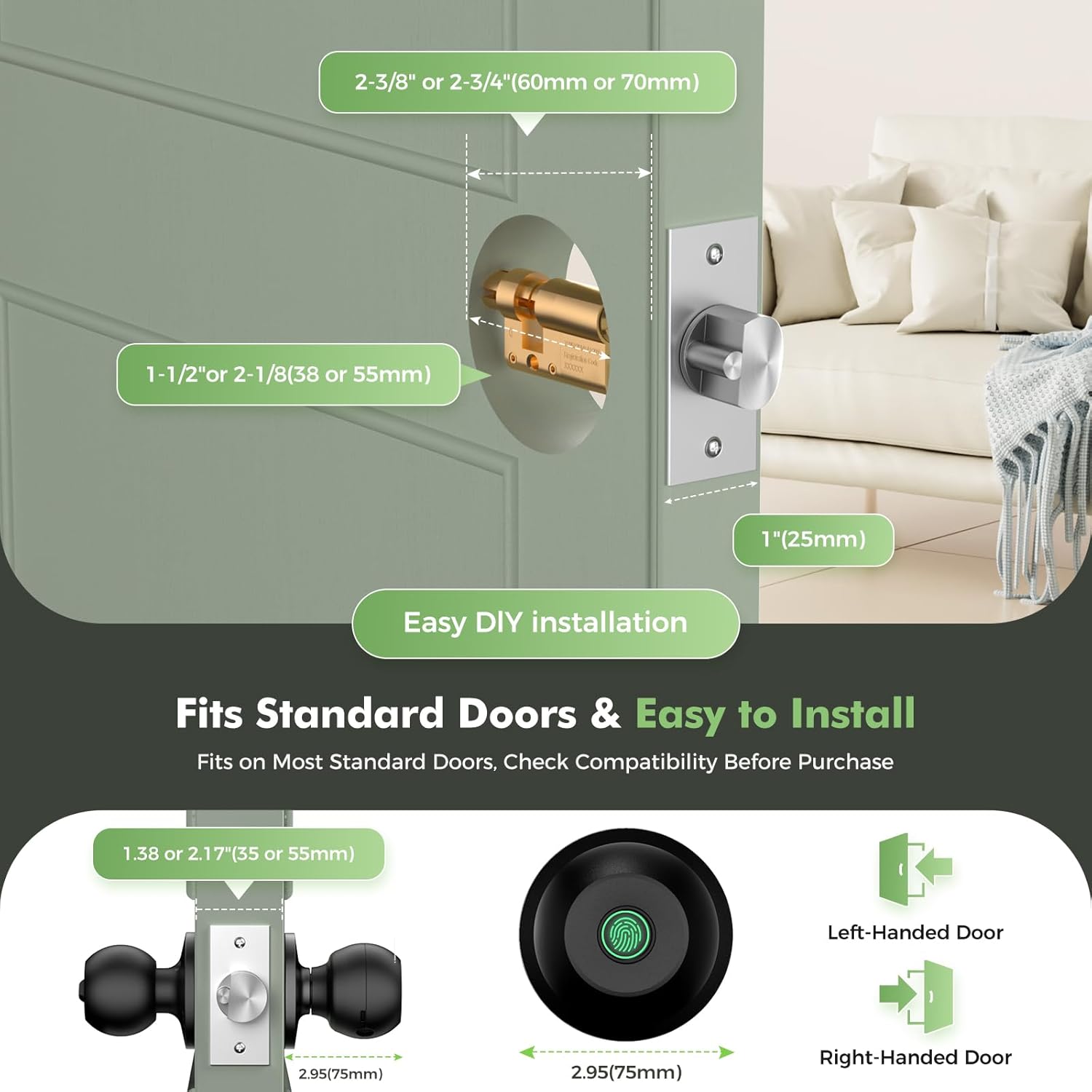
Image: Door compatibility and installation guide, showing measurements for standard doors and how to orient the lock for left or right-handed doors.
4.2. Installation Steps
Refer to the included Installation Guide for detailed, step-by-step instructions and diagrams. Generally, the process involves:
- Remove your existing door handle.
- Install the new latch into the door edge.
- Mount the exterior and interior lock components, ensuring proper alignment and connection of internal cables.
- Secure the lock with the provided screws.
- Install the strike plate on the door frame.
Always follow the 'UP' sign on the lock for correct orientation during installation.
5. Operating Instructions
Your HEI LIANG Smart Door Lock offers versatile access options for enhanced security and convenience.
5.1. Access Methods
- Fingerprint Recognition: Unlock in approximately 0.5 seconds. The lock can store up to 20 unique fingerprints.
- App Control: Manage your lock remotely via the companion app (requires a gateway for Wi-Fi connectivity).
- Mechanical Key: A hidden mechanical keyhole provides a reliable backup access method.

Image: Multiple ways to access the smart door knob, including app, fingerprint, and physical key.
5.2. Fingerprint Management
The biometric security system allows for easy fingerprint management through the app. You can add, delete, and manage up to 20 fingerprints. The advanced 160x160 DPI sensor provides higher identification efficiency.
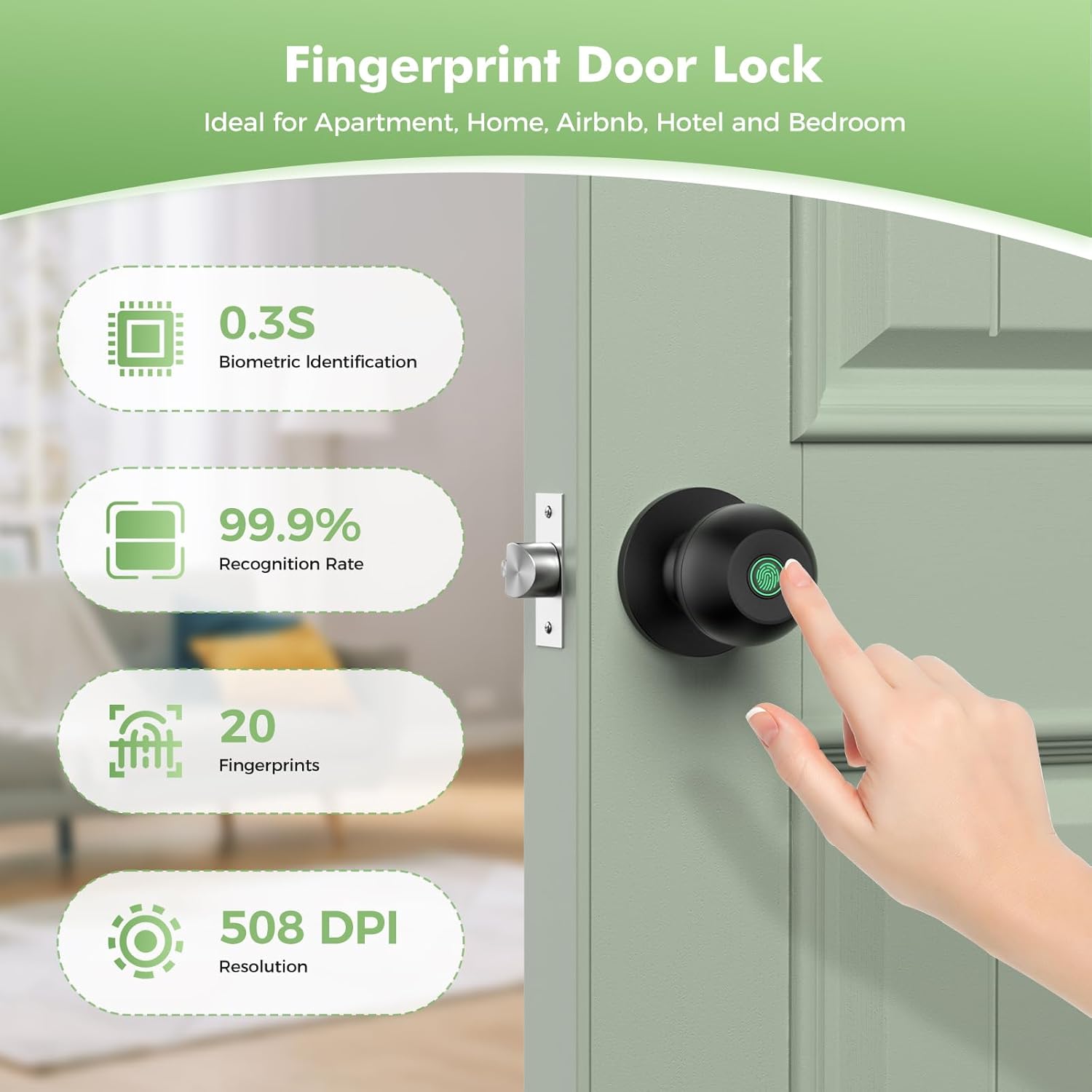
Image: Key features of the fingerprint recognition system, including speed, accuracy, and capacity.
5.3. App Control Features
The companion app provides comprehensive control and monitoring capabilities:
- User Management: Remotely create and delete fingerprints or temporary access codes for guests.
- Access Logs: View unlock records and traffic patterns in real-time.
- Automatic Locking: The lock automatically engages within 5 seconds of closing, with customizable auto-lock delay times (3-1800 seconds).
- Intrusion Alerts: Receive notifications for unauthorized access attempts.
- Temporary Access Codes: Create time-limited codes (e.g., 12 hours, 3 days, 1 week) ideal for Airbnb hosts or property managers.
- Silent Mode: Enable silent mode for quiet operation, ensuring the keypad does not make noise.
- Channel Mode: Allows for frequent access without re-locking, suitable for events or parties.

Image: Overview of how the smart door lock can be easily controlled via a smartphone app, offering convenience and security.

Image: Remote one-time passcodes can be generated and shared for temporary access, such as for deliveries or service personnel.

Image: The silent mode feature allows for quiet unlocking without disturbing occupants.
6. Maintenance
6.1. Battery Charging
The fingerprint door lock has a built-in 400mAh rechargeable battery. It takes approximately 3 to 4 hours to fully charge using a USBA-TypeC cable. An automatic low battery warning activates at 15% capacity, and the app features a visual battery display and low battery alarm.
6.2. Cleaning
To maintain the appearance and functionality of your lock, wipe it regularly with a soft, damp cloth. Avoid using abrasive cleaners, solvents, or harsh chemicals, as these can damage the finish and electronic components.
6.3. Durability
The lock features a 500-pound impact-resistant stainless steel and aluminum alloy frame, designed for durability. It is also rated P54 waterproof, offering protection against splashes and dust.

Image: The smart door knob is P54 waterproof and designed to operate within a wide temperature range.
7. Troubleshooting
If you encounter issues with your HEI LIANG Fingerprint Door Lock, refer to the following common problems and solutions:
| Problem | Possible Cause | Solution |
|---|---|---|
| Fingerprint not recognized. | Dirty sensor, unregistered fingerprint, incorrect finger placement. | Clean the sensor. Ensure your finger is dry and placed correctly. Re-register fingerprint if necessary. |
| Lock does not respond. | Low battery, mechanical obstruction. | Charge the battery. Check for any obstructions around the latch or door frame. |
| App cannot connect to the device. | Bluetooth range, app permissions, temporary glitch. | Ensure you are within 3-4 feet of the lock. Check app permissions for Bluetooth. Restart the app or your phone. |
| Lock does not auto-lock. | Auto-lock feature disabled or setting incorrect. | Verify auto-lock settings in the app. Ensure the door closes completely. |
| Battery indicator is inaccurate. | Software calibration issue. | Fully charge the lock. If the issue persists, contact customer support. |
For further assistance, please refer to the full user guide or contact HEI LIANG customer support.
8. Specifications
| Feature | Specification |
|---|---|
| Brand | HEI LIANG |
| Model Name | HL Knob Lock 1 |
| Item Model Number | HL-1 |
| Lock Type | Biometric |
| Special Feature | Easy to Install |
| Connectivity Protocol | Bluetooth |
| Control Method | App, Hand Control, Mechanical knob |
| Item Dimensions (L x W x H) | 9.29 x 2.99 x 2.99 inches |
| Item Weight | 1.49 pounds |
| Color | Black |
| Material | Stainless Steel |
| Battery Type | Lithium Ion (Rechargeable 400mAh) |
| Recommended Uses | Bedroom doors, cloakroom doors, apartments, offices, hotels |
| UPC | 758984224249 |
9. Warranty and Support
Warranty information for your HEI LIANG Fingerprint Door Lock is typically provided with the product packaging. Please refer to the documentation included in your product box for specific warranty terms and conditions.
For additional support, you can refer to the official user guide PDF: Download User Guide (PDF)
If you require further assistance or have questions not covered in this manual, please contact HEI LIANG customer service through the contact information provided on the product packaging or the official brand website.
Related documentsHL-1


Ask a question about this manual
Ask about setup, troubleshooting, compatibility, parts, safety, or missing instructions. Manuals+ will review the question and use this page’s manual context to help answer it.