
1. Introduction
This manual provides detailed instructions for the Feikeer RMF-TX520U replacement remote control, designed for Sony Smart TVs. It covers essential information regarding compatibility, setup, operation, and troubleshooting to ensure optimal use of your new remote.

Image 1.1: The Feikeer RMF-TX520U remote control, highlighting its voice control and dedicated hotkey buttons.
2. Compatibility
The RMF-TX520U remote is specifically designed for Sony Smart TVs with voice command capabilities, manufactured between 2019 and 2023. It is compatible with various Sony BRAVIA XBR, XR, and KD series models. Please note that this remote is generally not suitable for TVs manufactured before 2018 and cannot control external TV boxes.
Compatible Sony TV Series and Models:
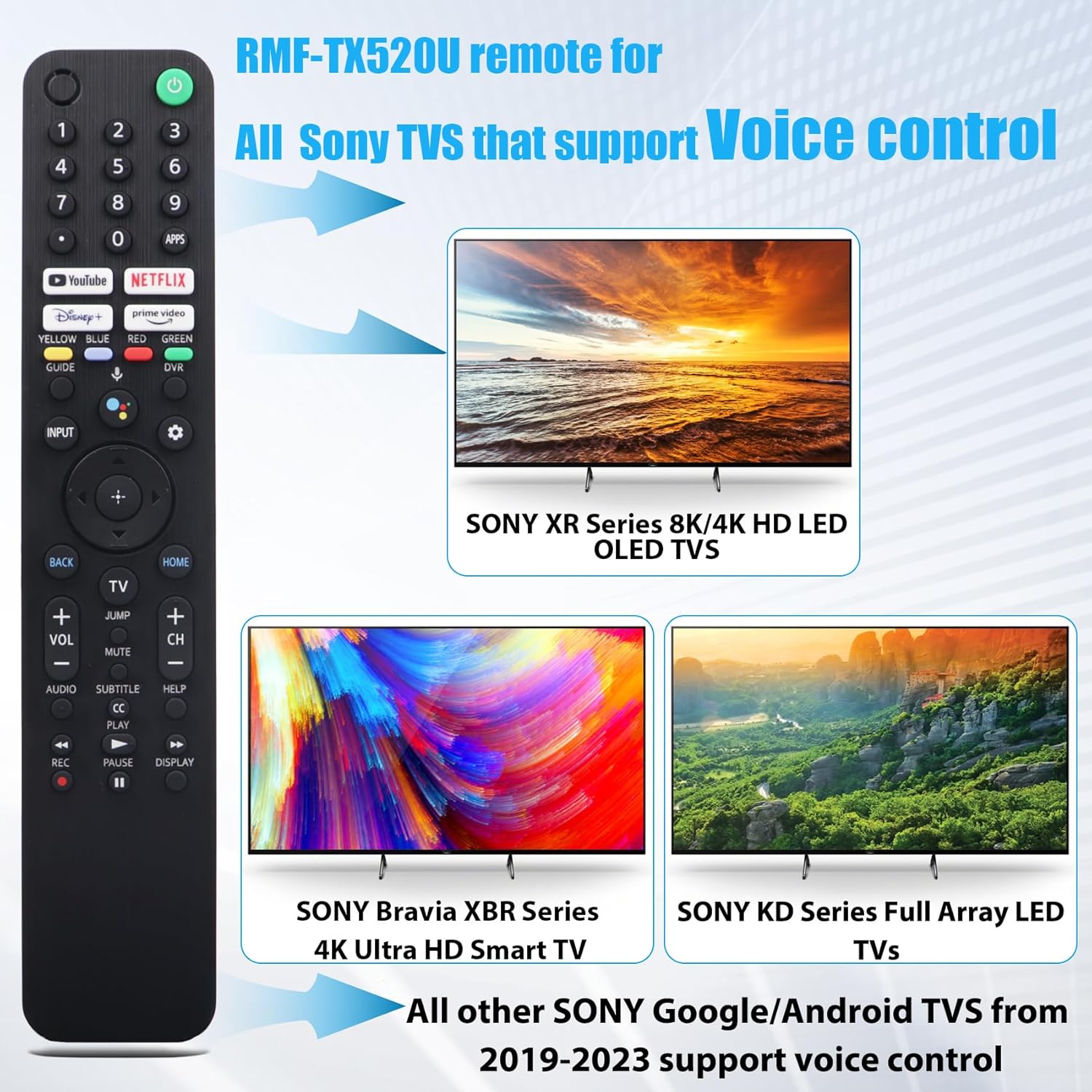
Image 2.1: The RMF-TX520U remote is compatible with various Sony TV series that support voice control.
This remote supports models including, but not limited to:
- KD Series: KD-43X80J, KD-43X85J, KD-50X80J, KD-55X80CJ, KD-65X79J, KD-75X81J, KD-85X91J, and other KD series models from 2019-2023.
- XR Series: XR-50X90J, XR-50X94J, XR-55A80J, XR-55A84J, XR-55A90J, and other XR series models from 2019-2023.
- XBR Series: Compatible XBR series models from 2019-2023.

Image 2.2: A comprehensive list of compatible Sony TV models.
3. Setup and Pairing
The RMF-TX520U remote is designed for easy and fast pairing with your Sony Smart TV. Follow these steps for initial setup:
- Step 1: Power On TV. Press the Power button on the remote to turn on your Sony TV.
- Step 2: Initiate Pairing. Once the TV is on, simultaneously press and hold the VOL(-) button and the Google Assistant button (voice button) for 2 seconds. The remote will begin the pairing process with your Sony Smart TV.
- Step 3: Wait for Connection. No further operation is required. Simply wait patiently for approximately two minutes for the remote to establish a connection with your TV.

Image 3.1: Visual guide for the remote control and TV pairing steps.
If you encounter any difficulties during the matching process, refer to the Troubleshooting section or contact customer support.
4. Operating Instructions
The RMF-TX520U remote offers intuitive controls and advanced features for an enhanced viewing experience.
4.1 Basic Functions
- Power Button: Turns the TV on or off.
- Navigation Pad: Use the directional arrows to navigate menus and select options. The central button confirms selections.
- Volume Control (VOL +/-): Adjusts the TV volume.
- Channel Control (CH +/-): Changes TV channels.
- Mute: Mutes or unmutes the TV audio.
- Back: Returns to the previous screen or menu.
- Home: Accesses the TV's home screen or smart hub.
- Input: Changes the input source (HDMI, AV, etc.).
4.2 Voice Control
The remote features a dedicated Google Assistant button for voice commands. Press and hold the Google Assistant button and speak into the remote's microphone to:
- Search for programs or movies.
- Play music.
- Ask for weather updates.
- Control smart home devices (if configured).
4.3 Hotkeys
Quickly access popular streaming services with the dedicated hotkey buttons:
- Netflix
- Disney+
- Prime Video
- YouTube

Image 4.1: Hotkeys provide direct access to popular streaming channels, and voice control allows for quick searches and commands.
5. Troubleshooting
If you experience issues with your RMF-TX520U remote, consider the following common solutions:
- Remote Not Responding:
- Ensure batteries are correctly inserted and have sufficient charge. Replace batteries if necessary.
- Verify there are no obstructions between the remote and the TV's infrared receiver.
- Pairing Failure:
- Repeat the pairing steps (Section 3). Ensure you hold the VOL(-) and Google Assistant buttons simultaneously for the required 2 seconds.
- Ensure your TV is a compatible model (Section 2) and supports voice control.
- Try restarting your TV by unplugging it from the power outlet for a few minutes, then plugging it back in and attempting pairing again.
- Voice Control Not Working:
- Ensure the remote is successfully paired via Bluetooth, as voice control typically relies on Bluetooth connectivity.
- Speak clearly and directly into the remote's microphone.
- Check your TV's settings to ensure voice control features are enabled.
- Slow Response:
- Ensure the remote is properly paired. Some users report improved responsiveness after pairing the remote through the TV's settings, rather than just using it out of the box.
- Check for any potential interference from other electronic devices.
6. Specifications
| Model Number | RMF-TX520U |
| Brand | Feikeer |
| Connectivity Technology | Infrared (IR) and Bluetooth (for voice control) |
| Compatible Devices | Sony Smart TVs (2019-2023 XBR/KD/XR Series with voice control) |
| Item Weight | 3.84 ounces |
| Package Dimensions | 11.5 x 4.96 x 0.91 inches |
| Special Feature | Ergonomic design, Voice Control, Dedicated Hotkeys |
7. Warranty and Support
The Feikeer RMF-TX520U remote control comes with a 1-year warranty. Feikeer is committed to customer satisfaction and product quality.
If you encounter any problems or are not satisfied with your purchase for any reason, please contact Feikeer customer support. We aim to provide a satisfactory solution within 12-24 hours.
For support, please refer to the contact information provided with your product packaging or visit the official Feikeer store on Amazon.