
1. Introduction
This manual provides essential information for the safe and effective use of your DEKO Auto-Darkening Welding Helmet, model MZ350T. Please read these instructions thoroughly before operation to ensure proper function and personal safety. This helmet is designed for various welding processes including MIG, TIG, and MMA.

Image 1.1: The DEKO Auto-Darkening Welding Helmet is suitable for multiple welding applications including TIG, MIG, MMA, and plasma grinding.

Image 1.2: A welder utilizing the DEKO Auto-Darkening Welding Helmet during a welding task, demonstrating its practical application.
2. Safety Information
Always prioritize safety when welding. This helmet provides crucial eye and face protection, but it is essential to follow all general welding safety guidelines.
- The auto-darkening filter protects against harmful UV and IR radiation even in the event of power failure.
- Ensure the helmet is properly adjusted and fitted before starting any welding operation.
- Do not use the helmet if any part is damaged or appears to be malfunctioning.
- Avoid direct exposure to welding arc without proper eye protection.
- Clean the helmet and filter regularly to maintain optimal visibility and function.
Important: Initial settings may be in the 'light' state. Always verify the shade setting before welding to prevent eye injury. Refer to the operating instructions for proper adjustment.
3. Product Overview
The DEKO Auto-Darkening Welding Helmet is designed for comfort and protection, featuring a wide viewing area and adjustable settings.
Key Components:
- Auto-Darkening Filter (ADF): Automatically switches from light to dark shade upon arc ignition.
- Solar Power Panel: Charges the internal battery and extends battery life.
- ARC Sensors: Detect the welding arc to trigger the auto-darkening function.
- Headgear: Adjustable for a secure and comfortable fit.
- External Controls: Knobs for adjusting shade, sensitivity, and delay.

Image 3.1: An exploded view of the DEKO Welding Helmet highlighting its main components, including the solar power panel, ARC sensors, internal filter, and adjustment knobs.

Image 3.2: Detailed view of the auto-darkening filter (ADF DX-500S) with indicators for replaceable CR2032 battery, delay control, sensitivity control, and UV/IR filter. The viewing area is 90mm x 35mm.

Image 3.3: This image illustrates the enhanced color recognition provided by the helmet's full-color lens set compared to a conventional green-tinted lens.
4. Setup
Proper setup ensures comfort and optimal performance.
4.1 Headgear Adjustment
The helmet features an ergonomic headgear designed for extended wear. Adjust the headgear to fit your head securely and comfortably.
- Use the top strap to adjust the height of the helmet on your head.
- Rotate the rear knob to tighten or loosen the headband for a snug fit.
- Adjust the side knobs to control the angle of the helmet when in the down position.
- Ensure the soft sponge padding rests comfortably against your forehead.

Image 4.1: The adjustable headgear features a soft sponge for comfort, a dial to adjust head size, and a knob to control the helmet's angle and fixation.
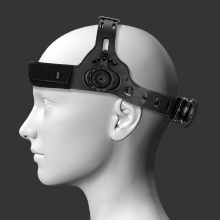
Image 4.2: A mannequin head demonstrates the proper fit and adjustability of the welding helmet's headgear.
5. Operating Instructions
Familiarize yourself with the helmet's controls before welding.
5.1 Shade Adjustment
The helmet offers a variable shade range from DIN 9 to DIN 13. Use the external shade knob to select the appropriate shade level for your welding process and current.
5.2 Sensitivity Control
Adjust the sensitivity knob (Low to High) to ensure the filter reacts to the welding arc. Higher sensitivity is suitable for low-current TIG welding, while lower sensitivity is for high-current applications or environments with other light sources.

Image 5.1: A close-up view of the auto-darkening filter in action, demonstrating its rapid response to a welding arc.
5.3 Delay Control
The delay control knob (0.1s to 1.0s) determines how long the filter remains dark after the welding arc ceases. A shorter delay is suitable for tack welding, while a longer delay helps protect against afterglow and reduces eye strain during prolonged welding.
5.4 Grinding Mode
Some models may feature a grinding mode. If available, switch to grinding mode to disable the auto-darkening function, allowing clear vision for grinding tasks without the filter darkening.
6. Maintenance
Regular maintenance ensures the longevity and performance of your welding helmet.
6.1 Cleaning
- Clean the outer and inner protective lenses regularly with a soft cloth and mild cleaning solution.
- Do not use abrasive cleaners or solvents that could damage the lenses or helmet material.
- Wipe the helmet shell with a damp cloth.
6.2 Battery Replacement
The helmet uses a replaceable CR2032 lithium battery, supplemented by solar charging for extended life (up to 5000 hours). Replace the battery when the low battery indicator appears or if the auto-darkening function becomes unreliable.
- Locate the battery compartment on the auto-darkening filter.
- Carefully open the compartment and remove the old CR2032 battery.
- Insert a new CR2032 battery, ensuring correct polarity.
- Close the battery compartment securely.

Image 6.1: The helmet is powered by a replaceable CR2032 battery, which is continuously charged by the integrated solar panel, ensuring long operational life.
7. Troubleshooting
If you encounter issues with your welding helmet, refer to the following common problems and solutions:
| Problem | Possible Cause | Solution |
|---|---|---|
| Filter does not darken when arc is struck. | Low battery, sensitivity too low, sensors obstructed, filter damaged. | Replace battery, increase sensitivity, clean sensors, replace filter. |
| Filter remains dark after arc stops. | Delay setting too high. | Decrease delay setting. |
| Poor visibility. | Protective lenses dirty or scratched. | Clean or replace protective lenses. |
| Helmet feels uncomfortable. | Headgear not properly adjusted. | Adjust headgear for a secure and comfortable fit. |
8. Specifications
Technical specifications for the DEKO Auto-Darkening Welding Helmet MZ350T.

Image 8.1: Detailed technical specifications for the DEKO Auto-Darkening Welding Helmet MZ350T.
| Feature | Specification |
|---|---|
| Brand | DEKOPRO |
| Model | MZ350T |
| Lens Model | DX-350D |
| Viewing Area | 90mm x 35mm |
| Filter Size | 110mm x 90mm |
| ARC Sensors | 2 |
| Switching Speed | 1/25000s |
| Delay Control | 0.1 - 1.0s |
| Sensitivity Control | Low to High |
| Shade Range | DIN4 (Light State), DIN 9-13 (Variable Dark State) |
| Auto-Darkening | Yes |
| True Color Technology | Yes |
| Solar Power | Yes |
| UV/IR Protection | DIN 16 |
| Optical Class | 1/1/1/2 |
| Power Supply | Lithium Battery + Solar |
| Battery Type | Replaceable CR2032 |
| Material | PP (Polypropylene) |
| Product Weight | 680 g |
| Recommended Welding | MMA, MIG, MAG/CO2, TIG |
| ASIN | B0C3HGDQ1Z |
| First Available Date | 2023/05/06 |
9. Warranty and Support
For warranty information or technical support, please refer to the documentation included with your purchase or contact DEKOPRO customer service. Keep your purchase receipt as proof of purchase.