
1. Introduction
This manual provides detailed instructions for the safe and efficient operation of your Xiangtat Sky RC D200neo Dual Charger. This multi-function smart charger is designed for various battery types, offering both AC and DC input capabilities for hobbyists and professionals.
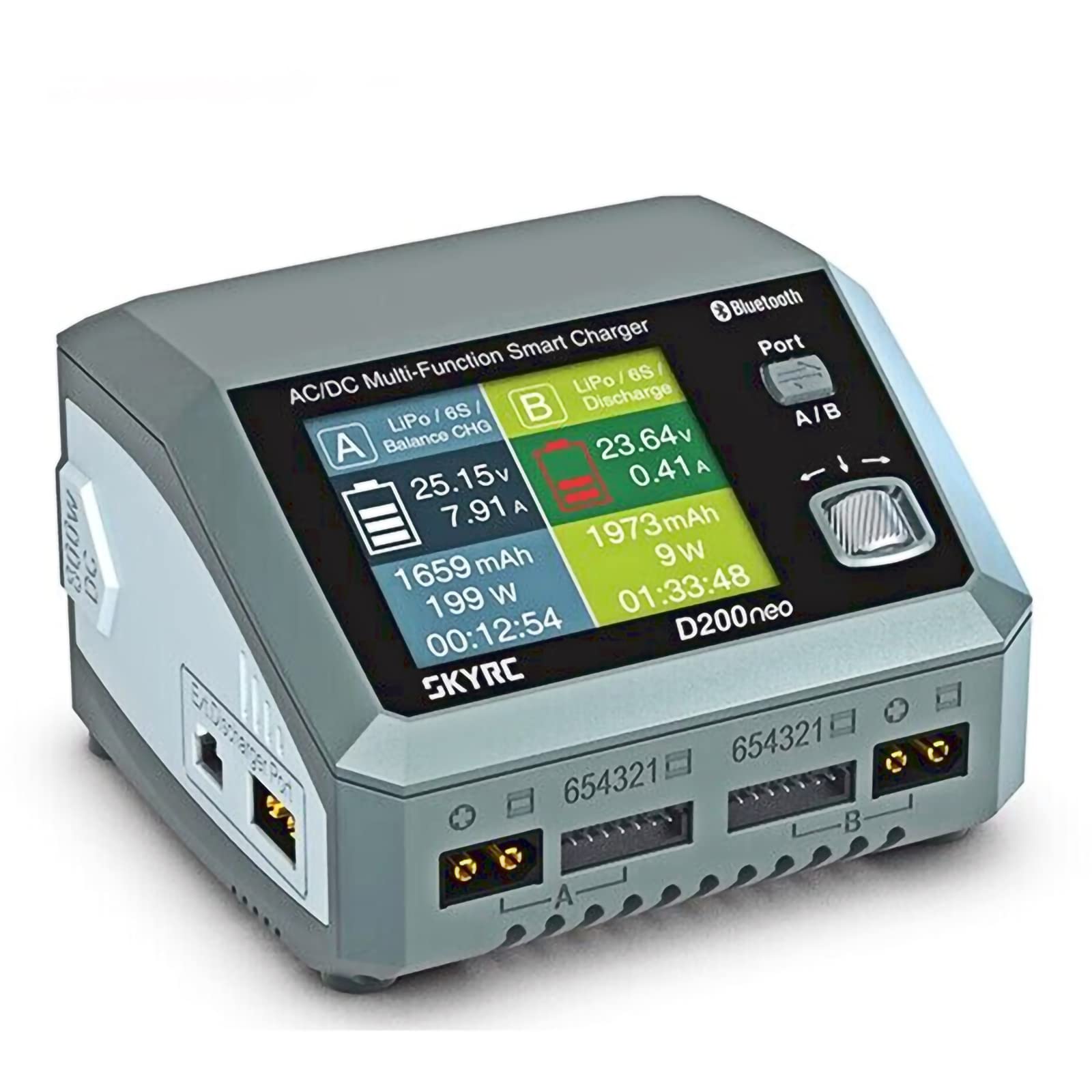
The Sky RC D200neo Dual Charger in operation, showing its display with battery charging status and power output details.
2. Key Features
- D200NEO AC200W DC800W 20A*2 PD3.0 Dual Channel Lipo Charger
- PC Communications: USB Port for PC Control & Firmware Upgrade
- Two independent channels for simultaneous charging of different battery types
- Intelligent charging power distribution with AC input
- Terminal Voltage Control for precise charging
- Re-peak Mode for NiMH/NiCd Batteries
- Equipped with Arm Cortex-M4 MCU for advanced processing
- AC/DC Dual Input for versatile power options
- 20A maximum current per port
- Intuitive Metal Scroll Control interface
- Up to 35A Parallel Charging capability
- Smart Power Distribution system
- Digital Power Supply function
- Smart Fan Control for optimal cooling
- HyperBoost Algorithm for enhanced performance
- Up to 40A Discharge capability
- PD 3.0 Output for charging external devices
- Battery Analyze Software for detailed insights
- SkyCharger App Control for remote management
- Integrated PD Charging Hub
- Vibrant Color X Display
- Compact, pocket-sized design
- Multi-language support

An overview of the D200neo's core features, including its power capabilities, control mechanisms, and advanced functionalities.
3. Setup
3.1 Power Connection
The D200neo charger supports both AC and DC power inputs, providing flexibility for various charging environments.
- For AC input, connect the provided AC power cable to the charger's AC input port and then to a standard wall outlet (100-240V).
- For DC input, connect a compatible DC power source (10-30V) to the DC input port on the charger. Ensure the power source can supply sufficient current for your charging needs.

This image illustrates the dual AC/DC input capability of the charger, highlighting its flexibility for different power sources and maximum power outputs for each mode.
3.2 Battery Connection
Connect your battery to one of the two charging ports (Port A or Port B) on the charger. Always ensure the correct connector type is used and that the polarity is observed to prevent damage. For balance charging, connect the balance lead to the corresponding balance port on the charger.

This image demonstrates connecting a battery to the charger for parallel charging, emphasizing the high current capability. Note that parallel charging cables are sold separately.
4. Operating Instructions
4.1 Basic Charging
- Power on the charger using the appropriate AC or DC input.
- Use the scroll wheel and buttons to navigate the menu on the Color X Display.
- Select the "Charge" function from the main menu.
- Choose the correct battery type (e.g., LiPo, NiMH) and cell count (e.g., 6S for LiPo).
- Set the desired charge current (ranging from 0.1A to 20.0A).
- Confirm all settings and initiate the charging process. Monitor the display for progress and any alerts.
The charger's display shows various settings for charging, including battery type, cell count, task, condition, and current, allowing for precise control over the charging process.
4.2 Parallel Charging
The D200neo supports parallel charging with a current range of 20.0A to 35.0A. This feature allows for faster charging of multiple compatible battery packs simultaneously. For safety and optimal performance, ensure all batteries connected for parallel charging are of the same type, cell count, and are at a similar state of charge.
This image illustrates the parallel charging feature, showing multiple batteries connected to the charger for simultaneous charging, highlighting the 35A capability.
4.3 Discharging and Battery Health Benchmarking
The charger can discharge batteries at a current of 0.1A to 2.0A. For higher discharge rates and advanced battery analysis, the D200neo can be paired with the optional BD350 discharger, which enables an external discharge current of 0.1A to 40.0A. This combination allows for comprehensive battery health benchmarking and detailed discharge curve analysis using the SkyRC Charger Master software.
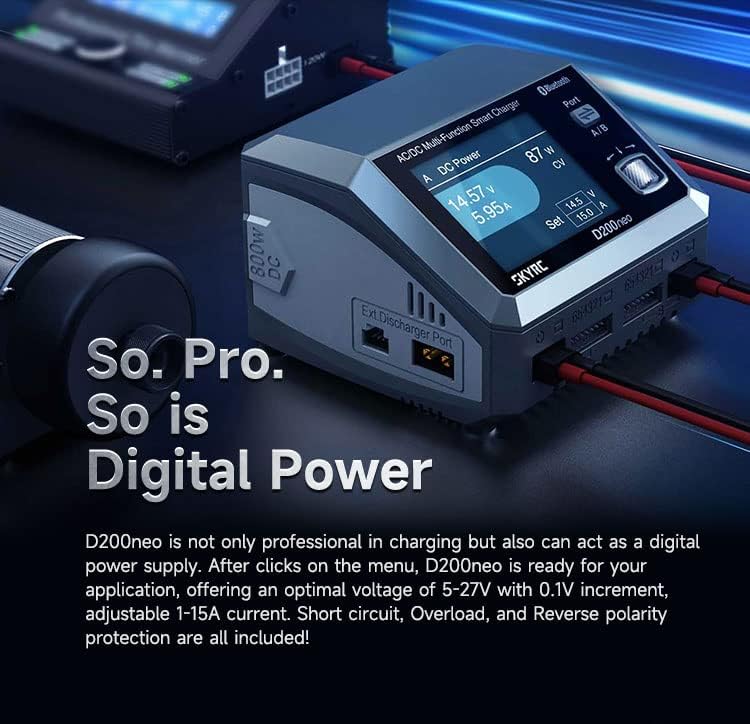
This image displays the D200neo charger alongside the optional BD350 discharger and a PD Power Charging Hub, demonstrating their combined functionality for advanced battery management. Note that BD350 and PD Power Charging Hub are optional and sold separately.

This image shows the D200neo charger connected to a battery, with a graph illustrating battery discharge curves for health benchmarking. This feature requires the optional BD350 and SkyRC Charger Master software.
4.4 Digital Power Supply Function
The D200neo can function as a versatile digital power supply. It offers an adjustable output voltage from 5V to 27V, with precise 0.1V increments, and an adjustable current from 1A to 15A. This function is protected against short circuits, overloads, and reverse polarity to ensure safe operation.

This image highlights the D200neo's capability to act as a digital power supply, showing its display set to output specific voltage and current for external devices.
4.5 USB-C Power Delivery
The charger features a USB-C port with Power Delivery (PD) 3.0 capabilities. This port supports Quick Charge 3.0 (QC3.0) at 5V⎓3A, 9V⎓2A, 12V⎓1.5A (up to 18W) and Power Delivery (PD) at 5V⎓3A, 9V⎓2.2A, 12V⎓1.67A (up to 20W). This allows for convenient and fast charging of compatible external devices such as smartphones, tablets, and laptops.
This video demonstrates the D200neo's USB-C Power Delivery feature, showcasing its ability to charge various devices like a smartphone and a laptop.
5. Maintenance
- Keep the charger clean and free from dust, dirt, and debris. Use a soft, dry cloth for cleaning.
- Store the charger in a dry, cool environment, away from direct sunlight, moisture, and extreme temperatures.
- Regularly inspect all cables and connectors for any signs of wear, fraying, or damage. Replace any damaged components immediately to ensure safe operation.
- Do not attempt to open, disassemble, or modify the charger. Doing so will void the warranty and could lead to damage, malfunction, or personal injury.
6. Troubleshooting
- Charger not powering on: Ensure both AC and DC power connections are securely plugged in and that the power source is active and supplying the correct voltage.
- Battery not charging: Verify that the correct battery type and cell count settings are selected on the charger. Double-check all battery and balance lead connections for proper contact. Ensure the battery is not severely over-discharged or damaged.
- Error messages on display: If an error message appears, refer to the on-screen code or the product's full manual for specific troubleshooting steps. Common errors often relate to incorrect battery settings, connection issues, or internal faults.
- Overheating: Ensure there is adequate ventilation around the charger and that its cooling fans are not obstructed. If overheating persists, reduce the charge current or allow the charger to cool down before resuming operation.
7. Specifications
| Feature | Specification |
|---|---|
| Case Material | Plastic |
| Case Size | 116 x 110 x 79mm |
| Weight | 602g |
| Display Type | Color X |
| DC Input Voltage | 10-30V |
| AC Input Voltage | 100-240V |
| Charger Power (AC) | 200W MAX |
| Charger Power (DC) | 800W MAX |
| Discharge Power (Main Port) | 10W |
| Discharge Power (Balance Port) | 37W MAX |
| External Discharge Power | 350W MAX |
| USB-C Power Delivery (QC3.0) | 5V⎓3A, 9V⎓2A, 12V⎓1.5A (18W) |
| USB-C Power Delivery (PD) | 5V⎓3A, 9V⎓2.2A, 12V⎓1.67A (20W) |
| Battery Types/Cells | LiPo/LiHV/LiFe/LiIon: 1-6 cells; NiMH/NiCd: 4-15 cells; Pb: 3S/6S/12S |
| Charge Current | 0.1-20.0A |
| Parallel Charge Current | 20.0-35.0A |
| Discharge Current | 0.1-2.0A |
| External Discharge Current | 0.1-40.0A |
| Balance Current | 1.5A MAX |
| Operation Modes | LiPo/LiFe/LiIon/LiHV: Balance, Charge, Discharge, Storage, Parallel; NiMH/NiCd: Charge, Cycle, Re-peak, Discharge; Pb: Normal, AGM Charge, Cold Charge, Discharge |

This image provides a visual summary of the D200neo charger's technical specifications, including input/output power, battery compatibility, and various current ratings.
8. Warranty and Support
This product is covered by a manufacturer's warranty. For specific details regarding the warranty period, terms, and conditions, please refer to the official Xiangtat website or contact your authorized local distributor. It is recommended to retain your purchase receipt as proof of purchase for any warranty claims or technical support inquiries.