
MLILY BLADJ-12F
MLILY Adjustable Bed Frame Queen Instruction Manual
Model: BLADJ-12F
Introduction
This manual provides comprehensive instructions for the assembly, operation, maintenance, and troubleshooting of your MLILY Adjustable Bed Frame Queen. Please read this manual thoroughly before setup and use to ensure proper function and safety. This adjustable bed base is designed to enhance your sleep experience by allowing independent adjustment of head and foot inclines, providing personalized comfort and support.

Image: The MLILY Adjustable Bed Frame Queen, showcasing its adjustable head and foot sections, accompanied by its wireless remote control.
Setup Instructions
The MLILY Adjustable Bed Frame is designed for easy assembly. Follow these steps carefully to set up your new bed base.
Unpacking and Initial Preparation
- Carefully remove the bed frame from its packaging. Ensure all components are present before proceeding.
- Cut all zip ties securing the frame and remove the corner legs from the box.

Image: Visual guide for assembly, showing the bed frame unfolded, zip ties cut, legs attached, and retainer bar inserted.
Attaching Legs and Retainer Bar
- Attach the corner legs. Rotate the end bolt into the hole in the corner brackets and tighten securely.
- Insert the mattress retainer bar into the grommets located at the foot of the bed frame. This bar prevents the mattress from sliding during adjustments.
The bed frame can be used with or without its legs, allowing for placement directly on an existing bed frame for versatility.

Image: Demonstrates the option of using the bed base with its own legs for under-bed storage or placing it directly onto an existing bed frame.
Finalizing Setup
- Once the legs and retainer bar are attached, plug the bed frame into a grounded electrical outlet.
- Place your mattress on the adjustable bed base. This base is compatible with foam, latex, and hybrid mattresses.

Image: Illustrates the types of mattresses compatible with the adjustable bed base: Memory Foam, Latex, and Hybrid.
Operating Instructions
Your MLILY Adjustable Bed Frame comes with a wireless remote control for easy adjustment of positions.
Wireless Remote Control Functions
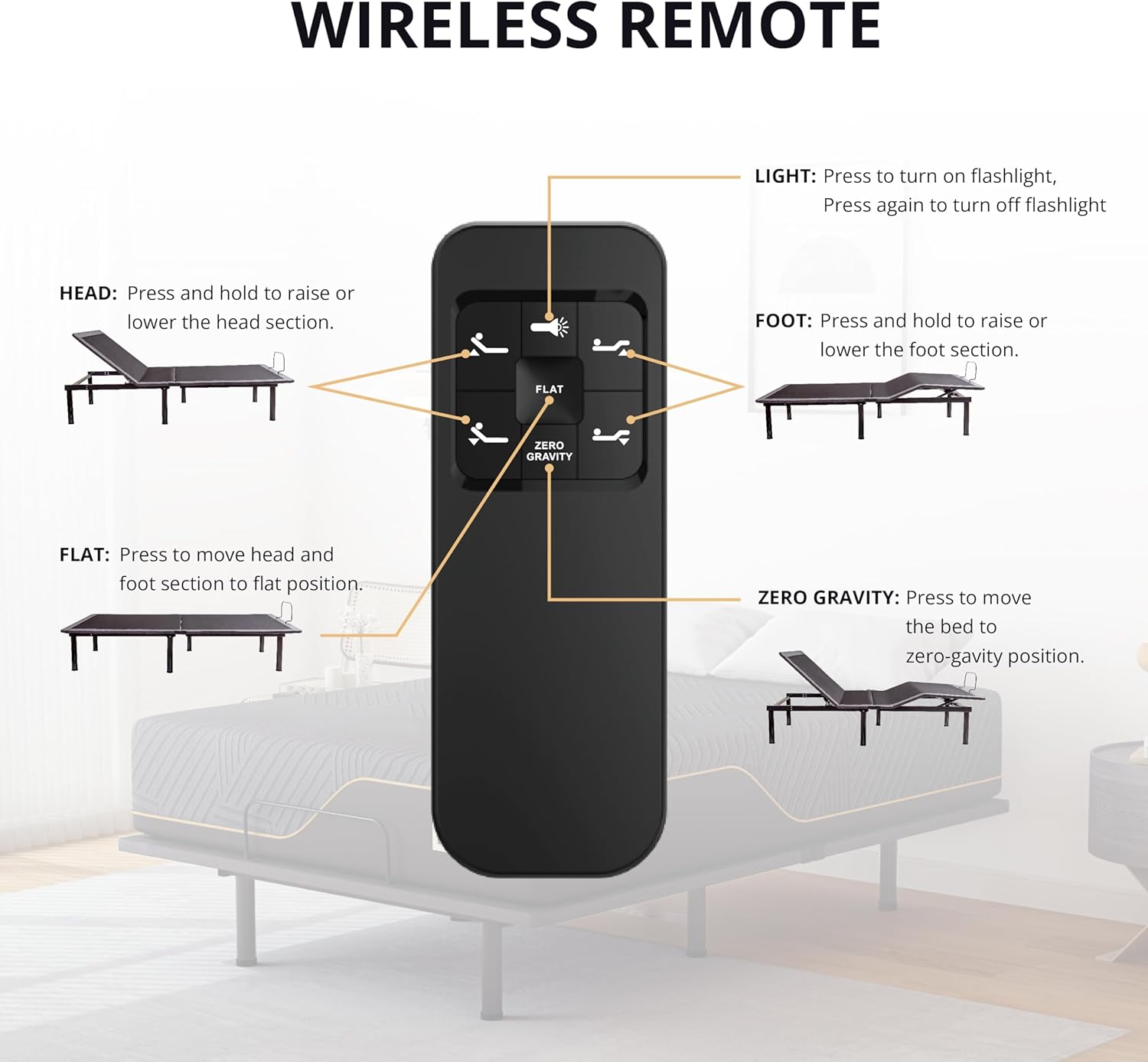
Image: A detailed diagram of the wireless remote control, showing buttons for head incline, foot incline, flat, zero gravity, and a flashlight.
- Head Incline: Press and hold the "Head Up" or "Head Down" buttons to raise or lower the head section independently (0° to 57°).
- Foot Incline: Press and hold the "Foot Up" or "Foot Down" buttons to raise or lower the foot section independently (0° to 38°).
- Flat: Press the "Flat" button to return both the head and foot sections to a completely flat position.
- Zero Gravity: Press the "Zero Gravity" button to move the bed to a position that simulates weightlessness, often recommended for pressure relief.
- Anti-Snore: (If available, typically a preset position) This position slightly raises the head to help reduce snoring.
- Programmable Memory Positions: The remote includes two programmable memory positions. To set a position, adjust the bed to your desired comfort, then press and hold one of the memory buttons until the bed beeps or the light flashes. To recall a saved position, simply press the corresponding memory button.
- Flashlight: The remote control also features a built-in flashlight for convenience.

Image: Illustrates the independent adjustment capabilities of the head and foot sections, along with the bed's overall dimensions and 850 lbs load capacity.
Maintenance
Proper maintenance ensures the longevity and optimal performance of your adjustable bed frame.
- Cleaning: The fabric components of the bed frame should be dry cleaned only. For the metal frame, wipe with a damp cloth and mild detergent if necessary. Avoid harsh chemicals.
- Motor and Electrical Components: Keep the motor and all electrical components dry and free from dust. Do not expose them to water or excessive moisture.
- Regular Inspection: Periodically check all bolts and connections to ensure they are secure. Tighten any loose fasteners.
- Weight Limit: Do not exceed the maximum weight limit of 850 pounds (including mattress and occupants) to prevent damage to the frame and motor.
- Power Disconnection: Always unplug the bed frame from the power outlet when performing any maintenance, cleaning, or when the bed will not be used for an extended period.
Troubleshooting
If you encounter issues with your adjustable bed frame, refer to the following common problems and solutions:
| Problem | Possible Cause | Solution |
|---|---|---|
| Bed does not operate (no movement). |
|
|
| Remote control not responding. |
|
|
| Bed makes unusual noises during operation. |
|
|
| Mattress slides on the base. |
|
|
If the problem persists after trying these solutions, please contact customer support.
Specifications
| Feature | Detail |
|---|---|
| Brand | MLILY |
| Model Number | BLADJ-12F |
| Size | Queen |
| Product Dimensions | 80"L x 60"W x 17"H |
| Color | Black |
| Weight Limit | 850 Pounds |
| Item Weight | 147 Pounds |
| Head Incline Range | 0° to 57° |
| Foot Incline Range | 0° to 38° |
| Included Components | 1 Adjustable Bed Base, Wireless Remote |
| Assembly Required | Yes |
| Compatible Mattress Types | Foam, Latex, Hybrid |
| Motor Performance | Powerful, low noise (below 50dB), supports up to 10000N pushing force. |

Image: Close-up of the bed's motor, highlighting its powerful performance and low noise operation.

Image: Diagram showing the bed base's 750 lbs withstand capacity, quiet and powerful motor, and successful lift tests.
Warranty Information
The MLILY Adjustable Bed Frame comes with a Limited Warranty. For specific details regarding the terms and conditions of your warranty, please refer to the documentation included with your product or contact MLILY customer support.
Return Policy: This product has a 30-day return policy for refund or replacement. Please note that opened mattresses cannot be returned.
Customer Support
For any questions, concerns, or assistance with your MLILY Adjustable Bed Frame, please contact our U.S.-based customer support team. They are dedicated to helping you resolve any issues and ensure your satisfaction.
You can also visit the official MLILY Store for more information and resources:
Related documentsBLADJ-12F


Ask a question about this manual
Ask about setup, troubleshooting, compatibility, parts, safety, or missing instructions. Manuals+ will review the question and use this page’s manual context to help answer it.