
1. Introduction
This manual provides essential instructions for the safe and efficient use of the FLIPSKY FSESC 75350 84V High Current 350A Electronic Speed Controller (ESC). It is designed for applications such as e-foils, fighting robots, surfboards, and AGV robots. Please read all instructions carefully before installation and operation.
Important Safety Information
- Read all instructions before use. Improper use can lead to damage to the ESC, connected components, or personal injury.
- This device is intended for experienced users due to its high power capabilities.
- Ensure all connections are secure and correctly insulated to prevent short circuits.
- Always disconnect the power source before performing any maintenance or making connections.
- Firmware Warning: Phase filtering is not available for Flipsky ESC75100 and 75200. Please turn off the phase filter function and choose "false" in VESC_TOOL when using firmware version 5.3 or above (VESC_TOOL 3.01). Failure to turn off the phase filter will result in ESC damage. Do not restore the default parameters when using the wizard interface. It is recommended to keep firmware 5.2 from the factory; new firmware upgrades may damage the ESC.
2. Product Features
- Aluminum alloy case for enhanced heat dissipation, improving ESC durability.
- Voltage range: 14-84V (safe for 3-20S battery configurations).
- Continuous Current: 50V/350A, 75V/250A.
- Maximum Current: 800A.
- Supported sensors: ABI, HALL, AS5047, AS5048A.
- EPRM: 150000.
- Regenerative braking capability.
- CPU: 32F405 with 168MHz main frequency and Cortex-M4 architecture with DSP function.
- Sensored or sensorless operation + hybrid mode.
- Configurable RPM, current, voltage, and power limits.
- Input sources: PPM, ADC, NRF, UART, PAS.
- Communication ports: USB, CAN, UART, SPI, IIC.
- Throttle curve and ramping for all input sources.
- Seamless 4-quadrant operation.
- Motor revolution, ampere hour, watt hour counting.
- Real-time data analysis and readout through the communication port.
- Adjustable protection against: Low input voltage, High input voltage, High motor current, High input current, High regenerative braking current (separate limits for motor and input), High RPM (separate limits for each direction).
- Digital VCC and analog VCC are produced by different voltage regulators for more accurate system AD conversion.
- Waterproof level (with water cooling enclosure): IP67.
3. Specifications
| Parameter | Value |
|---|---|
| Voltage Range | 14-84V (3-20S LiPo) |
| Continuous Current (50V) | 350A |
| Continuous Current (75V) | 250A |
| Max Current | 800A |
| EPRM | 150000 |
| Dimensions (L*W*H) | 200mm * 94.6mm * 50mm (Including water pipes and electrolytic capacitors) |
| Motor Wire Gauge | 8AWG |
| Power Cable Gauge | 8AWG |
| Material | Aluminum (Case) |
| Item Weight | 1.74 Kilograms |
| Waterproof Level | IP67 (with water cooling enclosure) |
4. Package Contents
The FLIPSKY FSESC 75350 package includes:
- 1 x FSESC 75350 ESC Base On Vesc With Aluminum Case Water Cooling Enclosure
5. Setup
5.1 Physical Connections
Connect the ESC to your battery, motor, and control peripherals according to the diagrams below. Ensure correct polarity for battery connections and secure all motor phase wires.


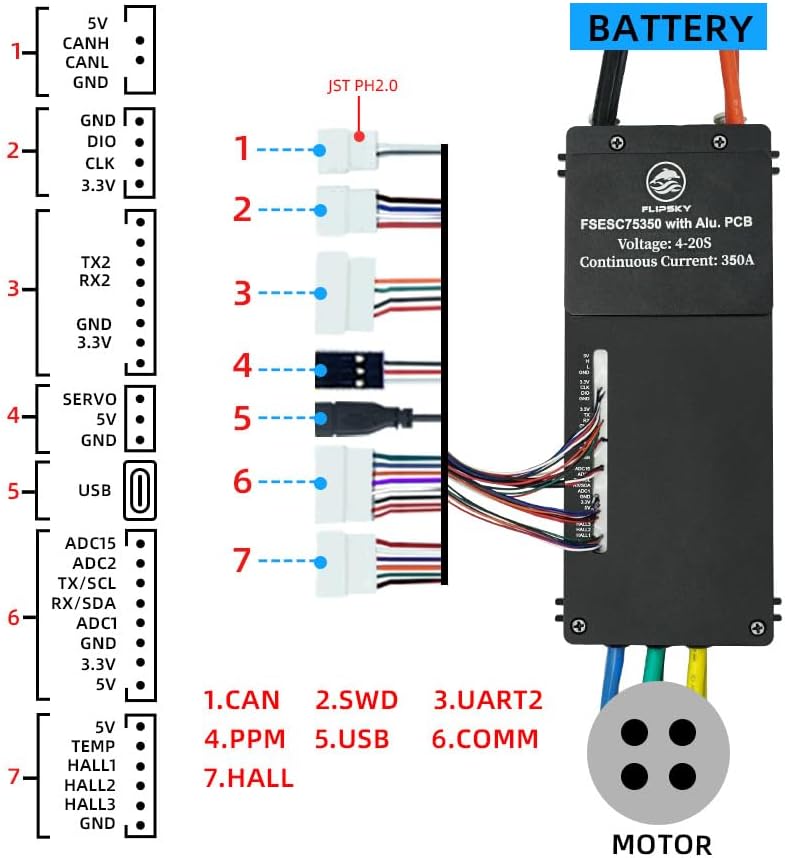
5.2 Initial Configuration (Firmware)
The FLIPSKY FSESC 75350 is based on VESC technology and requires configuration using the VESC_TOOL software. It is crucial to follow these guidelines:
- Firmware Version: It is strongly recommended to keep the factory-shipped firmware version 5.2. Upgrading to newer firmware versions may cause damage to the ESC.
- Phase Filter: If you must use firmware version 5.3 or above (VESC_TOOL 3.01), you must disable the phase filter function. Set this option to "false" within the VESC_TOOL. Failure to do so will result in ESC damage.
- Default Parameters: Do not restore default parameters when using the VESC_TOOL wizard interface, as this may overwrite critical settings.
Refer to the official VESC documentation and community resources for detailed instructions on using VESC_TOOL for motor detection and parameter tuning.
6. Operation
Once configured, the FSESC 75350 provides precise control over your motor. The ESC supports various input sources and communication protocols for flexible integration:
- Input Sources: PPM (Pulse Position Modulation), ADC (Analog-to-Digital Converter), NRF (Nordic Radio Frequency), UART (Universal Asynchronous Receiver/Transmitter), PAS (Pedal Assist System).
- Communication Ports: USB (for VESC_TOOL connection), CAN (Controller Area Network for multi-ESC setups), UART, SPI (Serial Peripheral Interface), IIC (Inter-Integrated Circuit).
The ESC allows for configurable limits on RPM, current, voltage, and power to protect your system and ensure safe operation. Real-time data analysis is available through the communication ports, enabling monitoring of motor revolution, ampere-hour, and watt-hour counting.
7. Maintenance
Proper maintenance ensures the longevity and reliable performance of your FLIPSKY FSESC 75350.
- Cooling: The aluminum alloy case and water cooling enclosure are designed for efficient heat dissipation. Ensure the water cooling system is properly connected and free of obstructions, especially during high-current operation.
- Inspection: Regularly inspect all electrical connections for tightness and signs of wear or corrosion. Replace any damaged wires or connectors immediately.
- Cleaning: Keep the ESC clean and free from dust, dirt, and moisture. Use a soft, dry cloth for cleaning. Avoid using solvents or harsh chemicals.
- Storage: When not in use for extended periods, store the ESC in a dry, cool environment.
8. Troubleshooting
If you encounter issues with your FLIPSKY FSESC 75350, consider the following troubleshooting steps:
- No Power: Verify battery connections, battery voltage, and ensure the power switch (if any) is on. Check for blown fuses in the power circuit.
- Motor Not Spinning:
- Check motor phase wire connections.
- Ensure sensor wires (if used) are correctly connected.
- Connect to VESC_TOOL and perform motor detection.
- Review input source settings (PPM, ADC, etc.) and ensure your controller is sending a valid signal.
- ESC Damage After Firmware Update: As warned, new firmware versions can cause issues. If this occurs, attempt to re-flash the recommended factory firmware 5.2. If unsuccessful, the ESC may be permanently damaged.
- Overheating: Ensure the water cooling system is functioning correctly. Reduce load or improve airflow if operating in high ambient temperatures. Check for short circuits in motor windings.
- Unstable Operation: Check for loose connections. Re-run motor detection in VESC_TOOL. Verify that the phase filter is disabled if using firmware 5.3 or higher.
For persistent issues, utilize the real-time data logging features of VESC_TOOL to gather diagnostic information. Consult online VESC communities or FLIPSKY support for advanced troubleshooting.
9. Warranty and Support
9.1 Warranty Information
The FLIPSKY FSESC 75350 comes with a warranty period of 2 months from the date of purchase. This warranty covers manufacturing defects under normal use conditions. Damage resulting from improper installation, incorrect firmware updates, misuse, abuse, or unauthorized modifications is not covered.
9.2 Customer Support
For technical assistance, warranty claims, or any questions regarding the FLIPSKY FSESC 75350, please contact FLIPSKY customer service through their official website or the retailer from whom the product was purchased. Please have your purchase details and product model number ready when contacting support.
