
1. Introduction
This manual provides essential information for the installation, operation, and maintenance of the Cisco Catalyst 9800-L Copper Uplink Wireless LAN Controller (Model C9800-L-C-K9). Please read this manual thoroughly before using the device to ensure proper functionality and safety.
2. Important Safety Information
Observe the following safety precautions to prevent injury and damage to the device:
- Ensure the device is installed in a well-ventilated area to prevent overheating.
- Use only the power supply specified for this device.
- Do not expose the device to moisture or extreme temperatures.
- Disconnect power before performing any maintenance or cleaning.
- Refer all servicing to qualified service personnel.
3. Package Contents
Verify that all items are present in the package:
- Cisco Catalyst 9800-L Wireless LAN Controller
- CD (containing documentation or software)
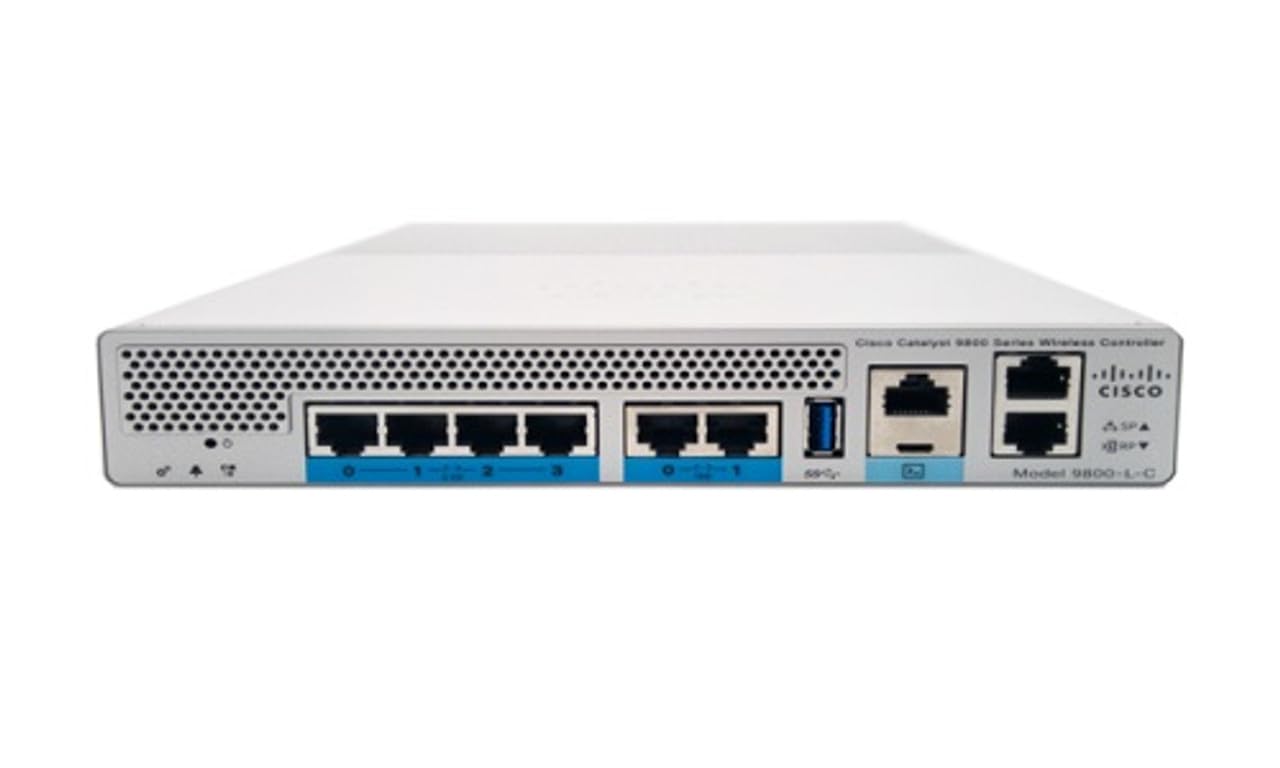
Figure 1: Front view of the Cisco Catalyst 9800-L Wireless LAN Controller. This image shows the compact design and port layout of the device.
4. Product Overview
The Cisco Catalyst 9800-L is a compact, fixed-configuration wireless LAN controller designed for small to medium-sized deployments. It provides centralized control for Cisco Aironet access points, offering robust wireless network management capabilities.
Key Features:
- Managed, Layer 2.5 (Wireless Controller) functionality
- Copper uplink interfaces
- RJ45 interface type
- 11 ports for connectivity
- Designed for desktop environments
5. Setup
5.1 Unpacking and Inspection
- Carefully remove the controller from its packaging.
- Inspect the device for any signs of physical damage. If damage is found, contact your supplier immediately.
5.2 Physical Installation
- Place the controller on a stable, flat surface, such as a desktop.
- Ensure adequate clearance around the device for proper airflow and ventilation.
5.3 Power Connection
- Connect the power cord to the power input on the rear of the controller.
- Plug the other end of the power cord into a grounded electrical outlet (220 Volts).
5.4 Network Connection
- Connect Ethernet cables from your network infrastructure to the RJ45 uplink ports on the controller.
- Connect access points to the appropriate downlink ports as required by your network design.
5.5 Initial Configuration Access
- Refer to the included CD or Cisco's official documentation for detailed instructions on initial console access and software configuration.
- Typically, this involves connecting a console cable to the device and using a terminal emulator.
6. Operating the Controller
6.1 Basic Operation
Once powered on and initially configured, the controller will begin managing connected access points. Monitor the status indicators on the device for operational status.
6.2 Access Point Management
The Cisco Catalyst 9800-L automatically discovers and provisions Cisco Aironet access points. Use the controller's management interface (CLI or GUI) to configure wireless networks, security policies, and guest access.
6.3 Network Configuration
Detailed network configuration, including VLANs, QoS, and routing, is performed through the controller's operating system. Consult Cisco's official documentation for advanced configuration guides.
7. Maintenance Guidelines
- Firmware Updates: Regularly check for and apply the latest firmware updates from Cisco to ensure optimal performance and security.
- Cleaning: Keep the device clean and free of dust. Use a soft, dry cloth for cleaning. Do not use liquid or aerosol cleaners.
- Environmental Conditions: Ensure the operating environment remains within specified temperature and humidity ranges to prevent hardware failure.
- Backup Configuration: Periodically back up your controller's configuration to prevent data loss.
8. Troubleshooting
This section addresses common issues you might encounter:
| Problem | Possible Cause | Solution |
|---|---|---|
| Controller not powering on | Power cable disconnected; Power outlet failure | Check power cable connections; Test power outlet with another device. |
| Access points not connecting | Incorrect network configuration; APs not discovered | Verify network settings on the controller; Ensure APs are on the same network segment or reachable via IP. |
| Slow wireless performance | Interference; Overloaded channels; Outdated firmware | Perform a site survey to identify interference; Optimize channel selection; Update controller and AP firmware. |
9. Technical Specifications
| Specification | Detail |
|---|---|
| Brand | Cisco |
| Model Number | C9800-L-C-K9 |
| Number of Ports | 11 |
| Interface | RJ45 |
| Switch Type | Managed, Layer 2.5 (Wireless Controller) |
| Platform | Zeta |
| Case Material Type | Copper |
| Voltage | 220 Volts |
| Compatible Devices | Desktop |
| Color | Blue |
| Item Weight | 3.09 Kilograms |
| UPC | 657768416101 |
| ASIN | B0C3FQPCY4 |
10. Warranty Information
This Cisco Catalyst 9800-L Wireless LAN Controller (Renewed) comes with a 90 days limited warranty. For specific terms and conditions, please refer to the warranty documentation provided with your purchase or contact your reseller.
11. Customer Support
For technical assistance, troubleshooting, or further inquiries regarding your Cisco Catalyst 9800-L Wireless LAN Controller, please visit the official Cisco support website or contact your authorized Cisco reseller. Ensure you have your model number (C9800-L-C-K9) and serial number available when seeking support.


