
1. Introduction
This manual provides detailed instructions for the assembly, operation, and maintenance of your ODK 54-inch L-Shaped Desk. Please read all instructions carefully before beginning assembly and retain this manual for future reference. This desk is designed for home office, study, bedroom, or living room use, offering a spacious work area, integrated storage, and an adjustable monitor stand.

Image 1.1: The ODK L-Shaped Desk with its integrated 5-tier shelf and monitor stand, set up in a home office environment.
2. Safety Instructions
- Always assemble the desk on a soft, clean surface to prevent scratches or damage.
- Ensure all screws and fasteners are securely tightened before use. Periodically check and re-tighten as necessary.
- Do not overload the desk or shelves. Refer to the specifications for weight limits.
- Keep small parts and packaging materials away from children and pets to prevent choking hazards.
- For ease and safety, assembly is recommended with two people.
- Avoid placing hot items directly on the desk surface without protection.
- Do not stand or sit on the desk or shelves.
3. Parts List
Before assembly, unpack all components and verify against the included parts list. If any parts are missing or damaged, contact customer support.
- Desk Boards: Main L-shaped desktop surfaces.
- Metal Frame Components: Various metal bars and legs for structural support.
- 5-Tier Shelf Boards: Individual shelves for the storage unit.
- Monitor Stand Components: Elevated platform and supports.
- Adjustable Foot Pads: For stability and leveling.
- Hardware: Screws, bolts, and Allen wrenches (specific quantities detailed in the packaging).
4. Assembly Instructions
Follow the steps below to assemble your ODK L-Shaped Desk. It is recommended to have a second person assist with assembly.
4.1. Video Assembly Guide
For a visual guide, please refer to the official assembly video:
Video 4.1: Detailed instruction guide for assembling the ODK L-Shaped Desk. This video demonstrates each step of the assembly process, including connecting frame components, installing shelves, and attaching the desktop boards.
4.2. Reversible Design Configuration
The L-shaped desk features a reversible design, allowing you to configure the 5-tier shelf on either the left or right side to best suit your space. Plan your desired orientation before attaching the main desktop boards.

Image 4.2: Illustration of the reversible L-shaped desk, demonstrating how the 5-tier shelf can be positioned on either the left or right side of the main desk.
4.3. Adjustable Foot Pads
The desk includes adjustable foot pads to ensure stability on uneven floors. Once the desk is fully assembled and in its desired location, rotate the foot pads at the bottom of each leg to level the desk and prevent wobbling.

Image 4.3: A close-up view of the adjustable foot pad, illustrating its function for leveling the desk on uneven surfaces.
5. Operating Instructions
5.1. Using the Monitor Stand
The integrated monitor stand is designed to elevate your monitor to an ergonomic height, improving your sitting posture. The stand offers three adjustable height options to suit individual preferences and monitor sizes.

Image 5.1: Visual representation of the monitor stand's three adjustable height settings (3.9, 5.1, and 6.3 inches), allowing for ergonomic customization.
5.2. Utilizing Storage Shelves
The desk includes a 5-tier storage shelf and additional 2-tier shelves under the main desktop. These are suitable for organizing books, printers, office supplies, and computer towers. Distribute weight evenly across the shelves.

Image 5.2: The 5-tier storage shelf, demonstrating its capacity for various items such as books, a printer, and potted plants.

Image 5.3: The 2-tier shelves located under the main desk, providing space for a computer tower or additional storage.
6. Maintenance
To maintain the appearance and longevity of your ODK L-Shaped Desk, follow these simple maintenance guidelines:
- Cleaning: Wipe the desk surface with a dry cloth. For spills, use a slightly damp cloth and dry immediately. Avoid harsh chemicals or abrasive cleaners.
- Hardware Check: Periodically inspect all screws and connections to ensure they remain tight. Re-tighten any loose hardware to maintain stability.
- Avoid Moisture: While the desk surface is designed to be water-resistant, prolonged exposure to moisture should be avoided. Wipe up spills promptly.
- Sunlight Exposure: Avoid direct and prolonged exposure to sunlight to prevent fading or discoloration of the desk surface.
7. Troubleshooting
- Wobbling Desk: If the desk wobbles, ensure all screws are tightened. Adjust the foot pads at the bottom of the legs to stabilize the desk on uneven surfaces.
- Difficulty during Assembly: If you encounter difficulty aligning parts or inserting screws, slightly loosen other screws in the vicinity to allow for minor adjustments, then re-tighten all screws once aligned.
- Missing Parts: If any parts are missing from the package, refer to the parts list and contact ODK customer support for assistance.
8. Specifications
| Feature | Detail |
|---|---|
| Brand | ODK |
| Model Number | ZJZ-DCZWJ |
| Product Dimensions (D x W x H) | 21.7"D x 53.9"W x 29.8"H |
| Color | Grey Oak |
| Material Type | Engineered Wood, Metal |
| Item Weight | 31 Kilograms |
| Number Of Shelves | 5 (on side unit) + 2 (under main desk) |
| Special Feature | L-shaped, Reversible, Adjustable Monitor Stand, Storage Shelves |
| Required Assembly | Yes |
| Recommended Number of People for Assembly | 1-2 |
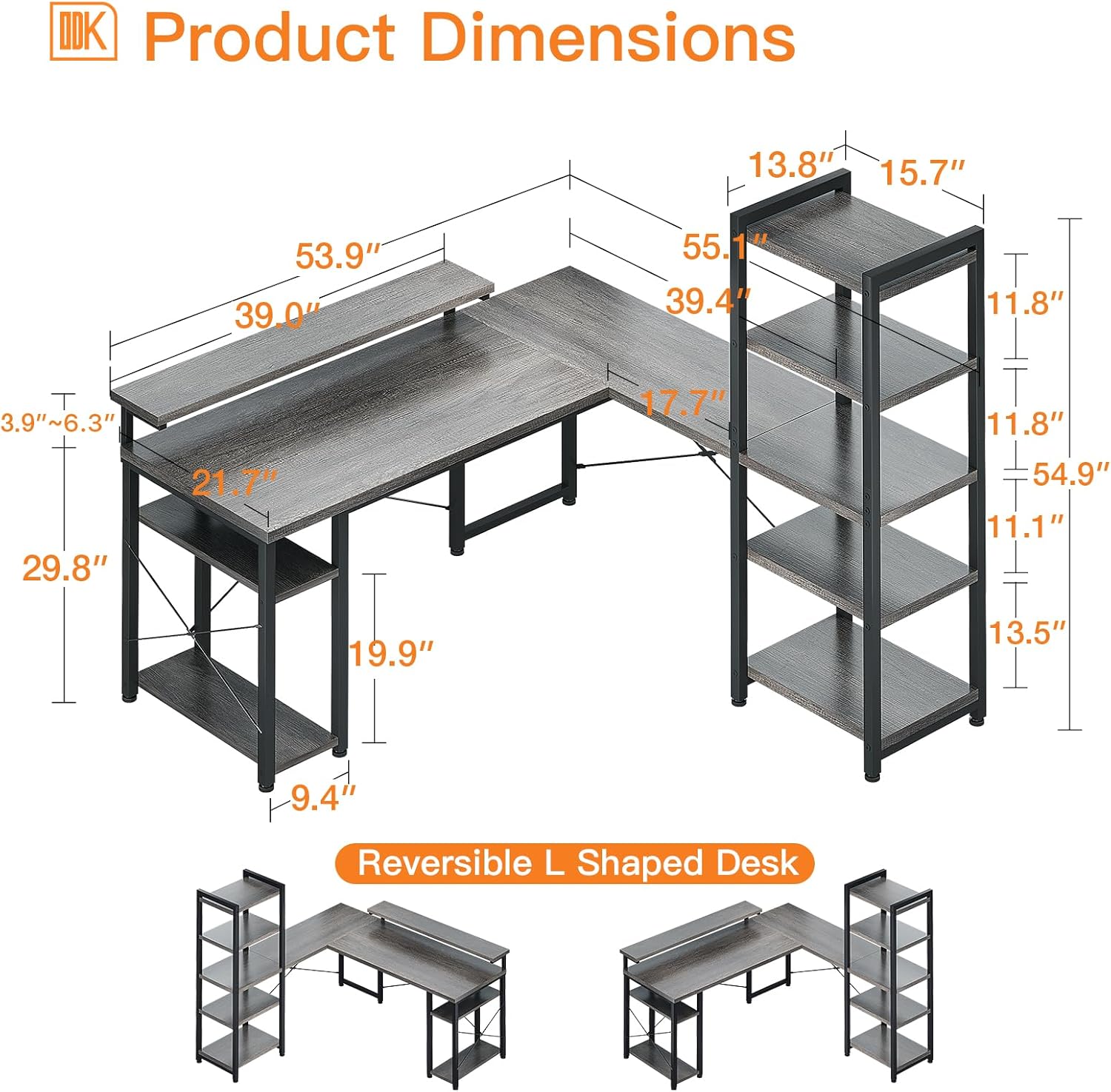
Image 8.1: Comprehensive product dimensions of the ODK L-Shaped Desk, including the main desktop and integrated shelving unit.
9. Warranty and Support
For any product problems, missing parts, or assembly assistance, please contact ODK customer support. Refer to your purchase documentation for specific warranty details. Your satisfaction is important to us.
Contact information can typically be found on the product packaging or the retailer's website where the desk was purchased.


