
1. Introduction
This manual provides essential information for the safe and efficient use of your Cecotec A2 Series ALU20065Z 65-inch 4K UHD Smart TV. This television features Android 11, a frameless design, a central base, MEMC technology, Dolby Vision, Dolby Atmos, HDR10, and two integrated 10W speakers, offering an immersive viewing and audio experience.
1.1. Package Contents
- 1 x Cecotec A2 Series ALU20065Z 65-inch 4K UHD Smart TV
- 2 x AAA Batteries
- 1 x Remote Control
- 1 x User Manual

2. Safety Information
Before operating the television, please read all safety instructions carefully. Keep this manual for future reference.
- Electrical Safety: Do not expose the TV to rain or moisture. Ensure the power cord is not damaged or pinched. Disconnect the power plug during lightning storms or when unused for long periods.
- Ventilation: Ensure adequate ventilation around the TV. Do not block ventilation openings. Avoid placing the TV on soft surfaces that may block airflow.
- Placement: Place the TV on a stable, level surface. Avoid direct sunlight, heat sources, or extreme temperatures. Keep away from water and high humidity.
- Cleaning: Unplug the TV before cleaning. Use a soft, dry cloth. Do not use liquid or aerosol cleaners.
- Handling: Handle the TV with care. Two people are recommended for lifting and moving the 65-inch model.
3. Setup
3.1. Unpacking
Carefully remove the TV from its packaging. Retain the packaging materials for potential future transport or service.
3.2. Stand Installation
To install the central stand:
- Place the TV face down on a soft, flat surface to prevent screen damage.
- Align the stand with the mounting holes on the bottom of the TV.
- Secure the stand using the provided screws. Ensure it is firmly attached.

3.3. Wall Mounting (Optional)
If you choose to wall mount your TV, ensure you use a VESA-compatible wall mount kit (not included) appropriate for the TV's size and weight. Professional installation is recommended to ensure safety and proper mounting.
3.4. Connecting Peripherals
Connect your devices to the TV using the available ports:
- Power: Connect the power cord to the TV and then to a wall outlet.
- HDMI: Use HDMI cables to connect external devices such as Blu-ray players, game consoles, or set-top boxes. This TV features 3 HDMI ports.
- Network: Connect to your home network via Wi-Fi for Smart TV functionalities.
4. Operating Instructions
4.1. First-Time Setup
Upon first power-on, the TV will guide you through the initial setup process. This includes selecting your language, connecting to Wi-Fi, and signing in with your Google account to access Android TV features and the Google Play Store.

4.2. Basic TV Functions
- Power On/Off: Press the power button on the remote control or the TV.
- Volume Control: Use the Volume Up/Down buttons on the remote.
- Channel Selection: Use the Channel Up/Down buttons or the numeric keypad.
- Input Source: Press the 'Source' button on the remote to switch between HDMI inputs, TV tuner, and other connected devices.
4.3. Smart TV Features
Your Cecotec Smart TV offers advanced features for an enhanced entertainment experience:
- Android 11: Access a vast library of apps, games, and streaming services through the Google Play Store.
- Chromecast Built-in: Easily cast content from your smartphone, tablet, or computer directly to your TV.
- Dolby Vision & HDR10: Experience stunning visuals with enhanced contrast, brightness, and color accuracy.


- Dolby Atmos: Enjoy immersive, multi-dimensional audio that flows around you.

- MEMC (Motion Estimation, Motion Compensation): Reduces motion blur and image judder, especially in fast-paced scenes, for smoother viewing.

5. Maintenance
Proper maintenance ensures the longevity and optimal performance of your TV.
- Screen Cleaning: Gently wipe the screen with a soft, lint-free cloth. For stubborn marks, slightly dampen the cloth with water or a specialized screen cleaner (never spray directly onto the screen).
- Body Cleaning: Wipe the TV's frame and back panel with a soft, dry cloth.
- Dust Removal: Regularly dust the ventilation slots to prevent overheating.
- Remote Control: Replace batteries when the remote's response becomes sluggish. Ensure correct polarity when inserting new batteries.
6. Troubleshooting
If you encounter issues with your TV, refer to the table below for common problems and solutions.
| Problem | Possible Cause | Solution |
|---|---|---|
| TV does not turn on | No power supply | Check if the power cord is securely plugged into the TV and the wall outlet. Test the outlet with another device. |
| No picture, but sound is present | Incorrect input source or faulty cable | Press the 'Source' button on the remote to select the correct input. Check HDMI or other video cables for secure connection and damage. |
| No sound, but picture is present | Volume muted or external audio system issue | Check if the volume is muted or too low. If using external speakers, ensure they are properly connected and powered on. |
| Remote control not working | Dead batteries or obstruction | Replace the AAA batteries. Ensure there are no obstructions between the remote and the TV's IR sensor. |
| Wi-Fi connection issues | Router problem or incorrect password | Restart your Wi-Fi router. Re-enter the Wi-Fi password in the TV's network settings. Ensure the TV is within range of the router. |
| Smart TV apps not loading | Network issue or app malfunction | Check your internet connection. Try restarting the TV. If the issue persists for a specific app, try clearing its cache or reinstalling it. |
7. Specifications
Key technical specifications for the Cecotec A2 Series ALU20065Z 65-inch 4K UHD Smart TV:
| Feature | Value |
|---|---|
| Brand | Cecotec |
| Screen Size | 65 Inches |
| Display Technology | LED |
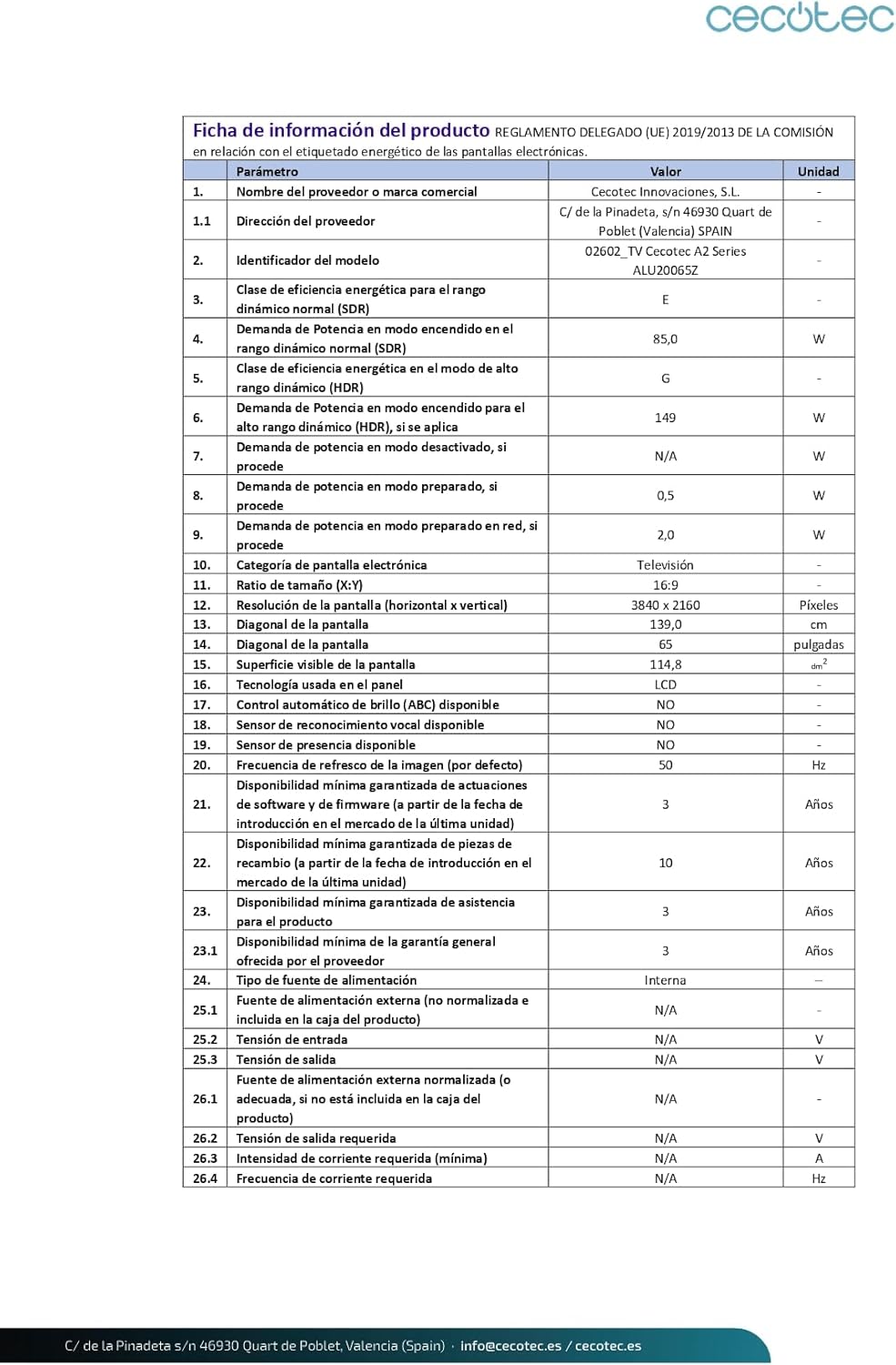
| Resolution | 4K Ultra HD (3840 x 2160) |
| Refresh Rate | 60 Hz |
| Operating System | Android 11 |
| Special Features | Chromecast Built-in, Dolby Vision, Dolby Atmos, HDR10, MEMC |
| Connectivity | Wi-Fi, 3 HDMI Ports |
| Audio Output | 2 x 10W Speakers |
| Product Dimensions (L x W x H) | 145.2 x 7.2 x 90.6 cm (with stand) |
| Weight | 33 Kilograms |
| Model Number | 02614 |
| Energy Efficiency Class | E |
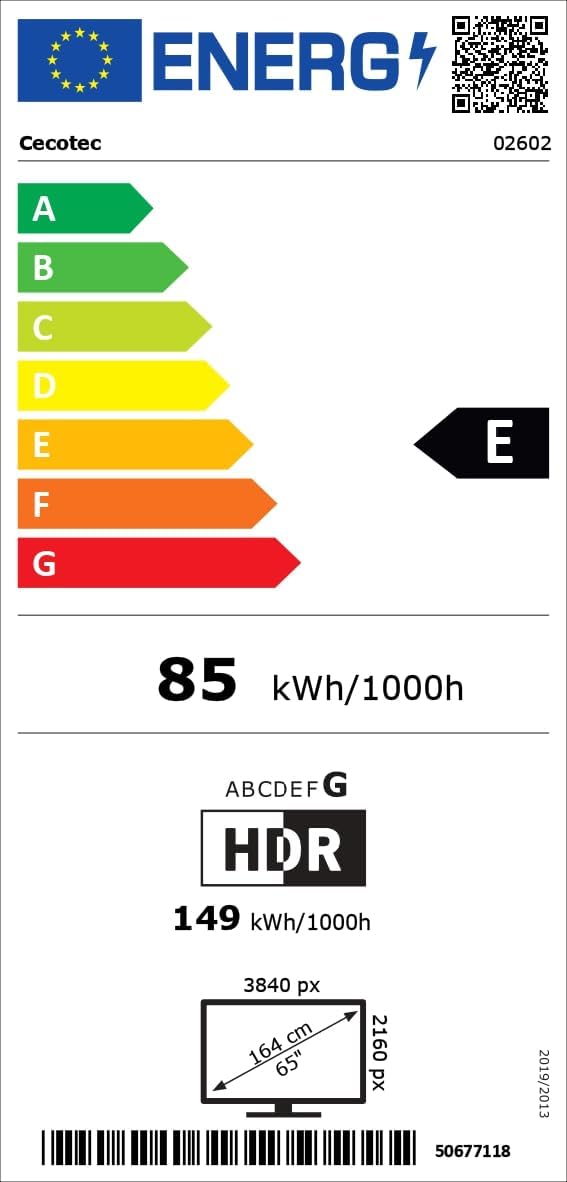
For detailed energy information, please refer to the EPREL database: https://eprel.ec.europa.eu/qr/1483852
8. Warranty and Support
Your Cecotec A2 Series ALU20065Z 65-inch 4K UHD Smart TV comes with a 3-year manufacturer's warranty. Additionally, spare parts are available for a period of 10 years from the date of purchase.
For further assistance, technical support, or to explore other Cecotec products, please visit the official Cecotec store on Amazon: Cecotec Amazon Store.