
FLYLINKTECH JF-H-40DC
FLYLINKTECH 2-in-1 Folding Treadmill User Manual
Model: JF-H-40DC
Brand: FLYLINKTECH
1. Important Safety Information
Please read this entire manual carefully before operating the FLYLINKTECH 2-in-1 Folding Treadmill. Retain this manual for future reference. Failure to follow these instructions could result in injury or damage to the product.
- Always place the treadmill on a flat, stable surface.
- Ensure there is at least 6 feet (1.8 meters) of clear space behind the treadmill and 2 feet (0.6 meters) on each side.
- Keep children and pets away from the treadmill during operation.
- The maximum user weight capacity for this treadmill is 380 lbs (172 kg). Do not exceed this limit.
- Always attach the safety key clip to your clothing before starting the treadmill. In case of an emergency, pulling the safety key will immediately stop the machine.
- Do not operate the treadmill if it is damaged or malfunctioning. Contact customer support.
- Wear appropriate athletic footwear and clothing during use.
- Consult a physician before starting any new exercise program.
2. Product Overview
The FLYLINKTECH 2-in-1 Folding Treadmill offers versatile exercise options, functioning as both an under-desk walking pad and a traditional running treadmill with a handle. It features a powerful 2.25HP motor, LED display, app connectivity, and remote control for convenient operation.

Figure 2.1: The FLYLINKTECH 2-in-1 Folding Treadmill, showcasing its dual functionality for walking and running.
3. Setup and Assembly
Your FLYLINKTECH treadmill comes largely pre-assembled. Follow these steps to prepare it for use:
- Unboxing: Carefully remove the treadmill from its packaging. Retain all packing materials in case of return or future transport.
- Placement: Place the treadmill on a firm, level surface, ensuring adequate clearance around the unit as described in the safety section.
- Unfolding the Handlebar (for Running Mode):
- Locate the locking pins or knobs on the sides of the handlebar base.
- Release the pins/knobs and carefully lift the handlebar into the upright position until it locks securely into place. Ensure both sides are fully locked.
- Power Connection: Plug the power cord into a grounded electrical outlet.
- Safety Key: Attach the safety key to the designated slot on the console. The treadmill will not operate without the safety key in place.

Figure 3.1: The treadmill's folding design allows for easy movement and compact storage, such as under a sofa, requiring only 4 inches of vertical space when folded flat.
4. Operating Instructions
4.1. Treadmill Modes
The treadmill supports two primary modes of operation:
- Walking Mode (Under-Desk): When the handlebar is folded down, the treadmill operates in walking mode, with a speed range typically from 0.6 MPH to 4 MPH (1 Km/H to 4 Km/H). This mode is ideal for light exercise or use with a standing desk.
- Running Mode: When the handlebar is in the upright position, the treadmill operates in running mode, allowing for higher speeds, typically up to 12 MPH (14 Km/H). This mode provides stability and support for more intense workouts.

Figure 4.1: Visual representation of the treadmill in Running Mode (handlebar up, higher speeds) and Walking Mode (handlebar down, lower speeds).
4.2. Control Panel and LED Display
The integrated LED display provides real-time workout data. The control panel allows for easy adjustment of settings.
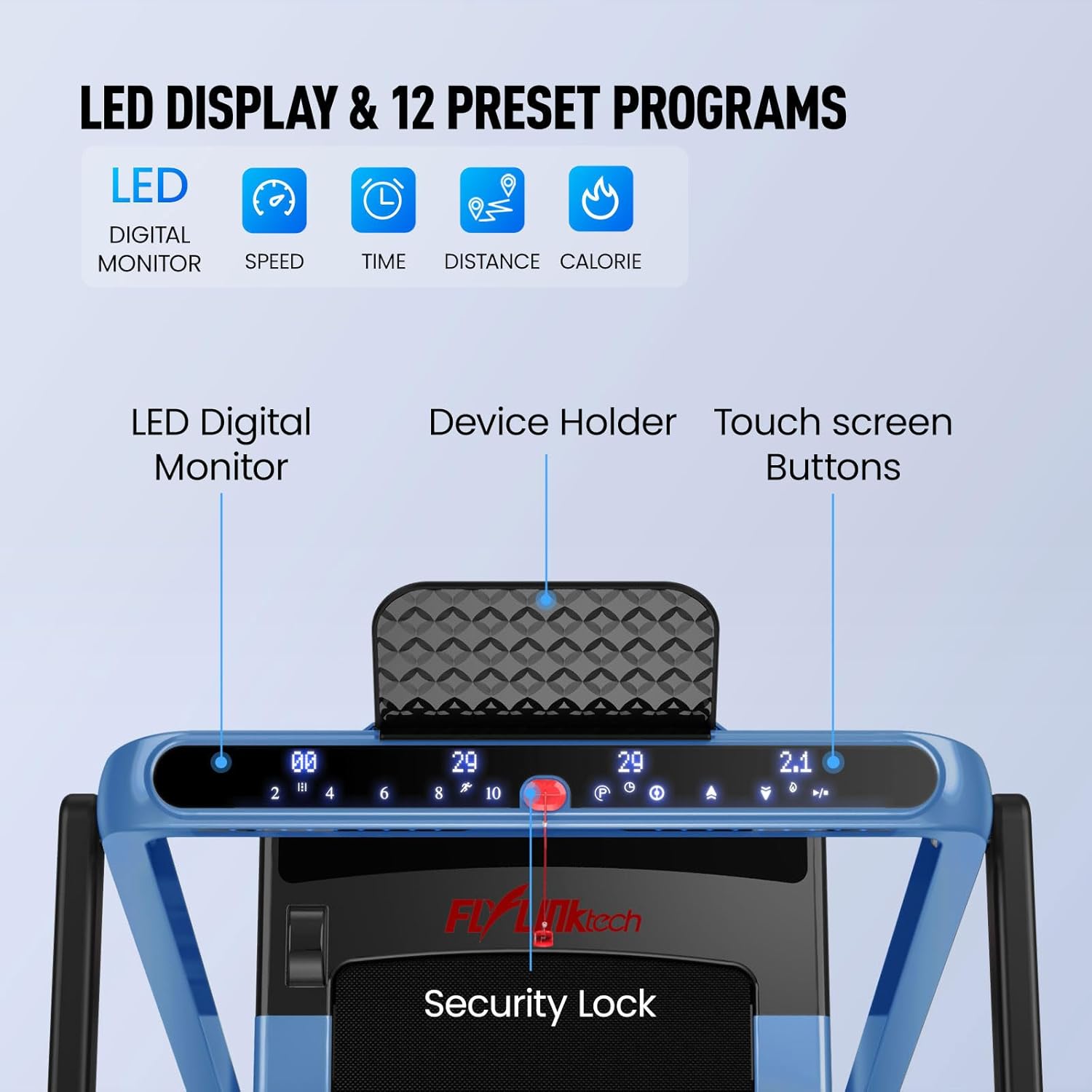
Figure 4.2: Detailed view of the LED Digital Monitor, device holder, touch screen buttons, and safety lock on the treadmill console. The display shows speed, time, distance, and calories.
- Start/Stop Button: Press to start or stop the treadmill belt.
- Speed Adjustment: Use the '+' and '-' buttons to increase or decrease the belt speed. Quick speed buttons may also be available for preset speeds.
- Program Selection: The treadmill includes 12 preset programs. Use the 'P' button to cycle through available programs.
- Display Modes: The LED display cycles through various metrics including Speed, Time, Distance, and Calories burned.
4.3. Remote Control and App Connectivity
For added convenience, the treadmill can be controlled via a remote control or a dedicated mobile application.
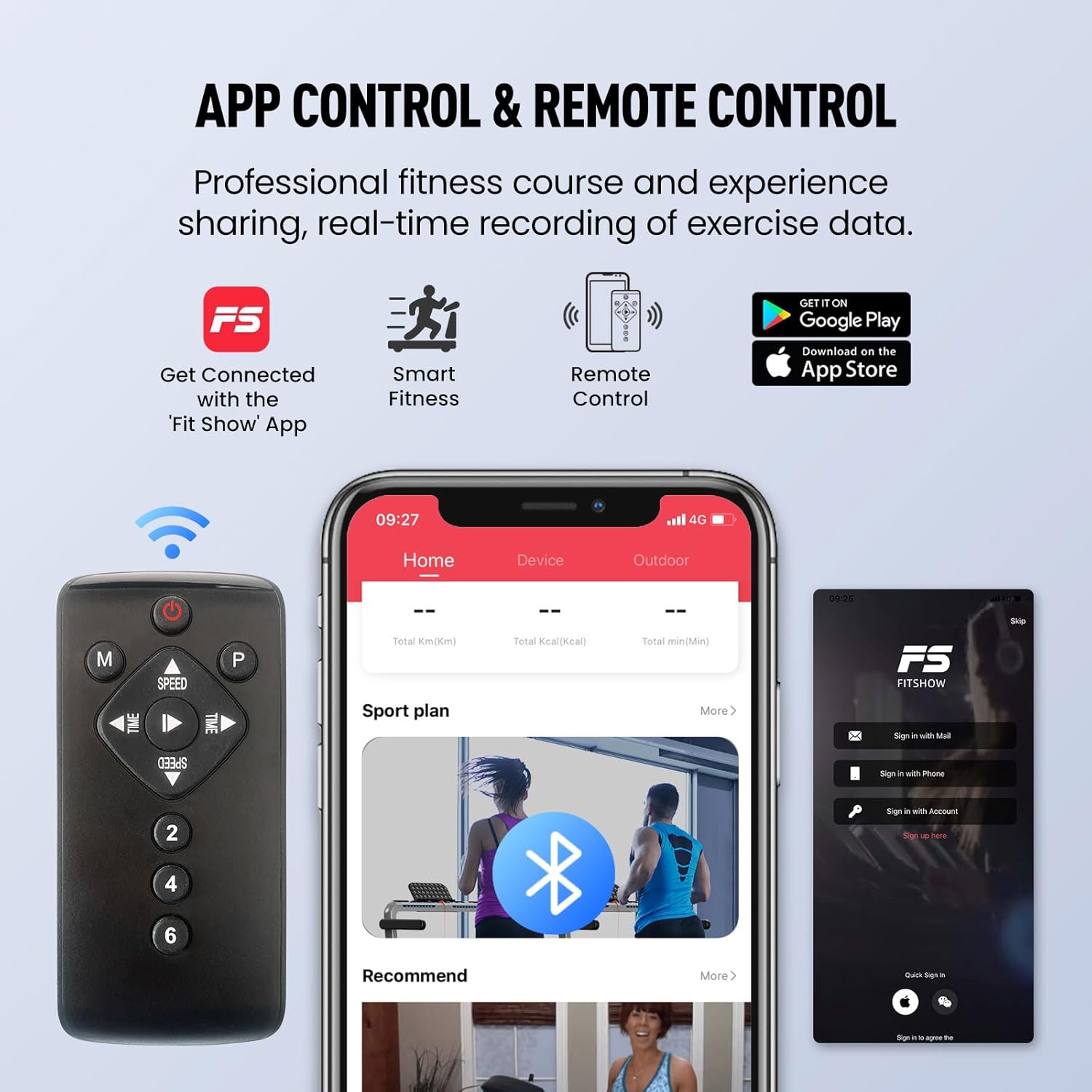
Figure 4.3: The treadmill can be controlled via the included remote or through the 'Fit Show' app, available on Google Play and the App Store, allowing for real-time data recording and fitness course access.
- Remote Control: Use the remote to start/stop the treadmill, adjust speed, and select programs.
- Mobile App ('Fit Show'): Download the 'Fit Show' app from your device's app store. Connect the treadmill via Bluetooth. The app allows for comprehensive control, tracking of exercise data, and access to professional fitness courses.
5. Maintenance
Regular maintenance ensures the longevity and optimal performance of your treadmill.
- Cleaning: Wipe down the treadmill surfaces with a damp cloth after each use. Avoid abrasive cleaners or solvents.
- Belt Lubrication: The running belt requires periodic lubrication to reduce friction and extend its lifespan. Refer to the specific instructions provided with your lubrication oil for frequency (typically every 3-6 months depending on usage).
- Belt Tension and Alignment: Check the running belt for proper tension and alignment regularly. If the belt slips or drifts to one side, adjust it according to the instructions in the troubleshooting section or contact customer support.
- Motor Area: Periodically vacuum the area around the motor to remove dust and debris, ensuring proper ventilation.
6. Troubleshooting
If you encounter issues with your treadmill, refer to the following common problems and solutions:
| Problem | Possible Cause | Solution |
|---|---|---|
| Treadmill does not start. | Power cord not plugged in, safety key not in place, circuit breaker tripped. | Ensure power cord is securely plugged in. Check safety key is fully inserted. Reset circuit breaker if tripped. |
| Running belt slips. | Belt too loose, belt worn out, excessive user weight. | Adjust belt tension (refer to specific instructions for tensioning screws). If worn, contact customer support for replacement. Ensure user weight is within limits. |
| Running belt drifts to one side. | Belt misalignment. | Adjust belt alignment using the rear roller adjustment bolts. Turn the bolt on the side the belt is drifting towards clockwise in small increments (e.g., 1/4 turn) and test. Repeat until centered. |
| Unusual noise from motor area. | Loose components, debris in motor housing, motor issue. | Unplug the treadmill. Check for any loose screws or visible debris. If noise persists, contact customer support. |
| Display not working or showing error codes. | Loose connection, sensor issue, electronic malfunction. | Turn off and unplug the treadmill for 5 minutes, then plug back in. If error persists, note the error code and contact customer support. |
7. Specifications
Key technical specifications for the FLYLINKTECH 2-in-1 Folding Treadmill:
| Feature | Detail |
|---|---|
| Motor Horsepower | 2.25 HP (Peak) |
| Speed Range (Walking Mode) | 0.6 - 4 MPH (1 - 4 Km/H) |
| Speed Range (Running Mode) | 0.6 - 12 MPH (1 - 14 Km/H) |
| Maximum Weight Capacity | 380 lbs (172 kg) |
| Running Area (L x W) | 40 inches x 16 inches (101.6 cm x 40.6 cm) |
| Noise Level | Below 60 dB (Low Noise Motor) |
| Number of Programs | 12 Preset Programs |
| Display Type | LED Digital Monitor (3 Inches Screen Size) |
| Connectivity | Bluetooth (for App Control) |
| Frame Material | Alloy Steel |
| Folded Dimensions (Approx.) | 55.6 x 30 x 6.25 inches (L x W x H) |
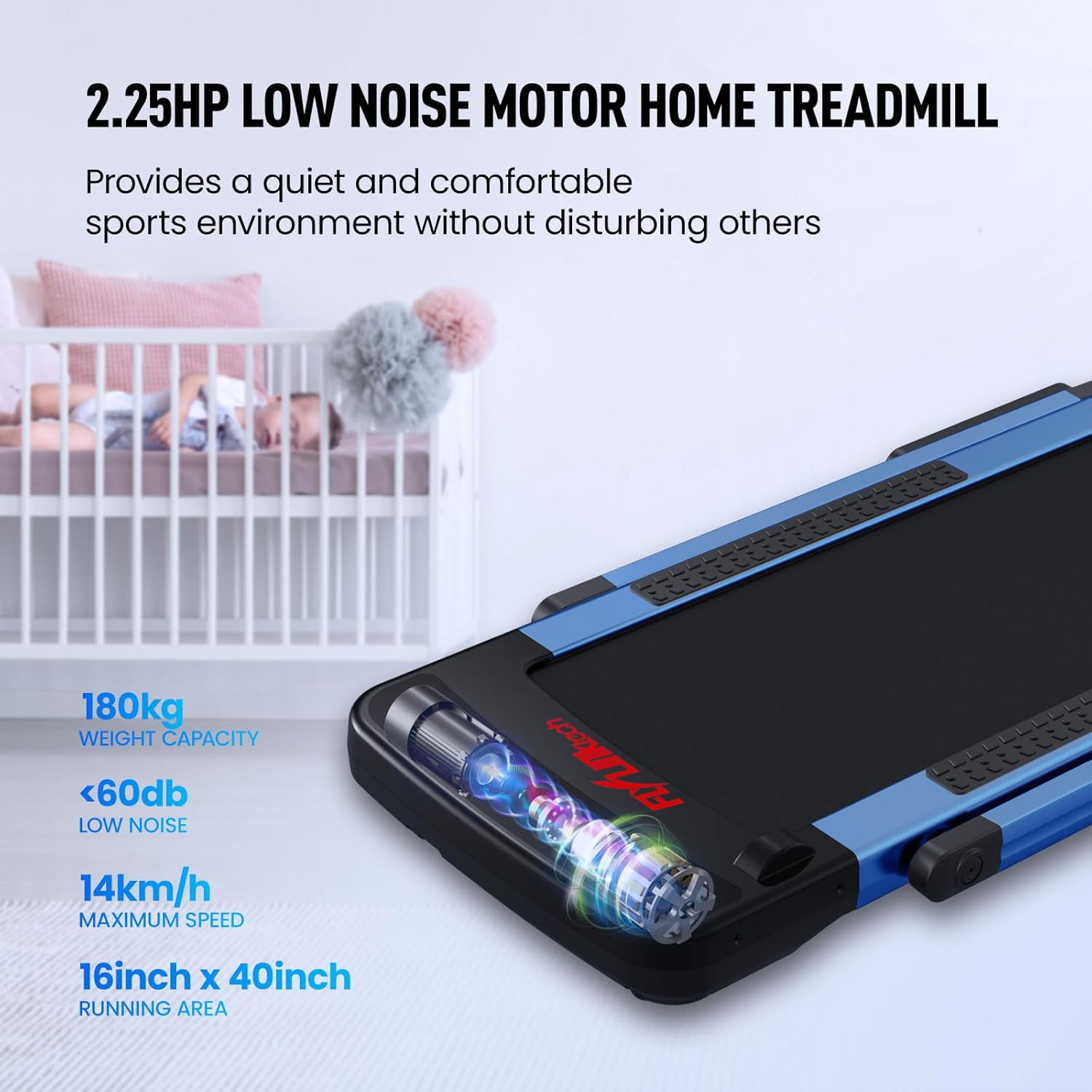
Figure 7.1: The 2.25HP low noise motor ensures a quiet workout environment, operating below 60dB.
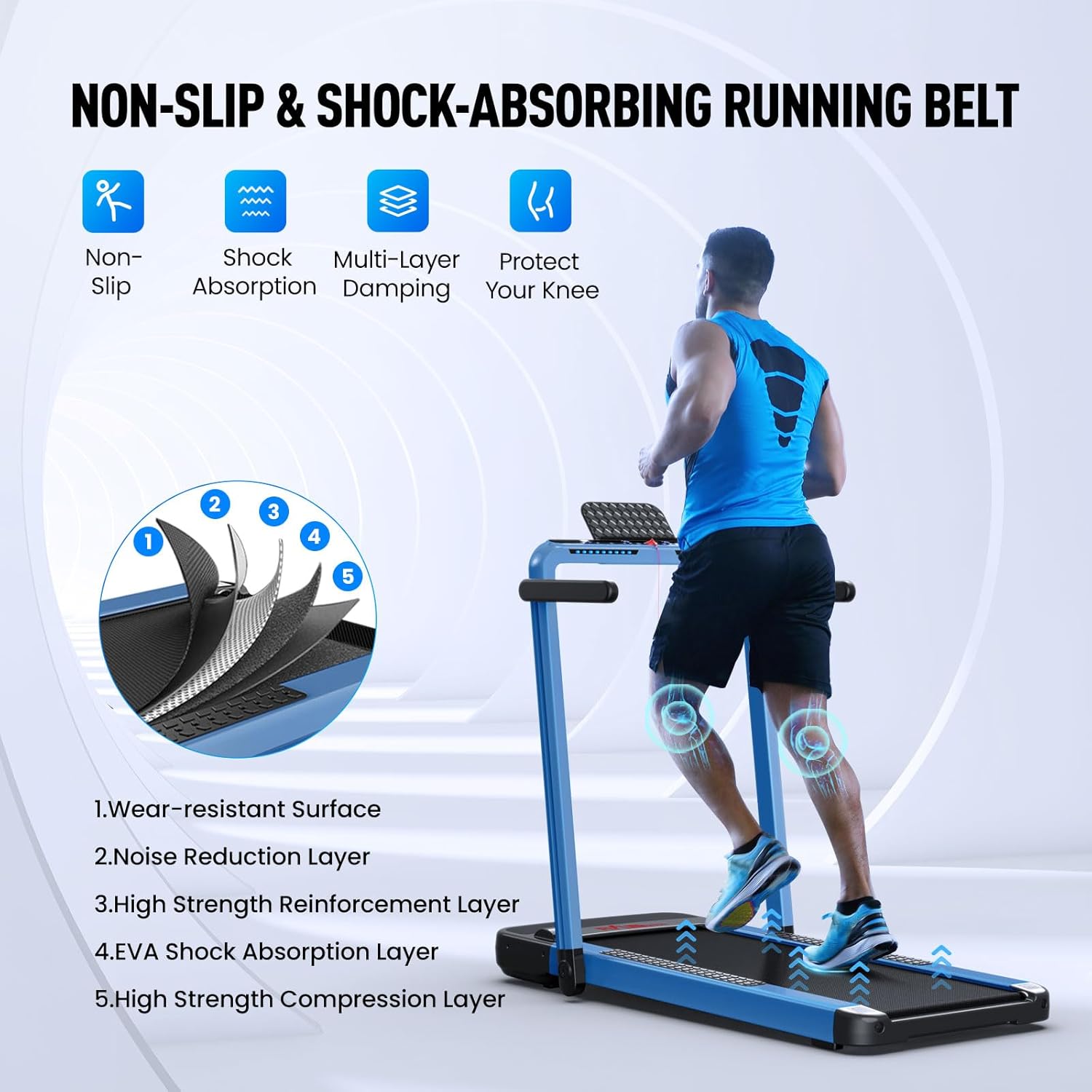
Figure 7.2: The non-slip and shock-absorbing running belt features multiple layers, including wear-resistant surface, noise reduction, high strength reinforcement, EVA shock absorption, and compression layers, designed to protect your knees.
8. Warranty and Support
FLYLINKTECH is committed to providing high-quality products. This treadmill comes with a manufacturer's warranty. For specific warranty details, claims, or technical support, please refer to the warranty card included with your product or contact FLYLINKTECH customer service directly.
You can often find contact information on the official FLYLINKTECH website or through your purchase platform.
Ask a question about this manual
Ask about setup, troubleshooting, compatibility, parts, safety, or missing instructions. Manuals+ will review the question and use this page’s manual context to help answer it.