
inruwo WR60X26866
Refrigerator Evaporator Fan Motor Instruction Manual
Brand: inruwo | Model: WR60X26866
Introduction
This instruction manual provides essential information for the installation, operation, and maintenance of your new inruwo Refrigerator Evaporator Fan Motor, model WR60X26866. This component is designed to replace original parts in various GE refrigerator models, addressing common issues such as freezing, poor heat dissipation, and noisy evaporator fans. Proper installation and care will ensure optimal performance and longevity of your refrigerator.
Safety Information
Always prioritize safety when working with electrical appliances. Failure to follow these safety guidelines may result in electric shock, injury, or damage to the appliance.
- Disconnect Power: Always unplug the refrigerator from the power outlet before attempting any installation, maintenance, or repair.
- Wear Protective Gear: Use appropriate personal protective equipment, such as gloves and safety glasses, to prevent injury.
- Professional Assistance: If you are unsure about any step or uncomfortable performing the repair, consult a qualified appliance technician.
- Handle with Care: The fan blades can be sharp. Handle the motor carefully to avoid cuts.
- Proper Disposal: Dispose of old parts responsibly according to local regulations.
Product Overview
What's in the Box
- 1 x Refrigerator Evaporator Fan Motor (Model: WR60X26866)
Key Features
- Direct replacement for various GE refrigerator models.
- Designed to address common issues such as abnormal refrigerator temperature, noisy evaporator fan, poor heat dissipation, and evaporator coil freezing.
- Upgraded design ensures proper function and compatibility.
- Ensures normal refrigerator operation by circulating air over the evaporator coils.
Specifications
| Product Dimensions | 3.15 x 1.15 x 3.15 inches |
| Item Weight | 0.23 Kilograms (8.15 ounces) |
| Model Number | WR60X26866 |
| Material | Plastic |
| Manufacturer | inruwo |
| Country of Origin | China |

Image: Detailed dimensions of the evaporator fan motor, showing 3.15 inches by 3.15 inches by 1.15 inches.
Compatible Models
This evaporator fan motor is compatible with a wide range of GE refrigerator models. Please verify your refrigerator's model number against the list below to ensure compatibility.
CFE28 Series:
- CFE28USHLSS, CFE28USHBSS, CFE28TSHFSS, CFE28TSHRSS, CFE28TP4MCW2, CFE28TP2MCS1, CFE28TSHESS, CFE28UP2MBS1, CFE28USHCSS, CFE28USHESS, CFE28TSHMSS, CFE28USHJSS, CFE28TSHGSS, CFE28TSHKSS, CFE28TSHOSS, CFE28UP3MBD1, CFE28UP3MCD1, CFE28USHNSS, CFE28TP3MCD1, CFE28TSHPSS, CFE28UELEDS, CFE28TSHJSS, CFE28USHGSS, CFE28USHFSS, CFE28UELCDS, CFE28USHKSS, CFE28TP3MBS1, CFE28TP4MBW2, CFE28GMKIES, CFE28TP3MCS1, CFE28TSHNSS, CFE28TP3MBW2
GNE29 Series:
- GNE29GGHDWW, GNE29GGHDBB, GNE29GGKCWW, GNE29GSKCSS, GNE29GGKEBB, GNE29GMHDES, GNE29GSHDSS, GNE29GMKFES, GNE29GGKBBB
PFD28 Series:
- PFD28KBLBTS, PFD28LBLCTS, PFD28KBLFTS, PFD28KBLGTS, PFD28KBLHTS, PFD28KELBDS, PFD28KMLBES, PFD28KSLBSS, PFD28KSLFSS, PFD28KSLGSS, PFD28KSLHSS
PFE28 Series:
- PFE28KBLGTS, PFE28PSKJSS, PFE28KMKKES, PFE28KSKESS, PFE28PMKHES, PFE28RSHHSS, PFE28PMKKES, PFE28PBLETS, PFE28PELDDS, PFE28KSKKSS, PFE28PBLCTS, PFE28RSHFSS, PFE28KMKLES, PFE28KSKJSS, PFE28PSKESS, PFE28KMKEES, PFE28KMKBES, PFE28PSKBSS, PFE28PSKKSS, PFE28PMKBES, PFE28SKSCSS, PFE28PSKHSS, PFE28PMKEES, PFE28PELBDS, PFE28KBLBTS
GFE26 Series:
- GFE26GSHFSS, GFE26GSKJSS, GFE26GSKCSS, GFE26GMHFES, GFE26GMKJES, GFE26GGKIWW, GFE26GGKCBB, GFE26GGKGBB, GFE26GGKBBB, GFE26GGHEWW, GFE26GGKFBB, GFE26GSHGSS, GFE26GMHEES, GFE26GSKFSS, GFE26GGKFWW, GFE26GGKEWW, GFE26GSKKSS, GFE26GMHGES, GFE26GMKFES, GFE26GMKCES, GFE26GGHEBB, GFE26GGKEBB, GFE26GMKIES, GFE26GGKBWW, GFE26GGHGWW, GFE26GMKGES, GFE26GSKGSS, GFE26GSKHSS
GFE28 Series:
- GFE28HGHCWW, GFE28GMKCES, GFE28HMHGES, GFE28GGKCWW, GFE28GGKEWW, GFE28GSKCSS, GFE28CMKEES, GFE28HMKKES, GFE28HSHESS, GFE28GMKJES, GFE28HGHDBB, GFE28HGHDWW, GFE28HSKFSS, GFE28HSKISS, GFE28HMHEES, GFE28HMKIES, GFE28HSKBSS, GFE28HSHGSS, GFE28HMKFES, GFE28HSKESS, GFE28GGKBBB, GFE28HSKKSS, GFE28HMKEES, GFE28GMKBES, GFE28GSKBSS
ZWE23 Series:
- ZWE23PSHDSS, ZWE23ESHPSS, ZWE23ESHLSS, ZWE23ESHMSS, ZWE23ESHQSS, ZWE23PSHNSS, ZWE23PSHJSS, ZWE23PSHPSS, ZWE23ESHFSS, ZWE23PSHMSS, ZWE23PSHQSS, ZWE23ESHJSS, ZWE23ESHNSS, ZWE23ESHISS, ZWE23PSHLSS, ZWE23PSHFSS, ZWE23PSHESS, ZWE23PSHISS, ZWE23ESHESS, ZWE23ESHHSS
PYD22 Series:
- PYD22KBLBTS, PYD22KBLCTS, PYD22KBLFTS, PYD22KBLGTS, PYD22KBLHTS, PYD22KELBDS, PYD22KMLBES, PYD22KSLBSS, PYD22KSLCSS, PYD22KSLFSS
Also compatible with: CWE23SSHISS, CYE22TP3MBD1, CYE22TSHPSS, CYE22USHOSS, DFE28JBLETS, DFE28JMKFES, GFD28GSLBSS, GFE26GMKJES, GYE22HMKEES, PFE28KELFDS, PWE23KSKDSS, PYE22KSKBSS, ZWE23PSHESS.
Installation Guide
Replacing the evaporator fan motor requires careful attention. The following steps are general guidelines. Always refer to your specific refrigerator model's service manual or a reputable online tutorial for detailed, model-specific instructions.
- Prepare for Installation:
- Disconnect Power: Unplug the refrigerator from the wall outlet. This is a critical safety step.
- Empty Freezer Compartment: Remove all food items and shelves from the freezer compartment to gain access to the evaporator cover.
- Access the Evaporator Fan:
- Locate and remove the screws holding the evaporator cover in place. These are typically at the top or bottom of the cover.
- Carefully detach the evaporator cover. It may be held by clips in addition to screws.
- You will now see the evaporator coils and the fan assembly.
- Remove the Old Fan Motor:
- Disconnect the wiring harness from the old fan motor.
- Unscrew or unclip the old fan motor from its mounting bracket. Note how it is oriented.
- Carefully remove the old fan motor and fan blade. You may need to gently pry the fan blade off the motor shaft.
- Install the New Fan Motor:
- Attach the fan blade to the shaft of the new motor. Ensure it is securely seated and facing the correct direction for airflow.
- Mount the new fan motor onto the bracket, securing it with screws or clips as per the original setup.
- Connect the wiring harness to the new fan motor. Ensure the connection is firm.
- Reassemble the Refrigerator:
- Carefully reattach the evaporator cover, ensuring all clips and screws are secured.
- Replace shelves and food items in the freezer compartment.
- Plug the refrigerator back into the power outlet.
- Test Operation:
- Listen for the fan motor to start running. The refrigerator should begin cooling normally.
- Monitor the refrigerator's temperature over the next few hours to ensure it reaches and maintains the desired temperature.
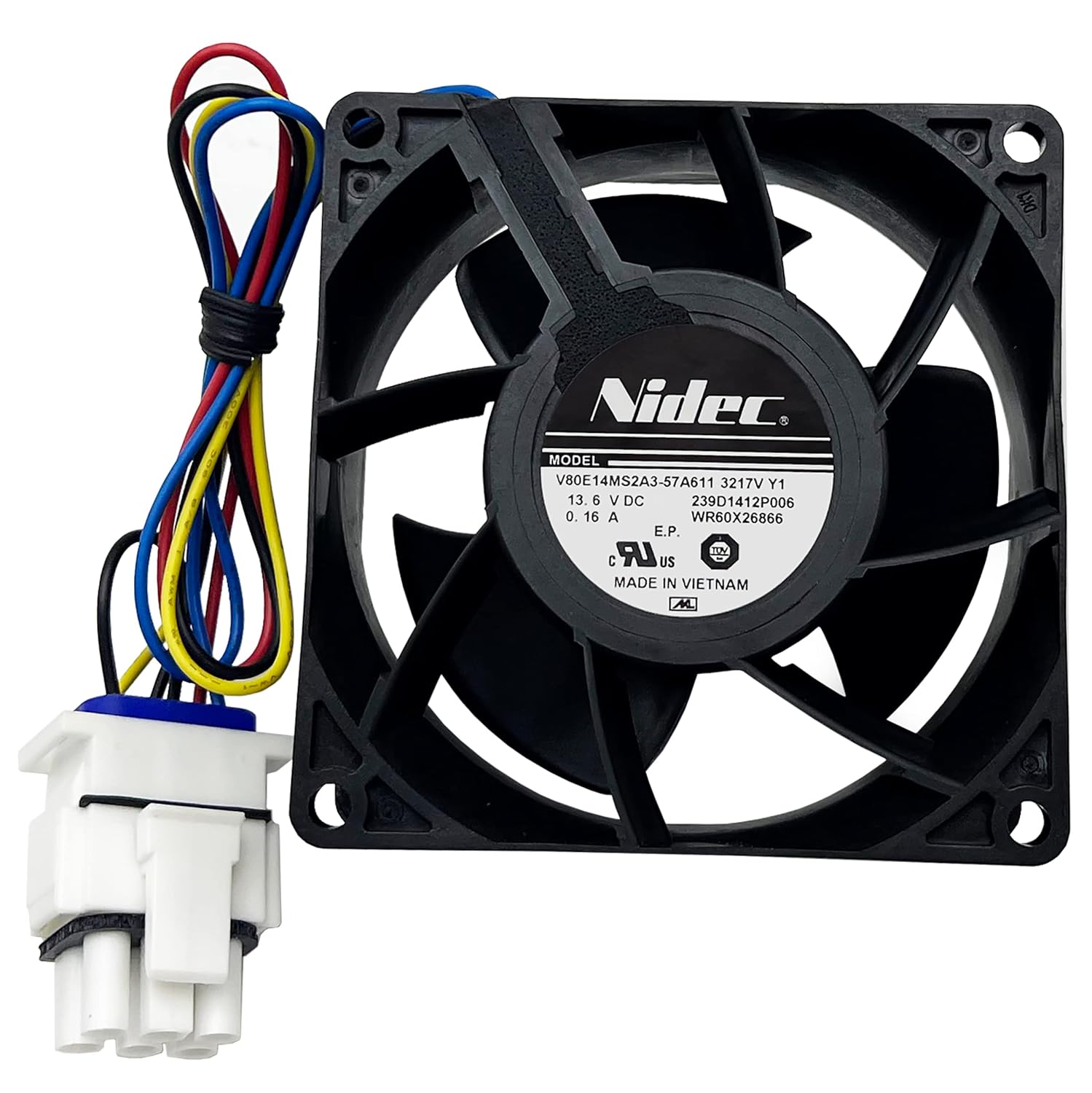
Image: Front view of the evaporator fan motor, showing the fan blades, motor housing, and attached multi-colored wiring harness with a white connector.

Image: Angled view of the evaporator fan motor, highlighting the Nidec branding and model information on the motor's label.

Image: Back view of the evaporator fan motor, showing the rear of the fan blades and the motor's central hub.
Operation
The evaporator fan motor is a critical component in your refrigerator's cooling system. Its primary function is to circulate air over the evaporator coils, which are responsible for removing heat from the refrigerator and freezer compartments. This circulated cold air then helps maintain the desired temperature throughout the appliance.
When the fan motor operates correctly, it ensures efficient cooling and prevents ice buildup on the evaporator coils. A malfunctioning fan can lead to uneven cooling, excessive frost, or complete loss of cooling in certain compartments.
Maintenance
While the evaporator fan motor itself requires minimal maintenance, ensuring the surrounding components are clean can prolong its lifespan and maintain refrigerator efficiency.
- Keep Coils Clean: Periodically clean the condenser coils (usually located at the back or bottom of the refrigerator) to ensure proper heat exchange, which indirectly reduces strain on the entire cooling system, including the evaporator fan.
- Check for Obstructions: Ensure that no items inside the freezer compartment are blocking the airflow to or from the evaporator fan.
- Monitor for Noise: Pay attention to any unusual noises coming from the freezer compartment. A noisy fan can indicate wear or an impending failure.
- Regular Defrosting: If your refrigerator is not frost-free, regular manual defrosting can prevent excessive ice buildup that might impede fan operation.
Troubleshooting
This replacement evaporator fan motor is designed to fix several common refrigerator issues. If you experience any of the following symptoms, replacing the evaporator fan motor may resolve the problem:
- Fridge Freezes: If the refrigerator compartment is freezing food, it could be due to improper air circulation caused by a faulty fan.
- Poor Heat Dissipation: The refrigerator feels warm, or food is not cooling properly, indicating the fan is not moving air efficiently over the coils.
- Not Cooling at All: In severe cases, a completely failed evaporator fan can lead to a complete loss of cooling in the refrigerator or freezer.
- Evaporator Fan is Noisy: Grinding, buzzing, or rattling noises from the freezer compartment often indicate a worn-out or damaged fan motor bearing or blade.
- Evaporator Fan is Damaged/Aging: Visible damage to the fan or motor, or if the fan simply stops spinning.
- Evaporator Coil is Freezing: Excessive frost or ice buildup on the evaporator coils can be a symptom of the fan not circulating air properly to defrost the coils.
If replacing the fan motor does not resolve the issue, further diagnosis by a qualified technician may be required to identify other potential problems within the refrigeration system.
Warranty and Support
This inruwo Refrigerator Evaporator Fan Motor comes with a one-year warranty from the order date. If the product fails to work within this period, a full refund or new replacement is guaranteed.
For warranty claims, technical support, or any questions regarding your product, please contact inruwo customer service through the platform where you purchased the item. Please have your order details and product model number (WR60X26866) ready for faster assistance.
Ask a question about this manual
Ask about setup, troubleshooting, compatibility, parts, safety, or missing instructions. Manuals+ will review the question and use this page’s manual context to help answer it.