1. Introduction
This manual provides instructions for the installation, operation, and maintenance of your STEAMEMO 8-Port Gigabit Unmanaged PoE Switch. This device is designed to provide both data connectivity and Power over Ethernet (PoE) to compatible devices, simplifying network deployment.
2. Product Overview
The STEAMEMO 8-Port Gigabit Unmanaged PoE Switch features a robust metal casing and a fanless design for quiet operation. It includes 4 PoE+ ports, 2 Gigabit Ethernet uplink ports, and 2 SFP slots, offering flexible connectivity options.
Key Features:
- Flexible Full Gigabit 8-Port PoE Configuration: Includes 4 PoE+ (802.3at/af) 10/100/1000 Mbps RJ45 ports, each providing up to 30W, with a total PoE power budget of 65W. Also features 2 Gigabit Ethernet RJ-45 uplink ports and 2 SFP slots. Note: SFP2 and LAN2 are a combo SFP uplink port; only one can be used at a time.
- 802.3af/at Compliant: Supports both PoE and non-PoE devices. For passive PoE or non-PoE devices, the switch transmits data only, requiring separate power for the device. Active PoE splitters can be used for compatibility.
- VLAN Mode: A dedicated switch enables VLAN mode, isolating the 4 PoE+ ports from each other. This helps reduce broadcast storms, prevent data confusion, and enhance network security.
- 4KV Lightning Protection: Features professional lightning protection design for both ports and power supply, effectively mitigating lightning-induced power surges.
- Built-in Power Supply: The power supply is integrated within the switch body, simplifying installation and reducing clutter.
- Stable, Powerful, Plug & Play: Provides reliable data transfer with a fanless design for quiet operation. No software installation or complex configuration is required.
- Network Cable Short-Circuit Protection: Ensures stability and strong anti-interference ability, protecting against faults caused by network port short circuits, over current, and over voltage.
Product Views:

Figure 1: Front view of the PoE Switch, highlighting the various ports and AI/VLAN switch.

Figure 2: Product dimensions and suggested installation methods (desktop, wall-mount).
3. Setup Instructions
The STEAMEMO PoE Switch is designed for plug-and-play operation, requiring minimal configuration.
3.1 Connecting the Switch
- Power Connection: Connect the included AC power cable to the switch's power input and then to a standard electrical outlet. The switch has a built-in power supply.
- Uplink Connection: Connect your router, gateway, or main network switch to one of the uplink ports (LAN1, LAN2, SFP1, or SFP2) on the STEAMEMO PoE Switch using an Ethernet cable or SFP module. Remember that SFP2 and LAN2 are combo ports; only one can be active at a time.
- PoE Device Connection: Connect your PoE-compatible devices (e.g., IP cameras, Wi-Fi access points, VoIP phones) to the PoE Ports (1-4) using Ethernet cables. The switch will automatically detect and provide power to these devices.
- Non-PoE Device Connection: Non-PoE devices can also be connected to the PoE ports for data transmission, but they will require their own separate power source. Alternatively, an active PoE splitter can be used to power non-PoE devices from the switch.
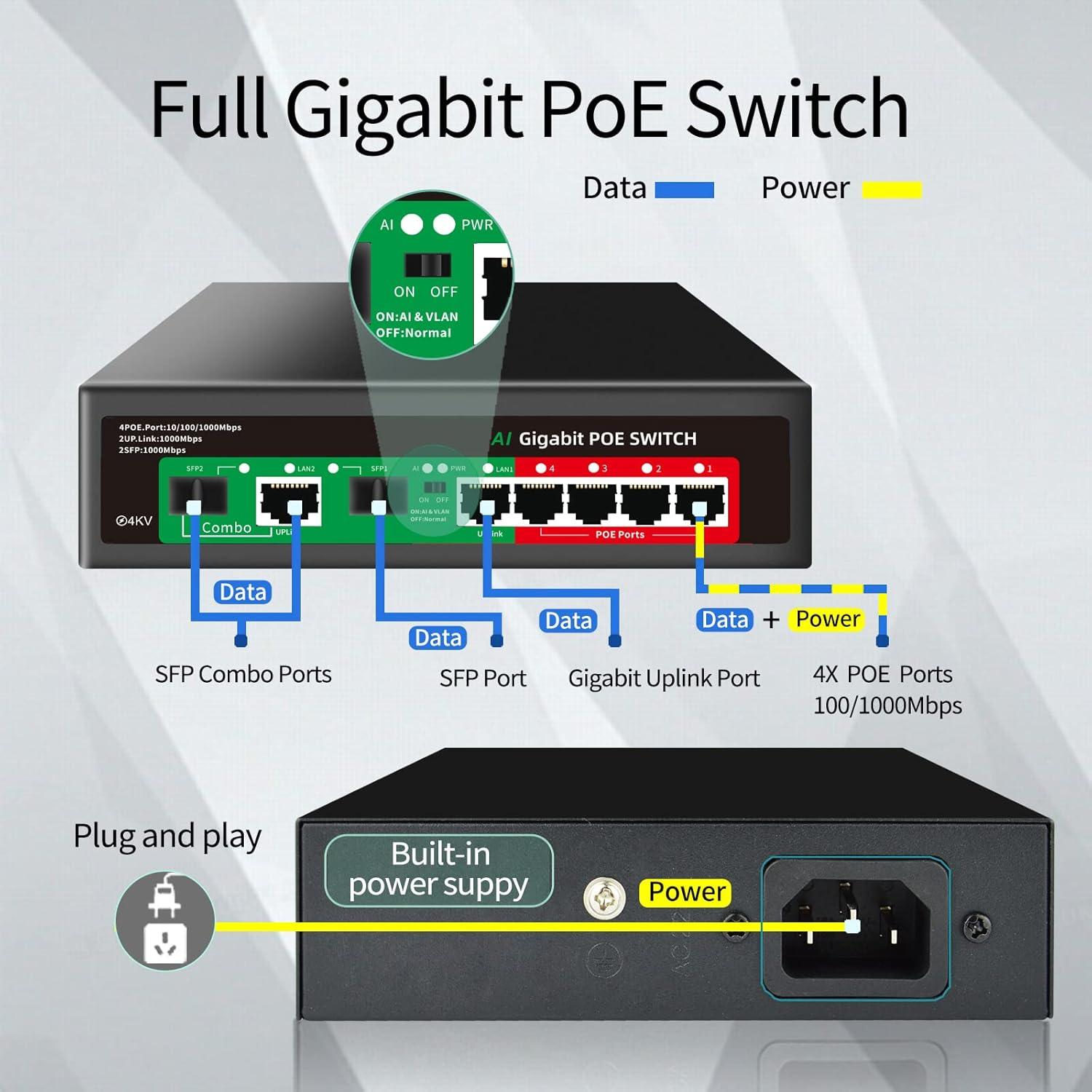
Figure 3: Basic connection diagram for the PoE Switch.

Figure 4: Power over Ethernet concept, delivering data and power via one cable.
Video 1: An overview of the STEAMEMO Full Gigabit PoE Switch, demonstrating its features and connectivity.
4. Operating Instructions
4.1 VLAN Mode
The switch includes a physical toggle switch for VLAN mode. When the VLAN switch is set to 'ON', the 4 PoE+ ports (1-4) are isolated from each other. This means devices connected to these ports cannot communicate directly with each other, enhancing security and preventing broadcast storms. When set to 'OFF' (Normal mode), all ports can communicate freely.

Figure 5: Illustration of VLAN mode operation, isolating PoE ports.
4.2 AI Watchdog Function
The AI Watchdog function automatically detects if a connected PoE device becomes unresponsive or drops its connection. If detected, the switch will automatically reboot the affected PoE port to restore functionality, ensuring continuous operation of your devices.
5. Maintenance
The STEAMEMO PoE Switch is designed for low maintenance due to its robust construction and fanless operation.
- Cleaning: Periodically wipe the exterior of the switch with a soft, dry cloth to remove dust. Do not use liquid cleaners or aerosols.
- Ventilation: Ensure the ventilation slots on the sides of the switch are not obstructed to allow for proper heat dissipation.
- Environmental Conditions: Operate the switch within its specified temperature and humidity ranges to ensure optimal performance and longevity.

Figure 6: Features contributing to low maintenance: fanless design, durable metal casing, and wide operating temperature.
6. Troubleshooting
If you encounter issues with your STEAMEMO PoE Switch, refer to the following common troubleshooting steps:
- No Power: Ensure the power cable is securely connected to both the switch and the electrical outlet. Verify the outlet is functional.
- No Network Connectivity: Check all Ethernet cables for secure connections. Ensure the uplink port is correctly connected to your router/network. Verify the status indicator lights on the switch and connected devices.
- PoE Device Not Powering On:
- Confirm the device is PoE-compatible (802.3af/at standard).
- Ensure the total power consumption of all connected PoE devices does not exceed the switch's 65W power budget.
- If using a passive PoE device, it requires a separate power source or an active PoE splitter.
- Check if the AI Watchdog function is active and if the port has attempted a reboot.
- VLAN Mode Issues: If devices on PoE ports 1-4 cannot communicate with each other, ensure the VLAN switch is in the 'ON' position. If they should communicate, set it to 'OFF' (Normal mode).
- Lightning Protection: The switch is equipped with 4KV lightning protection. In the event of a power surge, the protection mechanism is designed to safeguard the device.

Figure 7: The 4KV lightning protection feature.
7. Specifications
| Feature | Description |
|---|---|
| Brand | STEAMEMO |
| Model Number | 8 Gigabit Ports|65W 4xPoE+ |
| Number of Ports | 8 (4 PoE+, 2 Gigabit Uplink, 2 SFP) |
| PoE Standard | IEEE 802.3af/at |
| PoE Power Budget | 65W Total, up to 30W per port |
| Data Transfer Rate | 1000 Megabits Per Second (Gigabit) |
| Interface Type | PoE, SFP |
| Case Material | Metal |
| Upper Temperature Rating | 55 Degrees Celsius |
| Item Weight | 1.98 pounds |
| Package Dimensions | 8.66 x 7.8 x 2.05 inches |
| Included Components | PoE Switch |
8. Warranty and Support
STEAMEMO provides a one-year after-sales service for this product. Within one year from the order date, the product is eligible for replacement if unexplained failures occur. For support or warranty claims, please contact STEAMEMO customer service.


