
1. Introduction
The HFCCYBGS K-600M is an advanced 6-in-1 gas detector designed for simultaneous detection of multiple gases. It features an integrated built-in pump suction method, ensuring efficient and accurate sampling. The device incorporates an imported miniature vacuum suction pump, known for its stable flow, extended lifespan, and low operational noise. The sampling pump's flow rate is adjustable across 6 gears, accommodating various detection environments with a flow range of 300-800 ml/min.
Key features include:
- Automatic alarm and prompt for sampling pump failures.
- Real-time detection of ambient temperature and humidity.
- Support for both real-time data display and real-time curve display of gas concentration.
- Gas unit switching function.
- Mixed gas calibration mode for convenient and fast adjustments.
- External TF memory card storage for up to 100,000 data items in CSV format, accessible via USB cable.
- Multiple data storage methods: alarm storage, fixed storage, and manual storage.
- Expandable with a PM2.5/PM10 detection module (measurement range: 0-1000 µg/M³).
- Support for external Bluetooth printers for real-time data printing.
- Switchable between Chinese and English languages, with customization options for other languages.
- Integrated GPS positioning function.
- Large capacity 4000mAh rechargeable lithium battery for extended service life.
2. Safety Information
Please read all safety instructions carefully before operating the K-600M Gas Detector. Failure to follow these instructions may result in injury, damage to the device, or inaccurate readings.
- Environmental Conditions: Operate the device within the specified working environment of -10~50 ℃ and <95% RH.
- Calibration: Regular calibration is crucial for accurate gas detection. Refer to the maintenance section for details.
- Battery Safety: Use only the specified DC3.7V lithium battery. Do not attempt to open or modify the battery.
- Maintenance: Only qualified personnel should perform repairs or advanced maintenance.
- Storage: Store the device in a clean, dry environment away from extreme temperatures and corrosive substances.
3. Package Contents
Carefully unpack the box and ensure all items listed below are present and in good condition. If any items are missing or damaged, contact your supplier immediately.
- K-600M Gas Detector Unit
- USB Charging Cable
- Power Adapter
- After-sales Service Warranty Card
- Qualified Certificate
- Carrying Case

Image: The K-600M Gas Detector, along with its accessories including a manual, warranty card, and charging components, neatly organized within its protective carrying case.
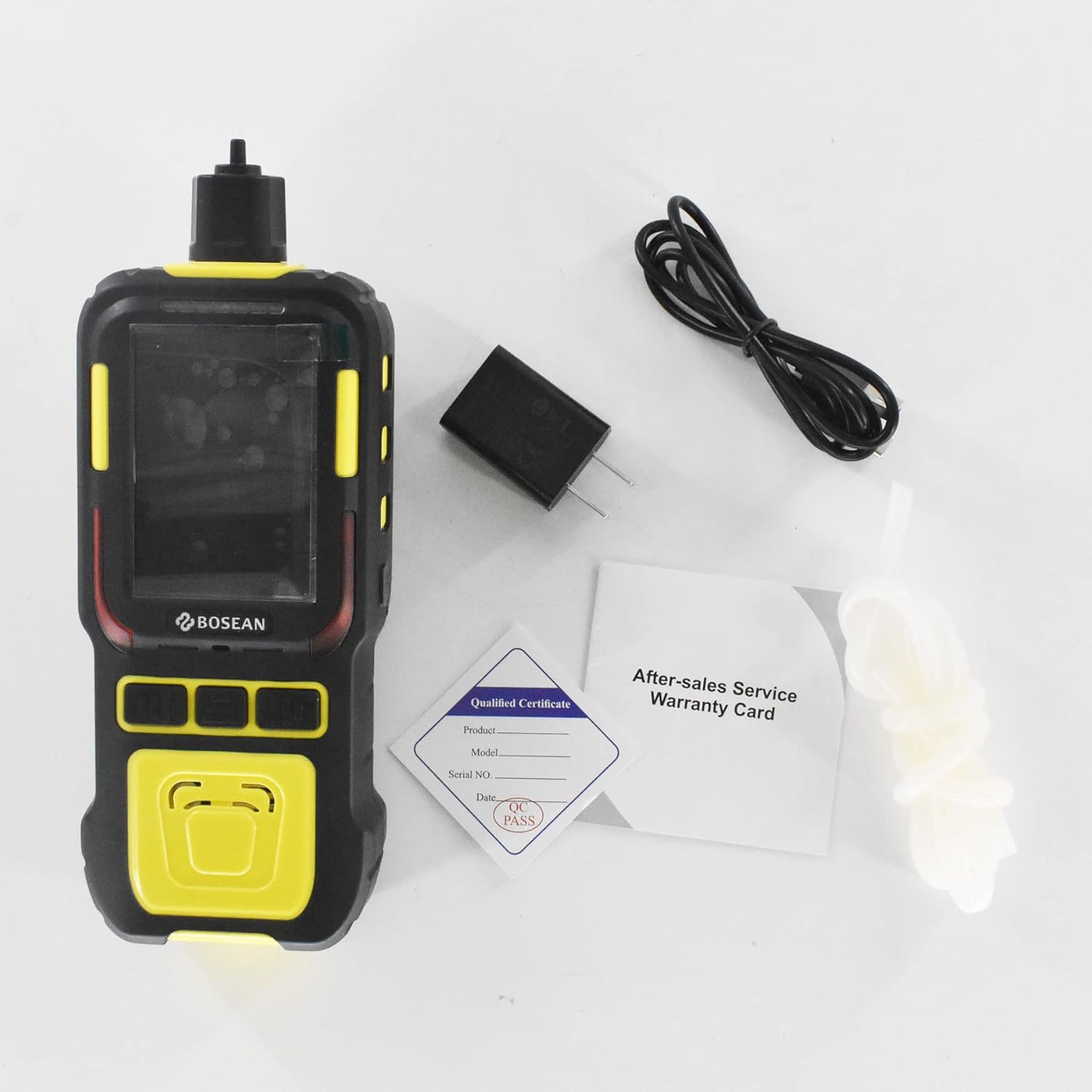
Image: A complete view of the K-600M Gas Detector and its individual accessories, including the main unit, USB cable, power adapter, warranty card, and qualified certificate, laid out on a flat surface.
4. Device Overview
Familiarize yourself with the components of your K-600M Gas Detector.

Image: A close-up view of the top section of the K-600M Gas Detector, highlighting the gas sampling inlet where air is drawn in for analysis.

Image: A detailed view of the control buttons located on the front panel of the K-600M Gas Detector, used for navigation and function selection.

Image: The rear view of the K-600M Gas Detector, clearly showing the integrated belt clip for convenient portability and attachment.

Image: The front view of the K-600M Gas Detector with its display screen active, showing real-time readings for various gas concentrations and environmental parameters.
Components:
- Display Screen: Shows gas concentrations, environmental data, battery status, and menu options.
- Control Buttons: For navigating menus, selecting functions, and adjusting settings.
- Sampling Inlet: Point of entry for gas samples to be analyzed by the built-in pump.
- Built-in Pump: Draws air samples into the detector.
- USB Port: For charging and data transfer.
- Belt Clip: For attaching the device to clothing or a belt.
5. Setup
5.1 Charging the Device
- Connect the USB charging cable to the K-600M detector's USB port.
- Plug the other end of the USB cable into the provided power adapter.
- Insert the power adapter into a standard electrical outlet.
- The charging indicator on the device will illuminate. A full charge takes approximately 5 hours.
- Once fully charged, disconnect the device from the power source. The device has a standby duration of at least 8 hours on a full charge.
5.2 Powering On/Off
- To Power On: Press and hold the power button (usually marked with a power symbol) for a few seconds until the display screen illuminates.
- To Power Off: Press and hold the power button again until the device powers down.
5.3 Initial Calibration (Mixed Gas)
The K-600M supports mixed gas calibration. Refer to the on-screen menu for specific instructions on initiating and completing the calibration process. Regular calibration ensures optimal accuracy.
5.4 Inserting TF Memory Card
If you intend to use the data storage feature, insert a compatible TF memory card into the designated slot. Ensure the card is inserted correctly to avoid damage.
6. Operating Instructions
6.1 Basic Operation
- Power on the device as described in Section 5.2.
- The device will perform a self-check and then display the main interface.
- Use the control buttons to navigate through the menu options.
6.2 Gas Detection
The K-600M utilizes a built-in pump for active gas sampling.
- Sampling: Position the sampling inlet in the area where gas detection is required. The built-in pump will automatically draw in air.
- Adjusting Flow Rate: The pump's flow rate can be adjusted in 6 gears (300-800 ml/min) via the device's menu to suit different detection environments.
- Reading Display: Gas concentrations for CO, CO2, NO, EX, SO2, and NO2 will be displayed in real-time on the screen.
- Alarm System: If gas concentrations exceed preset low (L-alarm) or high (H-alarm) thresholds, the device will activate alarms via sound, light, vibration, and on-screen display.
6.3 Data Display Modes
The device supports two primary data display modes:
- Real-time Data Display: Shows current gas concentrations numerically.
- Real-time Curve Display: Presents gas concentration trends over time graphically.
Switch between these modes using the menu options.
6.4 Data Storage and Retrieval
The K-600M offers versatile data storage capabilities:
- Storage Types: Alarm storage (automatically records data when an alarm is triggered), fixed storage (records data at set intervals), and manual storage (records data upon user command).
- Retrieval: Connect the device to a computer via the USB cable. The stored data on the TF card (CSV file format) can be accessed and viewed directly.
6.5 Optional Module Integration
- PM2.5/PM10 Module: If an external PM2.5/PM10 detection module is connected, the device will display real-time particle concentration information (0-1000 µg/M³).
- Bluetooth Printer: Pair an external Bluetooth printer with the device to print detection data in real-time.
6.6 Language and GPS
- Language: Switch between Chinese and English via the system settings. Other languages may be available through customization.
- GPS: The integrated GPS function provides location data for recorded measurements.
7. Maintenance
7.1 Sensor Lifespan and Replacement
The sensors in the K-600M typically have a lifespan of 2 years. This duration can vary depending on the specific usage environment and exposure to high concentrations of gases. It is recommended to replace sensors periodically or when their performance degrades. Contact your supplier for sensor replacement services.
7.2 Cleaning the Device
- Wipe the exterior of the device with a soft, damp cloth.
- Do not use abrasive cleaners, solvents, or immerse the device in water.
- Ensure the sampling inlet is free from obstructions.
7.3 Battery Care
- Charge the battery fully before first use.
- Avoid completely discharging the battery frequently to prolong its life.
- If storing the device for an extended period, charge the battery to approximately 50% and recharge every few months.
7.4 Regular Calibration
To maintain measurement accuracy, regular calibration of the gas sensors is essential. The frequency of calibration depends on usage and environmental conditions. Refer to the device's menu for calibration options or consult your supplier for professional calibration services.
8. Troubleshooting
This section addresses common issues you might encounter with your K-600M Gas Detector. If you experience problems not covered here, please contact customer support.
8.1 Device Not Powering On
- Ensure the battery is sufficiently charged. Connect the device to the charger and allow it to charge for at least 30 minutes before attempting to power on again.
- Verify that the power button is being pressed and held for the required duration.
8.2 Inaccurate Readings or No Readings
- Check if the sampling inlet is clear and unobstructed.
- Ensure the built-in pump is operating correctly. The device provides an automatic alarm and prompt in case of sampling pump failure.
- Perform a calibration as described in the Maintenance section. Sensors may require recalibration or replacement if readings remain inaccurate.
- Verify that the device is operating within its specified working environment conditions (temperature and humidity).
8.3 Data Storage Issues
- Ensure a compatible TF memory card is correctly inserted into the device.
- Check if the TF card has sufficient free space.
- If data cannot be read via USB, try re-inserting the TF card or using a different USB cable.
9. Specifications
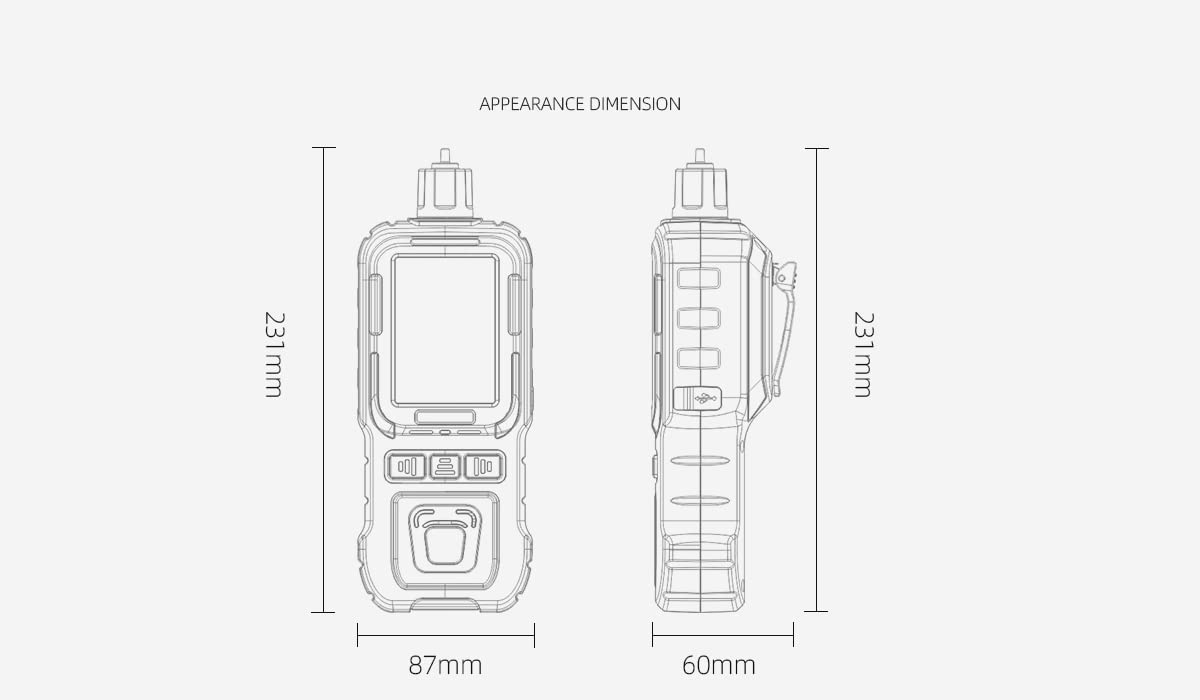
Image: A technical diagram illustrating the appearance dimensions of the K-600M Gas Detector, showing its height (231mm), width (87mm), and depth (60mm).
| Parameter | Value |
|---|---|
| Product Model | K-600M |
| Protection Level | IP65 |
| Response Time (T90) | < 30 seconds |
| Alarm Methods | Sound, Light, Vibration, Display |
| Working Environment | -10~50 ℃, <95% RH |
| Power Supply | DC3.7V Lithium Battery (4000mAh) |
| Sensor Lifespan | 2 years (usage dependent) |
| Charging Duration | < 5 hours |
| Standby Duration | ≥ 8 hours |
| Dimensions (L x W x H) | 231 x 87 x 60 mm |
| Weight | 400 g |
| Manufacturer | HFCC |
| Part Number | 23042301 |
| UPC | 772168614633 |
Gas Detection Ranges and Alarm Levels:
| Gas | Range | Low Alarm (L-alarm) | High Alarm (H-alarm) |
|---|---|---|---|
| EX (Explosive Gas) | 0-100%LEL | 20%LEL | 50%LEL |
| O2 (Oxygen) | 0-30%vol | 19.5%vol | 23.5%vol |
| CO (Carbon Monoxide) | 0-1000ppm | 50ppm | 150ppm |
| H2S (Hydrogen Sulfide) | 0-100ppm | 10ppm | 35ppm |
| CO2 (Carbon Dioxide) | 0-5%vol | 1.00%vol | 2.00%vol |
| NO2 (Nitrogen Dioxide) | 0-20ppm | 5.0ppm | 10.0ppm |
10. Warranty and Support
10.1 Warranty Information
The K-600M Gas Detector comes with an After-sales Service Warranty Card included in the package. Please refer to this card for detailed information regarding warranty terms, conditions, and duration. Keep your purchase receipt as proof of purchase for warranty claims.
10.2 Customer Support
For technical assistance, troubleshooting beyond this manual, or warranty inquiries, please contact the manufacturer, HFCC, or your authorized seller. Contact information can typically be found on the product packaging, warranty card, or the seller's website.