
1. Introduction
The ATOMSTACK X30 PRO is a high-performance laser engraving and cutting machine designed for precision work on a wide range of materials. Featuring a 33W optical power diode laser, it utilizes advanced six 6W laser coupling technology to deliver powerful and efficient results. This manual provides essential information for the safe and effective use of your ATOMSTACK X30 PRO.
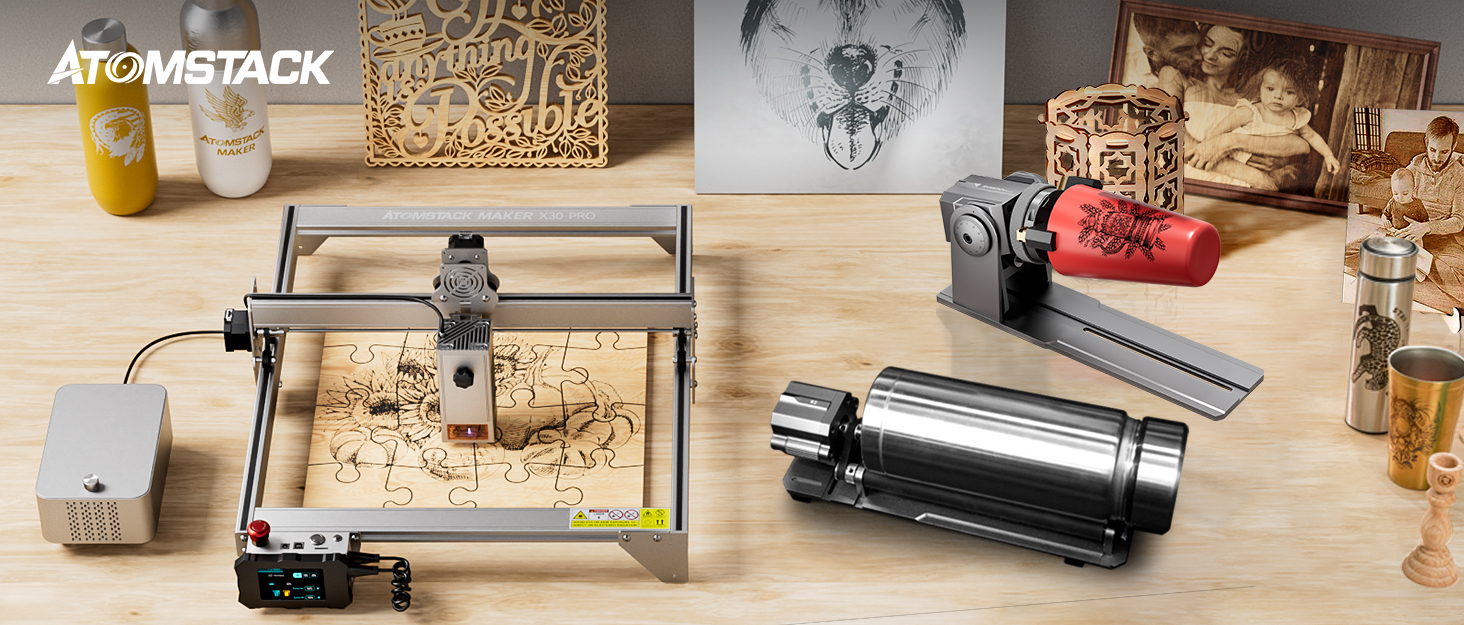
Image 1.1: The ATOMSTACK X30 PRO Laser Engraver and Cutter.
Video 1.1: An overview of the ATOMSTACK X30 PRO laser engraver and cutter in operation, demonstrating its capabilities on various materials.
2. Safety Information
WARNING: This is a Class 4 laser product. Direct exposure to the laser beam can cause severe eye and skin damage. Always wear appropriate laser safety goggles during operation. Never look directly into the laser beam or at its reflection.
- Ensure the work area is well-ventilated to dissipate fumes and smoke generated during engraving/cutting.
- Keep flammable materials away from the laser's operating path.
- Do not leave the machine unattended during operation.
- Ensure proper grounding of the equipment.
- Keep children and pets away from the machine during operation.
- Familiarize yourself with emergency stop procedures.
- Only use the provided power adapter and accessories.

Image 2.1: Always wear laser safety goggles to protect your eyes during operation.
3. Package Contents
Verify that all components listed below are present in your package. If any items are missing or damaged, please contact customer support.
- ATOMSTACK X30 PRO Laser Engraver/Cutter Unit
- Laser Module (33W Optical Power)
- F30 Pro Air Assist Pump Kit
- Power Adapter and Cable
- USB Cable
- Laser Safety Goggles
- Assembly Tools and Screws
- User Manual
- Metal Backing Plate
- Test Materials (e.g., wood, acrylic samples)
- Honeycomb Panel (optional, may be included in some packages)
Video 3.1: Unboxing and overview of the ATOMSTACK X30 PRO components, including the laser module and accessories.
4. Setup
Follow these steps to assemble and prepare your ATOMSTACK X30 PRO for first use.
4.1 Assembly
- Unpack Components: Carefully remove all parts from the packaging and place them on a clean, stable surface.
- Assemble the Frame: Connect the aluminum profiles to form the main frame of the engraver. Ensure all screws are tightened securely.
- Install the Laser Module: Mount the 33W laser module onto the gantry. Adjust its height as needed for initial focus.
- Connect Air Assist: If using the F30 Pro Air Assist Pump Kit, connect it to the laser module and power source as per its separate instructions.
- Connect Cables: Plug in the power adapter, USB cable (if connecting to a computer), and any other necessary cables.

Image 4.1: The F30 Pro Air Assist Pump Kit, essential for clean cuts and engravings.
4.2 Initial Focus Adjustment
The laser module has a fixed focus. Use the provided focus block or adjust the module height until the laser spot is at its smallest point on the material surface. This ensures optimal engraving and cutting performance.
5. Operating Instructions
This section outlines the basic steps for operating your ATOMSTACK X30 PRO.
5.1 Software and Connectivity
- The ATOMSTACK X30 PRO supports various engraving software, including LightBurn and LaserGRBL.
- Connect the engraver to your computer via USB or use the Atomstack mobile app for control.
- Ensure the correct drivers are installed for your operating system.
5.2 Preparing for Engraving/Cutting
- Place Material: Securely place your material on the working surface. For best results, use a honeycomb panel to prevent back-reflection and reduce smoke marks.
- Adjust Focus: Re-check and adjust the laser focus for the specific material thickness.
- Set Parameters: In your chosen software, set the appropriate laser power, speed, and passes based on the material type and desired effect. Refer to material test charts for guidance.
- Frame the Work Area: Use the software's framing function to ensure your design fits within the material and is positioned correctly.

Image 5.1: The ATOMSTACK X30 PRO can work with over 100 different materials, including wood, metal, and acrylic.
5.3 Starting Operation
- Wear Safety Goggles: Always wear your laser safety goggles before starting.
- Start Engraving/Cutting: Initiate the process from your software or the machine's control panel.
- Monitor Progress: Observe the process for any issues, such as excessive smoke, flames, or incorrect laser behavior. Be ready to use the emergency stop button if necessary.
Video 5.2: Demonstration of the ATOMSTACK X30 PRO's cutting power on various materials, highlighting its efficiency.
6. Maintenance
Regular maintenance ensures the longevity and optimal performance of your laser engraver.
- Clean the Lens: Periodically clean the laser lens with a soft, lint-free cloth and lens cleaning solution to maintain beam quality.
- Clean the Rails and Wheels: Keep the guide rails and wheels free of dust and debris to ensure smooth movement of the laser module.
- Check Belts: Inspect the timing belts for tension and wear. Adjust or replace if necessary.
- Clean the Work Area: Remove any debris or residue from the honeycomb panel and surrounding area after each use.

Image 6.1: Proper maintenance, especially with the F3 protective plate, helps prevent oil stains and ensures a clean finish on your projects.
7. Troubleshooting
Here are solutions to common issues you might encounter:
| Problem | Possible Cause | Solution |
|---|---|---|
| Laser not firing | Power cable loose, emergency stop engaged, software error. | Check all connections, disengage emergency stop, restart software/machine. |
| Poor engraving/cutting quality | Incorrect focus, wrong power/speed settings, dirty lens. | Adjust focus, optimize power/speed settings for material, clean laser lens. |
| Machine not connecting to computer | USB cable issue, driver not installed, incorrect port selected. | Try a different USB port/cable, install/update drivers, select correct COM port in software. |
| Unwanted grid marks on material back | Using a conventional honeycomb panel without proper protection. | Use the ATOMSTACK F3 protective plate or ensure adequate spacing/airflow. |
8. Specifications
Key technical specifications for the ATOMSTACK X30 PRO Laser Engraver/Cutter.
- Optical Laser Power: 33W (using six 6W laser coupling technology)
- Machine Power: 160W
- Engraving Accuracy: 0.01mm
- Spot Size: 0.08*0.1mm
- Cutting Capability: Up to 18-20mm paulownia board, 10mm black acrylic, 0.1mm stainless steel sheet (single pass); 25mm thick wood, 30mm thick black acrylic (multiple passes).
- Work Area: Standard (expandable with F3 connectors)
- Connectivity: USB, Mobile App (Android/Apple)
- Supported Software: LightBurn, LaserGRBL
- Laser Class: 4

Image 8.1: Illustration of the 33W laser module's internal structure and its cutting capabilities on various materials.

Image 8.2: Demonstrates the fine detail achievable with the upgraded 33W laser compressed spot technology (0.08*0.1mm).
9. Warranty & Support
ATOMSTACK MAKER products come with a standard manufacturer's warranty. Please refer to the warranty card included in your package for specific terms and conditions, including coverage period and limitations.
9.1 Customer Support
For technical assistance, troubleshooting, or warranty claims, please contact ATOMSTACK MAKER customer support through their official website or the contact information provided in your product documentation. When contacting support, please have your product model (X30 PRO) and purchase details ready.
You can also visit the ATOMSTACK MAKER Store on Amazon for additional resources and product information.


