
1. Introduction
This manual provides detailed instructions for the installation and operation of the Easyguard ECS002PP-BM-CS4-2 Plug Play Remote Start System. This system allows you to remotely start and stop your BMW vehicle using its factory OEM key fob. It is designed for vehicles equipped with a factory OEM push start button.
2. Compatibility
This remote start system is compatible with specific BMW models and years that feature a factory OEM push start button. Please verify your vehicle's compatibility before installation.

Image: Compatible BMW models and years. This table lists specific BMW 6 and 7 Series models and their corresponding production years, all requiring a factory OEM push start button.
Supported Vehicles:
- BMW 6 Series (F06, F12, F13, 6GT, M6): 2010-2017
- BMW 7 Series (F01, F02, F03, F04): 2007-2016
- BMW 5 Series (F07, F10, F11, F18, F90, 5GT, M5): 2008-2017
- BMW X3/X4 (F25, F26): 2009-2018
Note: All compatible vehicles must be equipped with a factory OEM push start button. The system supports automatic transmission, manual transmission, gasoline and diesel engines, and hybrid versions.
3. Package Contents
The Easyguard ECS002PP-BM-CS4-2 kit includes the following components:

Image: Kit Components. This image displays the Control Module, Bypass Module, Bypass Wire, Battery Board (choose one to use), and Plug Play Wire Harness.
- Control Module
- Bypass Module
- Bypass Wire
- Battery Board (only one is used)
- Plug Play Wire Harness
4. Important Considerations Before Installation
Please review these critical points before proceeding with the installation:

Image: Important Notes. This graphic summarizes key requirements and features of the system.
- Plug and Play Installation: The system is designed for plug-and-play installation, requiring no cutting or soldering of factory wiring.
- No Key Programming: There is no need to program new keys for this system.
- Factory Key Fob Use: The system utilizes your existing factory OEM key fob for remote start/stop functions. No additional remote is included in the kit.
- OEM Push Start Button Required: Your vehicle must have a factory OEM push start button.
- Bypass Module Included: A bypass module is included in the kit, eliminating the need for separate purchases.
- Two Working Factory Keys Required: For installation, you must have two functional factory keys. One key will be placed inside the bypass module, and the other will be used for controlling the car (remote start/stop).
- Professional Installation Recommended: If you lack experience with car alarm or electrical installations, it is strongly recommended to have this kit installed by a trained alarm installer.
- Wiring Diagram: Only an English electrical wiring diagram is available.
- Battery Voltage: The remote starter will not operate if the car battery voltage is below 11 volts.
5. Installation Guide
This section outlines the general installation process. Refer to the detailed wiring diagram for specific connections.
5.1 Bypass Module Installation
The bypass module is essential for dealing with the vehicle's chip immobilizer. Follow these steps to prepare and install the bypass module:

Image: Bypass Module Installation. This image illustrates the process of disassembling a key, placing its chip into the bypass module, and securing it.
- Prepare Key: Disassemble one of your working factory keys to access the transponder chip.
- Insert Chip: Carefully place the transponder chip into the designated slot within the bypass module.
- Secure Key: Fix the key (or just the chip) with adhesive tape several times to ensure it is securely held within the bypass module.
- Position Bypass Module: Install the bypass module near the vehicle's key sensing area. Ensure the key button side faces up for proper detection.
- Ensure Contact: Raise the contact spring slightly to ensure good contact with the battery board if applicable.
5.2 Wiring Diagram for CAS4 Vehicles
The system uses a plug-and-play harness. Refer to the following diagram for specific wiring connections. This diagram is for CAS4 vehicles.
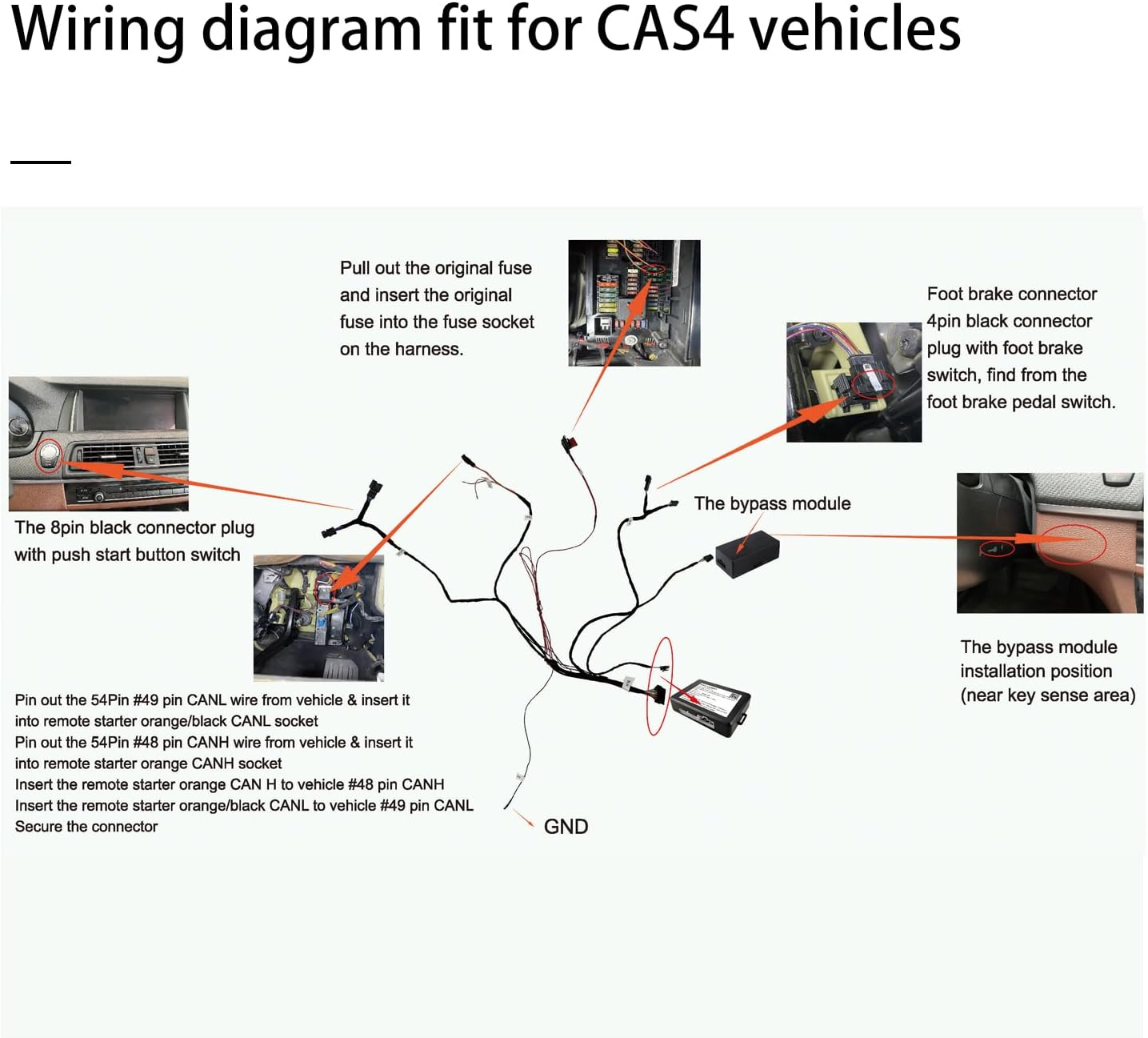
Image: Wiring Diagram for CAS4 Vehicles. This diagram illustrates the connections for the control module, bypass module, foot brake, and the 8-pin black connector with the push start button switch.
Key Wiring Steps:
- Fuse Connection: Pull out the original fuse and insert the new fuse from the kit into the fuse socket on the harness.
- Foot Brake Connector: Locate the 4-pin black connector with the foot brake switch and connect it.
- Push Start Button Connector: Connect the 8-pin black connector plug to the push start button switch.
- CAN Bus Connections:
- Pin out the 54Pin #49 pin CANL wire from the vehicle and insert it into the remote starter orange/black CANL socket.
- Pin out the 54Pin #48 pin CANH wire from the vehicle and insert it into the remote starter orange CANH socket.
- Insert the remote starter orange CAN H to vehicle #48 pin CANH.
- Insert the remote starter orange/black CANL to vehicle #49 pin CANL.
- Secure Connections: Ensure all connectors are securely fastened.
- Ground (GND): Connect the ground wire as indicated in the diagram.
6. Operation
The Easyguard remote start system uses your factory OEM key fob for all remote functions.

Image: Remote Start/Stop Method. This image shows a hand pressing the lock button on a BMW key fob three times to remote start the vehicle, and the trunk button three times to shut it off.
- Remote Start: In the locked/armed state, press the lock button on your factory key fob three times consecutively to remotely start the vehicle.
- Remote Stop: To remotely shut off the car, press the trunk button on your factory key fob three times consecutively.
- Automatic Shutdown: The engine will shut off during remote start if any door is opened.
- Keyless Entry: The system does not affect vehicles with keyless entry and comfortable access systems when the vehicle is remotely started.
7. Programmable Functions
The system offers user-selectable operating durations for the remote start function:
- Operating Duration: You can select a remote start operating duration of 10, 20, 30, or 40 minutes. The default setting is 20 minutes.
- Further user-programmable functions may be available. Refer to the full wiring diagram or contact support for details.
8. Specifications
| Model Number | ECS002PP-BM-CS4-2 |
| Brand | Easyguard |
| Compatible Devices | BMW Cars (Specific 6 & 7 Series models) |
| Remote Control Included | No (uses factory key fob) |
| Number of Items | 2 (Control Module, Bypass Module, Harness, etc.) |
| GTIN / UPC | 704755327725 |
| Manufacturer | ieasyguard.com |
9. Troubleshooting
- System Not Starting: Ensure the car battery voltage is above 11 volts. Verify all connections are secure according to the wiring diagram. Confirm that two working factory keys are available and one is correctly placed in the bypass module.
- Engine Shuts Off Immediately: If the engine starts but then immediately shuts off, check if any doors were opened after remote start activation. This is a safety feature.
- Remote Start Not Responding: Ensure you are pressing the lock button three times consecutively within a short period. Check the range of your factory key fob.
10. Support
For further assistance, detailed wiring diagrams, or troubleshooting not covered in this manual, please contact Easyguard customer support. It is recommended to consult with a professional installer for any complex installation or diagnostic issues.
Manufacturer: ieasyguard.com
