
1. Introduction
This manual provides essential information for the installation, operation, and maintenance of your OZLLO 4DRC F10 Foldable Drone Accessories Kit. This kit is designed to replace various components of the 4DRC F10 drone, ensuring continued optimal performance. Please read these instructions carefully before use to ensure proper handling and longevity of the parts.
2. Product Overview
The OZLLO 4DRC F10 Accessories Kit includes a range of replacement parts crucial for the functionality of your 4DRC F10 drone. These components are crafted for durability and precise fit.
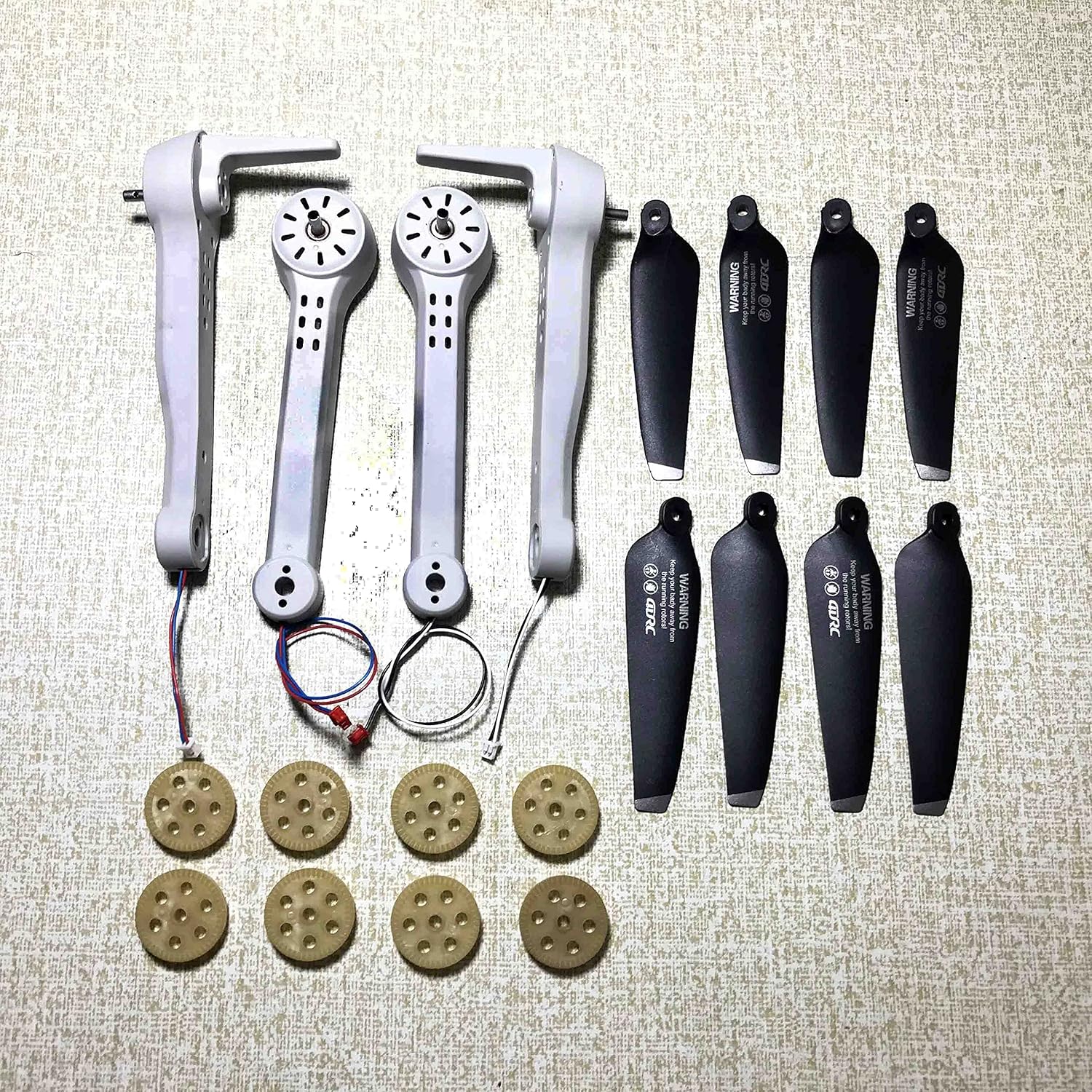
This image displays the range of components included in the OZLLO 4DRC F10 Foldable Drone Accessories Kit, such as replacement propellers, gears, blades, prop engines, and motor arms, designed for easy installation and maintenance.
3. Installation Guide
The accessories in this kit are designed for easy and suitable installation. Follow these general guidelines for replacing components on your 4DRC F10 drone:
- Identify the Part: Carefully identify the specific drone component that needs replacement.
- Power Off: Ensure your 4DRC F10 drone is completely powered off and the battery is removed before attempting any installation.
- Remove Old Part: Gently remove the damaged or worn-out part. Refer to your drone's original manual for specific removal instructions if necessary.
- Install New Part: Align the new accessory from the OZLLO kit with its corresponding position on the drone. Ensure a secure and snug fit.
- Test Functionality: After installation, reinsert the battery and perform a low-altitude test flight or functional check to ensure the new part operates correctly.
Note: For detailed, drone-specific installation steps, always consult the original 4DRC F10 drone user manual.
4. Operation and Function
These accessories are replacement parts that restore or enhance the operational capabilities of your 4DRC F10 drone. Once correctly installed, they integrate seamlessly with the drone's existing systems.
- Propellers/Blades: Essential for lift and directional control. Ensure they are installed with the correct orientation (A or B type, if applicable) for stable flight.
- Gear: Critical for the smooth rotation of propellers and motor function. Proper gear installation prevents friction and ensures efficient power transfer.
- Prop Engine/Motor Arm: These components house the motors and provide structural support. Correct installation ensures the motors are securely mounted and aligned for optimal thrust.
Always ensure all parts are securely fastened before operating the drone to prevent accidents or damage.
5. Maintenance and Care
Proper maintenance of your drone accessories will ensure a long service life and better working performance. The components feature good texture and are not easily broken, but regular care is still recommended.
- Regular Inspection: Periodically inspect all installed accessories for signs of wear, cracks, or damage, especially after any hard landings or impacts.
- Cleaning: Keep propellers, gears, and motor arms free from dust, dirt, grass, or other debris. Use a soft, dry cloth or a small brush for cleaning. Avoid harsh chemicals.
- Storage: When not in use, store the drone and its spare parts in a clean, dry environment, away from direct sunlight and extreme temperatures.
- Replacement: Replace any damaged parts immediately to prevent further damage to the drone or unsafe flight conditions.
6. Troubleshooting
If you encounter issues after replacing parts, consider the following common troubleshooting steps:
- Drone Unstable After Propeller Replacement:
Possible Cause: Propellers installed incorrectly (wrong type A/B on motor, or loose).
Solution: Double-check propeller orientation and ensure they are securely fastened. - Unusual Noise from Motor:
Possible Cause: Debris in motor, loose gear, or damaged motor arm.
Solution: Inspect the motor area for obstructions. Ensure gears are properly seated and the motor arm is not bent or cracked. - Reduced Flight Performance:
Possible Cause: Worn-out or damaged propellers/blades, or a faulty motor.
Solution: Replace any visibly damaged propellers. If the issue persists, inspect the motor for signs of wear or malfunction. - Part Does Not Fit:
Possible Cause: Incorrect part for your specific 4DRC F10 model or variant.
Solution: Verify the part number and compatibility with your drone model.
If problems persist, consult the original 4DRC F10 drone manual or contact the drone manufacturer for further assistance.
7. Specifications
Key specifications for the OZLLO 4DRC F10 Foldable Drone Accessories Kit:
| Feature | Detail |
|---|---|
| Brand | OZLLO |
| Model Compatibility | 4DRC F10 Foldable Drone (4D-F10) |
| Components Included | Propellers, Gear, Blades, Prop Engine, Motor Arm |
| Item Weight | 1 Gram (for the kit) |
| Batteries Included | No |
| Number of Items | 1 (kit) |
| Color | Blu (specific variant) |
Note: Features like 'Integrated GPS', 'Foldable', 'Wi-Fi Connectivity', and 'Remote Control Type' refer to the drone itself, for which these are accessories.