
Molypet F02D
Molypet Automatic Cat Feeder Instruction Manual
Model: F02D
Your trusted companion for pet feeding convenience.
Introduction
The Molypet Automatic Cat Feeder is designed to provide a convenient and reliable feeding solution for your feline companions. This 6-liter capacity feeder ensures your pets receive their meals on a consistent schedule, even when you're away. With programmable settings and dual power supply options, it offers peace of mind and promotes healthier eating habits for your cats.
Key Features:
- Multiple Cat Feeder: Features an adjustable two-way splitter to dispense equal or unequal amounts into two bowls, ideal for households with multiple pets.
- Flexible Feed Setting: Program up to 6 meals per day, with 1 to 50 portions (10g-500g) per meal, allowing for customized feeding schedules based on your pet's needs.
- No Jams and No Clogs: Equipped with a smart rotor that spins counterclockwise to release stuck food before returning to normal operation, preventing feeding interruptions.
- 6L Capacity Storage: Stores approximately 25.4 cups of dry food, reducing the frequency of refills. A triple seal design ensures food remains fresh and dry.
- Power Off Memory: A built-in microchip retains device time and feeding parameters for up to 7 days during power failures, ensuring uninterrupted feeding.
- 10-Second Voice Recorder: Record a personalized message to call your pets to their meals, adding a familiar comfort.

Figure 1: The Molypet Automatic Cat Feeder, showcasing its sleek design and dual bowl setup.
Setup
Follow these steps to set up your Molypet Automatic Cat Feeder for optimal performance.
1. Unpacking and Initial Assembly:
- Carefully remove all components from the packaging.
- Ensure all parts are present: main feeder unit, food storage barrel, lid, two stainless steel bowls, and power cable.
- Wash the stainless steel bowls and the food storage barrel with mild soap and water. The main feeder unit and base are not washable; wipe them with a damp cloth.
2. Installing the Lid:
To open the lid, turn it counterclockwise. To install or close, align the lid and turn clockwise until it fits tightly between the bayonets.
Video 1: Demonstrates how to open and install the lid on the Molypet Automatic Cat Feeder.
3. Assembling the Bowls:
The feeder supports both single and double bowl configurations. The double bowl setup uses an adjustable splitter to distribute food.

Figure 2: Illustration of the adjustable 2-bowl meal splitter, showing how to manually rotate it to adjust food distribution.
To install the double bowls, simply place them under the dispenser outlets. To switch to a single bowl setup, remove both bowls, firmly press the base to remove the feeder from the splitter, and then install a single bowl directly under the main outlet.
Video 2: Guide on how to install the double bowls for the Molypet Automatic Cat Feeder.
Video 3: Instructions for switching the feeder from a double bowl to a single bowl configuration.
4. Power Supply:
Connect the feeder to a power outlet using the provided cable. For backup power, install 3 alkaline D-cell batteries (not included). Rechargeable batteries cannot be used. The feeder will automatically switch to battery power during an outage and retain settings for up to 7 days.

Figure 3: Demonstrates the power off memory function, showing the feeder retaining settings during a power outage.
Operating Instructions
Learn how to program and operate your Molypet Automatic Cat Feeder.
1. Setting Time and Meal Plans:
- Refer to the detailed instructions in the included user manual for specific button functions and programming steps.
- You can set up to 6 meals per day. Each meal can be customized with 1 to 50 portions. (Note: 1 portion is approximately 10g).
2. Switching Time Format (12-hour/24-hour):
In the unlocked state, long press the "Setting" and "Clock" buttons simultaneously for 5 seconds to switch between 12-hour (AM/PM displayed) and 24-hour formats.
Video 4: Demonstrates how to switch between 12-hour and 24-hour time formats on the feeder's display.
3. Voice Recording:
Record a 10-second voice message that will play at each scheduled mealtime to call your pets. This feature provides a familiar sound for your pets, especially when you are not home.

Figure 4: The voice recording button on the feeder's control panel.
4. Manual Feeding:
To manually dispense food, ensure the feeder is unlocked. Press the manual feed button (usually indicated by a food bowl icon) to dispense one portion. You can press it multiple times for additional portions.
Maintenance
Proper maintenance ensures the longevity and hygiene of your Molypet Automatic Cat Feeder.
1. Cleaning:
- The stainless steel bowls and the food storage barrel are washable. Remove them from the main unit and wash with mild soap and water.
- The main feeder unit and its base are not washable. Wipe them clean with a damp cloth. Do not submerge in water.
- Ensure all parts are completely dry before reassembling to prevent moisture from affecting the food or electronics.
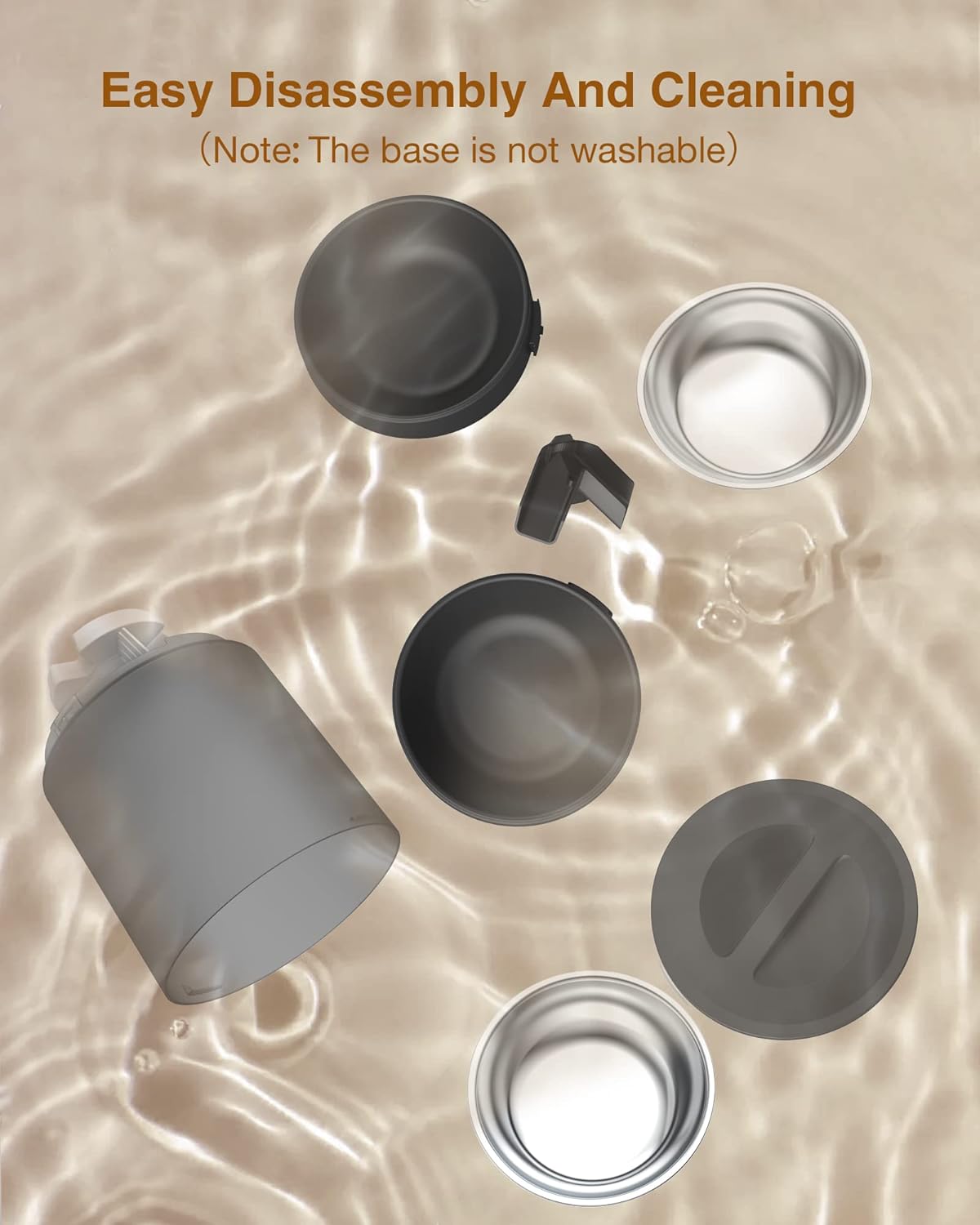
Figure 5: Shows the easy disassembly of the feeder components for cleaning, highlighting parts that can be washed.
2. Desiccant Replacement:
To maintain food freshness, replace the desiccant bag every month. We recommend using a desiccant bag smaller than 2.36 x 2.95 inches.

Figure 6: Diagram illustrating the placement of the desiccant bag within the feeder's lid to ensure food freshness.
Troubleshooting
Common issues and their solutions for your Molypet Automatic Cat Feeder.
Food Not Dispensing:
- Check Power: Ensure the feeder is properly plugged in or that the backup batteries are installed and have sufficient charge.
- Food Jam: The feeder has a "Grain Free Rotor" feature that attempts to clear jams by spinning counterclockwise. If a jam persists, manually check the food outlet for blockages. Ensure dry food size is between 0.2-0.6 inches.
- Low Food Level: Verify that there is enough food in the storage barrel.
- Incorrect Settings: Double-check your programmed meal times and portion sizes. Ensure the feeder is not in a locked state if attempting manual dispense.

Figure 7: Detailed view of the grain-free rotor mechanism, designed to prevent food jams by reversing rotation.
Display Not Working:
- If powered by battery only and no operation within 2 minutes, the display will automatically turn off to extend battery life. Press any button to wake it up.
- Check power connection or replace batteries if necessary.
Settings Lost After Power Outage:
- The feeder has a power-off memory function for up to 7 days. If settings are lost beyond this period, reprogram the device. Ensure backup batteries are fresh.
Specifications
| Feature | Detail |
|---|---|
| Brand | Molypet |
| Model Name | F02D |
| Item Weight | 6.39 Pounds |
| Product Dimensions (LxWxH) | 7.72 x 7.72 x 17.72 inches |
| Color | Black |
| Capacity | 6L (approx. 25.4 cups) |
| Meals per Day | Up to 6 |
| Portions per Meal | 1-50 (approx. 10g per portion) |
| Food Size Compatibility | 0.2-0.6 inches (dry, freeze-dried, air-dried food) |
| Power Supply | Dual (Cable, 3x D-cell alkaline batteries) |
| Special Feature | Voice Recording |
| Care Instructions | Hand Wash Only (bowls & barrel) |
Warranty & Support
Molypet stands behind the quality of its products.
Warranty Information:
This product comes with a 1 Year Manufacturer Warranty.
Customer Support:
For any questions, technical assistance, or warranty claims, please contact Molypet customer support:
- Email: support@molypet.com
- Molypet offers a 24-Month Replacement Guarantee.
Ask a question about this manual
Ask about setup, troubleshooting, compatibility, parts, safety, or missing instructions. Manuals+ will review the question and use this page’s manual context to help answer it.