
BELLA 17799
BELLA 8 Qt Digital Air Fryer User Manual
Model: 17799
Product Overview
The BELLA 8 Qt Digital Air Fryer with TurboCrisp Technology is designed to provide a healthier and more efficient way to cook your favorite foods. Utilizing powerful hot air circulation, it delivers crispy results with little to no oil. Its large 8-quart capacity and intuitive digital controls make it ideal for family meals and various cooking tasks, from frying and roasting to baking and broiling.

Image: The BELLA 8 Qt Digital Air Fryer, showcasing its sleek stainless steel design and digital control panel.
Important Safety Instructions
When using electrical appliances, basic safety precautions should always be followed, including the following:
- Read all instructions before operating the appliance.
- Do not touch hot surfaces. Use handles or knobs.
- To protect against electrical shock, do not immerse cord, plugs, or main unit in water or other liquid.
- Close supervision is necessary when any appliance is used by or near children.
- Unplug from outlet when not in use and before cleaning. Allow to cool before putting on or taking off parts.
- Do not operate any appliance with a damaged cord or plug, or after the appliance malfunctions or has been damaged in any manner.
- The use of accessory attachments not recommended by the appliance manufacturer may cause injuries.
- Do not use outdoors.
- Do not let cord hang over edge of table or counter, or touch hot surfaces.
- Do not place on or near a hot gas or electric burner, or in a heated oven.
- Extreme caution must be used when moving an appliance containing hot oil or other hot liquids.
- Always attach plug to appliance first, then plug cord into the wall outlet. To disconnect, turn any control to “off”, then remove plug from wall outlet.
- Do not use appliance for other than intended use.
Understanding Your Air Fryer
Familiarize yourself with the main components of your BELLA Digital Air Fryer:
- Main Unit: Houses the heating element and fan.
- Digital Control Panel: Touchscreen interface for setting time, temperature, and selecting presets.
- Cooking Basket: The primary cooking container where food is placed.
- Crisping Tray: Sits inside the cooking basket, allowing air to circulate around food for even crisping.
- Handle: For safely pulling out and inserting the cooking basket.
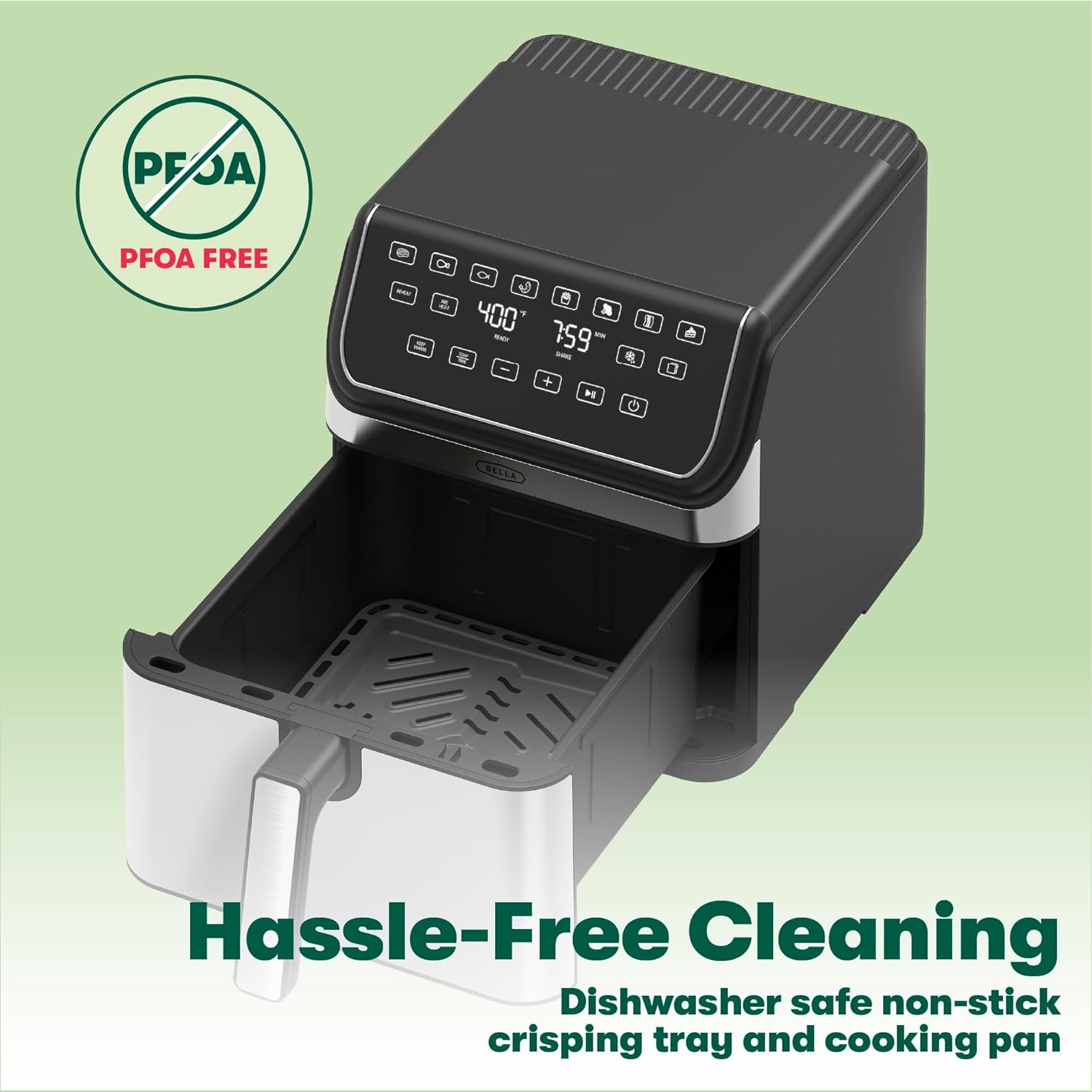
Image: The air fryer with its non-stick cooking basket and crisping tray pulled out, demonstrating ease of access and cleaning.
Initial Setup
Before first use, follow these steps to prepare your air fryer:
- Unpack: Carefully remove all packaging materials and promotional labels from the air fryer.
- Clean Components: Wash the cooking basket and crisping tray thoroughly with hot, soapy water. Rinse and dry completely. Wipe the interior and exterior of the main unit with a damp cloth.
- Placement: Place the air fryer on a stable, heat-resistant surface, away from walls or other appliances to allow for proper air circulation. Ensure there is at least 6 inches of space on all sides.
- First Use Burn-Off: It is recommended to run the air fryer empty for about 10-15 minutes at 400°F (200°C) before cooking food for the first time. This helps to burn off any manufacturing residues and odors. A slight odor may be present during this process, which is normal.
Operating Your Air Fryer
Control Panel Overview
The BELLA 8 Qt Digital Air Fryer features an intuitive touchscreen control panel. The display shows temperature, time, and various preset icons. Touch controls allow you to adjust settings and select cooking functions.
Basic Operation
- Prepare Food: Place food on the crisping tray inside the cooking basket. Do not overfill the basket to ensure even cooking.
- Insert Basket: Slide the cooking basket firmly into the main unit until it clicks into place.
- Power On: Plug the air fryer into a grounded electrical outlet. The display will illuminate.
- Set Temperature and Time: Use the temperature control buttons (usually + and -) to set the desired cooking temperature (90°F to 400°F). Use the time control buttons to set the cooking duration.
- Start Cooking: Press the Start/Pause button to begin the cooking cycle. The fan and heating element will activate.
- Shake Reminder: For some foods, the air fryer may prompt a 'SHAKE' reminder during cooking. Carefully remove the basket, shake the contents, and reinsert to resume cooking.
- End of Cycle: The air fryer will beep when the cooking cycle is complete and automatically shut off.
- Remove Food: Carefully pull out the cooking basket using the handle. Use tongs to remove cooked food.

Image: The air fryer in operation, cooking onion rings, highlighting its digital display and adjustable temperature feature.
Using Preset Functions
The air fryer includes multiple preset functions for common foods. To use a preset:
- After inserting the food basket, press the desired preset icon on the digital control panel.
- The air fryer will automatically set the optimal temperature and time for that food type.
- You can manually adjust the time and temperature even after selecting a preset if needed.
- Press the Start/Pause button to begin cooking.

Image: A baked cake inside the air fryer's basket, illustrating its versatility for baking and large capacity for family-sized meals.
Care and Maintenance
Proper cleaning and maintenance will extend the life of your air fryer:
- Always Unplug: Ensure the air fryer is unplugged and completely cooled before cleaning.
- Cleaning Basket and Tray: The RapidRelease Non-Stick Coating on the cooking pot and crisping tray makes them easy to clean. They are dishwasher safe, but hand washing with warm, soapy water is recommended to prolong the non-stick coating's life. Avoid abrasive cleaning tools.
- Cleaning Main Unit: Wipe the exterior of the air fryer with a damp cloth. Do not immerse the main unit in water or any other liquid. Clean the interior with a damp cloth and mild detergent if necessary, ensuring it is dry before next use.
- Storage: Store the air fryer in a cool, dry place with the power cord neatly wrapped.
Troubleshooting Guide
If you encounter issues with your air fryer, consult this guide:
| Problem | Possible Cause | Solution |
|---|---|---|
| Air fryer does not turn on. | Not plugged in; power outlet issue; basket not fully inserted. | Ensure the power cord is securely plugged into a working outlet. Push the cooking basket fully into the unit until it clicks. |
| Food is not cooked evenly. | Basket is overcrowded; food not shaken or flipped. | Cook food in smaller batches. Shake or flip food halfway through cooking for even results. |
| Food is not crispy. | Not enough oil (if applicable); temperature too low; cooking time too short. | Lightly spray or toss food with oil. Increase temperature or cooking time. Ensure crisping tray is used. |
| White smoke coming from appliance. | Grease residue from previous use; high-fat food. | Clean the basket and crisping tray thoroughly. For high-fat foods, drain excess fat during cooking. |
| Appliance smells during first use. | Manufacturing residues burning off. | This is normal for first use. Run the air fryer empty for 10-15 minutes at 400°F (200°C) to dissipate odors. |
Technical Specifications
| Feature | Specification |
|---|---|
| Model Name | BELLA 8.0 QT Digital Air Fryer, Stainless steel |
| Model Number | 17799 |
| Capacity | 8.0 Quarts (approx. 3 Kilograms / 6.6 lbs food capacity) |
| Wattage | 1750 Watts |
| Voltage | 120 Volts (AC) |
| Temperature Range | 90°F - 400°F (32°C - 204°C) |
| Control Method | Touch (Digital) |
| Special Features | Automatic Shut-Off, Programmable, Temperature Control, Timer, TurboCrisp Technology |
| Non-stick Coating | Yes (RapidRelease) |
| Dishwasher Safe Parts | Cooking Basket, Crisping Tray |
| Product Dimensions (DxWxH) | 11.18"D x 14.25"W x 12.67"H |
| Item Weight | 14.12 pounds |
| Material | Aluminum, Plastic, Stainless Steel (Outer and Inner) |
| UPC | 829486177996 |
Warranty and Customer Support
BELLA products are engineered to perform and built to last. This product comes with a 2-year warranty from the date of purchase, covering defects in material and workmanship under normal household use.
For warranty claims, technical assistance, or general inquiries, please visit the official BELLA website or contact their customer support. Keep your proof of purchase for warranty validation.
You can find more information and support by visiting the BELLA Store on Amazon.
Related documents17799

Ask a question about this manual
Ask about setup, troubleshooting, compatibility, parts, safety, or missing instructions. Manuals+ will review the question and use this page’s manual context to help answer it.