
Introduction
This manual provides essential information for the proper use and maintenance of your Motorola Moto G32 smartphone. Please read this guide thoroughly before using your device to ensure optimal performance and longevity. This device operates on the Android operating system and features a 6.5-inch display.
Product Overview
Familiarize yourself with the physical components of your Motorola Moto G32 smartphone.
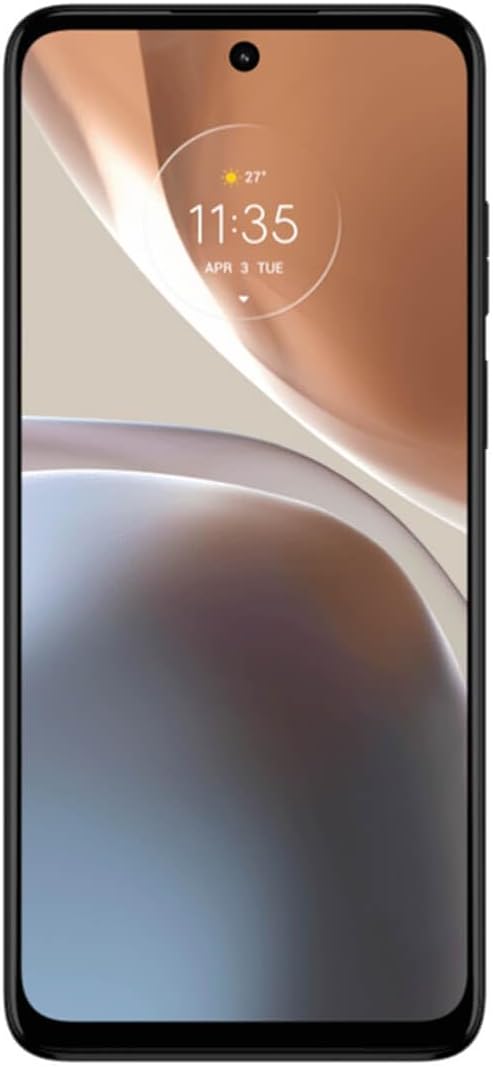
Figure 1: Front View. This image shows the front of the Motorola Moto G32, highlighting its 6.5-inch display and the front-facing camera cutout at the top center.
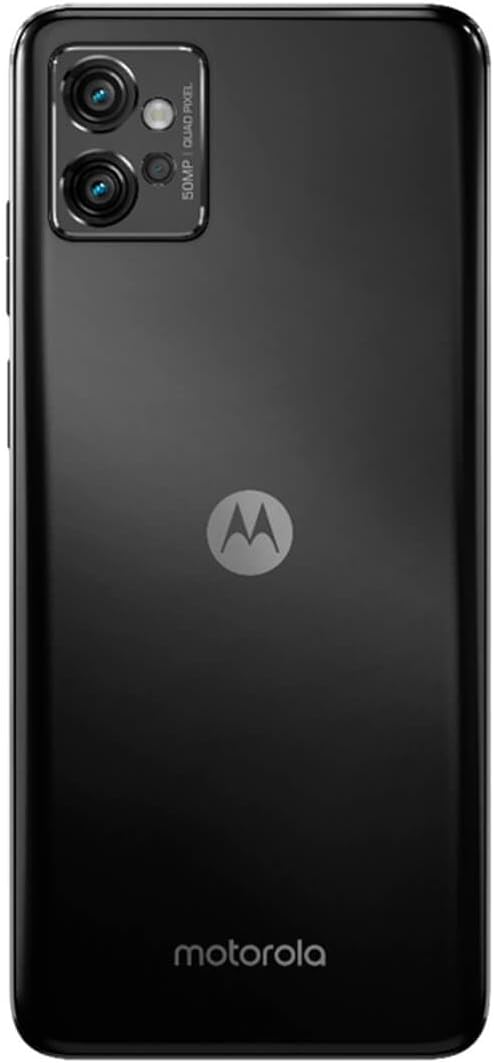
Figure 2: Rear View. The back of the device features the triple camera system in the upper left corner and the distinctive Motorola 'M' logo in the center.

Figure 3: Angled Side View. This perspective illustrates the overall design and slim profile of the Motorola Moto G32.

Figure 4: Side View. This image highlights the placement of the power button (which often includes a fingerprint sensor) and volume rocker on the side of the device.
Setup
1. Inserting SIM and microSD Cards
- Locate the SIM/microSD card tray on the side of your phone.
- Insert the SIM ejector tool (usually included in the box) into the small hole on the tray to open it.
- Carefully pull out the tray.
- Place your Nano-SIM card(s) and/or microSD card into the designated slots on the tray, ensuring the gold contacts face down.
- Gently push the tray back into the phone until it clicks into place.
2. Initial Power On and Setup
- Press and hold the Power button (located on the side) until the Motorola logo appears.
- Follow the on-screen prompts to select your language, connect to a Wi-Fi network, and set up your Google account.
- You may be prompted to transfer data from an old device or set up a new device.
3. Charging the Battery
Before first use, it is recommended to fully charge your device. Connect the USB Type-C cable to the phone's charging port and the other end to a compatible power adapter. The Motorola Moto G32 supports Turbo Power charging for faster replenishment of its 5000 mAh battery.
Operating Instructions
1. Basic Navigation
- Touchscreen: Tap to select, swipe to scroll, pinch to zoom.
- Home Screen: Access your apps and widgets.
- Notifications: Swipe down from the top of the screen to view notifications and quick settings.
2. Making Calls and Sending Messages
- Calls: Open the Phone app, enter a number or select a contact, then tap the call icon.
- Messages: Open the Messages app, tap 'Start chat', enter a recipient, and type your message.
3. Camera Usage
Your Moto G32 features a 50 Megapixel triple camera system. Open the Camera app from your home screen or app drawer. Select different modes (e.g., Photo, Video, Portrait) by swiping across the screen. Tap the shutter button to capture images or start/stop video recording.
4. Display Features
The 6.5-inch Full HD+ display offers a 90Hz refresh rate for smoother scrolling and improved visual fluidity. Adjust display settings such as brightness, dark theme, and screen timeout in the Settings app under 'Display'.
5. Audio Experience
Experience enhanced sound quality with Dolby Atmos stereo speakers. Adjust audio settings and profiles in the Settings app under 'Sound & vibration'.
6. Battery Management
The 5000 mAh battery provides extended usage. To optimize battery life, manage background app activity, reduce screen brightness, and enable battery saver mode when needed. Monitor battery usage in Settings > Battery.
Maintenance
1. Cleaning Your Device
Use a soft, lint-free cloth to clean the screen and body of your phone. Avoid using harsh chemicals or abrasive materials, which can damage the finish. Do not expose the device to excessive moisture.
2. Software Updates
Your Motorola Moto G32 runs on the Android operating system. Periodically check for software updates to ensure your device has the latest features and security patches. Go to Settings > System > System updates. Information regarding guaranteed software updates is not available in the provided product data.
3. Storage Management
The device comes with 64 GB of internal storage, expandable up to 1 TB via a microSD card. Regularly clear unnecessary files, uninstall unused apps, and move media to cloud storage or a microSD card to maintain optimal performance.
Troubleshooting
If you encounter issues with your Motorola Moto G32, try the following common troubleshooting steps:
- Device Not Responding: Press and hold the Power button for about 10-15 seconds to force a restart.
- Apps Crashing: Clear the cache and data for the problematic app (Settings > Apps > [App Name] > Storage > Clear cache/Clear data). If the issue persists, uninstall and reinstall the app.
- Connectivity Issues (Wi-Fi/Bluetooth): Turn Wi-Fi or Bluetooth off and then on again. If the problem continues, restart your phone or reset network settings (Settings > System > Reset options > Reset Wi-Fi, mobile & Bluetooth).
- Battery Draining Quickly: Review battery usage in Settings > Battery to identify apps consuming excessive power. Reduce screen brightness, disable unnecessary features like GPS or Bluetooth when not in use.
- Slow Performance: Free up storage space, close background apps, and restart your device.
- Factory Reset: As a last resort, if software issues persist, you may perform a factory data reset (Settings > System > Reset options > Erase all data). Warning: This will erase all data on your phone. Back up important information before proceeding.
Specifications
| Feature | Specification |
|---|---|
| Brand | Motorola |
| Model Number | XT2235-2 |
| Operating System | Android |
| Screen Size | 6.5 Inches |
| Resolution | 1080x2400 pixels |
| Refresh Rate | 90 Hz |
| Installed RAM Size | 4 GB |
| Memory Storage Capacity | 64 GB (Expandable up to 1 TB) |
| CPU Model | Snapdragon |
| Effective Still Resolution | 50 Megapixels |
| Special Features | Camera |
| Connections | Bluetooth, Cellular |
| Focal Length (Port) | USB Type C |
| Battery | 1 Lithium Polymer (required) |
| Color | Grey |
| Wireless Carrier | Alltel Cellular (unlocked) |
Warranty and Support
Specific information regarding product warranty, availability of spare parts, and guaranteed software updates is not available in the provided product data. For detailed warranty terms, support options, and the latest software update information, please refer to the official Motorola website or contact Motorola customer support directly.


