Product Overview
The LaCie Rugged Mini SSD is a durable, fast, and portable external solid-state drive designed for efficient data storage and transfer. It offers high-speed connectivity and robust protection against environmental factors, making it suitable for various professional and personal uses.

Front view of the LaCie Rugged Mini SSD, showcasing its signature orange protective bumper and white faceplate with the LaCie logo.
Setup Guide
Follow these steps to set up your LaCie Rugged Mini SSD:
- Unpack the Device: Carefully remove the LaCie Rugged Mini SSD and its included USB-C cable from the packaging.
- Connect to Your Device:
Use the provided USB-C cable to connect the LaCie Rugged Mini SSD to a compatible port on your computer (PC or Mac) or iPad. The drive features a USB-C port for seamless plug-and-play connectivity.

Close-up of the LaCie Rugged Mini SSD showing its USB-C port, designed for universal compatibility.
- Initial Recognition: Your operating system should automatically detect the drive. For first-time use, you may be prompted to format the drive, especially if switching between different operating systems (e.g., from Mac to Windows or vice-versa). Follow the on-screen instructions for formatting if necessary.
- Software Installation (Optional): The drive may come with pre-loaded software or offer downloads for data management, backup, or data recovery services. Refer to the included quick start guide or visit the LaCie support website for details on installing any optional software.
Operating Instructions
The LaCie Rugged Mini SSD is designed for high-speed data transfer and reliable performance across various devices.
Data Transfer
- Drag and Drop: The simplest method for transferring files is to drag and drop them directly onto the drive icon or into an opened folder on the drive.
- Copy and Paste: Alternatively, right-click on files or folders, select "Copy," then navigate to the desired location on the LaCie drive, right-click, and select "Paste."
- High-Speed Performance: Leveraging USB 3.2 Gen 2x2 technology, the drive offers read speeds up to 2000MB/s, ensuring rapid file transfers for large media files and projects.

The LaCie Rugged Mini SSD connected to a laptop, illustrating its use for high-speed data transfer.
Compatibility
The drive is universally compatible with PC, Mac, and iPad devices, providing flexible workflow options.
The LaCie Rugged Mini SSD connected to an iPad, demonstrating its broad device compatibility.
Official Product Video
An official video showcasing the features and capabilities of the LaCie Rugged Mini Solid State Drive, including its durability, speed, and universal compatibility.
Maintenance and Care
To ensure the longevity and optimal performance of your LaCie Rugged Mini SSD, follow these maintenance guidelines:
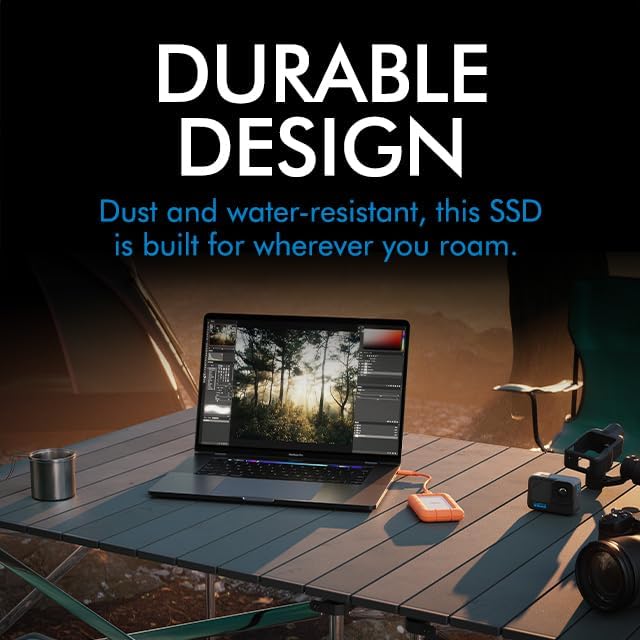
- Physical Protection: The drive features a durable design with an IP54 rating, providing resistance to dust and water splashes. While robust, avoid prolonged submersion in water or exposure to excessive dust.
- Temperature: Operate and store the drive within recommended temperature ranges to prevent damage. Avoid extreme heat or cold.
- Safe Ejection: Always safely eject the drive from your computer or device before disconnecting it to prevent data corruption.
- Cleaning: Use a soft, dry cloth to clean the exterior of the drive. Do not use harsh chemicals or abrasive materials.

The LaCie Rugged Mini SSD shown in an outdoor environment, highlighting its durable and portable design.
Troubleshooting
If you encounter issues with your LaCie Rugged Mini SSD, consider the following common solutions:
- Drive Not Detected:
- Ensure the USB-C cable is securely connected to both the drive and your device.
- Try connecting to a different USB-C port on your device.
- Test with a different compatible USB-C cable if available.
- Restart your computer or iPad.
- Slow Transfer Speeds:
- Ensure you are connected to a USB 3.2 Gen 2x2 compatible port for optimal performance. Older USB ports will result in slower speeds.
- Close other applications that might be using significant system resources.
- Check your device's drivers to ensure they are up to date.
- Data Corruption:
- Always safely eject the drive before disconnecting.
- If data appears corrupted, consider running a disk utility tool (e.g., Disk Utility on Mac, Check Disk on Windows) to repair the drive.
Specifications
| Feature | Detail |
|---|---|
| Brand | LaCie |
| Series | LaCie Rugged Mini SSD |
| Model Number | STMF4000400 |
| Digital Storage Capacity | 4 TB |
| Hard Disk Type | Solid State Drive (SSD) |
| Interface | USB-C (USB 3.2 Gen 2x2 / Thunderbolt compatible) |
| Read Speed | Up to 2000 MB/s |
| Hardware Platform | PC, Mac, and iPad |
| Item Weight | 4 ounces |
| Product Dimensions (LxWxH) | 0.68 x 2.63 x 4.15 inches |
| Special Features | Data Recovery Service, Dust and Water Resistant (IP54) |
Warranty and Support
LaCie provides comprehensive support for its products, including data recovery services.
- Rescue Data Recovery Services: This drive includes 3 years of Rescue Data Recovery Services. These services help protect your data against unexpected data loss due to mechanical failure, accidental damage, or natural disaster. For more information and to activate your service, please visit the official LaCie website.
- Technical Support: For technical assistance, driver downloads, or further troubleshooting, please visit the official LaCie support website or contact their customer service.

Product packaging indicating the inclusion of 3 years of Rescue Data Recovery Services.


