
Introduction
Thank you for purchasing the Sharp YC-MS252AE-W 25-Liter Digital Solo Microwave Oven. This manual provides essential information for safe and efficient use of your appliance. Please read it thoroughly before operation and keep it for future reference.

Image: Front view of the Sharp YC-MS252AE-W microwave oven, showcasing its white exterior and black digital control panel.
Important Safety Instructions
Always follow basic safety precautions when using electrical appliances to reduce the risk of fire, electric shock, injury to persons, or exposure to excessive microwave energy.
- Read all instructions before using the appliance.
- Do not attempt to operate this oven with the door open as this can result in harmful exposure to microwave energy.
- Do not heat liquids or other foods in sealed containers since they are liable to explode.
- Regularly clean the oven cavity, door, and seals.
- Ensure the appliance is properly grounded.
Setup and Installation
Unpacking
Carefully remove the microwave oven and all packaging materials. Check for any damage. Do not operate the oven if it is damaged.
Placement
Place the oven on a flat, stable surface capable of supporting its weight (12 kg). Ensure adequate ventilation around the appliance. Maintain a minimum clearance of 10 cm (4 inches) on the sides and back, and 30 cm (12 inches) above the oven.
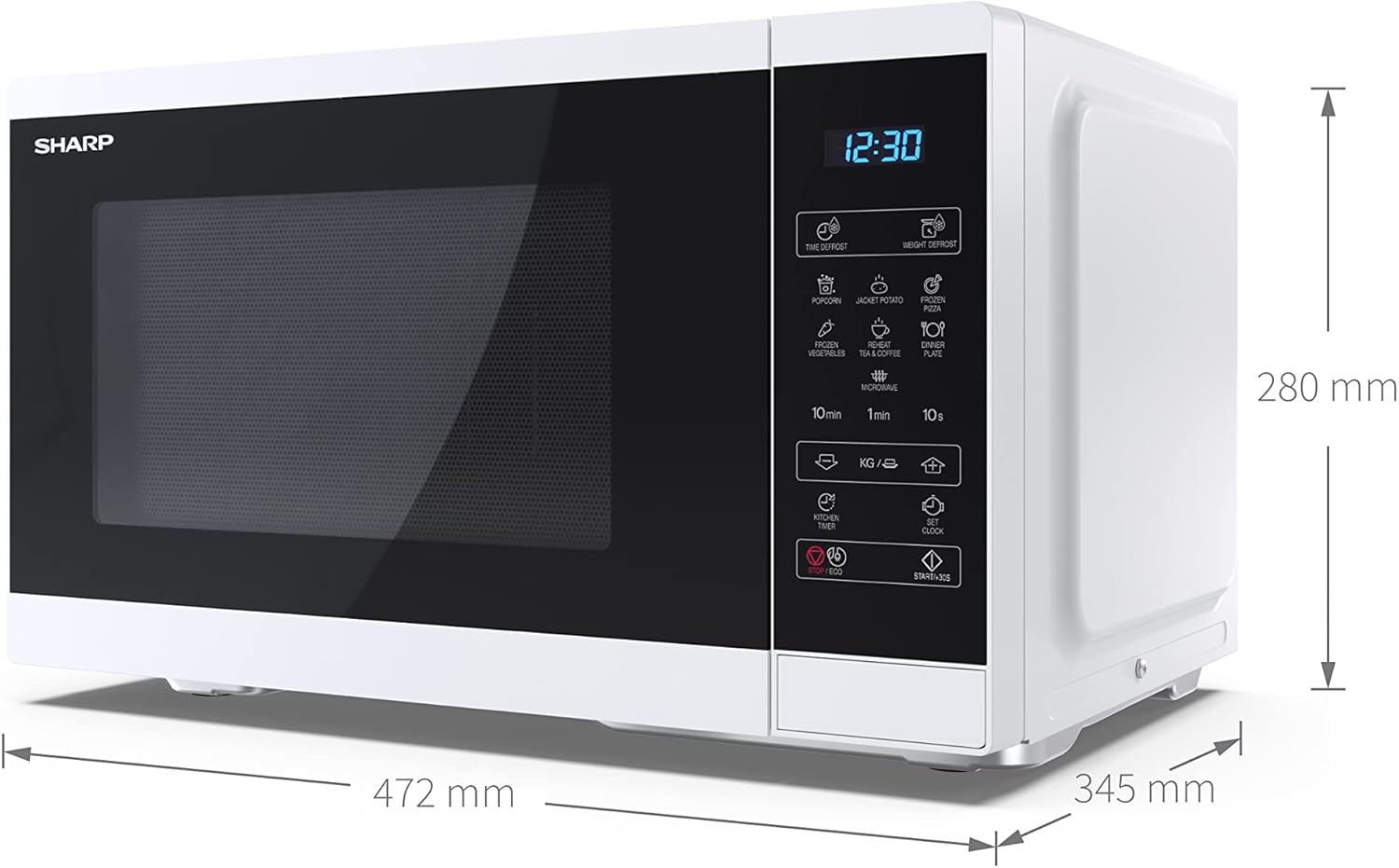
Image: Side view of the Sharp YC-MS252AE-W microwave oven, illustrating its dimensions: 472 mm width, 345 mm depth, and 280 mm height.
Turntable Installation
The microwave oven is equipped with a glass turntable and a turntable ring. Place the turntable ring in the center of the oven cavity. Then, place the glass turntable securely on top of the turntable ring, ensuring it sits correctly on the central hub.

Image: Interior view of the Sharp YC-MS252AE-W microwave oven, showing the glass turntable and roller ring correctly placed inside the cavity.
Power Connection
Plug the power cord into a standard 220V, 50Hz grounded electrical outlet. Do not use extension cords or adapters.
Operating Instructions
The Sharp YC-MS252AE-W features a digital control panel for easy operation. Below are common functions and how to use them.

Image: Close-up of the digital control panel on the Sharp YC-MS252AE-W microwave oven, displaying various function buttons and the time display.
Setting the Clock
- Press the "CLOCK" button.
- Use the number buttons (10min, 1min, 10s) to enter the current time.
- Press "CLOCK" again to confirm.
Basic Microwave Cooking
- Place food in a microwave-safe container on the turntable.
- Close the oven door.
- Press the "MICROWAVE" button.
- Use the number buttons (10min, 1min, 10s) to set the desired cooking time.
- Press "START/+30s" to begin cooking.
Power Level Adjustment
This microwave offers 11 power levels. To adjust the power level:
- After setting the cooking time, press the "MICROWAVE" button repeatedly to cycle through power levels (P100, P90, P80... P10).
- Press "START/+30s" to begin cooking at the selected power level.
Defrost Function
The oven features both Time Defrost and Weight Defrost functions.
Time Defrost:
- Press the "TIME DEFROST" button.
- Use the number buttons to enter the desired defrosting time.
- Press "START/+30s".
Weight Defrost:
- Press the "WEIGHT DEFROST" button.
- Use the "KG / g" button to select the weight of the food.
- Press "START/+30s".
Auto Cook Menus
The microwave includes pre-programmed settings for common foods:
- Popcorn: For preparing popcorn.
- Jacket Potato: For cooking baked potatoes.
- Frozen Pizza: For reheating or cooking frozen pizza.
- Frozen Vegetables: For cooking frozen vegetables.
- Tea & Coffee: For reheating beverages.
- Dinner Plate: For reheating a dinner plate.
To use an auto cook menu:
- Place the food in the oven.
- Press the corresponding auto cook button (e.g., "POPCORN").
- Press "START/+30s". The oven will automatically set the time and power level.
Child Lock Function
To activate the child lock:
- Press and hold the "STOP/ECO" button for 3 seconds. The lock indicator will appear on the display.
To deactivate the child lock:
- Press and hold the "STOP/ECO" button for 3 seconds. The lock indicator will disappear.
Care and Maintenance
Cleaning the Oven Interior
Regularly clean the oven cavity, door, and door seals with a mild detergent and a soft cloth. Do not use abrasive cleaners or harsh chemicals. For stubborn stains, place a bowl of water with lemon juice inside and microwave for a few minutes to loosen residue.
Cleaning the Turntable and Roller Ring
The glass turntable and roller ring can be removed for cleaning. Wash them in warm, soapy water or in a dishwasher. Ensure they are completely dry before placing them back in the oven.
Exterior Cleaning
Wipe the exterior surfaces with a soft, damp cloth. Avoid getting water into the ventilation openings.
Troubleshooting
| Problem | Possible Cause | Solution |
|---|---|---|
| Oven does not start. | Power cord not plugged in; Door not closed properly; Fuse blown or circuit breaker tripped. | Ensure power cord is securely plugged in; Close the door firmly; Check household fuse or reset circuit breaker. |
| Food not heating. | Door not closed properly; Cooking time or power level set incorrectly. | Ensure door is closed; Verify cooking time and power level settings. |
| Turntable does not rotate. | Turntable not properly seated; Obstruction under the roller ring. | Ensure turntable and roller ring are correctly positioned; Remove any food debris or obstructions. |
| Sparking inside the oven. | Metal or foil in the oven; Food residue. | Remove any metal objects; Clean the oven interior thoroughly. |
If the problem persists after attempting these solutions, please contact customer support.
Specifications
| Feature | Detail |
|---|---|
| Brand | Sharp |
| Model Number | YC-MS252AE-W |
| Color | White |
| Capacity | 25 Liters |
| Microwave Power | 900 Watts |
| Power Levels | 11 |
| Voltage | 220 Volts |
| Material | Stainless Steel |
| Dimensions (D x W x H) | 34.5 x 47 x 28 cm |
| Item Weight | 12 Kilograms |
| Special Feature | Defrost |
| Automatic Stop Function | Yes |
| Installation Type | Countertop |
| Included Components | Microwave Oven, Turntable, Roller Ring, Quick Start Guide, Warranty Card |
Warranty Information
This Sharp microwave oven comes with a manufacturer's warranty. Please refer to the included Warranty Card for specific terms and conditions, including the warranty period and coverage details. Spare parts are available for a period of 5 years from the date of purchase.
Keep your proof of purchase for any warranty claims.
Customer Support
For technical assistance, service, or questions regarding your Sharp microwave oven, please refer to the contact information provided in your Warranty Card or Quick Start Guide.
You can also visit the official Sharp website for additional resources and support.
For more information about Sharp products, visit the Sharp Brand Store.


