
1. Introduction
Thank you for purchasing the SHARP YC-MG252AE-W Microwave Oven with Grill. This appliance combines the convenience of a 900W microwave with the versatility of a 1000W grill, offering 25 liters of capacity for various cooking needs. Featuring 11 power levels, 8 automatic programs, and a defrost function, this oven is designed for efficient and flexible food preparation. Please read this manual carefully before operating your new appliance to ensure safe and optimal use.

Figure 1: Front view of the SHARP YC-MG252AE-W Microwave Oven with Grill.
2. Important Safety Instructions
When using electrical appliances, basic safety precautions should always be followed to reduce the risk of fire, electric shock, injury to persons, or exposure to excessive microwave energy.
- Do not attempt to operate this oven with the door open as this can result in harmful exposure to microwave energy.
- Do not place any object between the oven front face and the door or allow soil or cleaner residue to accumulate on sealing surfaces.
- Do not operate the oven if it is damaged. It is particularly important that the oven door closes properly and that there is no damage to the: (1) door (bent), (2) hinges and latches (broken or loosened), (3) door seals and sealing surfaces.
- The oven should not be adjusted or repaired by anyone except properly qualified service personnel.
- Ensure proper ventilation around the appliance. Do not block any ventilation openings.
- Never use metal containers or foil in microwave mode, as this can cause arcing and damage the oven.
- Always supervise children when the appliance is in use.
- Liquids and other foods must not be heated in sealed containers since they are liable to explode.
3. Package Contents
Carefully unpack your new microwave oven and ensure all items are present and undamaged. If any items are missing or damaged, please contact your retailer.
- SHARP YC-MG252AE-W Microwave Oven Unit
- Glass Turntable
- Grill Rack
- User Manual
4. Product Overview
Familiarize yourself with the main components and control panel of your microwave oven.
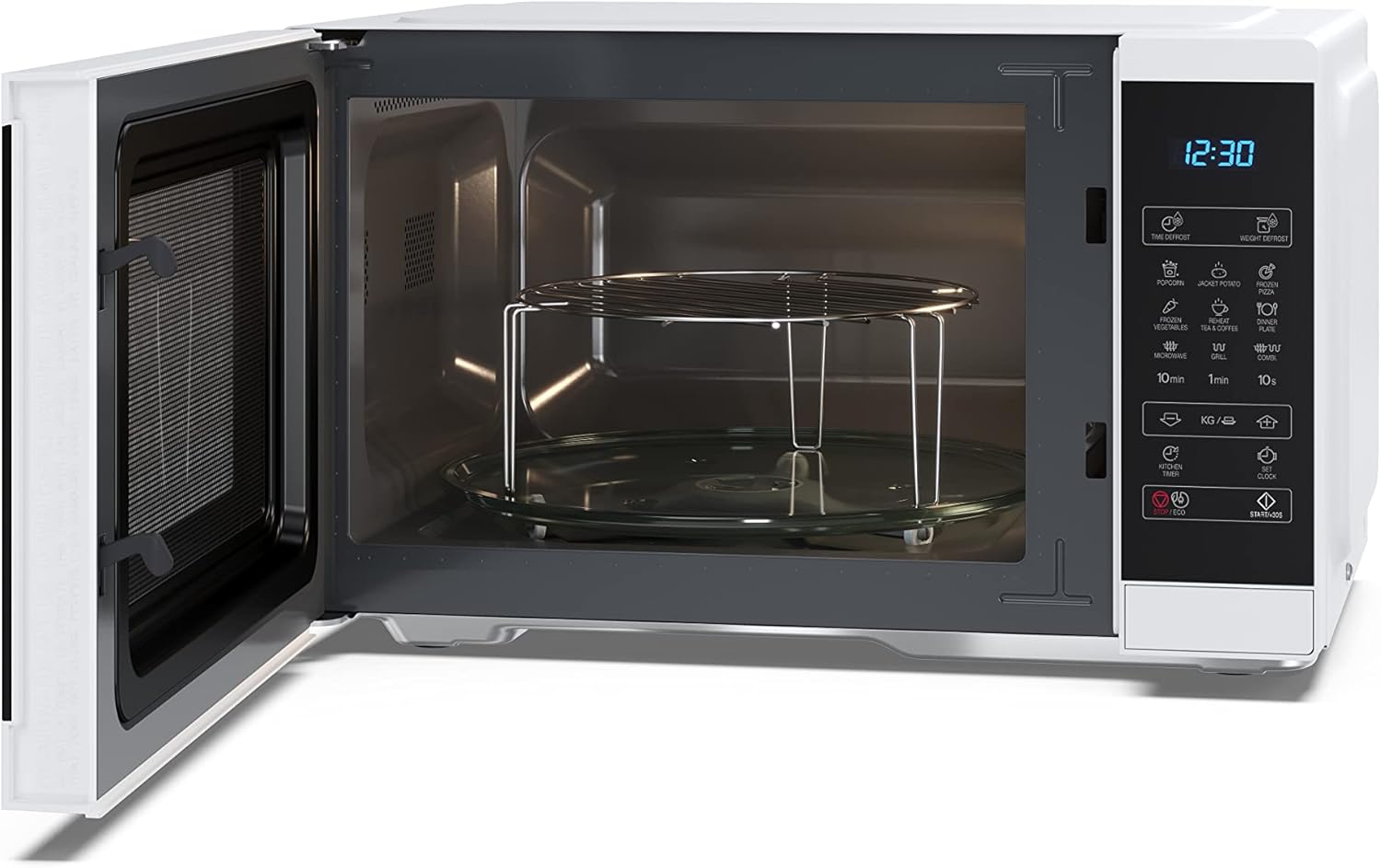
Figure 2: Interior view with turntable and grill rack.

Figure 3: Control Panel and Display.
Control Panel Functions:
- Digital Display: Shows time, power level, and cooking status.
- Time Defrost / Weight Defrost: Buttons for defrosting food by time or weight.
- Popcorn / Jacket Potato / Frozen Pizza / Frozen Vegetables / Dinner Plate / Tea & Coffee: One-touch auto cooking programs.
- Microwave / Grill / Combi: Buttons to select cooking modes.
- 10min / 1min / 10s: Buttons for quick time setting.
- KG / g / ↑ / ↓: Buttons for weight input and adjusting settings.
- Kitchen Timer / Clock: Functions for setting a kitchen timer or the current time.
- Start / +30s / ECO: Start cooking, add 30 seconds, or activate ECO mode.
- Stop / Clear: Stops cooking or clears settings.
5. Setup
5.1 Unpacking and Placement
- Remove all packaging materials and accessories. Inspect the oven for any damage such as dents or a broken door. Do not install if damaged.
- Place the oven on a flat, stable surface that is strong enough to hold the oven and the food you will be placing in it.
- Ensure there is adequate ventilation space: at least 20 cm of space above the oven, 10 cm at the rear, and 5 cm on both sides. Do not block the air vents.
5.2 Turntable and Grill Rack Installation
- Place the turntable support ring in the center of the oven cavity.
- Place the glass turntable securely on the turntable support. Ensure it rotates freely.
- For grill cooking, place the metal grill rack directly on the glass turntable.
5.3 Electrical Connection
Plug the power cord into a standard 220V, 50Hz grounded electrical outlet. Do not use extension cords or multiple adapters.
6. Operating Instructions
6.1 Setting the Clock
- In standby mode, press the 'Clock' button once.
- Use the time buttons (e.g., '10min', '1min', '10s') to set the hour.
- Press 'Clock' again.
- Use the time buttons to set the minutes.
- Press 'Clock' to confirm.
6.2 Microwave Cooking
- Place food in a microwave-safe container on the glass turntable. Close the door.
- Press the 'Microwave' button repeatedly to select the desired power level (e.g., P100 for 100% power, P80 for 80% power). There are 11 power levels available.
- Use the time buttons ('10min', '1min', '10s') to set the cooking time.
- Press 'Start / +30s' to begin cooking.
6.3 Grill Cooking
- Place food on the grill rack (placed on the glass turntable). Close the door.
- Press the 'Grill' button.
- Use the time buttons to set the grilling time.
- Press 'Start / +30s' to begin grilling.
6.4 Defrost Function
The oven offers both time defrost and weight defrost options.
- Weight Defrost: Press 'Weight Defrost'. Use the 'KG / g' buttons to input the food weight. The oven will automatically set the defrost time. Press 'Start / +30s'.
- Time Defrost: Press 'Time Defrost'. Use the time buttons to set the desired defrosting time. Press 'Start / +30s'.
6.5 Auto Programs
The oven has 8 pre-set auto cooking programs for common foods. Refer to the labels on the control panel for specific programs like Popcorn, Jacket Potato, Frozen Pizza, etc.
- Place the food in the oven.
- Press the desired auto program button (e.g., 'Popcorn').
- If applicable, use the 'KG / g' buttons to select the weight or quantity.
- Press 'Start / +30s' to begin.
6.6 Kitchen Timer
- In standby mode, press the 'Kitchen Timer' button.
- Use the time buttons to set the desired countdown time.
- Press 'Start / +30s'. The timer will count down without cooking.
6.7 ECO Function
Press the 'ECO' button to activate the energy-saving mode. The display will dim or turn off to conserve power when the oven is not in use.
6.8 Child Safety Lock
To prevent unintended operation, especially by children:
- To activate: In standby mode, press and hold the 'Stop / Clear' button for 3 seconds. A lock indicator will appear on the display.
- To deactivate: Press and hold the 'Stop / Clear' button for 3 seconds again. The lock indicator will disappear.
7. Maintenance and Cleaning
Regular cleaning helps maintain the performance and longevity of your microwave oven.
- Before Cleaning: Always unplug the oven from the power outlet.
- Oven Interior: Wipe the cavity after each use with a damp cloth. For stubborn stains, use a mild detergent. Do not use abrasive cleaners or scouring pads.
- Oven Exterior: Clean the exterior with a damp cloth and mild soap. Avoid getting water into the ventilation openings.
- Door and Door Seals: Wipe the door, door seals, and adjacent parts frequently with a damp cloth to remove spills and splatters.
- Glass Turntable and Grill Rack: These can be washed in warm soapy water or in a dishwasher. Ensure they are completely dry before placing them back in the oven.
8. Troubleshooting
If you encounter any issues with your microwave oven, please refer to the following common problems and solutions before contacting service.
| Problem | Possible Cause | Solution |
|---|---|---|
| Oven does not start | Power cord not plugged in; Door not closed properly; Fuse blown or circuit breaker tripped. | Ensure plug is firmly in outlet; Close door securely; Check household fuse or reset circuit breaker. |
| Food not heating | Incorrect cooking time/power level set; Door not closed properly. | Adjust time and power settings; Close door securely. |
| Turntable not rotating | Turntable not properly seated; Obstruction under turntable. | Ensure turntable and support ring are correctly positioned; Remove any obstructions. |
| Unusual noise during operation | Food container touching oven walls; Turntable not properly seated. | Use a smaller container; Re-seat turntable and support ring. |
9. Specifications
Technical specifications for the SHARP YC-MG252AE-W Microwave Oven with Grill.
| Feature | Specification |
|---|---|
| Brand | Sharp |
| Model Number | YC-MG252AE-W |
| Capacity | 25 Liters |
| Microwave Power | 900 Watts |
| Grill Power | 1000 Watts |
| Power Levels | 11 |
| Product Dimensions (L x W x H) | 47.2 x 34.5 x 28 cm (18.58 x 13.58 x 11.02 inches) |
| Turntable Diameter | 31.5 cm (12.4 inches) |
| Color | White |
| Material | Stainless Steel, Glass |
| Special Features | Defrost, Timer, Turntable, Programmable, Child Safety, LED Lighting, ECO Function |
| Voltage | 220 Volts |
| Weight | 12.5 Kilograms |

Figure 4: Product Dimensions.
10. Warranty and Support
This SHARP YC-MG252AE-W Microwave Oven with Grill comes with a commitment to quality. Parts availability is guaranteed for 5 years from the date of purchase.
For technical assistance, warranty claims, or to inquire about spare parts, please contact your retailer or the official Sharp customer support in your region. Always have your model number (YC-MG252AE-W) and proof of purchase ready when contacting support.


