
HOTBEST A
SH402 5-in-1 Stud Finder Sensor User Manual
Model: A | Brand: HOTBEST
Introduction
The HOTBEST SH402 5-in-1 Stud Finder Sensor is a versatile wall scanner detector designed to accurately locate various hidden elements behind walls, floors, and ceilings. This electronic handheld device features an LED display and an audio alarm, making it an essential tool for DIY enthusiasts and professionals alike. It can detect wood studs, metal studs, joists, metal pipes, rebar, and live AC wires, enhancing safety and precision in your projects.
Safety Information
- Battery Handling: Keep batteries away from heat, sparks, and open flames. Do not short-circuit. Use only a 9V dry battery.
- Alarm Use: Avoid using the device in quiet environments to prevent disturbing others, as it features an audible alarm.
- Always ensure the device is calibrated correctly before use to prevent inaccurate readings.
- Do not attempt to open or modify the device, as this may void the warranty and pose safety risks.
Setup
- Battery Installation: Open the battery compartment cover on the back of the device. Insert one 9V dry battery, ensuring correct polarity. Close the cover securely.
- Power On: Press and hold the power button located on the side of the device. The LED LCD green backlight screen will illuminate.
- Calibration: Before each scan, place the device flat against the wall surface where you intend to scan. Press and hold the scan button (often the same as the power button or a dedicated mode button) until calibration is complete. The display will indicate when it's ready. This step is crucial for accurate detection.

Image: The SH402 Stud Finder Sensor, showing its ability to detect wood, electrical wires, metal pipes, and rebar.
Video: Demonstrates the initial setup and power-on sequence of the SH402 Stud Finder Sensor, including battery installation and screen activation.
Operating Instructions
The SH402 offers five distinct detection modes for various materials. Select the appropriate mode using the "MODE" button.
Detection Modes:
- Stud Scan (Wood): Locates the center and edges of wood studs behind drywall. Ideal for hanging pictures, shelves, or mounting TVs.
- Metal Scan: Detects ferrous and non-ferrous metals, such as metal pipes, rebar, and metal studs.
- AC Wire Scan: Identifies live unshielded AC electrical wires. Essential for avoiding electrical hazards during drilling or renovation.
- Deep Scan: Provides extended depth detection for wood and metal objects, useful for thicker walls.
- Moisture Scan: (Note: While the product description mentions 5-in-1, the detailed features and images primarily focus on wood, metal, and AC. If a moisture scan is present, it would be used to detect moisture content in materials. Please refer to the device's display for specific mode indicators.)
Scanning Procedure:
- Select Mode: Press the "MODE" button to cycle through the available detection modes until the desired mode is displayed on the LCD screen.
- Place and Calibrate: Place the device flat against the wall surface. Press and hold the scan button. Wait for the calibration process to complete (usually indicated by a stable reading or a specific icon on the display).
- Scan: While holding the scan button, slowly slide the device horizontally across the surface. Maintain constant contact with the wall.
- Interpret Readings:
- The LED LCD screen will show visual indicators (e.g., bars, arrows) to guide you towards the center of the detected object.
- An audio alarm will sound when an object is detected, becoming more frequent or louder as you approach the center.
- The "CENTER" indicator on the display will light up when the device is directly over the center of a stud or object.
- An "AC" warning light will illuminate if live AC wires are detected, regardless of the selected mode.
- Marking: Once the center of an object is located, mark its position on the wall. For studs, it's recommended to scan from both directions to confirm the edges and center.

Image: Detailed view of the SH402 Stud Finder Sensor with labels for its various components and indicators, including Stud Center, AC Wire Warning, Wooden Fence Detection Mode, Stud Edge Indicator, Button, Metal Detection Mode, AC Detection Mode, Movement Direction Indicator, and Power Button/Mode Switch Button.
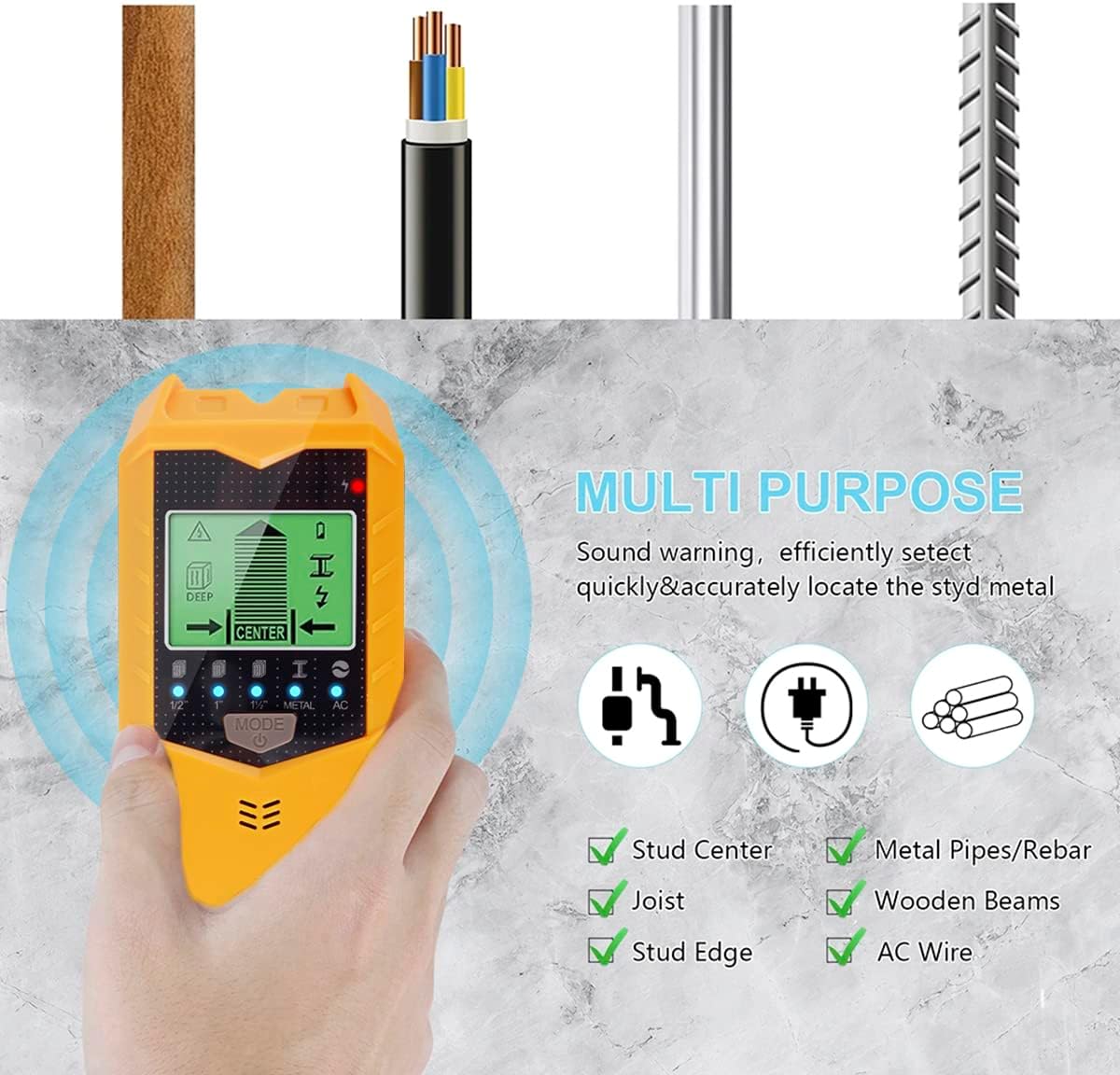
Image: Illustrates the multi-purpose detection capabilities of the SH402, including stud center, joist, stud edge, metal pipes/rebar, wooden beams, and AC wire detection.
Maintenance
- Cleaning: Wipe the device with a soft, dry cloth. Do not use abrasive cleaners or solvents.
- Storage: Store the stud finder in a cool, dry place away from direct sunlight and extreme temperatures.
- Battery Replacement: Replace the 9V battery when the low battery indicator appears on the display to ensure optimal performance. Remove the battery if the device will not be used for an extended period to prevent leakage.
Troubleshooting
- Inaccurate Readings: Ensure the device is properly calibrated on the wall surface before scanning. Avoid placing your free hand on the wall near the device during scanning.
- No Detection: Check if the battery is properly installed and has sufficient charge. Ensure you are using the correct mode for the material you are trying to detect.
- Constant Alarm/False Positives: This may occur if the wall material is highly irregular or contains dense materials. Try recalibrating in a different spot or adjusting your scanning speed.
- Display Not Working: Verify battery charge. If the issue persists after battery replacement, contact customer support.
Specifications
| Feature | Detail |
|---|---|
| Brand | HOTBEST |
| Model Number | A (SH402) |
| Product Dimensions | 6.7"L x 2.76"W x 1.38"H (17.1cm x 7cm x 3.5cm) |
| Item Weight | 7 ounces |
| Power Source | Battery Powered (9V dry battery, not included) |
| Display Type | LCD with Green Backlight |
| International Protection Rating | IP66 |
| Detection Capabilities | Wood Studs, Metal Studs, Joists, Metal Pipes, Rebar, Live AC Wires |
| Features | Audio Alarm, LED Display, Easy Operation |

Image: The SH402 Stud Finder Sensor displayed against a wall, illustrating its physical dimensions (17.1cm/6.73in length, 7cm/2.75in width, 3.5cm/1.37in thickness).
Warranty and Support
Specific warranty information is not provided in the product details. For any questions, technical support, or warranty claims, please refer to the contact information provided with your purchase or visit the official HOTBEST website.
You can visit the HOTBEST Store for more information: HOTBEST Store
Ask a question about this manual
Ask about setup, troubleshooting, compatibility, parts, safety, or missing instructions. Manuals+ will review the question and use this page’s manual context to help answer it.