
1. Introduction
Thank you for choosing the Fotopro FY-810 Mini Tripod. This versatile and compact tripod is designed for photographers and videographers using cameras and smartphones, offering stability and flexibility for various shooting scenarios. Please read this manual carefully to ensure proper use and maintenance of your product.
2. Product Features
- Lightweight and Portable: The 4-section legs adjust the height of the mini tripod from 8.5 inches (21.5 cm) to 55.1 inches (140 cm). It folds down to 8.6 inches (21.6 cm) and weighs only 1.6 lbs (0.72 kg), making it ideal for travel.
- Stable and Sturdy: Despite its lightweight design, this tripod supports a maximum load capacity of 6.6 lbs (3 kg), suitable for a wide range of cameras and equipment. The tripod legs feature a 0.98 inch (25 mm) diameter and are constructed from high-strength aluminum alloy for stable performance.
- Versatility: Features an inverted center column mode for low-angle and specialty photography. The center column can be detached and used as a selfie stick, extending up to 29.4 inches (74.7 cm) with a maximum weight capacity of 2.2 lbs (1 kg) in selfie stick mode. An included cell phone clip allows for smartphone use.
- 360-degree Panoramic Ball Head: The integrated ball head provides smooth and precise movements for capturing panoramic shots and adjusting angles.
- Humanized Design: Equipped with a quick-lock design for rapid leg extension and retraction. Legs feature non-slip grips for comfortable handling. A mountaineering buckle hook is included to add counterweight in windy conditions, enhancing stability.
3. Setup Guide
3.1 Unfolding the Tripod
- Gently pull the tripod legs outwards until they click into position. The legs have multiple angle stops for different stability requirements.
- To extend the legs, twist the leg sections counter-clockwise to unlock, pull to the desired length, and then twist clockwise to lock them securely.
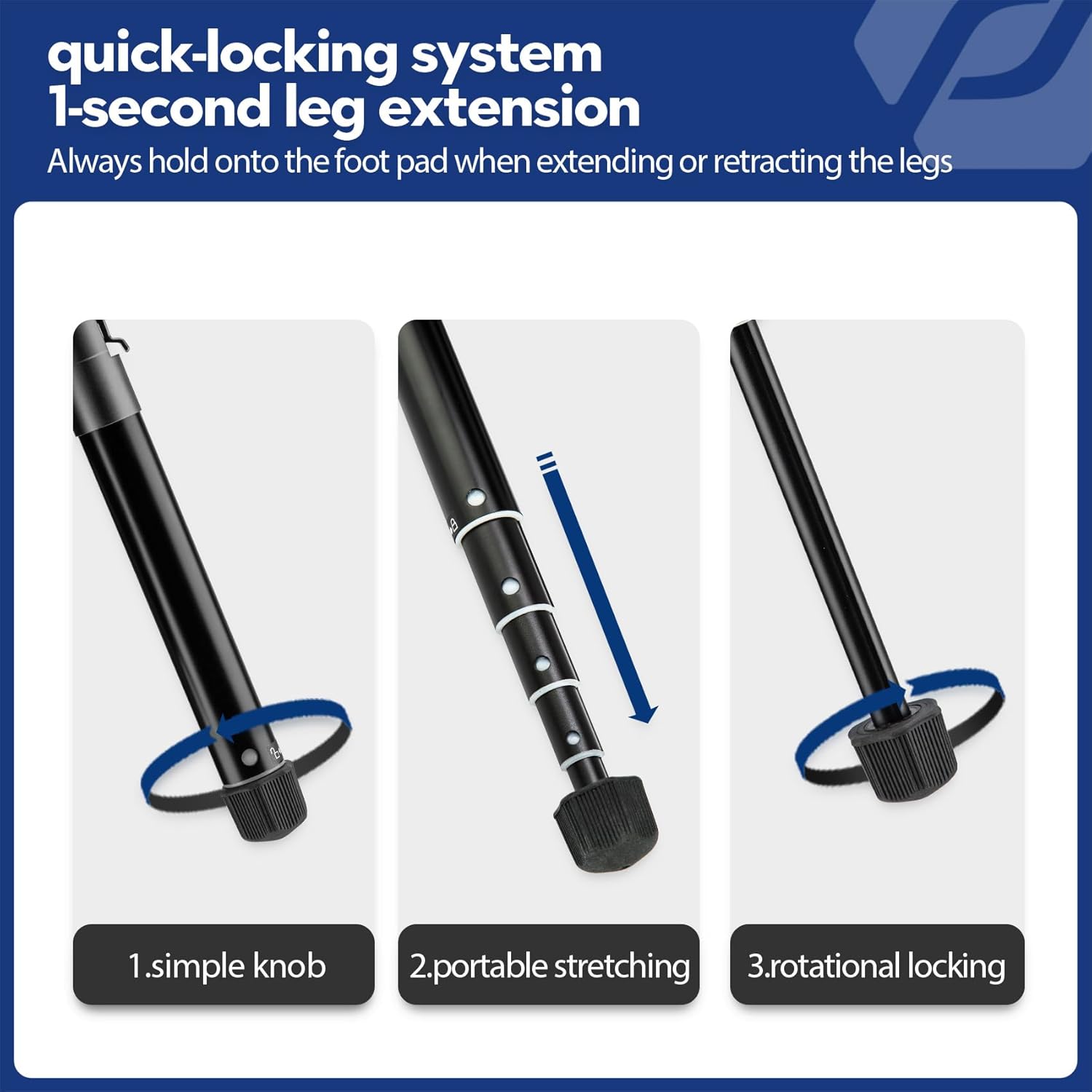
Image: Tripod legs extended to maximum height.
3.2 Attaching Your Device
- For Cameras: Unscrew the quick release plate from the ball head. Attach the quick release plate to the bottom of your camera by screwing it into the camera's tripod socket. Ensure it is tightened securely. Slide the quick release plate with the camera back into the ball head and lock it in place using the locking knob.
- For Smartphones: Attach the included phone clip to the quick release plate or directly to the ball head's 1/4-inch screw. Secure your smartphone into the clip.

Image: Detail of the ball head with quick release plate and leveling features.
3.3 Quick-Locking System
The tripod features a quick-locking system for rapid deployment. Always hold onto the foot pad when extending or retracting the legs to ensure smooth operation and prevent accidental collapse.

Image: Illustration of the quick-locking mechanism.
4. Operating Instructions
4.1 Adjusting Height and Angle
- Leg Adjustment: Unlock the leg sections by twisting counter-clockwise, extend to the desired height, and twist clockwise to lock.
- Ball Head Adjustment: Loosen the main locking knob on the ball head to adjust the camera angle. Tighten the knob to secure the position. Use the panoramic base for 360-degree rotation, locking it with its dedicated knob.
- Low Angle Shooting: For extremely low angles, invert the center column and mount your camera.
4.2 Using as a Selfie Stick
The center column can be removed from the tripod base and used independently as a selfie stick. Simply detach it, attach your phone using the phone clip, and extend to the desired length. Ensure all sections are securely locked before use.
Video: Demonstrates the compact nature, setup as a tripod, and use as a selfie stick for the Fotopro FY-810. This video highlights the versatility and ease of use for various shooting needs.
4.3 Enhancing Stability
In windy conditions or when using heavier equipment, utilize the mountaineering buckle hook located at the bottom of the center column. Attach a backpack or other weight to increase the tripod's stability.

Image: Tripod demonstrating enhanced stability with a backpack attached.
5. Maintenance
- Regularly clean the tripod with a soft, dry cloth to remove dust and dirt.
- Avoid using harsh chemicals or abrasive materials that could damage the finish.
- Ensure all locking mechanisms are free of debris and operate smoothly.
- Store the tripod in its carry bag in a dry, cool place when not in use.
6. Troubleshooting
| Problem | Possible Cause | Solution |
|---|---|---|
| Tripod is unstable | Legs not fully extended or locked; uneven surface; heavy equipment without counterweight. | Ensure all leg sections are fully extended and locked. Adjust leg angles for stability on uneven ground. Use the mountaineering hook to add counterweight. |
| Ball head does not hold position | Locking knob not tightened sufficiently. | Tighten the main locking knob firmly. Ensure the quick release plate is properly seated and locked. |
| Leg sections are difficult to extend/retract | Dirt or debris in the locking mechanism; overtightened. | Clean leg sections and locking mechanisms. Do not overtighten when locking. |
7. Specifications
- Brand: Fotopro
- Model Name: CSZXFY13FTAABK (FY-810)
- Color: Black
- Material: Aluminum
- Compatible Devices: Camera, Smartphone
- Special Feature: Adjustable, Compact, Lightweight, Portable
- Item Weight: 0.82 Kilograms (1.8 lbs)
- Weight Limit: 6.6 Pounds (3 kg)
- Maximum Height: 55 Inches (140 cm)
- Minimum Height: 8.5 Inches (21.5 cm)
- Folded Size: 8.6 Inches (21.6 cm)
- Leg Diameter: 0.98 Inches (25 mm)
- Tripod Head Type: Ball Heads
- Water Resistance Level: Not Water Resistant
- UPC: 732781384740
8. Warranty Information
This Fotopro FY-810 Mini Tripod comes with a 1-year warranty from the date of purchase. This warranty covers manufacturing defects and workmanship. Please retain your proof of purchase for warranty claims. The warranty does not cover damage caused by misuse, accidents, unauthorized modifications, or normal wear and tear.
9. Customer Support
For further assistance, product inquiries, or support, please visit the official Fotopro Store on Amazon or contact our customer service team. You can find more information and products at the Fotopro Official Store.

