
OLEVS FT-S-G1101HP-QH
OLEVS Men's Sport Watch User Manual
Comprehensive instructions for your OLEVS Men's Sport Watch, Model FT-S-G1101HP-QH.
1. Introduction
This manual provides detailed instructions for the operation, maintenance, and troubleshooting of your OLEVS Men's Sport Watch. Please read this manual thoroughly to ensure proper use and to maximize the lifespan of your timepiece. This watch combines analog and digital displays with multiple functions designed for convenience and style.
2. Product Overview
The OLEVS Men's Sport Watch features a unique design with a large square face, combining both digital and analog time displays. It is equipped with a reliable quartz movement and offers multiple functionalities including multi-time zones, stopwatch, alarm, and date display.

Figure 2.1: Front view of the OLEVS Men's Sport Watch, showcasing its large square face and dual analog-digital display.
Key features include:
- Unique Design: Sport style with a durable leather band, offering a blend of classic and modern aesthetics.
- Precise Timekeeping: Imported quartz movement and Japan battery ensure accurate time.
- Multi-functional Display: Features three working time zones with analog and LED digital displays, stopwatch, alarm, and date.
- Comfortable Wearing: Soft, breathable, and durable leather band for extended comfort.
- Water Resistance: Rated 3 ATM, suitable for daily use like splashing water or brief immersion. Not suitable for hot water bathing or diving.
Video 2.2: An overview of the OLEVS Men's Sport Watch, demonstrating its design and various features.
3. Setup
Before first use, ensure the watch is properly set to your local time and preferences.
3.1 Initial Time Setting (Analog Display)
The analog time is typically set by pulling out the crown (the knob on the side) and rotating it to adjust the hands. Push the crown back in to start the analog movement.
3.2 Initial Time Setting (Digital Display)
The digital display and its functions (date, alarm, stopwatch, second time zone) are controlled by the push-buttons on the side of the watch. Refer to the "Operating Instructions" section for detailed button functions.
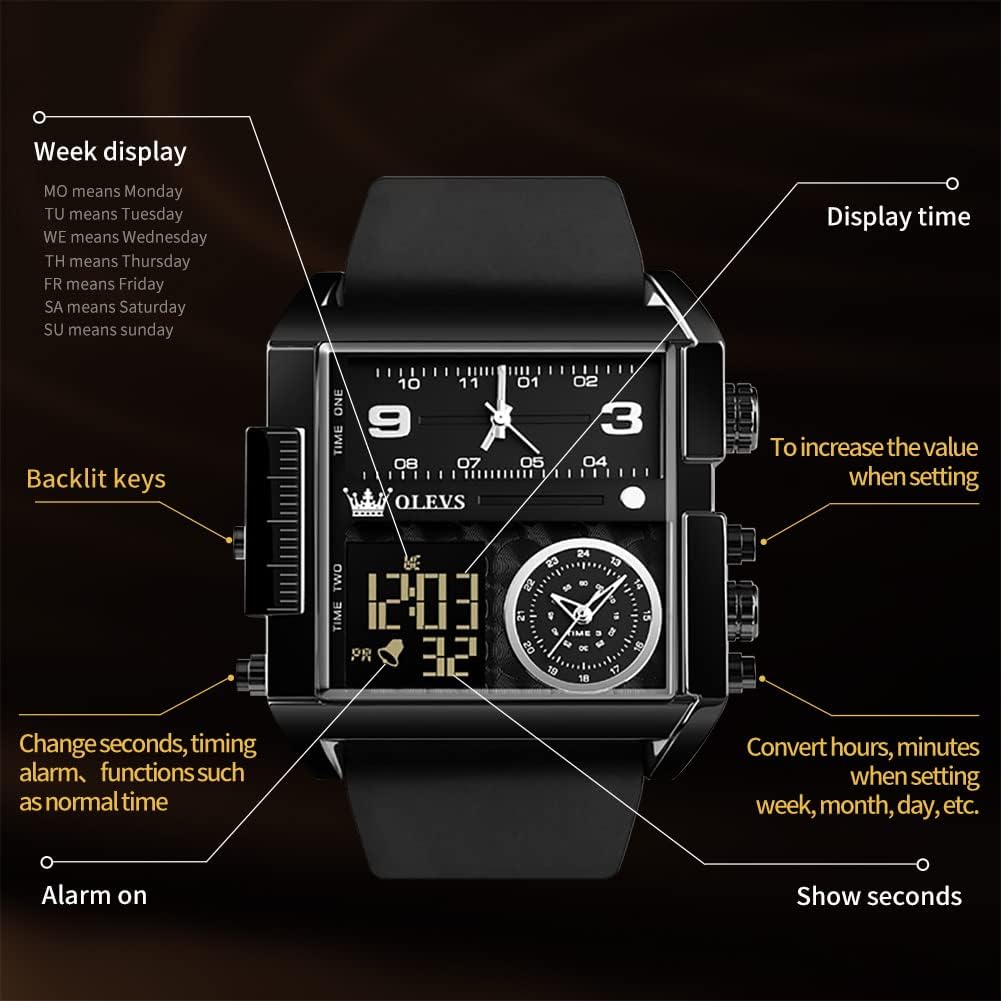
Figure 3.1: Diagram illustrating the various buttons and their corresponding functions for setting and operating the watch.
4. Operating Instructions
Your OLEVS Sport Watch offers a range of functions accessible via its multiple dials and buttons.
4.1 Digital Time and Date Display
- The digital display shows the current time, including seconds, and the date (day of the week and day of the month).
- Use the designated buttons (as shown in Figure 3.1) to cycle through display modes or to enter setting mode.
- When in setting mode, use the "To increase the value when setting" button to adjust hours, minutes, week, month, or day.
4.2 Multi-Time Zone Function
The watch features three time zones: one analog and two digital (Time One and Time Two). This allows you to track time in different locations simultaneously.
- Analog Time: Set independently using the crown.
- Digital Time One & Two: These can be set to different time zones using the digital setting buttons.
4.3 Stopwatch Function
To use the stopwatch:
- Enter stopwatch mode using the mode button.
- Press the start/stop button to begin or pause timing.
- Press the reset button to clear the stopwatch.
4.4 Alarm Function
To set the alarm:
- Enter alarm setting mode.
- Adjust the alarm time using the value adjustment button.
- Activate or deactivate the alarm using the appropriate button.
4.5 Luminous Function & Backlit Keys
- The analog hands and markers feature a luminous coating for visibility in low light.
- The digital display has backlit keys, allowing for easy operation in the dark.
5. Maintenance
Proper care will ensure the longevity and performance of your OLEVS Sport Watch.
5.1 Water Resistance
This watch is 3 ATM water-resistant. This means it can withstand splashes, rain, and brief immersion in water (e.g., washing hands). It is not suitable for hot water bathing, showering, swimming, or diving. Avoid pressing any buttons while the watch is wet or submerged to prevent water ingress.

Figure 5.1: The watch demonstrating its water resistance against splashes.
5.2 Cleaning
Wipe the watch case and strap with a soft, dry cloth regularly. For the leather strap, avoid excessive moisture and harsh chemicals, which can damage the material.
5.3 Battery Replacement
The watch uses a Japan battery. When the timekeeping becomes erratic or the digital display fades, it indicates a low battery. Battery replacement should be performed by a qualified watch technician to ensure proper sealing and water resistance.
5.4 Storage
When not in use for extended periods, store the watch in a cool, dry place, away from direct sunlight and extreme temperatures.
6. Troubleshooting
If you encounter any issues with your watch, please refer to the following common problems and solutions:
| Problem | Possible Cause | Solution |
|---|---|---|
| Analog hands not moving. | Crown pulled out; low battery. | Push crown back in. If issue persists, replace battery. |
| Digital display is blank or dim. | Low battery. | Replace battery. |
| Time is inaccurate. | Incorrect setting; low battery. | Re-set the time. If issue persists, replace battery. |
| Water inside the watch. | Exceeded water resistance limits; buttons pressed underwater. | Immediately take to a professional watch repair service. Do not attempt to dry it yourself. |
7. Specifications
- Model Number: FT-S-G1101HP-QH
- Brand: OLEVS
- Movement: Quartz (Analog & Digital)
- Water Resistance: 3 ATM (30 meters)
- Case Dimensions: Approximately 4.33 x 3.54 x 2.64 inches (Package Dimensions)
- Item Weight: Approximately 7.83 ounces (Package Weight)
- Department: Men's
- First Available: April 20, 2023
8. Warranty and Support
OLEVS provides a comprehensive warranty for your watch.
- Warranty: A 24-month warranty is provided for manufacturing defects.
- Refund Policy: A 30-day no-reason refund policy is available.
- Customer Support: For any problems during the use of the wristwatch, you can contact OLEVS through Amazon. The professional after-sales team is available to assist you.
For more information or to explore other OLEVS products, visit the Official OLEVS Store on Amazon.
Related documentsFT-S-G1101HP-QH


Ask a question about this manual
Ask about setup, troubleshooting, compatibility, parts, safety, or missing instructions. Manuals+ will review the question and use this page’s manual context to help answer it.