
CL-PAC-122, CL-PAC-121, 407.83126, 40783126310, GM-07, GM-09, GM-12
Instruction Manual for Generic Replacement Remote Control
Compatible with Cool-Living CL-PAC-122, CL-PAC-121 & Kenmore 407.83126, 40783126310 & TOSOT GM-07, GM-09, GM-12 Portable AC Air Conditioners
1. Introduction
This manual provides essential information for the proper setup, operation, and maintenance of your Generic Replacement Remote Control. This remote is designed to function as a replacement for specific portable air conditioner models, including Cool-Living CL-PAC-122, CL-PAC-121, Kenmore 407.83126, 40783126310, and TOSOT GM-07, GM-09, GM-12. Please read this manual thoroughly before use to ensure optimal performance and longevity of your remote control.
Important Note: This is a replacement remote control. While it is designed to be compatible, some advanced functions of your original unit's remote may not be supported. No instruction manual or batteries are included with the remote itself.
2. Product Overview
The Generic Replacement Remote Control features a clear LCD display and an intuitive button layout for easy control of your compatible air conditioner. Below are images illustrating the remote's design and key components.

Figure 2.1: Front View of the Remote Control. This image displays the front of the remote control, showing the LCD screen at the top and various control buttons below it. Buttons include OFF/ON, MODE, FAN, temperature adjustment buttons (+ and -), and function buttons like TURBO, BLOW, HEALTH, HUMIDITY, SLEEP, and TIME.
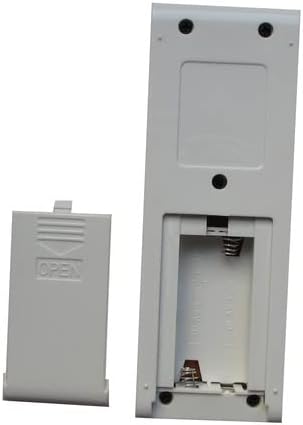
Figure 2.2: Back View of the Remote Control with Battery Compartment Open. This image shows the rear side of the remote control. The battery compartment cover is removed, revealing the slot for two AAA batteries and the spring contacts for power connection.
Button Functions:
- OFF/ON: Powers the air conditioner on or off.
- MODE: Cycles through operating modes (e.g., Cool, Heat, Fan, Dry, Auto).
- FAN: Adjusts fan speed (e.g., Low, Medium, High, Auto).
- +/- (Temperature Adjustment): Increases or decreases the set temperature.
- TURBO: Activates rapid cooling or heating.
- BLOW: Initiates a fan-only operation to dry internal components and prevent mold.
- HEALTH: Activates air purification or health-related functions (if supported by AC unit).
- HUMIDITY: Controls humidity levels (if supported by AC unit).
- SLEEP: Adjusts temperature and fan speed for comfortable sleep.
- TIME: Used for setting timer functions (e.g., auto on/off).
3. Setup
3.1 Battery Installation
The remote control requires two (2) AAA batteries (not included). Follow these steps to install them:
- Locate the battery compartment on the back of the remote control.
- Slide the battery compartment cover downwards or press the tab and lift to open.
- Insert two AAA batteries, ensuring the positive (+) and negative (-) ends match the diagrams inside the compartment.
- Replace the battery compartment cover by sliding it back into place until it clicks securely.
Note: The remote control is ready for use immediately after battery installation. No pairing or complex setup is required for this infrared (IR) replacement remote.
4. Operating Instructions
Point the remote control directly at the air conditioner's receiver window. Ensure there are no obstructions between the remote and the unit.
4.1 Basic Operation
- Power On/Off: Press the OFF/ON button to turn the air conditioner on or off.
- Mode Selection: Press the MODE button repeatedly to cycle through available operating modes (e.g., Cool, Heat, Fan, Dry, Auto). The current mode will be displayed on the remote's LCD screen.
- Temperature Adjustment: Use the + button to increase the temperature and the - button to decrease it.
- Fan Speed: Press the FAN button to adjust the fan speed.
4.2 Special Functions
- Celsius to Fahrenheit Conversion: To switch the temperature display between Celsius and Fahrenheit, simultaneously press and hold the MODE button and the - (temperature down) button. The default display is in Celsius.
- Timer Function: Use the TIME button to set the auto-on or auto-off timer. Refer to your air conditioner's original manual for specific timer programming details, as this remote provides the interface but the AC unit handles the logic.
- Sleep Mode: Press the SLEEP button to activate sleep mode, which typically adjusts temperature and fan speed for quiet, energy-efficient operation during sleep.
- Turbo Mode: Press the TURBO button for rapid cooling or heating.
- Health/Blow/Humidity: These buttons activate specific functions on your AC unit if it supports them. Their exact behavior depends on the air conditioner model.
5. Maintenance
5.1 Cleaning the Remote Control
To maintain the remote's appearance and functionality:
- Wipe the surface with a soft, dry cloth.
- Do not use liquid cleaners, abrasive cleaners, or chemical solvents, as these can damage the remote's finish or internal components.
5.2 Battery Replacement
Replace batteries when the remote's display becomes dim or the remote no longer controls the air conditioner effectively. Always replace both batteries at the same time with new AAA batteries. Do not mix old and new batteries, or different types of batteries.
6. Troubleshooting
- Remote not responding:
- Check if the batteries are installed correctly with the correct polarity (+/-).
- Replace the batteries with new ones.
- Ensure there are no obstructions between the remote and the air conditioner's receiver.
- Confirm you are within the effective operating range of the air conditioner's IR receiver.
- Some functions do not work:
- As a replacement remote, it may not support all advanced or unique functions of your original air conditioner's remote. This is normal for generic replacement units.
- Verify that your specific air conditioner model is listed as compatible in the product description. If your model is not listed, the remote may not be fully compatible.
- Display is dim or blank:
- Batteries are low or depleted. Replace them.
7. Specifications
| Compatible Devices | Portable Air Conditioner units (Cool-Living CL-PAC-122, CL-PAC-121, Kenmore 407.83126, 40783126310, TOSOT GM-07, GM-09, GM-12) |
| Connectivity Technology | Infrared (IR) |
| Max Number of Supported Devices | 1 (one air conditioner unit) |
| Batteries Required | 2 x AAA batteries (not included) |
| Special Feature | Celsius/Fahrenheit conversion (Hold MODE and Temp- buttons) |
8. Warranty and Support
As a generic replacement remote control, this product typically does not come with a manufacturer's warranty from the original air conditioner brand. Support for this replacement remote is generally limited to ensuring basic functionality as described. For specific warranty information or advanced technical support related to your air conditioner unit, please refer to the original manufacturer's documentation for your air conditioner model.
If you encounter issues with the remote control's basic operation, please refer to the Troubleshooting section of this manual. For further assistance, contact the seller from whom you purchased this replacement remote.
Related documentsCL-PAC-122, CL-PAC-121, 407.83126, 40783126310, GM-07, GM-09, GM-12


Ask a question about this manual
Ask about setup, troubleshooting, compatibility, parts, safety, or missing instructions. Manuals+ will review the question and use this page’s manual context to help answer it.